
Node.js NPM Tutorial: Create, Publish, Extend & Manage
A module in Node.js is a logical encapsulation of code in a single unit. It's always a good programming practice to always segregate code in such a way that makes it more manageable and maintainable for future purposes. That's where modules in Node.js comes in action.
Since each module is an independent entity with its own encapsulated functionality, it can be managed as a separate unit of work.
由于每个模块都是具有其自身封装功能的独立实体,因此可以将其作为单独的工作单元进行管理
In this tutorial, will learn-
- What are modules in Node.js
- Using modules in Node.js
- Creating NPM modules
- Extending modules
- Publishing NPM Modules
- Managing third-party packages with npm
- What is the package.json file
What are modules in Node.js?
As stated earlier, modules in Node.js are a way of encapsulating code in a separate logical unit. There are many ready made modules available in the market which can be used within Node.js.
如前所述,Node.js中的模块是一种将代码封装在单独的逻辑单元中的方法。市场上有很多现成的模块可以在Node.js中使用。
Below are some of the popular modules which are used in a Node.js application
Express framework – Express is a minimal and flexible Node.js web application framework that provides a robust set of features for the web andmobileapplications.
Express是一个最小且灵活的Node.js Web应用程序框架,为Web和移动应用程序提供了一组强大的功能
Socket.io - Socket.IO enables real-time bidirectional event-based communication. This module is good for creation of chatting based applications.
Socket.IO支持基于事件的实时双向通信。该模块非常适合创建基于聊天的应用程序
Pug - Pug is a high-performance template engine and implemented withJavaScriptfor node and browsers.
Pug是一种高性能的模板引擎,并使用JavaScript实现了针对node和浏览器的功能
MongoDB - TheMongoDBNode.js driver is the officially supported node.js driver for MongoDB.
MongoDB Node.js驱动程序是MongoDB官方支持的node.js驱动程序。
Restify - restify is a lightweight framework, similar to express for building REST APIs
restify是一个轻量级框架,类似于用于构建REST API的表达
Bluebird - Bluebird is a fully-featured promise library with a focus on innovative features and performance
Using modules in Node.js
In order to use modules in a Node.js application, they first need to be installed using the Node package manager.
为了在Node.js应用程序中使用模块,首先需要使用Node软件包管理器来安装它们。下面的命令行显示了如何安装“ express”模块。
The below command line shows how a module "express" can be installed.
npm install express

The above command will download the necessary files which contain the "express modules" and take care of the installation as well
上面的命令将下载包含“ express modules”的必要文件,并负责安装
Once the module has been installed, in order to use a module in a Node.js application, you need to use the 'require' keyword. This keyword is a way that Node.js uses to incorporate the functionality of a module in an application.
安装模块后,为了在Node.js应用程序中使用模块,您需要使用'require'关键字。此关键字是Node.js用于在应用程序中合并模块功能的一种方式
Let's look at an example of how we can use the "require" keyword. The below "Guru99" code example shows how to use the require function
让我们看一个示例,说明如何使用“ require”关键字。下面的“ Guru99”代码示例显示了如何使用require函数

注意在写代码时var应改为const
const express = require('express');

const app = express();

app.set('view engine','pug');

app.get('/',function(req,res) {

});

const server = app.listen(3000,function() {

});
1. In the first statement itself, we are using the "require" keyword to include the express module. The "express" module is an optimized JavaScript library for Node.js development. This is one of the most commonly used Node.js modules.

在第一个语句本身中,我们使用“ require”关键字来包含Express模块。“ express”模块是用于Node.js开发的优化的JavaScript库。这是最常用的Node.js模块之一

2. After the module is included, in order to use the functionality within the module, an object needs to be created. Here an object of the express module is created.

包含模块后,为了使用模块内的功能,需要创建一个对象。此处创建了Express模块的对象。

3. Once the module is included using the "require" command and an "object" is created, the required methods of the express module can be invoked. Here we are using the set command to set the view engine, which is used to set the templating engine used in Node.js.

一旦使用“ require”命令将模块包括在内并创建了“对象”,便可以调用快速模块的所需方法。在这里,我们使用set命令设置视图引擎,该视图引擎用于设置Node.js中使用的模板引擎

Note:(Just for the reader's understanding; a templating engine is an approach for injecting values in an application by picking up data from data files. This concept is pretty famous in Angular JS wherein the curly braces {{ key }} is used to substitutes values in the web page. The word 'key' in the curly braces basically denotes the variable which will be substituted by a value when the page is displayed.)

注意:模板引擎是一种通过从数据文件中拾取数据来在应用程序中注入值的方法。这个概念在Angular JS中非常有名,其中花括号{{key}}用于替换网页中的值。大括号中的“键”一词基本上表示在显示页面时将由值替换的变量。)

4. Here we are using the listen to method to make the application listen on a particular port number.

在这里,我们使用listen方法来使应用程序侦听特定的端口号

Creating NPM modules

Node.js has the ability to create custom modules and allows you to include those custom modules in your Node.js application.

Node.js能够创建自定义模块,并允许您将这些自定义模块包括在Node.js应用程序中

Let's look at a simple example of how we can create our own module and include that module in our main application file. Our module will just do a simple task of adding two numbers.

让我们看一个简单的示例,说明如何创建自己的模块并将该模块包含在主应用程序文件中。我们的模块将完成一个简单的添加两个数字的任务

Let's follow the below steps to see how we can create modules and include them in our application.

让我们按照以下步骤查看如何创建模块并将其包含在我们的应用程序中
Step 1) Create a file called "Addition.js" and include the below code. This file will contain the logic for your module.
Below is the code which would go into this file;
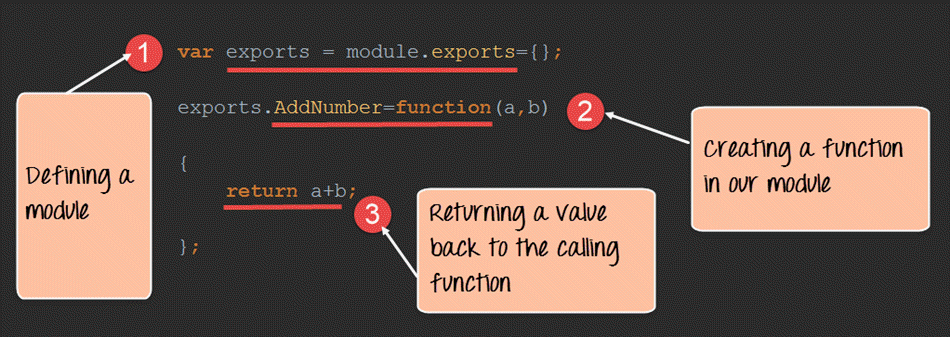
// 上图代码为Node.js V8.4.0

// 以下代码为Node.js V12.16.3

module.exports.AddNumber = (a, b) => {

    return a + b;

};
Step 2) Create a file called "app.js," which is your main application file and add the below code
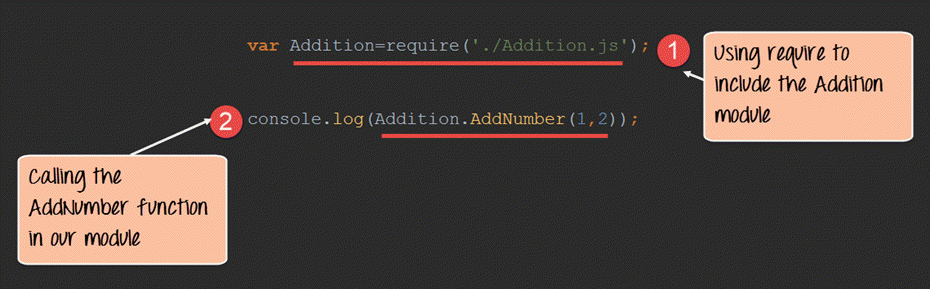
// 上图代码为Node.js V8.4.0

// 以下代码为Node.js V12.16.3

const Addition = require('./Addition')

console.log(Addition.AddNumber(1, 2));
We are using the "require" keyword to include the functionality in the Addition.js file.
Since the functions in the Addition.js file are now accessible, we can now make a call to the AddNumber function. In the function, we are passing 2 numbers as parameters. We are then displaying the value in the console.
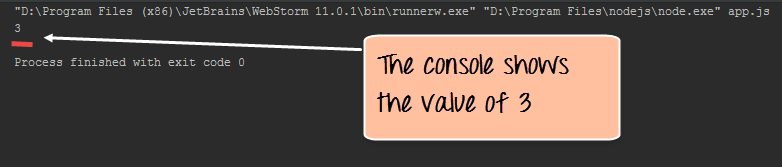
Output:
- When you run the app.js file, you will get an output of value 3 in the console log.
- The result is because the AddNumber function in the Addition.js file was called successfully, and the returned value of 3 was displayed in the console.
Note: - We are not using the "Node package manager" as of yet to install our Addition.js module. This is because the module is already part of our project on the local machine. The Node package manager comes in the picture when you publish a module on the internet, which we see in the subsequent topic.
Extending modules
When creating modules, it is also possible to extend or inherit one module from another.
创建模块时,还可以扩展或继承另一个模块
In modern-day programming, it's quite common to build a library of common modules and then extend the functionality of these common modules if required.
在现代编程中,通常会先建立一个通用模块库,然后根据需要扩展这些通用模块的功能
Let's look at an example of how we can extend modules in Node.js.
让我们看一下如何在Node.js中扩展模块的示例
Step 1) Create the base module.
In our example, create a file called "Tutorial.js" and place the below code.
In this code, we are just creating a function which returns a string to the console. The string returned is "Guru99 Tutorial".
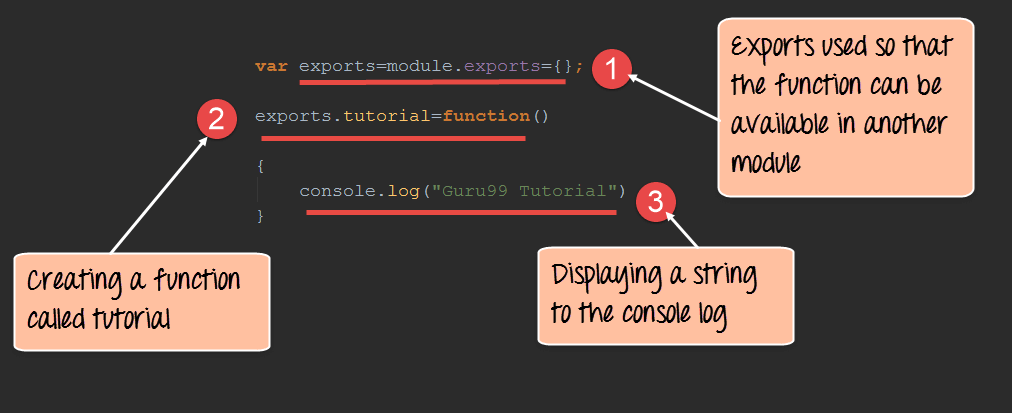
module.exports.tutorial = () => {

    console.log('Guru99 Tutorial');

};
Step 2) Next, we will create our extended module. Create a new file called "NodeTutorial.js" and place the below code in the file.
const Tutor = require('./Tutorial');

module.exports.NodeTutorial = () => {

    console.log('Node Tutorial');

    Tutor.tutorial();

};
Note, the following key points about the above code
- We are using the "require" function in the new module file itself. Since we are going to extend the existing module file "Tutorial.js", we need to first include it before extending it.
- We then create a function called "Nodetutorial." This function will do 2 things,
- It will send a string "Node Tutorial" to the console.
- It will send the string "Guru99 Tutorial" from the base module "Tutorial.js" to our extended module "NodeTutorial.js".
Step 3) Create your main app.js file, which is your main application file and include the below code.
const localTutor = require('./NodeTutorial');

localTutor.NodeTutorial();
Publishing NPM(Node Package Manager) Modules
One can publish their own module to their own Github repository.
By publishing your module to a central location, you are then not burdened with having to install yourself on every machine that requires it.
Instead, you can use the install command of npm and install your published npm module.
The following steps need to be followed to publish your npm module
Step 1) Create your repository on GitHub (an online code repository management tool). It can be used for hosting your code repositories.
在GitHub(在线代码存储库管理工具)上创建存储库。它可以用于托管您的代码存储库
Step 2) You need to tell your local npm installation on who you are. Which means that we need to tell npm who is the author of this module, what is the email id and any company URL, which is available which needs to be associated with this id. All of these details will be added to your npm module when it is published.
The below commands sets the name, email and URL of the author of the npm module.
npm set init.author.name "Unity."
npm set init.author.email "guru99@gmail.com "
npm set init.author.url http://Guru99.com
Step 3) The next step is to login into npm using the credentials provided in the last step. To login, you need to use the below command
npm login
Step 4) Initialize your package – The next step is to initialize the package to create the package.json file. This can be done by issuing the below command
npm init
When you issue the above command, you will be prompted for some questions. The most important one is the version number for your module.
Step 5) Publish to GitHub – The next step is to publish your source files to GitHub. This can be done by running the below commands.
发布到GitHub –下一步是将源文件发布到GitHub。可以通过运行以下命令来完成
git add.

git commit -m "Initial release"

git tag v0.0.1

git push origin master --tags
Step 6) Publish your module – The final bit is to publish your module into the npm registry. This is done via the below command.
发布模块–最后一点是将模块发布到npm注册表中。这是通过以下命令完成的
npm publish
Managing third party packages with npm
As we have seen, the "Node package manager" has the ability to manage modules, which are required by Node.js applications.
如我们所见,“ Node包管理器”具有管理Node.js应用程序所需的模块的能力
Let's look at some of the functions available in the node package manager for managing modules
Installing packages in global mode – Modules can be installed at the global level, which just basically means that these modules would be available for all Node.js projects on a local machine. The example below shows how to install the "express module" with the global option.
以全局模式安装软件包–模块可以在全局级别安装,这基本上意味着这些模块可用于本地计算机上的所有Node.js项目。下面的示例显示了如何使用全局选项安装“ express模块”。
npm install express –global
The global option in the above statement is what allows the modules to be installed at a global level.
上述语句中的global选项是允许在全局级别安装模块的选项
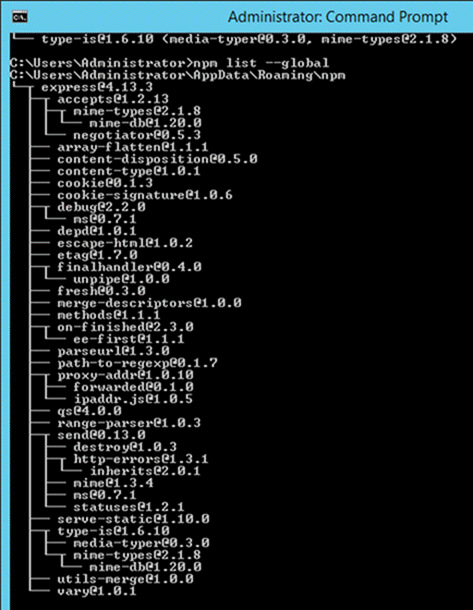
Listing all of the global packages installed on a local machine. This can be done by executing the below command in the command prompt
列出安装在本地计算机上的所有全局软件包。这可以通过在命令提示符下执行以下命令来完成
npm list --global
Below is the output which will be shown, if you have previously installed the "express module" on your system.
如果您先前在系统上安装了“ express模块”,则将显示以下输出
Here you can see the different modules installed on the local machine.
- Installing a specific version of a package – Sometimes there may be a requirement to install just the specific version of a package. Once you know package name and the relevant version that needs to be installed, you can use the npm install command to install that specific version.
The example below shows how to install the module called underscore with a specific version of 1.7.0
npm install underscore@1.7.0
- Updating a package version – Sometimes you may have an older version of a package in a system, and you may want to update to the latest one available in the market. To do this, one can use the npm update command. The example below shows how to update the underscore package to the latest version
npm update underscore
- Searching for a particular package – To search whether a particular version is available on the local system or not, you can use the search command of npm. The example below will check if the express module is installed on the local machine or not.
搜索特定的软件包–要搜索本地系统上是否有特定的版本,可以使用npm的search命令。下面的示例将检查Express模块是否已安装在本地计算机上
npm search express
- Uninstalling a package – The same in which you can install a package, you can also uninstall a package. The uninstallation of a package is done with the uninstallation command of npm. The example below shows how to uninstall the express module
npm uninstall express
What is the package.json file
The "package.json" file is used to hold the metadata about a particular project. This information provides the Node package manager the necessary information to understand how the project should be handled along with its dependencies.
“ package.json”文件用于保存有关特定项目的元数据。此信息为Node包管理器提供了必要的信息,以了解应如何处理项目及其依赖项
The package.json files contain information such as the project description, the version of the project in a particular distribution, license information, and configuration data.
package.json文件包含诸如项目描述,特定分发中的项目版本,许可证信息和配置数据之类的信息
The package.json file is normally located at the root directory of a Node.js project.
package.json文件通常位于Node.js项目的根目录下
Let's take an example of how the structure of a module looks when it is installed via npm.
The below snapshot shows the file contents of the express module when it is included in your Node.js project. From the snapshot, you can see the package.json file in the express folder.

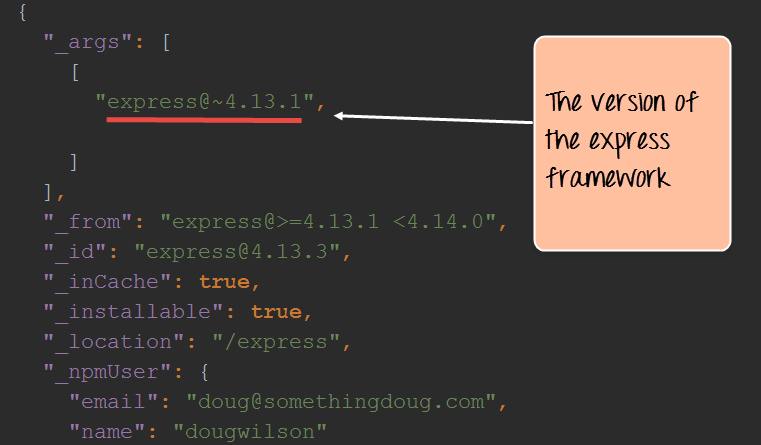
If you open the package.json file, you will see a lot of information in the file.
Below is a snapshot of a portion of the file. The express@~4.13.1 mentions the version number of the express module being used.
Summary
A module in Node.js is a logical encapsulation of code in a single unit. Separation into modules makes code more manageable and maintainable for future purposes
Node.js中的模块是代码在单个单元中的逻辑封装。分离成模块使代码更易于管理和维护,以备将来使用
There are many modules available in the market which can be used within Node.js such as express, underscore, MongoDB, etc.
The node package manager (npm) is used to download and install modules which can then be used in a Node.js application.
One can create custom NPM modules, extend these modules, and also publish these modules.
可以创建自定义NPM模块,扩展这些模块,也可以发布这些模块
The Node package manager has a complete set of commands to manage the npm modules on the local system such as the installation, un-installation, searching, etc.
The package.json file is used to hold the entire metadata information for an npm module.
Node.js NPM Tutorial: Create, Publish, Extend & Manage的更多相关文章
- Node.js NPM Tutorial
Node.js NPM Tutorial – How to Get Started with NPM? NPM is the core of any application that is devel ...
- Node.js npm
Node程序包管理器(NPM)提供了以下两个主要功能: 在线存储库的Node.js包/模块,可搜索 search.nodejs.org 命令行实用程序来安装Node.js的包,做版本管理和Node.j ...
- 自制node.js + npm绿色版
自制node.js + npm绿色版 Node.js官网有各平台的安装包下载,不想折腾的可以直接下载安装,下面说下windows平台下如何制作绿色版node,以方便迁移. 获取node.exe下载 ...
- Latest node.js & npm installation on Ubuntu 12.04
转自:https://rtcamp.com/tutorials/nodejs/node-js-npm-install-ubuntu/ Compiling is way to go for many b ...
- Mac 下搭建环境 homebrew/git/node.js/npm/vsCode...
主要记录一下 homebrew/git/node.js/npm/mysql 的命令行安装 1. 首先安装 homebrew 也是一个包管理工具: mac 里打开终端命令行工具,粘下面一行回车安装br ...
- Node.js npm基础安装配置&创建第一个VUE项目
使用之前,我们先来明白这几个东西是用来干什么的. node.js: 一种javascript的运行环境,能够使得javascript脱离浏览器运行.Node.js的出现,使得前后端使用同一种语言,统一 ...
- Node.js NPM Package.json
章节 Node.js NPM 介绍 Node.js NPM 作用 Node.js NPM 包(Package) Node.js NPM 管理包 Node.js NPM Package.json Nod ...
- Node.js NPM 包(Package)
章节 Node.js NPM 介绍 Node.js NPM 作用 Node.js NPM 包(Package) Node.js NPM 管理包 Node.js NPM Package.json 包是打 ...
- Node.js NPM 管理包
章节 Node.js NPM 介绍 Node.js NPM 作用 Node.js NPM 包(Package) Node.js NPM 管理包 Node.js NPM Package.json 根据安 ...
随机推荐
- spark下dataframe转为rdd格式
dataframe可以实现很多操作,但是存储到本地的时候,只能存 parquest格式 需要存储源格式,需要转换为rdd类型 将dataframe中的每一行都map成有逗号相连的string,就变为了 ...
- SocksCap64应用程序通过SOCKS代理
一.下载SocksCap64 https://pan.baidu.com/s/1B671kT9R6Zb6ch1mc4Kb2Q 提取码:hai3 一个是免安装版本,一个是安装版本,选一个即可. 下面以免 ...
- Makefile中的CFLAGS,LDFLAGS,LIBS
CFLAGS:C编译器选项,而CXXFLAGS表示C++编译器的选项 1. CFLAGS参数 选项 说明 -c 用于把源码编译成.o对象文件,不进行链接过程 -o 用于连接生成可执行文件,在其后可以指 ...
- nnIPXougCC
13:58:31 2020-03-14 发现一本书叫做<活法> 学习ing 2020-03-14 15:22:36 太快 ,练习了一会sql语句和打字 想看一会 憨豆特 ...
- 使用Python+TensorFlow2构建基于卷积神经网络(CNN)的ECG心电信号识别分类(二)
心律失常数据库 目前,国际上公认的标准数据库包含四个,分别为美国麻省理工学院提供的MIT-BIH(Massachusetts Institute of Technology-Beth Israel H ...
- CODING 敏捷实战系列课第二讲:Scrum 敏捷项目管理核心要素之 3355
Scrum 是敏捷开发流派中最著名和最落地的一支,全球 70% 以上公司的敏捷转型都是以 Scrum 起步.CODING 特邀敏捷顾问.CST & CTC 认证敏捷教练申健老师将在本课程< ...
- 利用一个VI写入或读取另一个VI的控件值
利用一个VI写入或读取另一个VI的控件值(转载自浅浅的小草) 有一个VI,叫未命名1.vi. 还有一个vi,叫未命名2.vi 现在,我在 1.vi里要对2.vi的字符串控件进行写入. 可 ...
- Python语法学习第三天--元组
元组:元组与列表相似,但是元组不能随意修改 ①创建元组 使用圆括号,用逗号隔开 空元组tuple1=()元组中只包含一个元素时,需要在元素后面添加逗号#逗号是关键tuple1=(1,) 当tuple1 ...
- [hdu4301]DP
题意:给一个2*n的矩形块,求把它分成k个连通块的方法数.(有公共边即视为联通) 思路:由于宽度只有2,于是很容易设计状态使问题满足阶段性以及无后效性.具体来说,令dp[i][j][0]和dp[i][ ...
- JVM-Java内存区域与内存溢出异常
第二章:Java内存区域与内存溢出异常 2.1 运行时数据区 1:程序计数器 : 线程私有,较小的内存空间,当前线程所执行的字节码的行号指示器,唯一不会发生错误的内存区域 2:虚拟机栈: 线程私有, ...