
nginx openssl升级支持http2
阿里云openssl升级,实现nginx主动推送
nginx主动推送能够有效减少不必要的报文传输,减少用户请求次数,以达到更快访问速度
现有版本检查
[root@node3 ~]# openssl version     #这个版本是无法支持http2.0主动推送功能.需要升级为2019版本.

OpenSSL 1.0.2k-fips  26 Jan 2017
安装一个nginx
如果当前版本不支持http2.0 那么请升级nginx版本,升级办法本博客有.
 #安装一个nginx 也可以自定义安装.  yum安装的nginx默认路径: /etc/nginx

 yum install -y nginx

 yum install -y pcre pcre-devel openssl openssl-devel gd-devel  zlib-devel

 #检查编译参数 , 我们需要后面重新编译来添加 openssl

 [root@node3 ~]# nginx -V

nginx version: nginx/1.16.1

built by gcc 4.8.5 20150623 (Red Hat 4.8.5-39) (GCC)

built with OpenSSL 1.0.2k-fips  26 Jan 2017

TLS SNI support enabled

configure arguments: --prefix=/usr/share/nginx --sbin-path=/usr/sbin/nginx --modules-path=/usr/lib64/nginx/modules --conf-path=/etc/nginx/nginx.conf --error-log-path=/var/log/nginx/error.log --http-log-path=/var/log/nginx/access.log --http-client-body-temp-path=/var/lib/nginx/tmp/client_body --http-proxy-temp-path=/var/lib/nginx/tmp/proxy --http-fastcgi-temp-path=/var/lib/nginx/tmp/fastcgi --http-uwsgi-temp-path=/var/lib/nginx/tmp/uwsgi --http-scgi-temp-path=/var/lib/nginx/tmp/scgi --pid-path=/run/nginx.pid --lock-path=/run/lock/subsys/nginx --user=nginx --group=nginx --with-file-aio --with-ipv6 --with-http_ssl_module --with-http_v2_module --with-http_realip_module --with-stream_ssl_preread_module --with-http_addition_module --with-http_xslt_module=dynamic --with-http_image_filter_module=dynamic --with-http_sub_module --with-http_dav_module --with-http_flv_module --with-http_mp4_module --with-http_gunzip_module --with-http_gzip_static_module --with-http_random_index_module --with-http_secure_link_module --with-http_degradation_module --with-http_slice_module --with-http_stub_status_module --with-http_perl_module=dynamic --with-http_auth_request_module --with-mail=dynamic --with-mail_ssl_module --with-pcre --with-pcre-jit --with-stream=dynamic --with-stream_ssl_module --with-google_perftools_module --with-debug --with-cc-opt='-O2 -g -pipe -Wall -Wp,-D_FORTIFY_SOURCE=2 -fexceptions -fstack-protector-strong --param=ssp-buffer-size=4 -grecord-gcc-switches -specs=/usr/lib/rpm/redhat/redhat-hardened-cc1 -m64 -mtune=generic' --with-ld-opt='-Wl,-z,relro -specs=/usr/lib/rpm/redhat/redhat-hardened-ld -Wl,-E'
升级现有openssl
升级前版本:

[root@node3 openssl-1.1.1d]# openssl version -a

OpenSSL 1.0.2k-fips  26 Jan 2017

built on: reproducible build, date unspecified

platform: linux-x86_64

options:  bn(64,64) md2(int) rc4(16x,int) des(idx,cisc,16,int) idea(int) blowfish(idx)

compiler: gcc -I. -I.. -I../include  -fPIC -DOPENSSL_PIC -DZLIB -DOPENSSL_THREADS -D_REENTRANT -DDSO_DLFCN -DHAVE_DLFCN_H -DKRB5_MIT -m64 -DL_ENDIAN -Wall -O2 -g -pipe -Wall -Wp,-D_FORTIFY_SOURCE=2 -fexceptions -fstack-protector-strong --param=ssp-buffer-size=4 -grecord-gcc-switches   -m64 -mtune=generic -Wa,--noexecstack -DPURIFY -DOPENSSL_IA32_SSE2 -DOPENSSL_BN_ASM_MONT -DOPENSSL_BN_ASM_MONT5 -DOPENSSL_BN_ASM_GF2m -DRC4_ASM -DSHA1_ASM -DSHA256_ASM -DSHA512_ASM -DMD5_ASM -DAES_ASM -DVPAES_ASM -DBSAES_ASM -DWHIRLPOOL_ASM -DGHASH_ASM -DECP_NISTZ256_ASM

OPENSSLDIR: "/etc/pki/tls"

engines:  rdrand dynamic

[root@node3 ~]# mkdir /server/tools -p

[root@node3 ~]# cd /server/tools/

[root@node3 tools]# wget https://www.openssl.org/source/openssl-1.1.1d.tar.gz

[root@node3 tools]# tar -xf openssl-1.1.1d.tar.gz

[root@node3 tools]# cd openssl-1.1.1d/

[root@node3 openssl-1.1.1d]# ./config --shared zlib    #配置

输出:

Operating system: x86_64-whatever-linux2

Configuring OpenSSL version 1.1.1d (0x1010104fL) for linux-x86_64

Using os-specific seed configuration

Creating configdata.pm

Creating Makefile

**********************************************************************

***                                                                ***

***   OpenSSL has been successfully configured                     ***

***                                                                ***

***   If you encounter a problem while building, please open an    ***

***   issue on GitHub <https://github.com/openssl/openssl/issues>  ***

***   and include the output from the following command:           ***

***                                                                ***

***       perl configdata.pm --dump                                ***

***                                                                ***

***   (If you are new to OpenSSL, you might want to consult the    ***

***   'Troubleshooting' section in the INSTALL file first)         ***

***                                                                ***

**********************************************************************

然后输入  make  进行预编译

make

make install
编译出错信息和解决办法:
compilation terminated.

make[1]: *** [crypto/comp/c_zlib.o] Error 1

make[1]: Leaving directory `/server/tools/openssl-1.1.1d'

make: *** [all] Error 2

缺少openssl开发依赖包:

yum install openssl-devel -y

安装完成后再次进行 make预编译
出现以下信息,则安装成功.:
${LDCMD:-gcc} -pthread -m64 -Wa,--noexecstack -Wall -O3 -L.   \

	-o test/x509aux test/x509aux.o \

	 test/libtestutil.a -lcrypto -lz -ldl -pthread

/usr/bin/perl "-I." -Mconfigdata "util/dofile.pl" \

    "-oMakefile" apps/CA.pl.in > "apps/CA.pl"

chmod a+x apps/CA.pl

/usr/bin/perl "-I." -Mconfigdata "util/dofile.pl" \

    "-oMakefile" apps/tsget.in > "apps/tsget.pl"

chmod a+x apps/tsget.pl

/usr/bin/perl "-I." -Mconfigdata "util/dofile.pl" \

    "-oMakefile" tools/c_rehash.in > "tools/c_rehash"

chmod a+x tools/c_rehash

/usr/bin/perl "-I." -Mconfigdata "util/dofile.pl" \

    "-oMakefile" util/shlib_wrap.sh.in > "util/shlib_wrap.sh"

chmod a+x util/shlib_wrap.sh

make[1]: Leaving directory `/server/tools/openssl-1.1.1d'

#判断编译过程是否有报错,0 为正常.

[root@node3 openssl-1.1.1d]# echo $?

0

# 没有问题 继续 make install
创建新的openssl软连接:
mv /usr/bin/openssl /usr/bin/openssl.old

mv /usr/include/openssl /usr/include/openssl.old

ln -s /usr/local/bin/openssl /usr/bin/openssl

ln -s /usr/local/include/openssl/ /usr/include/openssl

ln -s /usr/local/lib64/libssl.so.1.1 /usr/lib64/libssl.so.1.1

ln -s /usr/local/lib64/libcrypto.so.1.1 /usr/lib64/libcrypto.so.1.1
检查版本
[root@node3 openssl-1.1.1d]# openssl version -a

OpenSSL 1.1.1d  10 Sep 2019

built on: Mon Oct 21 13:07:14 2019 UTC

platform: linux-x86_64

options:  bn(64,64) rc4(16x,int) des(int) idea(int) blowfish(ptr)

compiler: gcc -fPIC -pthread -m64 -Wa,--noexecstack -Wall -O3 -DOPENSSL_USE_NODELETE -DL_ENDIAN -DOPENSSL_PIC -DOPENSSL_CPUID_OBJ -DOPENSSL_IA32_SSE2 -DOPENSSL_BN_ASM_MONT -DOPENSSL_BN_ASM_MONT5 -DOPENSSL_BN_ASM_GF2m -DSHA1_ASM -DSHA256_ASM -DSHA512_ASM -DKECCAK1600_ASM -DRC4_ASM -DMD5_ASM -DVPAES_ASM -DGHASH_ASM -DECP_NISTZ256_ASM -DX25519_ASM -DPOLY1305_ASM -DZLIB -DNDEBUG

OPENSSLDIR: "/usr/local/ssl"

ENGINESDIR: "/usr/local/lib64/engines-1.1"

Seeding source: os-specific
如果在make的时候出现出错误:
找到文件: vim auto/lib/openssl/conf
修改 大约39-43行:

CORE_INCS="$CORE_INCS $OPENSSL/.openssl/include"

CORE_DEPS="$CORE_DEPS $OPENSSL/.openssl/include/openssl/ssl.h"

CORE_LIBS="$CORE_LIBS $OPENSSL/.openssl/lib/libssl.a"

CORE_LIBS="$CORE_LIBS $OPENSSL/.openssl/lib/libcrypto.a"

CORE_LIBS="$CORE_LIBS $NGX_LIBDL"

改为:

CORE_INCS="$CORE_INCS $OPENSSL/.openssl/include"

CORE_DEPS="$CORE_DEPS $OPENSSL/include/openssl/ssl.h"

CORE_LIBS="$CORE_LIBS $OPENSSL/lib/libssl.a"

CORE_LIBS="$CORE_LIBS $OPENSSL/lib/libcrypto.a"

CORE_LIBS="$CORE_LIBS $NGX_LIBDL"
到这里openssl版本升级完成
openssl添加到nginx
1. yum安装一个nginx, 检查nginx openssl版本

2. 将新版本openssl加入到nginx中
现有nginx版本检查
[root@node3 openssl-1.1.1d]# nginx -V

nginx version: nginx/1.16.1

built by gcc 4.8.5 20150623 (Red Hat 4.8.5-39) (GCC)

built with OpenSSL 1.0.2k-fips  26 Jan 2017       #-----#nginx版本还没升级

TLS SNI support enabled

configure arguments: --prefix=/usr/share/nginx --sbin-path=/usr/sbin/nginx --modules-path=/usr/lib64/nginx/modules --conf-path=/etc/nginx/nginx.conf --error-log-path=/var/log/nginx/error.log --http-log-path=/var/log/nginx/access.log --http-client-body-temp-path=/var/lib/nginx/tmp/client_body --http-proxy-temp-path=/var/lib/nginx/tmp/proxy --http-fastcgi-temp-path=/var/lib/nginx/tmp/fastcgi --http-uwsgi-temp-path=/var/lib/nginx/tmp/uwsgi --http-scgi-temp-path=/var/lib/nginx/tmp/scgi --pid-path=/run/nginx.pid --lock-path=/run/lock/subsys/nginx --user=nginx --group=nginx --with-file-aio --with-ipv6 --with-http_ssl_module --with-http_v2_module --with-http_realip_module --with-stream_ssl_preread_module --with-http_addition_module --with-http_xslt_module=dynamic --with-http_image_filter_module=dynamic --with-http_sub_module --with-http_dav_module --with-http_flv_module --with-http_mp4_module --with-http_gunzip_module --with-http_gzip_static_module --with-http_random_index_module --with-http_secure_link_module --with-http_degradation_module --with-http_slice_module --with-http_stub_status_module --with-http_perl_module=dynamic --with-http_auth_request_module --with-mail=dynamic --with-mail_ssl_module --with-pcre --with-pcre-jit --with-stream=dynamic --with-stream_ssl_module --with-google_perftools_module --with-debug --with-cc-opt='-O2 -g -pipe -Wall -Wp,-D_FORTIFY_SOURCE=2 -fexceptions -fstack-protector-strong --param=ssp-buffer-size=4 -grecord-gcc-switches -specs=/usr/lib/rpm/redhat/redhat-hardened-cc1 -m64 -mtune=generic' --with-ld-opt='-Wl,-z,relro -specs=/usr/lib/rpm/redhat/redhat-hardened-ld -Wl,-E'
下载新版nginx
wget http://nginx.org/download/nginx-1.17.0.tar.gz
安装必备的包
yum install -y pcre pcre-devel openssl openssl-devel gd-devel zlib-devel
重新编译nginx添加openssl
[root@node3 tools]# tar xf nginx-1.17.0.tar.gz

[root@node3 tools]# cd nginx-1.17.0

#获取原有nginx参数:

nginx version: nginx/1.16.1

built by gcc 4.8.5 20150623 (Red Hat 4.8.5-39) (GCC)

built with OpenSSL 1.0.2k-fips  26 Jan 2017

TLS SNI support enabled

configure arguments: --prefix=/usr/share/nginx --sbin-path=/usr/sbin/nginx --modules-path=/usr/lib64/nginx/modules --conf-path=/etc/nginx/nginx.conf --error-log-path=/var/log/nginx/error.log --http-log-path=/var/log/nginx/access.log --http-client-body-temp-path=/var/lib/nginx/tmp/client_body --http-proxy-temp-path=/var/lib/nginx/tmp/proxy --http-fastcgi-temp-path=/var/lib/nginx/tmp/fastcgi --http-uwsgi-temp-path=/var/lib/nginx/tmp/uwsgi --http-scgi-temp-path=/var/lib/nginx/tmp/scgi --pid-path=/run/nginx.pid --lock-path=/run/lock/subsys/nginx --user=nginx --group=nginx --with-file-aio --with-ipv6 --with-http_ssl_module --with-http_v2_module --with-http_realip_module --with-stream_ssl_preread_module --with-http_addition_module --with-http_xslt_module=dynamic  --with-http_image_filter_module=dynamic --with-http_sub_module --with-http_dav_module --with-http_flv_module --with-http_mp4_module --with-http_gunzip_module --with-http_gzip_static_module --with-http_random_index_module --with-http_secure_link_module --with-http_degradation_module --with-http_slice_module --with-http_stub_status_module --with-http_perl_module=dynamic --with-http_auth_request_module --with-mail=dynamic --with-mail_ssl_module --with-pcre --with-pcre-jit --with-stream=dynamic --with-stream_ssl_module --with-google_perftools_module --with-debug --with-cc-opt='-O2 -g -pipe -Wall -Wp,-D_FORTIFY_SOURCE=2 -fexceptions -fstack-protector-strong --param=ssp-buffer-size=4 -grecord-gcc-switches -specs=/usr/lib/rpm/redhat/redhat-hardened-cc1 -m64 -mtune=generic' --with-ld-opt='-Wl,-z,relro -specs=/usr/lib/rpm/redhat/redhat-hardened-ld -Wl,-E'

#重新编译,添加openssl,但是还要去除模块:   --with-http_image_filter_module=dynamic ,添加这个模块

#不然最后会出现报错:

nginx: [emerg] module "/usr/lib64/nginx/modules/ngx_http_image_filter_module.so" version 1016001 instead of 1017000 in /usr/share/nginx/modules/mod-http-image-filter.conf:1

nginx: configuration file /etc/nginx/nginx.conf test failed

#最终编译参数:

[root@node3 nginx-1.17.0]# ./configure --prefix=/usr/share/nginx --sbin-path=/usr/sbin/nginx --modules-path=/usr/lib64/nginx/modules --conf-path=/etc/nginx/nginx.conf --error-log-path=/var/log/nginx/error.log --http-log-path=/var/log/nginx/access.log --http-client-body-temp-path=/var/lib/nginx/tmp/client_body --http-proxy-temp-path=/var/lib/nginx/tmp/proxy --http-fastcgi-temp-path=/var/lib/nginx/tmp/fastcgi --http-uwsgi-temp-path=/var/lib/nginx/tmp/uwsgi --http-scgi-temp-path=/var/lib/nginx/tmp/scgi --pid-path=/run/nginx.pid --lock-path=/run/lock/subsys/nginx --user=nginx --group=nginx --with-file-aio --with-ipv6 --with-http_ssl_module --with-http_v2_module --with-http_realip_module --with-stream_ssl_preread_module --with-http_addition_module --with-http_xslt_module=dynamic  --with-http_sub_module --with-http_dav_module --with-http_flv_module --with-http_mp4_module --with-http_gunzip_module --with-http_gzip_static_module --with-http_random_index_module --with-http_secure_link_module --with-http_degradation_module --with-http_slice_module --with-http_stub_status_module --with-http_perl_module=dynamic --with-http_auth_request_module --with-mail=dynamic --with-mail_ssl_module --with-pcre --with-pcre-jit --with-stream=dynamic --with-stream_ssl_module --with-google_perftools_module --with-debug --with-cc-opt='-O2 -g -pipe -Wall -Wp,-D_FORTIFY_SOURCE=2 -fexceptions -fstack-protector-strong --param=ssp-buffer-size=4 -grecord-gcc-switches -specs=/usr/lib/rpm/redhat/redhat-hardened-cc1 -m64 -mtune=generic' --with-ld-opt='-Wl,-z,relro -specs=/usr/lib/rpm/redhat/redhat-hardened-ld -Wl,-E' --with-openssl=/server/tools/openssl-1.1.1d

#注意编译关键项: 加入这段

--with-openssl=/server/tools/openssl-1.1.1d

#报错处理:

#1. ./configure: error: the HTTP image filter module requires the GD library.

You can either do not enable the module or install the libraries.

处理:  yum install gd-devel -y

yum install -y gd-devel

#2. ./configure: error: the invalid value in --with-ld-opt="-Wl,-z,relro -specs=/usr/lib/rpm/redhat/redhat-hardened-ld -Wl,-E"

处理: yum -y install redhat-rpm-config.noarch

#3. ./configure: error: the HTTP XSLT module requires the libxml2/libxslt

处理: yum -y install libxml2 libxml2-dev libxslt-devel

#4. ./configure: error: perl module ExtUtils::Embed is required

处理: yum -y install perl-devel perl-ExtUtils-Embed

#5. ./configure: error: the Google perftools module requires the Google perftools

处理: yum install gperftools -y

#6. 编译和替换二进制nginx启动文件后出现报错:

nginx: [emerg] module "/usr/lib64/nginx/modules/ngx_http_image_filter_module.so" version 1016001 instead of 1017000 in /usr/share/nginx/modules/mod-http-image-filter.conf:1

nginx: configuration file /etc/nginx/nginx.conf test failed

解决办法: 重新编译nginx  去除  --with-http_image_filter_module=dynamic 参数即可

#7. 出现报错:nginx: [emerg] open() "/etc/nginx/mime.types" failed (2: No such file or directory) in /etc/nginx/nginx.conf:17

解决办法: cp -a /server/tools/nginx-1.17.0/conf/mime.types /etc/nginx/

#8. make出现出错误:

找到文件: vim auto/lib/openssl/conf

修改 大约39-43行:

CORE_INCS="$CORE_INCS $OPENSSL/.openssl/include"

CORE_DEPS="$CORE_DEPS $OPENSSL/.openssl/include/openssl/ssl.h"

CORE_LIBS="$CORE_LIBS $OPENSSL/.openssl/lib/libssl.a"

CORE_LIBS="$CORE_LIBS $OPENSSL/.openssl/lib/libcrypto.a"

CORE_LIBS="$CORE_LIBS $NGX_LIBDL"

改为:

CORE_INCS="$CORE_INCS $OPENSSL/.openssl/include"

CORE_DEPS="$CORE_DEPS $OPENSSL/include/openssl/ssl.h"

CORE_LIBS="$CORE_LIBS $OPENSSL/lib/libssl.a"

CORE_LIBS="$CORE_LIBS $OPENSSL/lib/libcrypto.a"

CORE_LIBS="$CORE_LIBS $NGX_LIBDL"

========================================================================================

#看到以下信息,则编译成功

Configuration summary

  + using system PCRE library

  + using OpenSSL library: /usr/local/include/openssl/

  + using system zlib library

  nginx path prefix: "/opt/nginx"

  nginx binary file: "/usr/sbin/nginx"

  nginx modules path: "/opt/nginx/modules"

  nginx configuration prefix: "/etc/nginx"

  nginx configuration file: "/etc/nginx/nginx.conf"

  nginx pid file: "/var/log/nginx/nginx.pid"

  nginx error log file: "/var/log/nginx/error.log"

  nginx http access log file: "/var/log/nginx/access.log"

  nginx http client request body temporary files: "/var/nginx/client"

  nginx http proxy temporary files: "/var/nginx/proxy"

  nginx http fastcgi temporary files: "/var/nginx/fcgi"

  nginx http uwsgi temporary files: "/var/nginx/uwsgi"

  nginx http scgi temporary files: "/var/nginx/scgi"

[root@node3 nginx-1.17.0]# echo $?

0

## 完成后,将objs下编译好的nginx可执行文件,替换原有的nginx可执行文件

[root@leilei002 nginx-1.17.0]# cp -af objs/nginx /usr/sbin/nginx

cp: overwrite ‘/usr/sbin/nginx’? y

[root@leilei002 nginx-1.17.0]# nginx -t  进行语法检查,可能入错如下

#错误处理

## nginx 替换了二进制文件后,nginx -t检测报错:

nginx: [emerg] module "/usr/lib64/nginx/modules/ngx_http_image_filter_module.so" version 1016001 instead of 1017000 in /usr/share/nginx/modules/mod-http-image-filter.conf:1

nginx: configuration file /etc/nginx/nginx.conf test failed

解决办法: 重新编译nginx  去除  --with-http_image_filter_module=dynamic 参数即可

##nginx 检测出现报错:

nginx: [emerg] open() "/etc/nginx/mime.types" failed (2: No such file or directory) in /etc/nginx/nginx.conf:17

解决办法:  拷贝 类型文件mime.types

cp -a /server/tools/nginx-1.17.0/conf/mime.types /etc/nginx/
最终检测一次:
nginx 检测:

[root@leilei002 nginx-1.17.0]# nginx -t

nginx: the configuration file /etc/nginx/nginx.conf syntax is ok

nginx: configuration file /etc/nginx/nginx.conf test is successful

检查openssl版本:

[root@leilei002 nginx-1.17.0]# nginx -V

nginx version: nginx/1.17.0

built by gcc 4.8.5 20150623 (Red Hat 4.8.5-36) (GCC)

built with OpenSSL 1.1.1d  10 Sep 2019     ###---- 已经升级为openssl 1.1.d版本. 升级OK

TLS SNI support enabled

configure arguments: --prefix=/usr/share/nginx --sbin-path=/usr/sbin/nginx --modules-path=/usr/lib64/nginx/modules --conf-path=/etc/nginx/nginx.conf --error-log-path=/var/log/nginx/error.log --http-log-path=/var/log/nginx/access.log --http-client-body-temp-path=/var/lib/nginx/tmp/client_body --http-proxy-temp-path=/var/lib/nginx/tmp/proxy --http-fastcgi-temp-path=/var/lib/nginx/tmp/fastcgi --http-uwsgi-temp-path=/var/lib/nginx/tmp/uwsgi --http-scgi-temp-path=/var/lib/nginx/tmp/scgi --pid-path=/run/nginx.pid --lock-path=/run/lock/subsys/nginx --user=nginx --group=nginx --with-file-aio --with-ipv6 --with-http_ssl_module --with-http_v2_module --with-http_realip_module --with-stream_ssl_preread_module --with-http_addition_module --with-http_xslt_module=dynamic --with-http_sub_module --with-http_dav_module --with-http_flv_module --with-http_mp4_module --with-http_gunzip_module --with-http_gzip_static_module --with-http_random_index_module --with-http_secure_link_module --with-http_degradation_module --with-http_slice_module --with-http_stub_status_module --with-http_perl_module=dynamic --with-http_auth_request_module --with-mail=dynamic --with-mail_ssl_module --with-pcre --with-pcre-jit --with-stream=dynamic --with-stream_ssl_module --with-google_perftools_module --with-debug --with-cc-opt='-O2 -g -pipe -Wall -Wp,-D_FORTIFY_SOURCE=2 -fexceptions -fstack-protector-strong --param=ssp-buffer-size=4 -grecord-gcc-switches -specs=/usr/lib/rpm/redhat/redhat-hardened-cc1 -m64 -mtune=generic' --with-ld-opt='-Wl,-z,relro -specs=/usr/lib/rpm/redhat/redhat-hardened-ld -Wl,-E' --with-openssl=/server/tools/openssl-1.1.1d
配置nginx主动推送
nginx主动推送配置
主动推送,可以减少用户请求的报文,缩短响应时间,提高用户访问速度.
nginx配置中添加http2支持:

server {

...

listen 443 ssl http2 default_server;

...

}

主动推送方法1. :

http2_push_preload on;

Link: </styles.css>; rel=preload; as=style

多个资源推送:

Link: </styles.css>; rel=preload; as=style, </example.png>;

rel=preload; as=image

主动推送方式2. :

http2_push /mi.txt;

http2_push /style.css;

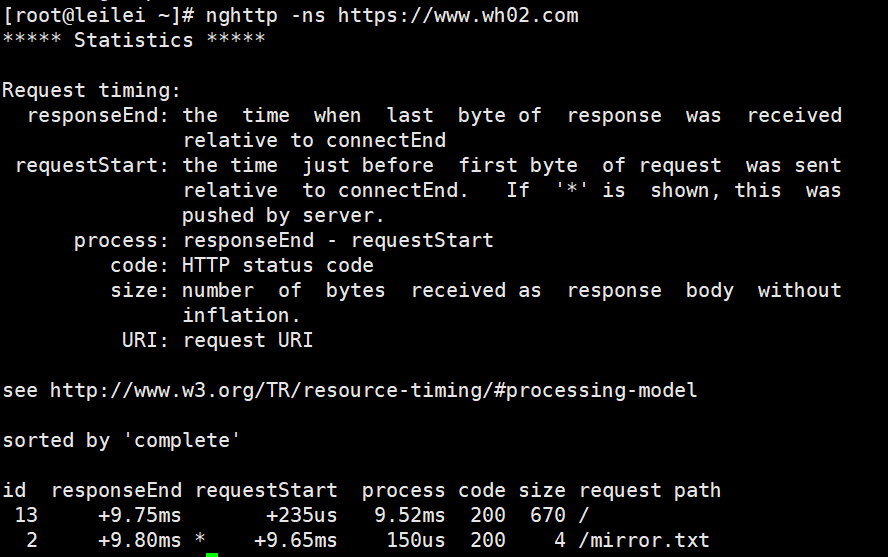
nghttp测试:

nghttp工具默认并没有安装,需要使用 yum install -y nghttp 来安装该测试工具.

nghttp -ns https://wh02.com
结果图:
注意
[当编译安装openssl 没有指定路径后,在当前服务器重装nignx,需要指定openssl路径,如果修改成下面的配置,就可以不用指定openssl路径 [默认路径--with-openssl=/usr/local] ]

nginx-1.16.1/auto/lib/openssl/conf 大约139行的位置,修改完成后再做编译.

39行 6行

vim +39 /server/tools/nginx-1.17.0/auto/lib/openssl/conf

CORE_INCS="$CORE_INCS $OPENSSL/.openssl/include"

CORE_DEPS="$CORE_DEPS $OPENSSL/.openssl/include/openssl/ssl.h"

CORE_LIBS="$CORE_LIBS $OPENSSL/.openssl/lib/libssl.a"

CORE_LIBS="$CORE_LIBS $OPENSSL/.openssl/lib/libcrypto.a"

CORE_LIBS="$CORE_LIBS $NGX_LIBDL"

CORE_LIBS="$CORE_LIBS $NGX_LIBPTHREAD"

改成

CORE_INCS="$CORE_INCS $OPENSSL/include"

CORE_DEPS="$CORE_DEPS $OPENSSL/include/openssl/ssl.h"

CORE_LIBS="$CORE_LIBS $OPENSSL/lib64/libssl.a"

CORE_LIBS="$CORE_LIBS $OPENSSL/lib64/libcrypto.a"

CORE_LIBS="$CORE_LIBS $NGX_LIBDL"

CORE_LIBS="$CORE_LIBS $NGX_LIBPTHREAD"

源码安装货升级openssl没有指定路径的情况下编译nginx.

39行 6行

vim +39 /server/tools/nginx-1.17.2/auto/lib/openssl/conf

这样 nginx 在ngix -V的时候会显示 openssl正确的版本
nginx openssl升级支持http2的更多相关文章
- nginx支持HTTP2的配置过程
一.获取安装包 http://zlib.net/zlib-1.2.11.tar.gz https://www.openssl.org/source/openssl-1.0.2e.tar.gz (ope ...
- nginx如何启用对HTTP2的支持 | nginx如何验证HTTP2是否已启用
nginx启用HTTP2特性 查看当前nginx的编译选项 1 #./nginx -V 2 3 nginx version: nginx/1.9.15 4 built by gcc 5.4.0 2 ...
- nginx编译支持HTTP2.0
nginx编译支持HTTP2.0 nginx编译支持HTTP2.0 wget https://www.openssl.org/source/openssl-1.1.0i.tar.gz #openssl ...
- 阿里云openssl升级,实现nginx主动推送,nginx主动推送能够有效减少不必要的报文传输,减少用户请求次数,以达到更快访问速度
现有版本检查 [root@node3 ~]# openssl version #这个版本是无法支持http2.0主动推送功能.需要升级为2019版本. OpenSSL 1. ...
- 让你的网站免费支持 HTTPS 及 Nginx 平滑升级
为什么要使用 HTTPS ? 首先来说一下 HTTP 与 HTTPS 协议的区别吧,他们的根本区别就是 HTTPS 在 HTTP 协议的基础上加入了 SSL 层,在传输层对网络连接进行加密.简单点说在 ...
- nginx配置支持http2
1.简介 nginx 配置支持http2.目前大多数网站都是http1.1(如果你没有特别配置过的话) 一切都是为了访问更快. 2.如何查看自己网站的http版本 最简单的方法就F12啊,我这里是火狐 ...
- 在Nginx/Openresty中启用http2支持
转自个人博客 chinazt.cc 以下摘自http2的介绍: HTTP/2 源自 SPDY/2 SPDY 系列协议由谷歌开发,于 2009 年公开.它的设计目标是降低 50% 的页面加载时间.当下很 ...
- nginx支持http2协议
1.http2协议 HTTP 2.0 的主要目标是改进传输性能,实现低延迟和高吞吐量.从另一方面看,HTTP 的高层协议语义并不会因为这次版本升级而受影响.所有HTTP 首部.值,以及它们的使用场景都 ...
- 轻松让你的nginx服务器支持HTTP2协议
目录 简介 HTTP1.1和HTTP2 安装最新的nginx 开启HTTP2支持 添加SSL支持 修改加密算法 Diffie–Hellman对消息进行加密 重定向所有的HTTP请求到HTTPS 启动n ...
随机推荐
- All Tips
Outlook分享心得 这是在爱奇艺的一场Outlook分享会上我记录的笔记. Read More 分享一点"关于应届生如何写简历"的人生经验 应届生如何写好一份求职简历是一件重要 ...
- SYC极客大挑战部分题目writeup
Welcome 复制黏贴flag即可 我相信你正在与我相遇的路上马不停蹄 关注微信工作号回复"我要flag"即可获得flag 代号为geek的行动第一幕:毒雾初现 发现flag为摩 ...
- C++走向远洋——20(项目一,三角形,类)
*/ * Copyright (c) 2016,烟台大学计算机与控制工程学院 * All rights reserved. * 文件名:sanjiaoxing.cpp * 作者:常轩 * 微信公众号: ...
- 使用Navicat或者其他数据库工具连接阿里云EDS(数据库服务器)实例过程详解
使用Navicat或者其他数据库工具连接阿里云EDS(数据库服务器)实例过程详解 背景:这几天从阿里云上面购买了云服务器,最垃圾的那种,还送oss和EDS数据库服务器,只不过EDS数据库服务器只有一个 ...
- 压力测试(九)-Jmeter压测课程总结和架构浅析
安装常见问题 1.问题 [root@iZwz95j86y235aroi85ht0Z bin]# ./jmeter-server Created remote object: UnicastServer ...
- Python爬虫开发教程
正文 现在Python语言大火,在网络爬虫.人工智能.大数据等领域都有很好的应用.今天我向大家介绍一下Python爬虫的一些知识和常用类库的用法,希望能对大家有所帮助.其实爬虫这个概念很简单,基 ...
- FreeModBus源码解析(1)---开篇
一.设计思想 任何通信协议的实现都是基于状态机的设计思想,就是来了一串数据判断是是干啥的在调用相应的处理函数只不过高手一般采用回调处理. 如果你熟悉了回调.源码里的状态机的实现又可以理解,那么恭喜你已 ...
- web前端问题整理
1.常用那几种浏览器测试?有哪些内核(Layout Engine)? (Q1)浏览器:IE,Chrome,FireFox,Safari,Opera (Q2)内核:Trident,Gecko,Prest ...
- seo搜索优化教程09 - seo搜索优化外链优化
为了使大家更方便的了解及学习网络营销推广.seo搜索优化,星辉科技强势推出seo搜索优化教程.此为seo教程第九课 网络营销推广中有句行话,叫做"内容为王,外链为王",可见外链对于 ...
- openwrt 外挂usb 网卡 RTL8188CU 及添加 RT5572 kernel支持
RT5572 原来叫 Ralink雷凌 现在被 MTK 收购了,淘宝上买的很便宜50块邮,2.4 5G 双频.在 win10 上插了试试,果然是支持 5G.这上面写着 飞荣 是什么牌子,有知道的和我说 ...