
uni-app实现文件上传(h5方式)
1.嵌入H5页面,需要采用web-view标签,如下:
<web-view src="/hybrid/html/index.html" @message="handleMessage"></web-view>
注意:
- h5页面必须在项目目录:/hybrid/html/下面,因为这样uni-app才不会进行编译
- @message事件是h5页面向应用发送数据的回调

2.h5页面代码:
<!DOCTYPE html>
<html lang="zh">
<head>
<meta charset="UTF-8">
<meta name="viewport" content="width=device-width, initial-scale=1.0">
<meta http-equiv="X-UA-Compatible" content="ie=edge">
<title>上传文件</title>
<style>
*{
margin: 0;
padding: 0;
}
.head-btn{
text-align: center;
margin-top: 50px;
}
.file {
position: relative;
display: inline-block;
background: #D0EEFF;
border: 1px solid #99D3F5;
border-radius: 10px;
padding: 24px 50px;
overflow: hidden;
color: #1E88C7;
text-decoration: none;
text-indent: 0;
line-height: 20px;
font-size: 40px;
}
.file input {
position: absolute;
font-size: 200px;
right: 0;
top: 0;
opacity: 0;}
.file:hover {
background: #AADFFD;
border-color: #78C3F3;
color: #004974;
text-decoration: none;
}
.determine{
color: #FFFFFF;
background-color: #007AFF;
display: inline-block;
font-size: 20px;
border-radius: 5px;
padding: 8px 24px;
}
.showFileName{
display: inline-block;
height: 30px;
min-width: 300px;
}
.btn {
display: block;
margin: 20px auto;
padding: 5px;
background-color: #007aff;
border: 0;
color: #ffffff;
height: 40px;
width: 200px;
border-radius: 5px;
}
.btn1 {
display: block;
margin: 20px auto;
padding: 5px;
background-color: #007aff;
border: 0;
color: #ffffff;
height: 40px;
width: 200px;
border-radius: 5px;
}.btn-red {
background-color: #dd524d;
}.btn-yellow {
background-color: #f0ad4e;
}.desc {
padding: 10px;
color: #999999;
}
.text{
background-color: #007AFF;
text-align: center;
font-size: 18px;
color: white;
height: 45px;
}
.text-in{
padding-top: 10px;
}
.body{
background-image: url(../../static/timg.jpg);
}</style>
</head>
<body class="body">
<div class="text">
<div class="text-in">
文件上传
</div>
</div>
<div class="head-btn">
<form action="" method="post">
<a href="javascript:;" class="file">选择文件
<input type="file" name="uploadFile" id="uploadFile" >
</a>
</form>
<p class="showFileName"></p></div>
<div>
<button class="btn" type="button" data-action="redirectTo">确定</button>
<button class="btn1" type="button" data-action="navigateBack">取消上传</button>
</div><script src="./js/jQuery1_10_2.js"></script>
<script type="text/javascript" src="https://js.cdn.aliyun.dcloud.net.cn/dev/uni-app/uni.webview.1.5.2.js"></script>
<script>
console.log("转检编号:"+getQuery('id')); //转检编号
//取url中的参数值
function getQuery(id) {
// 正则:[找寻'&' + 'url参数名字' = '值' + '&']('&'可以不存在)
let reg = new RegExp("(^|&)"+ id +"=([^&]*)(&|$)");
let r = window.location.search.substr(1).match(reg);
//console.log("r="+r);
if(r != null) {
// 对参数值进行解码
return decodeURIComponent(r[2]);
}
return null;
}$(".file").on("change", "input[type='file']", function() {
let filePath = $(this).val();
// console.log(filePath);
localStorage.setItem("fileAddress", filePath);
let lastname = localStorage.getItem("fileAddress");
if (lastname != "") {
$(".showFileName").html(lastname);
} else {
$(".showFileName").html("");
}
});
$('.btn').click(function(evt) {
var fileUrl;
var formdata = new FormData(); // 创建一个form类型的数据
formdata.append("files",$("#uploadFile")[0].files[0]); // 获取上传文件的数据
formdata.append("operate","UpLoadFile"); // 操作码
formdata.append("name","name");
//console.log("files:"+formdata.get("files") + ",name:" + formdata.get("name"))
console.log("begin")
$.ajax({
url: 'http://47.97.163.146:8080/Controler.ashx',
type: "POST",
async:false, //同步请求,否则内部嵌套的ajax不会运行
processData: false,
contentType: false,
data:formdata,
dataType:"json",
success: function(data) {
//更新数据库添入附件的url
console.log("data:" + JSON.stringify(data))
fileUrl = data.url;
// var formdata1 = new FormData(); // 创建一个form类型的数据
// formdata1.append("operate","UploadFileZJ"); // 操作码
// formdata1.append("ID",getQuery('id'));
// formdata1.append("url",fileUrl);
console.log("url地址:"+fileUrl);
console.log("转检编号:"+getQuery('id'));
//console.log("url:"+formdata1.get("url") + ",ID:" + formdata1.get("ID")) //查看url和转检id
$.ajax({
url: 'http://47.97.163.146:8080/Controler.ashx',
type: "POST",
data:{operate:"UploadFileZJ",ID:getQuery('id'),url:fileUrl},
dataType:"json",
success: function(data){
console.log("更新成功")
},
error: function(err) {
console.log(555)
console.log("更新失败的");
}
})
console.log("这是请求成功的");
},
error: function(err) {console.log("这是请求失败的");
}
});
console.log("end")var target = evt.target;
if (target.tagName === 'BUTTON') {
var action = target.getAttribute('data-action');
if (action == 'redirectTo') {
uni.redirectTo({
url: '/pages/index/index',
success:function (d) {
console.log("跳转成功");
},
fail:function(e){
console.log(e);
},
});
}
}
});//取消文件上传
$('.btn1').click(function(evt) {
var target = evt.target;
if (target.tagName === 'BUTTON') {
var action = target.getAttribute('data-action');
if (action == 'navigateBack') {
uni.navigateBack({
delta: 1
});
}
}
});</script>
</body>
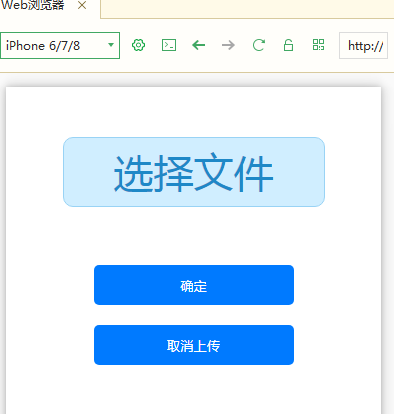
</html>样式图:
uni-app实现文件上传(h5方式)的更多相关文章
- python_way day21 Django文件上传Form方式提交,原生Ajax提交字符处啊,Django文件上传之原生Ajax方式、jQuery Ajax方式、iframe方式,Django验证码,抽屉示例,
python_way day21 1.Django文件上传至Form方式 2.原生Ajax文件上传提交表单 使用原生Ajax好处:不依赖jquery,在发送一个很小的文件或者字符串的时候就可以用原生A ...
- 表单文件上传编码方式(enctype 属性)
enctype 属性规定在发送到服务器之前应该如何对表单数据进行编码. 如下: <form action="upload.php" method="post&quo ...
- JavaWeb 文件上传 commons_fileupload方式
import org.apache.commons.fileupload.FileItem; import org.apache.commons.fileupload.FileUploadExcept ...
- type=file文件上传H5新特性
1.语法 <input name="myFile" type="file"> 2.属性(以下三个仅HTML5支持,因此存在兼容性问题) (1)mul ...
- springMVC两种方式实现多文件上传及效率比较
springMVC实现 多文件上传的方式有两种,一种是我们经常使用的以字节流的方式进行文件上传,另外一种是使用springMVC包装好的解析器进行上传.这两种方式对于实 现多文件上传效率上却有着很大的 ...
- Java实现文件上传
最近自己在做一个小系统玩的时候涉及到了文件的上传,于是在网上找到Java上传文件的方案,最后确定使用common-fileupload实现上传操作. 需求说明 用户添加页面有一个“上传”按钮,点击按钮 ...
- java常见3种文件上传速度对比和文件上传方法详细代码
在java里面文件上传的方式很多,最简单的依然是FileInputStream.FileOutputStream了,在这里我列举3种常见的文件上传方法代码,并比较他们的上传速度(由于代码是在本地测试, ...
- servlet3.0文件上传与下载
描述:文件上传与下载是在JavaEE中常见的功能,实现文件上传与下载的方式有多种,其中文件上传的方式有: (1)commons-fileupload: (2)Servlet 3.0 实现文件上传 (3 ...
- Selenium2学习-039-WebUI自动化实战实例-文件上传下载
通常在 WebUI 自动化测试过程中必然会涉及到文件上传的自动化测试需求,而开发在进行相应的技术实现是不同的,粗略可划分为两类:input标签类(类型为file)和非input标签类(例如:div.a ...
随机推荐
- 微软亚洲研究院开源图数据查询语言LIKQ
近日,微软亚洲研究院通过GitHub 平台开源图数据查询语言LIKQ (Language-Integrated Knowledge Query).LIKQ是基于分布式大规模图数据处理引擎Graph ...
- 理解 Java 内存模型的因果性约束
目录 理解 Java 内存模型的因果性约束 欢迎讨论 规范理解 例子练习 例子1 例子2 总结 理解 Java 内存模型的因果性约束 欢迎讨论 欢迎加入技术交流群186233599讨论交流,也欢迎关注 ...
- marquee横向无缝滚动无js
<!DOCTYPE html><html><head><meta charset="utf-8"> <title>< ...
- 【Mood】在COVID-19疫情中
看完网课(这还得从一只蝙蝠说起...),本来准备刷几道题. 还是来记录下这次事件吧. 2月1号,病毒感染人数破万. 接下来4天(今日6号)疫情走向爆发期. 每日平均新增发病人数达到了3000~4000 ...
- Markdown语法说明及常用软件推荐(附链接)
Markdown语法同样支持HTML标签 以下所有字符均为英文字符 标题 标题级别由#决定,一个为一级 样例 # 一级标题 ## 二级标题 ### 三级标题 #### 四级标题 ##### 五级标题 ...
- 4,Java中的多线程
1,创建线程 ··· 继承Thread类: 必须覆写Thread的run方法. ··· 实现Runnable接口: 必须实现run方法,再传入到Thread(Runnable t)构造 ...
- Ajax同步和异步的区别?
今天在code review时候看到同事的代码,用了ajax同步,async:false,如果不设置async参数,默认是true,为异步,异步的情况是比较复杂的,看下同步这个例子: function ...
- NLP自然语言处理入门-- 文本预处理Pre-processing
引言 自然语言处理NLP(nature language processing),顾名思义,就是使用计算机对语言文字进行处理的相关技术以及应用.在对文本做数据分析时,我们一大半的时间都会花在文本预处理 ...
- 误删除所有redo日志的一组成员的处理过程
系统中共有3个日志文件组,每个组中各有一个日志文件成员.往系统中添加一个日志文件组,组中日志文件成员数量是2.SQL> alter database add logfile group 4 (' ...
- SpringBoot图文教程15—项目异常怎么办?「跳转404错误页面」「全局异常捕获」
有天上飞的概念,就要有落地的实现 概念十遍不如代码一遍,朋友,希望你把文中所有的代码案例都敲一遍 先赞后看,养成习惯 SpringBoot 图文教程系列文章目录 SpringBoot图文教程1-Spr ...