
abp(net core)+easyui+efcore实现仓储管理系统——入库管理之十二(四十八)
abp(net core)+easyui+efcore实现仓储管理系统目录
abp(net core)+easyui+efcore实现仓储管理系统——EasyUI前端页面框架 (十八)
在上面文章abp(net core)+easyui+efcore实现仓储管理系统——入库管理之十一(四十七)的学习之后,我们已经实现了入库单前端的关于实现库位的功能,今天我们来学习如何在后台实现添加库位的功能。接上文。
6. 在Visual Studio 2017的“解决方案资源管理器”中,左键单击“ABP.TPLMS.Application”项目,打开“InStocks\Dto”文件夹,找到InStockOrderDto与CreateUpdateInStockOrderDto两个类,分别添加一行代码。代码如下。
public List<InStockOrderDetailLocDto> InStockOrderDetailLoc { get; set; }
7. 在Visual Studio 2017的“解决方案资源管理器”中,右键单击在领域层“ABP.TPLMS.Web.Mvc”项目中的Controller目录。 找到InStockController.cs文件中输入如下代码,通过构造函数注入对应的服务类实例。
namespace ABP.TPLMS.Web.Controllers

{

    public class InStockController : TPLMSControllerBase

    {

        private readonly IInStockOrderAppService _inSOAppService;

        private readonly IInStockOrderDetailAppService _inSODAppService;

        private readonly IInStockOrderDetailLocAppService _inSODLAppService;

        private const int MAX_COUNT = ;

        public InStockController(IInStockOrderAppService InSOAppService,IInStockOrderDetailAppService InSODAppService,

            IInStockOrderDetailLocAppService InSODLAppService)

        {

            _inSOAppService = InSOAppService;

            _inSODAppService = InSODAppService;

            _inSODLAppService = InSODLAppService;

        }

       //省略见前文

 [HttpPost]

        [DisableValidation]

        public string Update(InStockOrderDto iso)

        {

            string result = "NO";

            List<InStockOrderDetailDto> list = new List<InStockOrderDetailDto>();

            List<InStockOrderDetailLocDto> listLoc = new List<InStockOrderDetailLocDto>();

            try

            {

                string head = Request.Form["postdata"];

                if (!string.IsNullOrEmpty(head))

                {

                    //把json字符串转换成对象

                    iso = JsonHelper.Instance.Deserialize<InStockOrderDto>(head);

                }

                list = GetDetailDtos();

                listLoc = GetDetailLocDtos();

                if (iso == null)

                {

                    return "没有表头!";

                }

                iso.InStockOrderDetail = list;

                iso.InStockOrderDetailLoc = listLoc;

                result = _inSOAppService.Save(iso);

            }

            catch

            {

            }

            if (result == "OK")

            {

                return "更新成功!";

            }

            else

                return "更新失败!";

        }

        private List<InStockOrderDetailDto> GetDetailDtos()

        {

            List<InStockOrderDetailDto> list = new List<InStockOrderDetailDto>();

            string deleted = Request.Form["deleted"];

            string inserted = Request.Form["inserted"];

            string updated = Request.Form["updated"];

            // TODO: Add update logic here

            if (!string.IsNullOrEmpty(deleted))

            {

                //把json字符串转换成对象

                List<InStockOrderDetailDto> listDeleted = JsonHelper.Instance.Deserialize<List<InStockOrderDetailDto>>(deleted);

                //TODO 下面就可以根据转换后的对象进行相应的操作了

                if (listDeleted != null && listDeleted.Count > )

                {

                    list.AddRange(listDeleted.ToArray());

                }

            }

            if (!string.IsNullOrEmpty(inserted))

            {

                //把json字符串转换成对象

                List<InStockOrderDetailDto> listInserted = JsonHelper.Instance.Deserialize<List<InStockOrderDetailDto>>(inserted);

                if (listInserted != null && listInserted.Count > )

                {

                    list.AddRange(listInserted.ToArray());

                }

            }

            if (!string.IsNullOrEmpty(updated))

            {

                //把json字符串转换成对象

                List<InStockOrderDetailDto> listUpdated = JsonHelper.Instance.Deserialize<List<InStockOrderDetailDto>>(updated);

                if (listUpdated != null && listUpdated.Count > )

                {

                    list.AddRange(listUpdated.ToArray());

                }

            }

            return list;

        }

         private List<InStockOrderDetailLocDto> GetDetailLocDtos()

        {

            List<InStockOrderDetailLocDto> listLoc = new List<InStockOrderDetailLocDto>();

            string locDel = Request.Form["locsDeleted"];

            string locIns = Request.Form["locsInserted"];

            string locUpd = Request.Form["locsUpdated"];

            // TODO: Add update logic here

            if (!string.IsNullOrEmpty(locDel))

            {

                //把json字符串转换成对象

                List<InStockOrderDetailLocDto> listLocDeleted = JsonHelper.Instance.Deserialize<List<InStockOrderDetailLocDto>>(locDel);

                //TODO 下面就可以根据转换后的对象进行相应的操作了

                if (listLocDeleted != null && listLocDeleted.Count > )

                {

                    listLoc.AddRange(listLocDeleted.ToArray());

                }

            }

            if (!string.IsNullOrEmpty(locIns))

            {

                //把json字符串转换成对象

                List<InStockOrderDetailLocDto> listLocInserted = JsonHelper.Instance.Deserialize<List<InStockOrderDetailLocDto>>(locIns);

                if (listLocInserted != null && listLocInserted.Count > )

                {

                    listLoc.AddRange(listLocInserted.ToArray());

                }

            }

            if (!string.IsNullOrEmpty(locUpd))

            {

                //把json字符串转换成对象

                List<InStockOrderDetailLocDto> listLocUpdated = JsonHelper.Instance.Deserialize<List<InStockOrderDetailLocDto>>(locUpd);

                if (listLocUpdated != null && listLocUpdated.Count > )

                {

                    listLoc.AddRange(listLocUpdated.ToArray());

                }

            }

            return listLoc;

        }

[DontWrapResult]

        public string GetLocs(string Id)

        {

            int inodId;

            int.TryParse(Id, out inodId);

            PagedInStockDetailLocResultRequestDto paged = new PagedInStockDetailLocResultRequestDto();

            paged.MaxResultCount = MAX_COUNT;

            paged.InStockOrderDetailId = inodId;

            var iodlList = _inSODLAppService.GetAll(paged).GetAwaiter().GetResult().Items; ;

            var json = JsonEasyUI(iodlList);

            return json;

        }

    }

}
8.在Visual Studio 2017的“解决方案资源管理器”中,右键单击在领域层“ABP.TPLMS.Application”项目中的InStocks目录。 找到InStockOrderAppService.cs文件中的Save方法,修改如下。
 public string Save(InStockOrderDto iso)

        {

            try

            {

                CreateUpdateInStockOrderDto order = ObjectMapper.Map<CreateUpdateInStockOrderDto>(iso);

                foreach (var item in order.InStockOrderDetail)

                {

                    CreateUpdateInStockOrderDetailDto isod = ObjectMapper.Map<CreateUpdateInStockOrderDetailDto>(item);

                    if (isod.Id > )

                    {

                        isodApp.Update(isod);

                    }

                    else

                        isodApp.Create(isod);

                }

                foreach (var loc in iso.InStockOrderDetailLoc)

                {

                    CreateUpdateInStockOrderDetailLocDto isodLoc = ObjectMapper.Map<CreateUpdateInStockOrderDetailLocDto>(loc);

                    if (isodLoc.Id > )

                    {

                        isodLocApp.Update(isodLoc);

                    }

                    else

                        isodLocApp.Create(isodLoc);

                }

                order.InStockOrderDetail = null;

                order.InStockOrderDetail = null;

                order.Status =  ;

                Update(order);

            }

            catch (Exception ex)

            {

                throw ex;

            }

            return "OK";

        }
9.在Visual Studio 2017的按F5运行。在主界面的菜单中,选择“Business->入库管理”菜单项,浏览器中呈现一个组织信息列表与五个按钮。
10.在“入库单管理”列表中选择一条入库单记录,然后点击“修改”按钮。弹出一个入库单修改界面,在界面中选择“入库单明细”,选中一条入库单明细。如下图。

11.选中序号为1的库位信息,我们发现库位这个单元格的数据不可见。如下图。
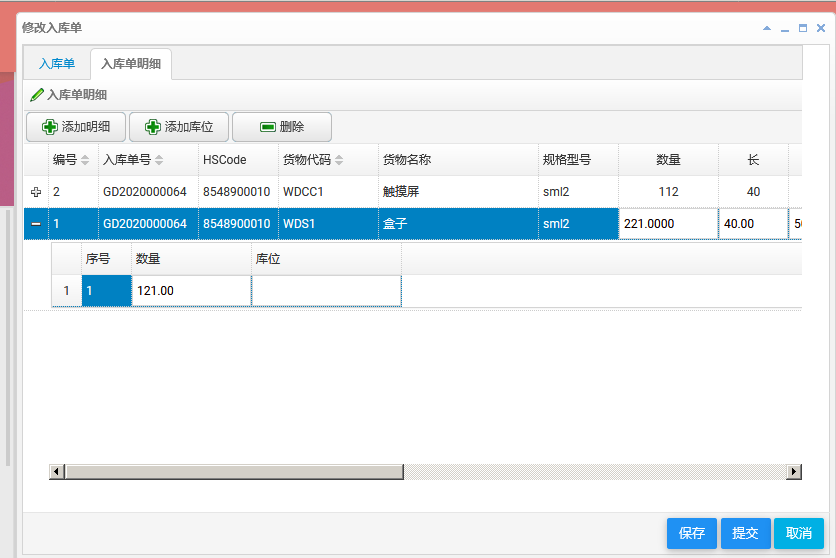
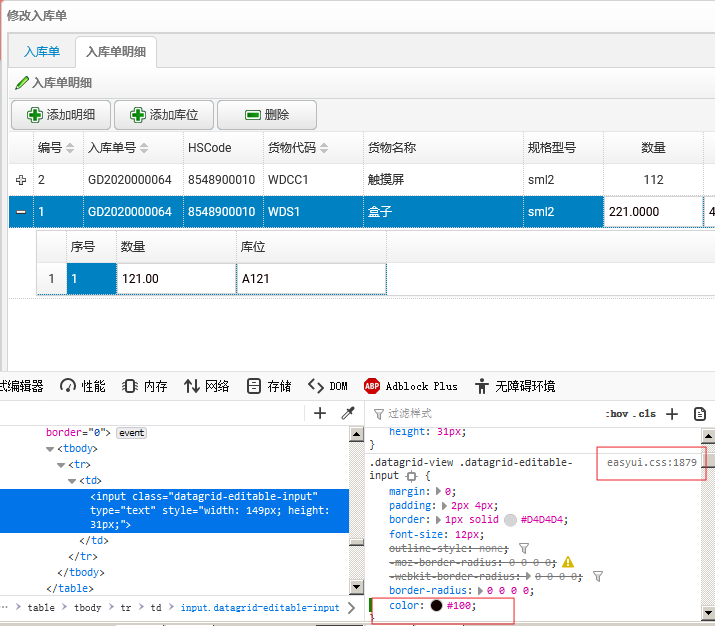
12. 在单元格上,点击鼠标右键,在弹出菜单中选择“查看元素”。如下图。

13.在修改文本框的样式,添加颜色。单元格中的数字立即可见。如下图。
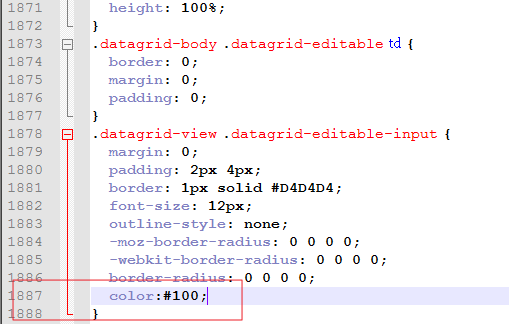
14.我们找到“easyui-1.8\themes\bootstrap\easyui.css”文件,找到1879行,在这个样式中添加颜色(“color:#100”)。如下图。
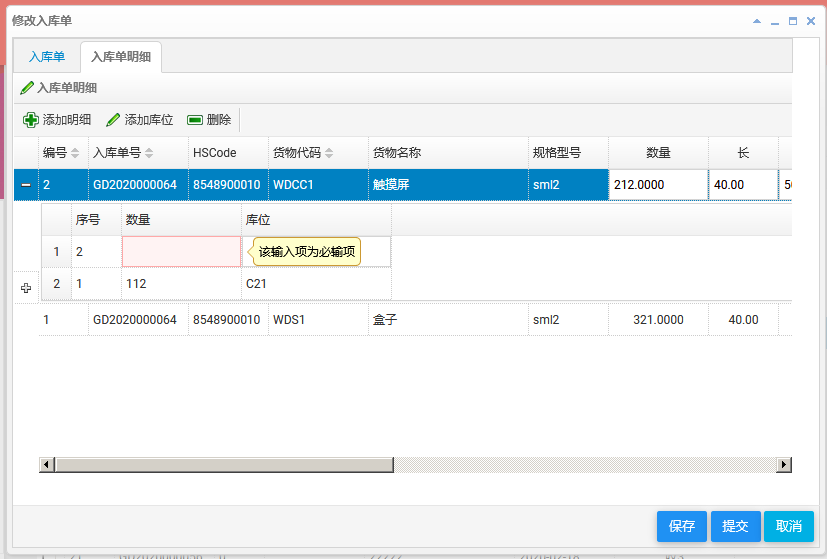
15.使用鼠标左键点击“添加库位”按钮。如下图。
16.对于入库单的库位信息进行修改完成之后,点击“保存”按钮,弹出一个“您确认要修改吗?”对话框。点击对话框中的“确定”按钮。然后会出现修改入库单界面,如下图。
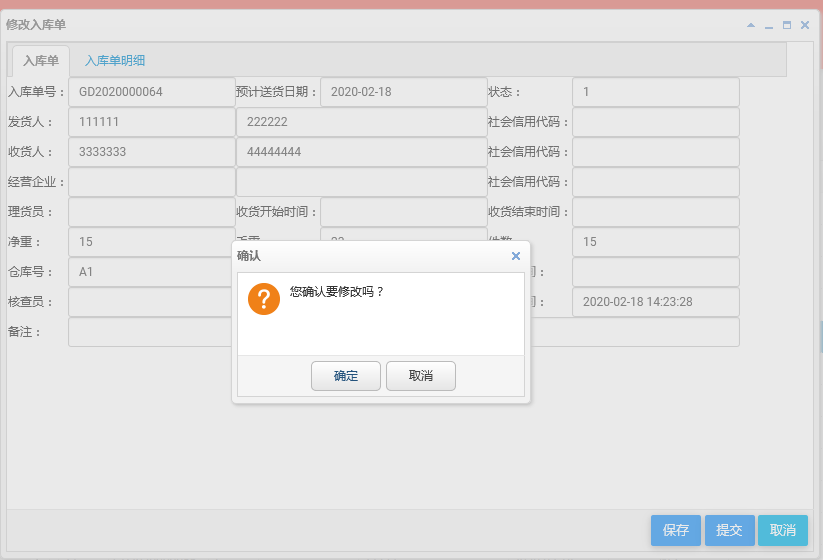
17.如果修改成功,会有一个“更新成功”的提示信息,同时更新入库单管理列表。如下图。

最后,我发现一个bug,偶尔出现,或是在第一次点保存按钮时出现。我暂时没找到原因。如果有知道如何解决的请留言。具体情况如下面三张图。图1,我添加了一条库位信息,点击保存按钮。见图2,实际上并没有把这个库位信息的数据传递到后台。最后的结果如图3。
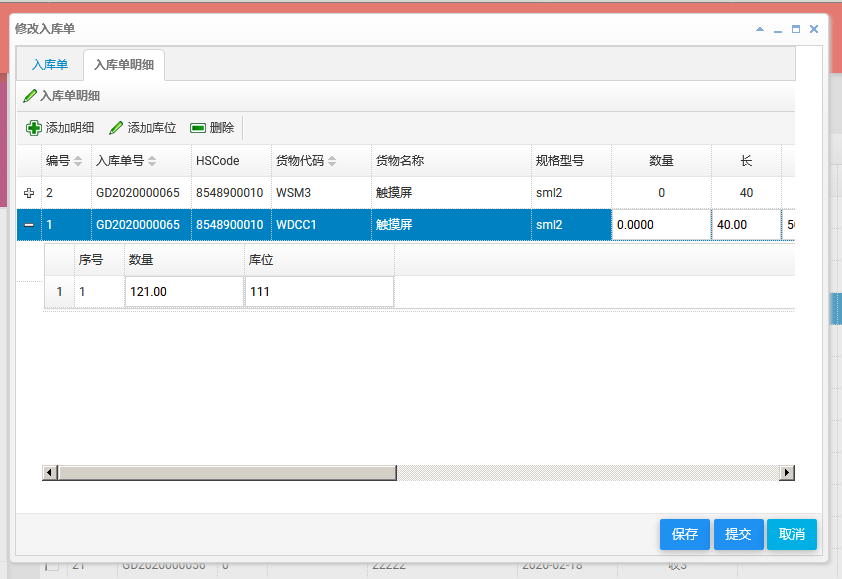
图1

图2

图3
abp(net core)+easyui+efcore实现仓储管理系统——入库管理之十二(四十八)的更多相关文章
- abp(net core)+easyui+efcore实现仓储管理系统——入库管理之四(四十)
abp(net core)+easyui+efcore实现仓储管理系统目录 abp(net core)+easyui+efcore实现仓储管理系统——ABP总体介绍(一) abp(net core)+ ...
- abp(net core)+easyui+efcore实现仓储管理系统——入库管理之五(四十一)
abp(net core)+easyui+efcore实现仓储管理系统目录 abp(net core)+easyui+efcore实现仓储管理系统——ABP总体介绍(一) abp(net core)+ ...
- abp(net core)+easyui+efcore实现仓储管理系统——入库管理之六(四十二)
abp(net core)+easyui+efcore实现仓储管理系统目录 abp(net core)+easyui+efcore实现仓储管理系统——ABP总体介绍(一) abp(net core)+ ...
- abp(net core)+easyui+efcore实现仓储管理系统——入库管理之七(四十三)
abp(net core)+easyui+efcore实现仓储管理系统目录 abp(net core)+easyui+efcore实现仓储管理系统——ABP总体介绍(一) abp(net core)+ ...
- abp(net core)+easyui+efcore实现仓储管理系统——入库管理之八(四十四)
abp(net core)+easyui+efcore实现仓储管理系统目录 abp(net core)+easyui+efcore实现仓储管理系统——ABP总体介绍(一) abp(net core)+ ...
- abp(net core)+easyui+efcore实现仓储管理系统——入库管理之九(四十五)
abp(net core)+easyui+efcore实现仓储管理系统目录 abp(net core)+easyui+efcore实现仓储管理系统——ABP总体介绍(一) abp(net core)+ ...
- abp(net core)+easyui+efcore实现仓储管理系统——入库管理之十(四十六)
abp(net core)+easyui+efcore实现仓储管理系统目录 abp(net core)+easyui+efcore实现仓储管理系统——ABP总体介绍(一) abp(net core)+ ...
- abp(net core)+easyui+efcore实现仓储管理系统——入库管理之十一(四十七)
abp(net core)+easyui+efcore实现仓储管理系统目录 abp(net core)+easyui+efcore实现仓储管理系统——ABP总体介绍(一) abp(net core)+ ...
- abp(net core)+easyui+efcore实现仓储管理系统——入库管理之一(三十七)
abp(net core)+easyui+efcore实现仓储管理系统目录 abp(net core)+easyui+efcore实现仓储管理系统——ABP总体介绍(一) abp(net core)+ ...
随机推荐
- JWT验证机制【刘新宇】【Django REST framework中使用JWT】
JWT 在用户注册或登录后,我们想记录用户的登录状态,或者为用户创建身份认证的凭证.我们不再使用Session认证机制,而使用Json Web Token认证机制. 什么是JWT Json web t ...
- Java 反射调用方法 - 不跳过安全检查、跳过安全检查和普通方法性能比较测试
java中反射提供灵活性同时,给运行效率带来了一定影响.写个代码测试一下 package com.xzlf.reflectTest; import java.lang.reflect.Method; ...
- Java 自定义注解及注解读取解析--模拟框架生成SQL语句
假设们使用一张简单的表,结构如下: 定义注解: 表注解: package com.xzlf.annotation; import java.lang.annotation.ElementType; i ...
- 在Windows中使用VirtualBox安装Ubuntu
VeitualBox官网下载:https://www.virtualbox.org/wiki/Downloads 安装教程:http://dblab.xmu.edu.cn/blog/337-2/ 安装 ...
- 使用pthread进行编程
使用pthread进行并行编程 进程与线程 进程是一个运行程序的实例:线程像一个轻量级的进程:在一个共享内存系统中,一个进程可以有多个线程 POSIX® Threads: 即 Pthreads,是一个 ...
- 免费 https 申请步骤,你必须知道
不适用 https 加密的网站,基本上就等于在裸奔. 来,开始开始动手做 我的系统是 CentOS6 第一步:安装Certbot Certbot可以用于管理(申请.更新.配置.撤销和删除等)Let's ...
- 通过注册表查询 .Net Framework 的版本
HKEY_LOCAL_MACHINE\SOFTWARE\Microsoft\NET Framework Setup\NDP\v4\Full 注意:即使卸载 .Net Framework 这些注册表依然 ...
- 15个有趣好玩的linux shell 命令
今天介绍一些有趣的linux shell命令,所有的命令都可以使用man + 命令名称 来查看完整的使用方法. 1,figlet 字符画 figlet 可以将英文字符串以字符画的形式输出: >& ...
- 12.Python提供了哪些内建类型
There are mutable and Immutable types of Pythons built in types Mutable built-in types: List Set Dic ...
- Eclipse Mac OS 安装 Subversion插件subclipse 缺失JavaHL解决方案
安装 SVN 插件 subclipse 时可能遇到问题 subclipse 安装完成后,当我们选择使用 的时候还是会提示:javaHL not available, SVN接口选择 client:选择 ...