
十四、 React路由(react-router4.x): 动态路由、get传值、React中使用url模块
概述
新闻列表 —跳转—> 详情页 时,想把列表对应的id传到详情页里,可用到三种传值方法:
1、动态路由传值
2、get传值
3、localstorage传值
一、动态路由传值
【App.js】主要路由配置都在此处。01所在
import React from 'react';

import './App.css';

import { BrowserRouter as Router, Route, Link } from 'react-router-dom'; //引入路由模块

import Home from './components/Home';

import News from './components/News';

import Product from './components/Product';

import Content from './components/Content';

function App() {

  return (

    <Router>

    <div>

        <header className="title">

          <Link to="/">首页</Link> |

          <Link to="/news">新闻</Link> |

          <Link to="/product">商品</Link> |

        </header>

         <br /><hr />

        <Route exact path="/" component={Home} />

        <Route path="/news" component={News} />

        <Route path="/product" component={Product} />

        {/* 【01】配置动态路由 (:aid即动态路由意思) 02在News.js */}

        <Route path="/Content/:aid" component={Content} />

    </div>

</Router>

  );

}

export default App;
【News.js】路由配置02步所在
import React, { Component } from 'react';

import {Link} from 'react-router-dom';

class News extends Component {

    constructor(props) {

        super(props);

        this.state = {

            list:[

                {

                    aid:1,

                    title:'新闻列表111'

                },

                {

                    aid:2,

                    title:'新闻列表222'

                },

                {

                    aid:3,

                    title:'新闻列表333'

                },

                {

                    aid:4,

                    title:'新闻列表444'

                },

                {

                    aid:5,

                    title:'新闻列表555'

                },

            ]

        };

    }

    render() {

        return (

            <div>

                <h1>我是新闻组件</h1>

                <ul>

                    {this.state.list.map((value,key)=>{

                        //【02】动态路由配置,获取对应值的aid值传到链接里。地址栏会变成类似 localhost:3000/content/1

                        //( 01在App.js里。to={``}这两个类似引号的符号是es6中模板字符串标记)

                        //03在Content.js

                      return  <li key={key}><Link to={`/Content/${value.aid}`}>{value.title}</Link></li>

                        })

                    }

                </ul>

            </div>

        );

    }

}

export default News;
【Content.js】路由配置03步所在
import React, { Component } from 'react';

class Content extends Component {

    constructor(props) {

        super(props);

        this.state = {  };

    }

    //生命周期函数:加载完成调用props

    componentDidMount(){

        //打印出整个传值内容为:Object isExact:true params:Object aid:"2"

        console.log(this.props)

        //【03】所以获取aid的值方法为(获取动态路由传值)【02】在News.js里

        console.log(this.props.match.params.aid)

    }

    render() {

        return (

            <div>

                我是新闻详情组件,当前aid值为:{this.props.match.params.aid}

            </div>

        );

    }

}

export default Content;
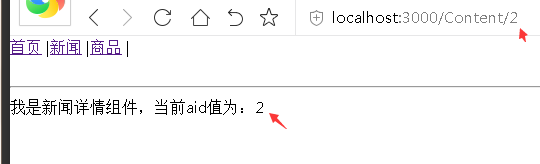
【效果】在新闻列表页点aid=2项:
二、get传值
get传值主要特征是地址有个 ?xxx:http://localhost:3000/ProductDetail?aid=1
【App.js】路由配置同路由
import React from 'react';

import './App.css';

import { BrowserRouter as Router, Route, Link } from 'react-router-dom'; //引入路由模块

import Home from './components/Home';

import News from './components/News';

import Content from './components/Content';

import Product from './components/Product';

import ProductDetail from './components/ProductDetail';

function App() {

  return (

    <Router>

    <div>

        <header className="title">

          <Link to="/">首页</Link> |

          <Link to="/news">新闻</Link> |

          <Link to="/product">商品</Link> |

        </header>

         <br /><hr />

        <Route exact path="/" component={Home} />

        <Route path="/news" component={News} />

        <Route path="/Content/:aid" component={Content} />

        <Route path="/product" component={Product} />

        {/* 【01】get配置 02在Product.js */}

        <Route path="/ProductDetail" component={ProductDetail} />

    </div>

</Router>

  );

}

export default App;
【Product.js】
import React, { Component } from 'react';

import {Link} from 'react-router-dom';

class Product extends Component {

    constructor(props) {

        super(props);

        this.state = {

            list:[

                {

                    aid:1,

                    title:'商品列表111'

                },

                {

                    aid:2,

                    title:'商品列表222'

                },

                {

                    aid:3,

                    title:'商品列表333'

                },

                {

                    aid:4,

                    title:'商品列表444'

                },

                {

                    aid:5,

                    title:'商品列表555'

                },

            ]

        };

    }

    render() {

        return (

            <div>

                <h1>我是商品组件</h1>

                <ul>

                    {this.state.list.map((value,key)=>{

                        //【02】get配置:获取对应值的aid值传到链接里。地址栏会变成类似 localhost:3000/ProductDetail?aid=1

                        //( 01在App.js里。to={``}这两个类似引号的符号是es6中模板字符串标记)

                        //03在ProductDetail.js

                      return  <li key={key}><Link to={`/ProductDetail?aid=${value.aid}`}>{value.title}</Link></li>

                        })

                    }

                </ul>

            </div>

        );

    }

}

export default Product;
【ProductDetail.js】
import React, { Component } from 'react';

class ProductDetail extends Component {

    constructor(props) {

        super(props);

        this.state = {  };

    }

    //生命周期函数:加载完成调用props

    componentDidMount(){

        //打印出整个传值内容为:

//location:[hash:"",key:"ov4jf0",pathname:"/ProductDetail",search:"?aid=3",state:undefined]

        console.log(this.props)

        //【03】所以获取aid的值方法为(获取动态路由传值)【02】在News.js里

        console.log(this.props.location.search)

    }

    render() {

        return (

            <div>

    <h1>我是商品详情组件当前商品aid是:{this.props.location.search}</h1>

            </div>

        );

    }

}

export default ProductDetail;
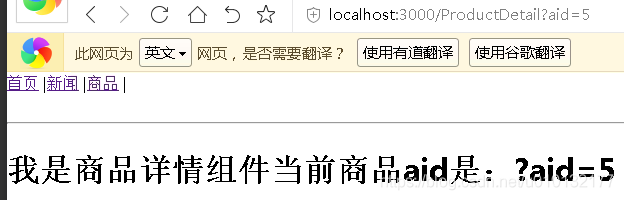
【效果】:点 [商品列表] 任意一个,会把 [对应的aid] 通过地址栏传到 [商品详情页] 去:
问题:此处需要得到的是 5 这个值,但结果确不同,将在下一节解决
三、React中使用url模块,解析url
1.安装url模块:
cnpm install url --save
2.引入页面:
import url from 'url'
url解析使用
解决:将解决上一节传过来的aid值成了:?aid=xx ,直接获取xx;
【App.js】:代码同上
【Product.js】:代码同上
【ProductDetail.js】
import React, { Component } from 'react';

import url from 'url'; //引入url解析模块

class ProductDetail extends Component {

    constructor(props) {

        super(props);

        this.state = {  };

    }

    //生命周期函数:加载完成调用props

    componentDidMount(){

        //打印出整个传值内容为:

        //location:[hash:"",key:"ov4jf0",pathname:"/ProductDetail",search:"?aid=3",state:undefined]

        //console.log(this.props)

        //【03】所以获取aid的值方法为(获取动态路由传值)【02】在News.js里

        //console.log(this.props.location.search)

        //【url解析01】将返回:query:[aid:x]

        console.log(url.parse(this.props.location.search,true))

        //【url解析02】所以获取aid值写法:

        var query=url.parse(this.props.location.search,true).query;

        console.log(query);

    }

    render() {

        return (

            <div>

    <h1>我是商品详情组件当前商品</h1>

            </div>

        );

    }

}

export default ProductDetail;
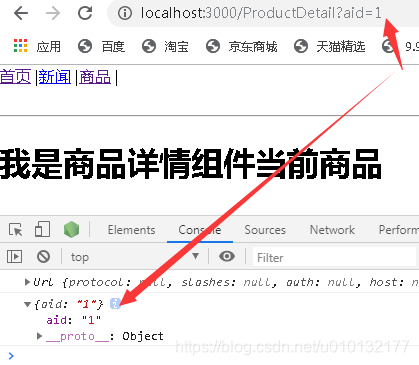
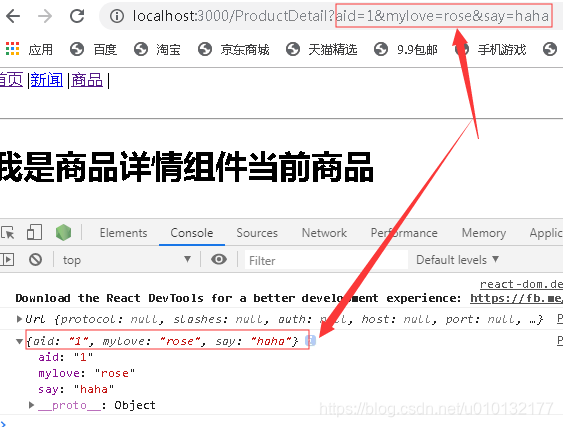
效果:在地址栏随意传过来的参数都会进行解析:
自己随便写个参数:都可进行解析
三、总结
react动态路由传值:
  1、动态路由配置

      <Route path="/content/:aid" component={Content} />

  2、对应的动态路由加载的组件里面获取传值

        this.props.match.params

  跳转:<Link to={`/content/${value.aid}`}>{value.title}</Link>
react get传值:
1、获取 this.props.location.search十四、 React路由(react-router4.x): 动态路由、get传值、React中使用url模块的更多相关文章
- 六、路由详细介绍之动态路由RIP(了解一下就行)
动态路由分为距离矢量路由(RIP)和链路状态(OSPF和ISIS) 一.离矢量路由协议-RIP RIP协议现在基本上被淘汰. RIP动态路由协议工作原理,如上图: R12中有192.168.1.0和1 ...
- 前端笔记之React(三)使用动态样式表&antd&React脚手架&props实战
一.使用动态样式表 1.1 LESS使用 全局安装Less npm install -g less 创建1.less文件,然后可以用lessc命令来编译这个文件: lessc 1.less 1.css ...
- C++第四十四篇 -- MFC使用ChartCtrl绘制动态曲线
前言 目的:使用控制台程序带MFC类库画一个动态曲线图 参考链接: https://blog.csdn.net/sinat_29890433/article/details/105360032 htt ...
- 八、路由详细介绍之动态路由OSPF(重点)
一.OSPF介绍 OSPF优点:无环路.收敛快.扩展性好.支持认证 二.工作原理: 图中RTA.RTB.RTC每个路由器都会生成一个LSA, 通过LSA泛洪进行互相发送相互学习,形成LSDB (链路状 ...
- Vue-Router动态路由匹配
//重点在于路由出口 <p> <!-- 使用 router-link 组件来导航. --> <!-- 通过传入 `to` 属性指定链接. --> <!-- & ...
- vue路由-动态路由和嵌套路由
一.动态路由 我们经常需要把某种模式匹配到的所有路由,全都映射到同个组件.例如,我们有一个 User 组件,对于所有 ID 各不相同的用户,都要使用这个组件来渲染.那么,我们可以在 vue-route ...
- 【odoo14】第十四章、CMS网站开发
第十四章.CMS网站开发** Odoo有一个功能齐全的内容管理系统(CMS).通过拖放功能,你的最终用户可以在几分钟内设计一个页面,但是在Odoo CMS中开发一个新功能或构建块就不是那么简单了.在本 ...
- JavaScript高级程序设计:第十四章
第十四章 一.表单的基础知识 在HTML中,表单是由<form>元素来表示的,而在javascript中,表单对应的则是HTMLFormElement类型.HTMLFormElement继 ...
- Express全系列教程之(二):Express的路由以及动态路由
一.Express路由简介 路由表示应用程序端点 (URI) 的定义以及响应客户端请求的方式.它包含一个请求方时(methods).路径(path)和路由匹配时的函数(callback); app.m ...
随机推荐
- python语言入门
1.python语言是一种高级的脚本语言,诞生于1991年. 2.python是目前主流的编程语言,具有超高的人气,是因为它是目前大数据与人工智能的语言基础,应用范围非常广泛. 3.python语言是 ...
- Ubuntu安装docker并修改镜像仓库
首先切换到root用户 安装docker wget -qO- https://get.docker.com/ | sh 使用docker -v查看docker版本 创建daemon.json 并键入以 ...
- Python学习第三课——运算符
# 运算符 + - * / **(幂) %(取余) //(取整) num=9%2 print("余数为"+(str)(num)) #运算结果为 1 num1=9//2 print( ...
- LIS问题
LIS定义LIS(Longest Increasing Subsequence)最长上升子序列 .一个数的序列bi,当b1 < b2 < … < bS的时候,我们称这个序列是上升的. ...
- 关于pandas增加行时,索引名称的一些问题
学习pandas两天了,关于这个增加行的问题一直困扰着我,测试了几个代码,终于搞通了一点(昨天是因为代码敲错了...) 直接上代码: dates = pd.date_range(',periods=6 ...
- 关闭Hyper-V后,天翼校园宽带(Netkeeper)依旧显示Sorry, this application cannot run under a Virtual Machin的解决方法
环境: win10专业版,版本1909 经过: 尝试了一下win10 更新后的沙盒系统,当时开启了沙盒,但是未打开Hyper-V,沙盒正常运行. 第二次开机后天翼校园宽带(Netkeeper)显示So ...
- git log format
默认git log 出来的格式并不是特别直观,很多时候想要更简便的输出更多或者更少的信息,这里列出几个git log的format. 可以根据自己的需要定制. git log命令可一接受一个--pre ...
- 吴裕雄 Bootstrap 前端框架开发——Bootstrap 辅助类:清除浮动1
<!DOCTYPE html> <html> <head> <meta charset="utf-8"> <title> ...
- 本地连接 HDFS 报错 Exception in thread "main" org.apache.hadoop.security.AccessControlException: org.apache.hadoop.security.AccessControlException: Permission denied: user=JM.H,access=WRITE, inode="":r
此时 到hdfs机器下修改hdfs-site.xml即可 添加如下配置 <property> <name>dfs.permissions</name> <va ...
- ubuntu18.04下neo4j的安装
参考CSDN博客 安装jdk8方式与博客中有不同,按照博客中方法没有成功 以下方法配置环境变量成功 进入配置文件 [root@cuierdan java]# vim /etc/profile在文件的后 ...