
MyBatis(三)动态SQL与缓存
个人博客网:https://wushaopei.github.io/ (你想要这里多有)
一、动态SQL语句
准备工作:
public class User {

	private int id;

	private String lastName;

	private int sex;
1、if 语句
说明: if语句,可以动态的根据你的值来决定,是否需要动态的添加查询条件。
方法代码:
public interface UserMapper {

	/**

	 * 根据用户的lastName属性和sex属性查询用户信息<br/>

	 * 	前提条件是lastName属性和sex属性值都合法。<br/>

	 * 	如果lastName属性和sex属性哪个不合法,就不要加入查询条件

	 */

	public List<User> queryUserByNameAndSex(User user);

}
配置信息:
	<select id="queryUserByNameAndSex" resultType="com.webcode.pojo.User">

		select

			id,last_name lastName,sex

		from

			t_user

		where

		<!-- 做if判断 -->

		<if test="lastName != null">

			last_name like concat('%',#{lastName},'%')

		</if>

		<if test="sex == 0 || sex == 1">

			and sex = #{sex}

		</if>

	</select>
测试代码:
        @Test

	public void testQueryUserByNameAndSex() {

		SqlSession session = sqlSessionFactory.openSession();

		try {

			UserMapper mapper = session.getMapper(UserMapper.class);

			mapper.queryUserByNameAndSex(new User(null, "bb", 10)).forEach(System.out::println);

		} catch (Exception e) {

			e.printStackTrace();

		} finally {

			session.close();

		}

	}
2、where 语句
说明: where语句,可以帮我们在多个动态语句中,有效的去掉前面的多余的and 或 or 之类的多余关键字
	<select id="queryUserByNameAndSex" resultType="com.webcode.pojo.User">

		select

			id,last_name lastName,sex

		from

			t_user

		<!-- where标签可以动态判断里面有没有内容。如果没有内容。就没有where关键字,有内容就有where关键字,并且可以去掉里面包含的多余的and或or关键字 -->

		<where>

			<!-- 做if判断 -->

			<if test="lastName != null">

				last_name like concat('%',#{lastName},'%')

			</if>

			<if test="sex == 0 || sex == 1">

				and sex = #{sex}

			</if>

		</where>

	</select>
3、trim语句
说明: trim 可以动态在包含的语句前面和后面添加内容。也可以去掉前面或者后面给定的内容
- prefix 前面添加内容
- suffix 后面添加内容
- suffixOverrides 去掉的后面内容
- prefixOverrides 去掉的前面内容
方法代码:
public List<User> queryUserByNameAndSexTrim(User user);
配置信息:
<select id="queryUserByNameAndSexTrim" resultType="com.webcode.pojo.User">

		select

			id,last_name lastName,sex

		from

			t_user

		<!--

			trim 语句可以去掉包含内容的前面或后台的指定内容

				prefixOverrides="and" 	去掉前缀add

				suffixOverrides="and"	去掉后缀add

				prefix					在内容前面添加where

				suffix=""				在内容后面添加

		-->

		<trim prefixOverrides="and" suffixOverrides="and" prefix="where" >

			<!-- 做if判断 -->

			<if test="lastName != null">

				last_name like concat('%',#{lastName},'%') and

			</if>

			<if test="sex == 0 || sex == 1">

				sex = #{sex}

			</if>

		</trim>

	</select>
测试代码:
public void testQueryUserByNameAndSexTrim() {

		SqlSession session = sqlSessionFactory.openSession();

		try {

			UserMapper mapper = session.getMapper(UserMapper.class);

			mapper.queryUserByNameAndSexTrim(new User(null, "bb", 10)).forEach(System.out::println);

		} catch (Exception e) {

			e.printStackTrace();

		} finally {

			session.close();

		}

	}
4、choose( when , otherwise )语句
说明:choose when otherwise 可以执行多路选择判断,但是只会有一个分支会被执行。
类似switch case 语句
方法:
	/**

	 * 根据user对象的属性进行查询<br/>

	 * 	1、如果lastName值有效(非空),则做模糊查询<br/>

	 *  2、sex属性如果有效,就做性别查询<br/>

	 *  3、使用默认条件查询

	 */

	public List<User> queryUsersByNameOrSexChoose(User user);
配置信息:
<select id="queryUsersByNameOrSexChoose" resultType="com.webcode.pojo.User">

		select

			id,last_name lastName,sex

		from

			t_user

		<where>

			<choose>

				<when test="lastName != null">

					last_name like concat('%',#{lastName},'%')

				</when>

				<when test="sex == 1 || sex == 0">

					sex = #{sex}

				</when>

				<otherwise>

					1 = 1

				</otherwise>

			</choose>

		</where>

	</select>
测试代码:
        @Test

	public void testQueryUsersByNameOrSexChoose() {

		SqlSession session = sqlSessionFactory.openSession();

		try {

			UserMapper mapper = session.getMapper(UserMapper.class);

			mapper.queryUsersByNameOrSexChoose(new User(null, null, 10)).forEach(System.out::println);

		} catch (Exception e) {

			e.printStackTrace();

		} finally {

			session.close();

		}

	}
5、set语句
删除条件后的逗号
方法:
        /**

	 * 更新user

	 */

	public int updateUser(User user);
配置信息:
    <update id="updateUser" parameterType="com.webcode.pojo.User">

		update

			t_user

		<!-- set可以删除条件后的逗号 -->

		<set>

			<if test="lastName != null">

				last_name = #{lastName} ,

			</if>

			<if test="sex == 1 || sex == 0">

				sex = #{sex}

			</if>

		</set>

		where

			id = #{id}

	</update>
测试代码:
        @Test

	public void testUpdateUser() {

		SqlSession session = sqlSessionFactory.openSession();

		try {

			UserMapper mapper = session.getMapper(UserMapper.class);

			mapper.updateUser(new User(4, "ccc", 10));

			session.commit();

		} catch (Exception e) {

			e.printStackTrace();

		} finally {

			session.close();

		}

	}
6、foreach语句
方法:
        /**

	 * select * from t_user where id in(1,2,3)

	 */

	public List<User> queryUsersByIds(List<Integer> ids);
配置信息:
        <select id="queryUsersByIds" resultType="com.webcode.pojo.User">

		select

			id,last_name lastName,sex

		from

			t_user

		where

			id in

		<!--

			foreach是做遍历操作

				collection属性是遍历的集合

				open是遍历之前要添加的内容

				close是遍历之后要添加的内容

				separator是每遍历的元素中间要加的内容

				item 是当前正在遍历的内容

		 -->

		<foreach collection="list" open="(" close=")" separator="," item="i">

			#{i}

		</foreach>

	</select>
测试代码:
        @Test

	public void testQueryUsersByIds() throws Exception {

		SqlSession session = sqlSessionFactory.openSession();

		try {

			UserMapper mapper = session.getMapper(UserMapper.class);

			List<Integer> ids = new ArrayList<Integer>();

			ids.add(1);

			ids.add(2);

			ids.add(3);

			ids.add(4);

			mapper.queryUsersByIds(ids).forEach(System.out::println);

		} catch (Exception e) {

			e.printStackTrace();

		} finally {

			session.close();

		}

	}
二、mybatis缓存
缓存:所谓是指把一些经常访问的数据保存到一个调整的缓冲区中。保存在高速缓冲区中的数据叫缓存。
一级缓存:指的是缓存在SqlSession中的数据(默认开启,并且不能关闭)
二级缓存:指的是缓存在SqlSessionFactory中的数据(需要手动开启和配置)
1、mybatis的一级缓存的示例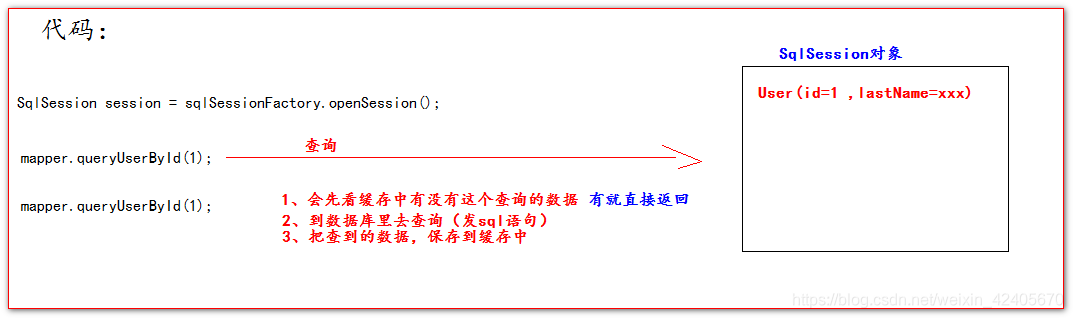
一级缓存测试代码:
        @Test

	public void testFirstLevelCache() throws Exception {

		SqlSession session = sqlSessionFactory.openSession();

		try {

			UserMapper mapper = session.getMapper(UserMapper.class);

			System.out.println( mapper.queryUserById(1) );

			System.out.println( mapper.queryUserById(1) );

		} catch (Exception e) {

			e.printStackTrace();

		} finally {

			session.close();

		}

	}
1.2、一级缓存的管理
一级缓存失效的四种情况:
1.不在同一个SqlSession对象中
        @Test

	public void testFirstLevelCacheFail1() throws Exception {

		queryOne();

		queryOne();

	}

	private void queryOne(){

		SqlSession session = sqlSessionFactory.openSession();

		UserMapper mapper = session.getMapper(UserMapper.class);

		System.out.println(mapper.queryUserById(1));

		session.close();

	}
2.执行语句的参数不同。缓存中也不存在数据。
        @Test

	public void testFirstLevelCacheFail2() throws Exception {

		SqlSession session = sqlSessionFactory.openSession();

		UserMapper mapper = session.getMapper(UserMapper.class);

		System.out.println(mapper.queryUserById(1));

		System.out.println(mapper.queryUserById(2));

		session.close();

	}
3.执行增,删,改,语句,会清空掉缓存
        @Test

	public void testFirstLevelCacheFail3() throws Exception {

		SqlSession session = sqlSessionFactory.openSession();

		UserMapper mapper = session.getMapper(UserMapper.class);

		System.out.println(mapper.queryUserById(1));

		mapper.updateUser(new User(1, "cadsrq", 1));//执行增,删,改,语句,会清空掉缓存

		System.out.println(mapper.queryUserById(1));

		session.close();

	}
4.手动清空缓存数据
        @Test

	public void testFirstLevelCacheFail4() throws Exception {

		SqlSession session = sqlSessionFactory.openSession();

		UserMapper mapper = session.getMapper(UserMapper.class);

		System.out.println(mapper.queryUserById(1));

		session.clearCache();//清空缓存

		System.out.println(mapper.queryUserById(1));

		session.close();

	}
2、mybatis的二级缓存
二级缓存的图解示意

二级缓存的使用:
myBatis的二级缓存默认是不开启的。
1、我们需要在mybatis的核心配置文件中配置setting选项
	<settings>

		<!-- 开启二级缓存 -->

		<setting name="cacheEnabled" value="true"/>

	</settings>
2、在Mapper的配置文件中加入cache标签。
        <!-- 表示使用二级缓存 -->

	<cache></cache>
3、需要被二级缓存的对象必须要实现java的序列化接口。

2.1、二级缓存的演示
        private void queryOne(){

		SqlSession session = sqlSessionFactory.openSession();

		UserMapper mapper = session.getMapper(UserMapper.class);

		System.out.println(mapper.queryUserById(1));

		session.close();

	}

	@Test

	public void testSecondLevelCache() throws Exception {

		queryOne();

		queryOne();

	}
2.2、useCache="false"的演示和说明
	<!--

 		userCache 设置是否使用二级缓存,默认是true,使用

 		false 表示不使用二级缓存

 	 -->

	<select id="queryUserById" resultType="com.webcode.pojo.User" parameterType="int" useCache="true">

		select id,last_name lastName,sex from t_user where id = #{id}

	</select>
2.3、flushCache="false"的演示和说明
flushCache刷新或清空缓存
        <!--  flushCache是设置是否要清空缓存

			默认是true,表示清空

			false表示不清空缓存

         -->

  	<update id="updateUser" parameterType="com.webcode.pojo.User" flushCache="false">

  		update t_user set last_name = #{lastName},sex = #{sex} where id = #{id}

  	</update>
2.4、<cache></cache>标签的介绍和说明
默认的<cache/>标签的作用:
1、映射语句文件中的所有 select 语句将会被缓存。
2、射语句文件中的所有 insert,update 和 delete 语句会刷新缓存。
3、缓存会使用 Least Recently Used(LRU,最近最少使用的)算法来收回。
4、根据时间表(比如 no Flush Interval,没有刷新间隔), 缓存不会以任何时间顺序 来刷新。
5、缓存会存储列表集合或对象(无论查询方法返回什么)的 1024 个引用。
6、缓存会被视为是 read/write(可读/可写)的缓存,意味着对象检索不是共享的,而 且可以安全地被调用者修改,而不干扰其他调用者或线程所做的潜在修改。
cache标签示例解析:
<cache eviction="FIFO" flushInterval="60000" size="512" readOnly="true"/>
eviction 属性表示缓存策略。
- LRU – 最近最少使用的:移除最长时间不被使用的对象(这是默认策略)。
- FIFO – 先进先出:按对象进入缓存的顺序来移除它们。
- SOFT – 软引用:移除基于垃圾回收器状态和软引用规则的对象。
- WEAK – 弱引用:更积极地移除基于垃圾收集器状态和弱引用规则的对象。
flushInterval 属性表示间隔多长时间刷新一下缓冲区,清理一下溢出的数据。以毫秒为单位。
size 属性表示缓存中可以保存多少个对象。默认是1024。
readOnly 属性表示是否只读。如果设置为true。表示缓存中只有一个对象。如果设置为false(默认为false)每次取出来都会反序列化拷贝一份。
type 属性表示自定义二级缓存对象。
自定义二级缓存:
- 编写一个类去实现Cache接口
- 到mapper配置文件的cache标签中配置type属性
<cache type="com.webcode.cache.MyCache"></cache>
public class MyCache implements Cache {

	private String id;

	private Map<Object, Object> cache = new HashMap<Object, Object>();

	public MyCache(String id) {

		this.id = id;

	}

	@Override

	public String getId() {

		return id;

	}

	@Override

	public int getSize() {

		return cache.size();

	}

	@Override

	public void putObject(Object key, Object value) {

		System.out.println("保存缓存");

		cache.put(key, value);

	}

	@Override

	public Object getObject(Object key) {

		System.out.println("获取缓存");

		return cache.get(key);

	}

	@Override

	public Object removeObject(Object key) {

		return cache.remove(key);

	}

	@Override

	public void clear() {

		cache.clear();

	}

	@Override

	public ReadWriteLock getReadWriteLock() {

		return null;

	}

	@Override

	public boolean equals(Object o) {

		if (getId() == null) {

			throw new CacheException("Cache instances require an ID.");

		}

		if (this == o) {

			return true;

		}

		if (!(o instanceof Cache)) {

			return false;

		}

		Cache otherCache = (Cache) o;

		return getId().equals(otherCache.getId());

	}

	@Override

	public int hashCode() {

		if (getId() == null) {

			throw new CacheException("Cache instances require an ID.");

		}

		return getId().hashCode();

	}

}
3、缓存的使用顺序说明
- 当我们执行一个查询语句的时候。mybatis会先去二级缓存中查询数据。如果二级缓存中没有。就到一级缓存中查找。
- 如果二级缓存和一级缓存都没有。就发sql语句到数据库中去查询。
- 查询出来之后马上把数据保存到一级缓存中。
- 当SqlSession关闭的时候,会把一级缓存中的数据保存到二级缓存中。
org.apache.ibatis.cache.impl.PerpetualCache一级缓存实现类
三、mybatis逆向工程
MyBatis逆向工程,简称MBG。是一个专门为MyBatis框架使用者定制的代码生成器。可以快速的根据数据库表生成对应的映射文件,接口,以及Bean类对象。
在Mybatis中,有一个可以自动对单表生成的增,删,改,查代码的插件。
叫 mybatis-generator-core-1.3.2。
它可以帮我们对比数据库表之后,生成大量的这个基础代码。
这些基础代码有:
- 数据库表对应的javaBean对象
- 这些javaBean对象对应的Mapper接口
- 这些Mapper接口对应的配置文件
  	<!-- 去掉全部的注释 -->

    <commentGenerator>

        <property name="suppressAllComments" value="true" />

    </commentGenerator>
1、准备数据库表
create database mbg;

use mbg;

create table t_user(

	`id` int primary key auto_increment,

	`username` varchar(30) not null unique,

	`password` varchar(40) not null,

	`email` varchar(50)

);

insert into t_user(`username`,`password`,`email`) values('admin','admin','admin@atguigu.com');

insert into t_user(`username`,`password`,`email`) values('wzg168','123456','admin@atguigu.com');

insert into t_user(`username`,`password`,`email`) values('admin168','123456','admin@atguigu.com');

insert into t_user(`username`,`password`,`email`) values('lisi','123456','admin@atguigu.com');

insert into t_user(`username`,`password`,`email`) values('wangwu','123456','admin@atguigu.com');

create table t_book(

	`id` int primary key auto_increment,

	`name` varchar(50),

	`author` varchar(50),

	`price`	decimal(11,2),

	`sales`	int,

	`stock` int

);

## 插入初始化测试数据

insert into t_book(`id` , `name` , `author` , `price` , `sales` , `stock` )

values(null , 'java从入门到放弃' , '国哥' , 80 , 9999 , 9);

insert into t_book(`id` , `name` , `author` , `price` , `sales` , `stock` )

values(null , '数据结构与算法' , '严敏君' , 78.5 , 6 , 13);

insert into t_book(`id` , `name` , `author` , `price` , `sales` , `stock` )

values(null , '怎样拐跑别人的媳妇' , '龙伍' , 68, 99999 , 52);

insert into t_book(`id` , `name` , `author` , `price` , `sales` , `stock` )

values(null , '木虚肉盖饭' , '小胖' , 16, 1000 , 50);

insert into t_book(`id` , `name` , `author` , `price` , `sales` , `stock` )

values(null , 'C++编程思想' , '刚哥' , 45.5 , 14 , 95);

insert into t_book(`id` , `name` , `author` , `price` , `sales` , `stock` )

values(null , '蛋炒饭' , '周星星' , 9.9, 12 , 53);

insert into t_book(`id` , `name` , `author` , `price` , `sales` , `stock` )

values(null , '赌神' , '龙伍' , 66.5, 125 , 535);

select * from t_user;

select * from t_book;
mbg配置文件内容:
<?xml version="1.0" encoding="UTF-8"?>

<!DOCTYPE generatorConfiguration

  PUBLIC "-//mybatis.org//DTD MyBatis Generator Configuration 1.0//EN"

  "http://mybatis.org/dtd/mybatis-generator-config_1_0.dtd">

<generatorConfiguration>

  <!--

  		targetRuntime="MyBatis3" 生成豪华版 CRUD(多了QBC查询)

  		targetRuntime="MyBatis3Simple"		生成标准版的CRUD

   -->

  <context id="DB2Tables" targetRuntime="MyBatis3Simple">

  	<!-- 去掉全部的注释 -->

	<commentGenerator>

        <property name="suppressAllComments" value="true" />

    </commentGenerator>

  	<!--

  		jdbcConnection 配置数据库的四个连接属性

  	 -->

    <jdbcConnection driverClass="com.mysql.jdbc.Driver"

        connectionURL="jdbc:mysql://localhost:3306/mbg"

        userId="root"

        password="root">

    </jdbcConnection>

    <javaTypeResolver >

      <property name="forceBigDecimals" value="false" />

    </javaTypeResolver>

	<!--

		javaModelGenerator 配置javaBean的生成信息

			targetPackage="com.webcode.pojo" 配置生成的javaBean的包名

			targetProject=".\src"	表示输出到当前工程的src目录下

	 -->

    <javaModelGenerator targetPackage="com.webcode.pojo" targetProject=".\src">

      <property name="enableSubPackages" value="true" />

      <property name="trimStrings" value="true" />

    </javaModelGenerator>

	<!--

		sqlMapGenerator 配置生成Mapper配置文件

			targetPackage="com.webcode.mapper" 	生成的mapper接口在哪个包下

			targetProject=".\src"	生成的代码放在哪个位置(当前工程的src目录下)

	 -->

    <sqlMapGenerator targetPackage="com.webcode.mapper"  targetProject=".\src">

      <property name="enableSubPackages" value="true" />

    </sqlMapGenerator>

	<!--

		javaClientGenerator生成Mapper接口

			targetPackage="com.webcode.mapper" 	生成的Mapper接口在哪个包下

			targetProject=".\src"		生成的Mapper接口输出在哪个位置(当前工程的src目录下)

	 -->

    <javaClientGenerator type="XMLMAPPER" targetPackage="com.webcode.mapper"  targetProject=".\src">

      <property name="enableSubPackages" value="true" />

    </javaClientGenerator>

	<!--

		一张表对应一个table标签

			tableName	表名

	 -->

    <table tableName="t_user" domainObjectName="User" ></table>

    <table tableName="t_book" domainObjectName="Book" ></table>

  </context>

</generatorConfiguration>
运行mbg的代码
import java.io.File;

import java.util.ArrayList;

import java.util.List;

import org.mybatis.generator.api.MyBatisGenerator;

import org.mybatis.generator.config.Configuration;

import org.mybatis.generator.config.xml.ConfigurationParser;

import org.mybatis.generator.internal.DefaultShellCallback;

public class Runner {

	public static void main(String[] args) throws Exception {

		List<String> warnings = new ArrayList<String>();

		boolean overwrite = true;

		File configFile = new File("mbg.xml");

		ConfigurationParser cp = new ConfigurationParser(warnings);

		Configuration config = cp.parseConfiguration(configFile);

		DefaultShellCallback callback = new DefaultShellCallback(overwrite);

		MyBatisGenerator myBatisGenerator = new MyBatisGenerator(config,

				callback, warnings);

		myBatisGenerator.generate(null);

	}

}
文件路径:

MyBatis(三)动态SQL与缓存的更多相关文章
- MyBatis框架——动态SQL、缓存机制、逆向工程
MyBatis框架--动态SQL.缓存机制.逆向工程 一.Dynamic SQL 为什么需要动态SQL?有时候需要根据实际传入的参数来动态的拼接SQL语句.最常用的就是:where和if标签 1.参考 ...
- Mybatis(三) 动态SQL
if + where 用法 1. if 元素来实现多条件查询 1.1 UserMapper.xml配置文件 <!--查询用户列表 (if)--> <select id="g ...
- MyBatis的动态SQL详解
MyBatis的动态SQL是基于OGNL表达式的,它可以帮助我们方便的在SQL语句中实现某些逻辑,本文详解mybatis的动态sql,需要的朋友可以参考下 MyBatis 的一个强大的特性之一通常是它 ...
- 使用Mybatis实现动态SQL(一)
使用Mybatis实现动态SQL 作者 : Stanley 罗昊 [转载请注明出处和署名,谢谢!] 写在前面: *本章节适合有Mybatis基础者观看* 前置讲解 我现在写一个查询全部的 ...
- mybatis中的.xml文件总结——mybatis的动态sql
resultMap resultType可以指定pojo将查询结果映射为pojo,但需要pojo的属性名和sql查询的列名一致方可映射成功. 如果sql查询字段名和pojo的属性名不一致,可以通过re ...
- MyBatis的动态SQL详解-各种标签使用
MyBatis的动态SQL是基于OGNL表达式的,它可以帮助我们方便的在SQL语句中实现某些逻辑. MyBatis中用于实现动态SQL的元素主要有: if choose(when,otherwise) ...
- 一分钟带你了解下MyBatis的动态SQL!
MyBatis的强大特性之一便是它的动态SQL,以前拼接的时候需要注意的空格.列表最后的逗号等,现在都可以不用手动处理了,MyBatis采用功能强大的基于OGNL的表达式来实现,下面主要介绍下. 一. ...
- 使用Mybatis实现动态SQL(二)
使用Mybatis实现动态SQL 作者 : Stanley 罗昊 [转载请注明出处和署名,谢谢!] 写在前面: *本章节适合有Mybatis基础者观看* 使用Mybatis实现动态SQL ...
- MyBatis 示例-动态 SQL
MyBatis 的动态 SQL 包括以下几种元素: 详细的使用参考官网文档:http://www.mybatis.org/mybatis-3/zh/dynamic-sql.html 本章内容简单描述这 ...
- Mybatis解析动态sql原理分析
前言 废话不多说,直接进入文章. 我们在使用mybatis的时候,会在xml中编写sql语句. 比如这段动态sql代码: <update id="update" parame ...
随机推荐
- Spring Cloud学习 之 Spring Cloud Hystrix(基础知识铺垫)
Spring Boot版本:2.1.4.RELEASE Spring Cloud版本:Greenwich.SR1 文章目录 前述: 快速入门: 命令模式: RxJava: 前述: 在微服务架构中, ...
- leetcode_课程表(BFS、拓扑排序)
题目描述: 你这个学期必须选修 numCourse 门课程,记为 0 到 numCourse-1 .在选修某些课程之前需要一些先修课程. 例如,想要学习课程 0 ,你需要先完成课程 1 ,我们用一个匹 ...
- 一分钟明白MySQL聚簇索引和非聚簇索引
MySQL的InnoDB索引数据结构是B+树,主键索引叶子节点的值存储的就是MySQL的数据行,普通索引的叶子节点的值存储的是主键值,这是了解聚簇索引和非聚簇索引的前提 什么是聚簇索引? 很简单记住一 ...
- vue+.netcore可支持业务代码扩展的开发框架 VOL.Vue 2.0版本发布
框架介绍 这是一个基于vue.element-ui.iview..netcore3.1 可支持前端.后台动态扩展业务代码快速开发框架. 框架内置定制开发的代码生成器,生成的代码不需要复制也不需要更改, ...
- 【Linux基础总结】Shell 基础编程
Shell 基础编程 重启虚拟机遇到磁盘损坏如何解决 Shell编程中变量的声明.引用及作用域 Shell程序 概述 以文件形式存放批量的Linux命令集合,该文件能够被Shell解释执行,这种文件就 ...
- flink优化总结
一.高性能Flink SQL优化技巧 1.Group Aggregate优化技巧 开启MicroBatch或MiniBatch(提升吞吐) MicroBatch和MiniBatch都是微批处理,只是微 ...
- Java 在Excel中创建透视表
本文内容介绍通过Java程序在Excel表格中根据数据来创建透视表. 环境准备 需要使用Excel类库工具—Free Spire.XLS for Java,这里使用的是免费版,可通过官网下载Jar包并 ...
- 如何使用 Shebang Line (Python 虚拟环境)
本文记录,如何在 Python Script 中使用 Shebang 行. Shebang Line 是什么: 也被叫做 Hashbang Line,只要是一个由,井号和叹号#!开头,并构成的字符序列 ...
- pod install update没有反应
出去是镜像的问题,我用的是外网,所以应该不是镜像的问题, 换用这个: pod install --verbose --no-repo-update pod update --verbose --no- ...
- 说一说JS的IIFE
1. 定义IIFE: Immediately Invoked Function Expression,意为立即调用的函数表达式,也就是说,声明函数的同时立即调用这个函数.对比一下,这是不采用IIFE时 ...