
Linux 使用fdisk添加新分区
Linux系统由于数据累计增长、前期存储规划不合理等诸多因素,出现存储不够用的情况时,此时就需要扩展逻辑分区或添加新的逻辑分区。下面介绍一下通过使用fdsik添加新的逻辑分区。
首先使用df命令检查文件系统的磁盘空间占用情况
[root@DB-ONE-SERVER~]# df -h
Filesystem Size Used Avail Use% Mounted on
/dev/mapper/VolGroup00-sda3
30G 2.4G 26G 9% /
/dev/sda1 99M 23M 71M 25% /boot
tmpfs 4.0G 0 4.0G 0% /dev/shm
You have new mail in /var/spool/mail/root
然后使用fdisk -l查看分区表信息
[root@DB-ONE-SERVER~]# fdisk -l
Disk /dev/sda: 42.9 GB, 42949672960 bytes
255 heads, 63 sectors/track, 5221 cylinders
Units = cylinders of 16065 * 512 = 8225280 bytes
Device Boot Start End Blocks Id System
/dev/sda1 * 1 13 104391 83 Linux
/dev/sda2 14 5221 41833260 8e Linux LVM
Disk /dev/sdb: 21.4 GB, 21474836480 bytes
255 heads, 63 sectors/track, 2610 cylinders
Units = cylinders of 16065 * 512 = 8225280 bytes
Disk /dev/sdb doesn't contain a valid partition table
Disk /dev/dm-0: 32.3 GB, 32346472448 bytes
255 heads, 63 sectors/track, 3932 cylinders
Units = cylinders of 16065 * 512 = 8225280 bytes
Disk /dev/dm-0 doesn't contain a valid partition table
Disk /dev/dm-1: 10.4 GB, 10468982784 bytes
255 heads, 63 sectors/track, 1272 cylinders
Units = cylinders of 16065 * 512 = 8225280 bytes
Disk /dev/dm-1 doesn't contain a valid partition table
fdisk命令参数介绍
p、打印分区表。
n、新建一个新分区。
d、删除一个分区。
m、输出菜单
q、退出不保存。
w、把分区写进分区表,保存并退出。
[root@DB-ONE-SERVER~]# fdisk /dev/sdb
Device contains neither a valid DOS partition table, nor Sun, SGI or OSF disklabel
Building a new DOS disklabel. Changes will remain in memory only,
until you decide to write them. After that, of course, the previous
content won't be recoverable.
The number of cylinders for this disk is set to 2610.
There is nothing wrong with that, but this is larger than 1024,
and could in certain setups cause problems with:
1) software that runs at boot time (e.g., old versions of LILO)
2) booting and partitioning software from other OSs
(e.g., DOS FDISK, OS/2 FDISK)
Warning: invalid flag 0x0000 of partition table 4 will be corrected by w(rite)
Command (m for help): m
Command action
a toggle a bootable flag
b edit bsd disklabel
c toggle the dos compatibility flag
d delete a partition
l list known partition types
m print this menu
n add a new partition
o create a new empty DOS partition table
p print the partition table
q quit without saving changes
s create a new empty Sun disklabel
t change a partition's system id
u change display/entry units
v verify the partition table
w write table to disk and exit
x extra functionality (experts only)
Command (m for help): p
Disk /dev/sdb: 21.4 GB, 21474836480 bytes
255 heads, 63 sectors/track, 2610 cylinders
Units = cylinders of 16065 * 512 = 8225280 bytes
Device Boot Start End Blocks Id System
Command (m for help): n
Command action
e extended
p primary partition (1-4)
p
Partition number (1-4): 1
First cylinder (1-2610, default 1): 1
Last cylinder or +size or +sizeM or +sizeK (1-2610, default 2610):
Using default value 2610
Command (m for help): p
Disk /dev/sdb: 21.4 GB, 21474836480 bytes
255 heads, 63 sectors/track, 2610 cylinders
Units = cylinders of 16065 * 512 = 8225280 bytes
Device Boot Start End Blocks Id System
/dev/sdb1 1 2610 20964793+ 83 Linux
Command (m for help): w
The partition table has been altered!
Calling ioctl() to re-read partition table.
Syncing disks.
[root@DB-ONE-SERVER~]# fdisk -l /dev/sdb
Disk /dev/sdb: 21.4 GB, 21474836480 bytes
255 heads, 63 sectors/track, 2610 cylinders
Units = cylinders of 16065 * 512 = 8225280 bytes
Device Boot Start End Blocks Id System
/dev/sdb1 1 2610 20964793+ 83 Linux
使用 mkfs.ext4 命令格式化磁盘成格式化成ext4各式的文件系统。
[root@DB-ONE-SERVER~]# mkfs.ext4 /dev/sdb1
mke4fs 1.41.12 (17-May-2010)
Filesystem label=
OS type: Linux
Block size=4096 (log=2)
Fragment size=4096 (log=2)
Stride=0 blocks, Stripe width=0 blocks
1310720 inodes, 5241198 blocks
262059 blocks (5.00%) reserved for the super user
First data block=0
Maximum filesystem blocks=4294967296
160 block groups
32768 blocks per group, 32768 fragments per group
8192 inodes per group
Superblock backups stored on blocks:
32768, 98304, 163840, 229376, 294912, 819200, 884736, 1605632, 2654208,
4096000
Writing inode tables: done
Creating journal (32768 blocks): done
Writing superblocks and filesystem accounting information: done
This filesystem will be automatically checked every 36 mounts or
180 days, whichever comes first. Use tune4fs -c or -i to override.
系统启动时自动挂载/dev/sdb1,编辑/etc/fstab文件,指定挂载目录为/u02
[root@DB-ONE-SERVER~]# vi /etc/fstab
/dev/VolGroup00/sda3 / ext3 defaults 1 1
/dev/sdb1 /u02 ext4 defaults 1 2
LABEL=/boot /boot ext3 defaults 1 2
tmpfs /dev/shm tmpfs defaults 0 0
devpts /dev/pts devpts gid=5,mode=620 0 0
sysfs /sys sysfs defaults 0 0
proc /proc proc defaults 0 0
/dev/VolGroup00/sda4 swap swap defaults 0 0
~
[root@DB-ONE-SERVER~]# cd /
[root@DB-ONE-SERVER/]# mkdir u02
[root@DB-ONE-SERVER/]# mount -a
[root@DB-ONE-SERVER/]# df -h
Filesystem Size Used Avail Use% Mounted on
/dev/mapper/VolGroup00-sda3
30G 2.4G 26G 9% /
/dev/sda1 99M 23M 71M 25% /boot
tmpfs 4.0G 0 4.0G 0% /dev/shm
/dev/sdb1 20G 172M 19G 1% /u02
[root@DB-ONE-SERVER/]#
下面来看看虚拟上Linux的添加新的逻辑分区的步骤,其实操作是一样的,只是顺带介绍一下虚拟机如何添加硬盘
[root@oracle_server ~]# fdisk -l
Disk /dev/sda: 584.6 GB, 584646328320 bytes
255 heads, 63 sectors/track, 71079 cylinders
Units = cylinders of 16065 * 512 = 8225280 bytes
Device Boot Start End Blocks Id System
/dev/sda1 * 1 19441 156151808 83 Linux
Partition 1 does not end on cylinder boundary.
/dev/sda2 19441 44937 204796672 83 Linux
Partition 2 does not end on cylinder boundary.
/dev/sda3 44937 57685 102398336 83 Linux
Partition 3 does not end on cylinder boundary.
/dev/sda4 57685 71080 107595584 5 Extended
Partition 4 does not end on cylinder boundary.
/dev/sda5 57685 70433 102398336 83 Linux
/dev/sda6 70433 70949 4144768 82 Linux swap
/dev/sda7 70949 71080 1052288 83 Linux
Disk /dev/sdb: 146.1 GB, 146156158976 bytes
2 heads, 24 sectors/track, 5947109 cylinders
Units = cylinders of 48 * 512 = 24576 bytes
Device Boot Start End Blocks Id System
/dev/sdb1 3 5947064 142729472 83 Linux
[root@oracle_server ~]#
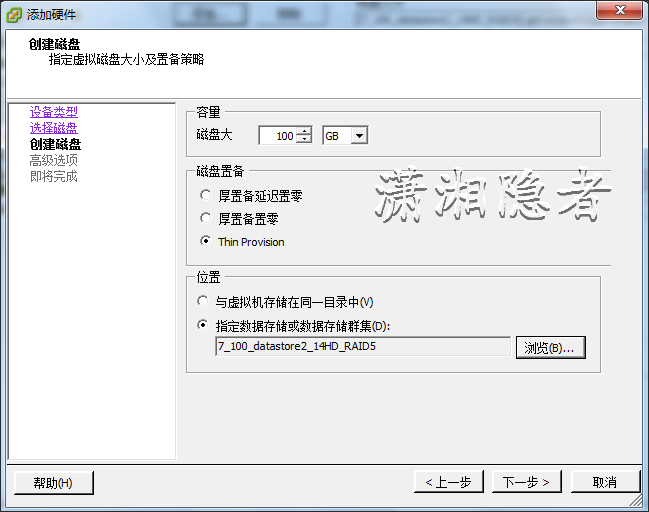
此时需要选择“添加”选项,增加一个磁盘。

如下所示,我们选择“创建新的虚拟磁盘”

容量选择100G, 磁盘置备我们选择“Thin Provison”,表示用多少分配多少,最大分配100G,而不是一开始就分配100G(厚置被延迟置零)


[root@oracle_server ~]# fdisk -l
Disk /dev/sda: 584.6 GB, 584646328320 bytes
255 heads, 63 sectors/track, 71079 cylinders
Units = cylinders of 16065 * 512 = 8225280 bytes
Device Boot Start End Blocks Id System
/dev/sda1 * 1 19441 156151808 83 Linux
Partition 1 does not end on cylinder boundary.
/dev/sda2 19441 44937 204796672 83 Linux
Partition 2 does not end on cylinder boundary.
/dev/sda3 44937 57685 102398336 83 Linux
Partition 3 does not end on cylinder boundary.
/dev/sda4 57685 71080 107595584 5 Extended
Partition 4 does not end on cylinder boundary.
/dev/sda5 57685 70433 102398336 83 Linux
/dev/sda6 70433 70949 4144768 82 Linux swap
/dev/sda7 70949 71080 1052288 83 Linux
Disk /dev/sdb: 146.1 GB, 146156158976 bytes
2 heads, 24 sectors/track, 5947109 cylinders
Units = cylinders of 48 * 512 = 24576 bytes
Device Boot Start End Blocks Id System
/dev/sdb1 3 5947064 142729472 83 Linux
此时使用fdisk -l 依然看不到添加的磁盘,此时可以通过重启或执行下面命令
[root@oracle_server ~]# echo "- - -" > /sys/class/scsi_host/host0/scan
[root@oracle_server ~]# fdisk -l
Disk /dev/sda: 584.6 GB, 584646328320 bytes
255 heads, 63 sectors/track, 71079 cylinders
Units = cylinders of 16065 * 512 = 8225280 bytes
Device Boot Start End Blocks Id System
/dev/sda1 * 1 19441 156151808 83 Linux
Partition 1 does not end on cylinder boundary.
/dev/sda2 19441 44937 204796672 83 Linux
Partition 2 does not end on cylinder boundary.
/dev/sda3 44937 57685 102398336 83 Linux
Partition 3 does not end on cylinder boundary.
/dev/sda4 57685 71080 107595584 5 Extended
Partition 4 does not end on cylinder boundary.
/dev/sda5 57685 70433 102398336 83 Linux
/dev/sda6 70433 70949 4144768 82 Linux swap
/dev/sda7 70949 71080 1052288 83 Linux
Disk /dev/sdb: 146.1 GB, 146156158976 bytes
2 heads, 24 sectors/track, 5947109 cylinders
Units = cylinders of 48 * 512 = 24576 bytes
Device Boot Start End Blocks Id System
/dev/sdb1 3 5947064 142729472 83 Linux
Disk /dev/sdc: 107.3 GB, 107374182400 bytes
255 heads, 63 sectors/track, 13054 cylinders
Units = cylinders of 16065 * 512 = 8225280 bytes
Disk /dev/sdc doesn't contain a valid partition table

[root@oracle_server ~]# fdisk /dev/sdc
Device contains neither a valid DOS partition table, nor Sun, SGI or OSF disklabel
Building a new DOS disklabel. Changes will remain in memory only,
until you decide to write them. After that, of course, the previous
content won't be recoverable.
The number of cylinders for this disk is set to 13054.
There is nothing wrong with that, but this is larger than 1024,
and could in certain setups cause problems with:
1) software that runs at boot time (e.g., old versions of LILO)
2) booting and partitioning software from other OSs
(e.g., DOS FDISK, OS/2 FDISK)
Warning: invalid flag 0x0000 of partition table 4 will be corrected by w(rite)
Command (m for help): m
Command action
a toggle a bootable flag
b edit bsd disklabel
c toggle the dos compatibility flag
d delete a partition
l list known partition types
m print this menu
n add a new partition
o create a new empty DOS partition table
p print the partition table
q quit without saving changes
s create a new empty Sun disklabel
t change a partition's system id
u change display/entry units
v verify the partition table
w write table to disk and exit
x extra functionality (experts only)
Command (m for help): p
Disk /dev/sdc: 107.3 GB, 107374182400 bytes
255 heads, 63 sectors/track, 13054 cylinders
Units = cylinders of 16065 * 512 = 8225280 bytes
Device Boot Start End Blocks Id System
Command (m for help): n
Command action
e extended
p primary partition (1-4)
p
Partition number (1-4): 1
First cylinder (1-13054, default 1):
Using default value 1
Last cylinder or +size or +sizeM or +sizeK (1-13054, default 13054):
Using default value 13054
Command (m for help): w
The partition table has been altered!
Calling ioctl() to re-read partition table.
Syncing disks.
[root@oracle_server u04]# mkfs.ext3 /dev/sdc1
mke2fs 1.35 (28-Feb-2004)
Filesystem label=
OS type: Linux
Block size=4096 (log=2)
Fragment size=4096 (log=2)
13107200 inodes, 26214055 blocks
1310702 blocks (5.00%) reserved for the super user
First data block=0
Maximum filesystem blocks=29360128
800 block groups
32768 blocks per group, 32768 fragments per group
16384 inodes per group
Superblock backups stored on blocks:
32768, 98304, 163840, 229376, 294912, 819200, 884736, 1605632, 2654208,
4096000, 7962624, 11239424, 20480000, 23887872
Writing inode tables: done
Creating journal (8192 blocks): done
Writing superblocks and filesystem accounting information: done
This filesystem will be automatically checked every 32 mounts or
180 days, whichever comes first. Use tune2fs -c or -i to override.
[root@oracle_server ~]$ more /etc/fstab
# This file is edited by fstab-sync - see 'man fstab-sync' for details
LABEL=/1 / ext3 defaults 1 1
none /dev/pts devpts gid=5,mode=620 0 0
none /dev/shm tmpfs defaults 0 0
none /proc proc defaults 0 0
none /sys sysfs defaults 0 0
LABEL=/tmp /tmp ext3 defaults 1 2
LABEL=/u01 /u01 ext3 defaults 1 2
LABEL=/u02 /u02 ext3 defaults 1 2
LABEL=/u03 /u03 ext3 defaults 1 2
LABEL=SWAP-sda6 swap swap defaults 0 0
/dev/sdb1 /u03/flash_recovery_area ext3 defaults 1 2
/dev/hda /media/cdrecorder auto pamconsole,exec,noauto,managed 0 0
/dev/fd0 /media/floppy auto pamconsole,exec,noauto,managed 0 0
vi
[oracle@get-orasvr02 ~]$ vi /etc/fstab
# This file is edited by fstab-sync - see 'man fstab-sync' for details
LABEL=/1 / ext3 defaults 1 1
none /dev/pts devpts gid=5,mode=620 0 0
none /dev/shm tmpfs defaults 0 0
none /proc proc defaults 0 0
none /sys sysfs defaults 0 0
LABEL=/tmp /tmp ext3 defaults 1 2
LABEL=/u01 /u01 ext3 defaults 1 2
LABEL=/u02 /u02 ext3 defaults 1 2
LABEL=/u03 /u03 ext3 defaults 1 2
LABEL=SWAP-sda6 swap swap defaults 0 0
/dev/sdb1 /u03/flash_recovery_area ext3 defaults 1 2
/dev/sdc1 /u04 ext3 defaults 1 2
/dev/hda /media/cdrecorder auto pamconsole,exec,noauto,managed 0 0
/dev/fd0 /media/floppy auto pamconsole,exec,noauto,managed 0 0
[root@oracle_server ~]# mkdir /u04
[root@oracle_server ~]# mount -a
[root@oracle_server ~]$ df -h
Filesystem Size Used Avail Use% Mounted on
/dev/sda1 147G 86G 54G 62% /
/dev/sda7 1012M 34M 927M 4% /tmp
/dev/sda5 97G 73G 19G 80% /u01
/dev/sda3 97G 84G 7.6G 92% /u02
/dev/sda2 193G 133G 51G 73% /u03
/dev/sdb1 134G 74G 54G 59% /u03/flash_recovery_area
/dev/sdc1 99G 93M 94G 1% /u04
Linux 使用fdisk添加新分区的更多相关文章
- 启动VMware环境下的Linux操作系统,添加新分区
启动VMware环境下的Linux操作系统,添加新分区,需要root账号身份. 3.1 [fdisk -l] 最大分区为/dev/sda3,说明新创建的分区将会是sda4 3.2 输入[fdisk / ...
- Ubuntu下添加新分区并设置挂载点
Ubuntu下添加新分区并设置挂载点 最近在做Android项目,可是解压根文件系统以后,就报警说硬盘不够.当初设置使用的大小为15G.不过扩展分区还是很方便的.当然首先你得设置添加使用的硬盘大小 ...
- CentOS添加新硬盘到新的分区(xfs/ext4) 或者添加新分区
CentOs添加新硬盘到新的分区(xfs/ext4) 添加新分区 转载请注明:http://www.cnblogs.com/juandx/p/5618162.html 这篇文章介绍怎么添加一块新的硬 ...
- linux系统下添加新硬盘的方法详解
对于linux新手来说,在linux上添加新硬盘,是很有挑战性的一项工作. 在Linux服务器上把硬盘接好,启动linux,以root登陆. fdisk -l ## 这里是查看目前系统上有几块硬盘 D ...
- Linux 阿里云挂载新分区
阿里云服务器可以自己购买数据盘并挂载使用,虽然官方也提供了挂载的教程,但是还是有些朋友不清楚其中的细节,为此,我在这里来给大家分享一下详细的挂载办法. 工具/原料 已经购买开通阿里云服务器,并且在开通 ...
- 阿里云服务器linux主机如何添加swap分区
为什么要添加Swap分区?swap分区,即交换区,作用为:当系统的物理内存不够用的时候,就需要将物理内存中的一部分空间释放出来,以供当前运行的程序使用.那些被释放的空间可能来自一些很长时间没有什么操作 ...
- Linux 添加新分区和 移动 /home到新挂载分区
https://blog.csdn.net/lyd135364/article/details/78623119 https://www.cnblogs.com/saszhuqing/p/871664 ...
- [Linux]vbox 虚拟机添加新磁盘
情况是这样的,开始创建虚拟机的时候硬盘设置太小了,只有10g,我现在通过vbox的设置给这个linux(centos6.6)虚拟机添加了一块硬盘. 下面的操作就是怎么把硬盘挂载到系统中. 通过 fdi ...
- linux 虚拟机在线添加新磁盘
在线添加磁盘,扩展LVM卷案例 一.添加硬盘,在线扫描出来 首先到虚拟机那里添加一块硬盘,注意必须是SCSI类型的硬盘. 扫描硬盘,不用重启操作系统的. echo "- - -" ...
随机推荐
- C# 在excel表格中检索并导出数据
由于工作需要,我经常使用excel文档来存储和处理各种数据,在生活中偶尔也会使用excel表格来记录各种开销,相信很多朋友也和我一样.Excel的功能很强大,其中一个很实用的数据处理功能就是查找和替换 ...
- 使用Spire.Barcode程序库生成二维码
使用Spire.Barcode程序库生成二维码 某天浏览网页发现了一个二维码的程序库.它的描述说他可以扫描二维码图像.我很感兴趣,想试试他是不是会有用.所以我就用了些方法扫描二维码图像来测试一下.结果 ...
- IE 11 如何设置“用户代理字符串”
"用户代理字符串"这个术语在IE11 之前被叫作“浏览器模式”(Browser Mode),在IE11下面这个特殊的选项被放在F12的“仿真”选项下面了. Figure 1通过按下 ...
- C#常用的IO操作方法
public class IoHelper { /// <summary> /// 判断文件是否存在 /// </summary> /// <param name=&qu ...
- Node.js连接Mysql,并把连接集成进Express中间件中
引言 在node.js连接mysql的过程,我们通常有两种连接方法,普通连接和连接池. 这两种方法较为常见,当我们使用express框架时还会选择使用中间express-myconnection,可以 ...
- Android应用底部导航栏(选项卡)实例
现在很多android的应用都采用底部导航栏的功能,这样可以使得用户在使用过程中随意切换不同的页面,现在我采用TabHost组件来自定义一个底部的导航栏的功能. 我们先看下该demo实例的框架图: 其 ...
- CSS 巧用 :before和:after
前几天的晚上较全面的去看了下css的一些文档和资料,大部分的样式运用都没什么大问题了,只是有些许较陌生,但是也知道他们的存在和实现的是什么样式.今天主要想在这篇学习笔记中写的也不多,主要是针对:bef ...
- 自定义UIButton
偶尔逛简书能看见很多值得记下来的东西,有的接触过有的没接触过,接触过的也可能过段时间就忘记了,再上手的时候可能手足无措,所以决定有些觉得值得记下来的东西还是记录一下.博客是个好地方,因为很多人都能搜索 ...
- 关于实现手机端自动获取天气的demo
博主大二做的一个项目,当时很傻很天真,但是还是贴出来,希望能给大家一点帮助.欢迎转载哦!我的博客园地址:http://www.cnblogs.com/natureless/ 首先分析需求,移动端实现天 ...
- python征程1.3(初识python)
1.字典. 字典是python中的映射的数据类型,由键值对构成,几乎所有类型的python对象都可以用作键,不过一般还是以数字或是字符串最为常见.值可以是任意类型的python对象,字典元素用{}来包 ...