
文本编辑器 - Sublime Text 3 换行无法自动缩进的解决方法
一、换行无法自动缩进的问题,如图:
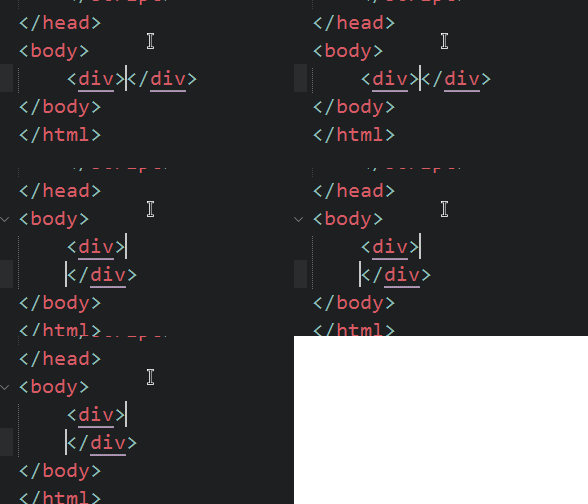
稍微查了一下网上的办法,是把汉化文件删除,但是会造成菜单栏混乱,简直无法忍受。。。
那么这里介绍的是另一种解决办法。在用户的热键配置文件(preferences-key binding-user)中加入以下代码:
    { "keys": ["enter"], "command": "auto_indent_tag", "context":

        [

            { "key": "setting.auto_indent", "operator": "equal", "operand": true },

            { "key": "selection_empty", "operator": "equal", "operand": true, "match_all": true },

            { "key": "selector", "operator": "equal", "operand": "punctuation.definition.tag.begin", "match_all": true },

            { "key": "preceding_text", "operator": "regex_contains", "operand": ">$", "match_all": true },

            { "key": "following_text", "operator": "regex_contains", "operand": "^</", "match_all": true },

        ]

    }
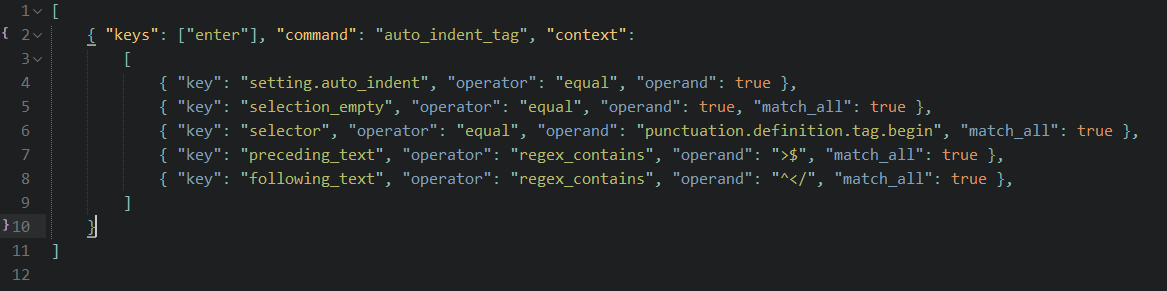
保存配置文件之后,换行就能够正常缩进了,如图:
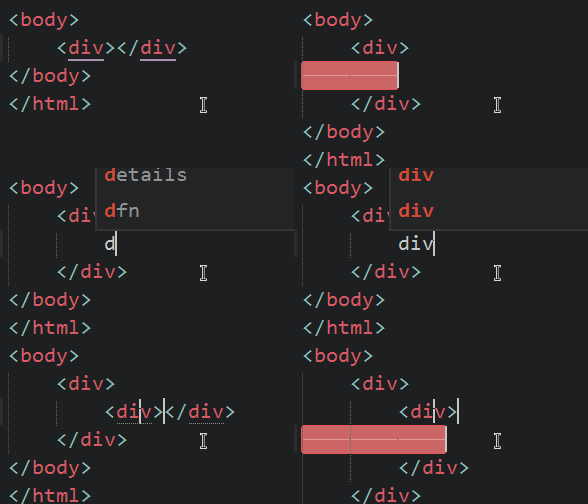
二、顺便把tab键的缩进也处理一下,按一次tab缩进足够的距离
处理之前,需要这样按tab。。。如图:
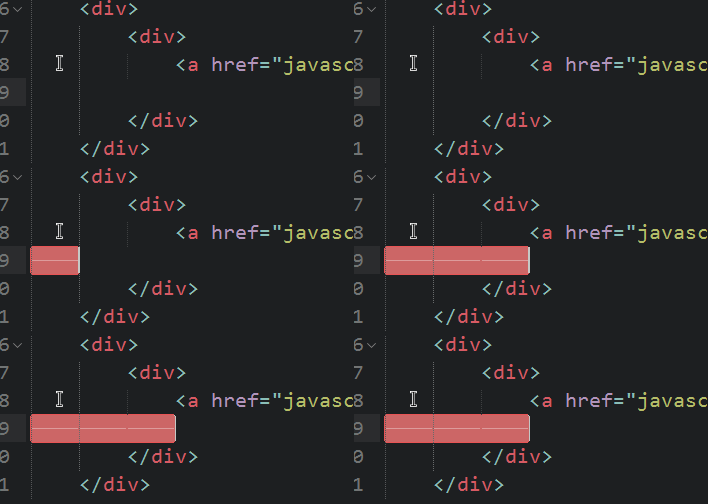
处理之后,tab一次到位,如图:

和上面的一样,在用户的热键配置文件(preferences-key binding-user)中加入以下代码:
    // Press the tab indent a sufficient distance

    { "keys": ["tab"], "command": "reindent", "context":

        [

            { "key": "setting.auto_indent", "operator": "equal", "operand": true },

            { "key": "selection_empty", "operator": "equal", "operand": true, "match_all": true },

            { "key": "preceding_text", "operator": "regex_match", "operand": "^$", "match_all": true },

            { "key": "following_text", "operator": "regex_match", "operand": "^$", "match_all": true }

        ]

    }
Tips:小白注意看我的图,在之前的代码后面加个逗号

说白了其实就是热键冲突的问题。。。END
文本编辑器 - Sublime Text 3 换行无法自动缩进的解决方法的更多相关文章
- 【开发工具】- 推荐一款好用的文本编辑器[Sublime Text]
作为一个程序员除了IDE外,文本编辑器也是必不可少的一个开发工具.之前一直在用的是NotePad++.EditPlus,这两款编辑器,但是总感觉差点什么,昨天在知乎上看到有人推荐Sublime Tex ...
- [SublimeText] Sublime Text 2 运行 Python 脚本中文路径解决方法
在 SublimeText 中直接运行 Python 脚本,出现以下报错提示: Running python -u C:\Documents and Settings\Administrator\桌面 ...
- 2016/4/26 sublime text 2 版本 遇到的问题及解决方法
1.汉化:下载汉化包 .打开程序Preference下的浏览包文件夹.将解压的程序包粘贴进包文件夹2.破解:标题栏上面有带(unregistered)表示还没有注册: 打开HELP→Enter lic ...
- 比NotePad++更好的文本代码(C#)编辑器Sublime Text
原文:比NotePad++更好的文本代码(C#)编辑器Sublime Text 前言 前两天在博客园看到@晴天猪的博客发表的关于他使用的代码编辑器,自己索性试了一下,果断好用,自己也来记录一下.以便以 ...
- sublime text 3 无法安装Package Control插件解决办法
sublime text 3 无法安装Package Control插件解决办法 ***关于sublime text 3 常用的 Package Control插件的安装方法*** 1.CTRL+` ...
- secureCRT自动断开的解决方法
转: secureCRT自动断开的解决方法 secureCRT自动断开的解决方法 在secureCRT上登录时,一段时间不用的话会自动断开,必须重新连接,有点麻烦. 有时候服务器端的 /etc/pro ...
- windows 10 删除库后自动恢复的解决方法
目录 什么是windows 库? 手动删除不行吗? 如何正确的"删除"? title: windows 10 删除库后自动恢复的解决方法 date: 2019-06-09 15:4 ...
- /etc/resolv.conf文件自动恢复的解决方法
/etc/resolv.conf文件自动恢复的解决方法: service NetworkManager stop #后台进程关闭 chkconfig NetworkManager off #配置关闭, ...
- SSH连接自动断开的解决方法(deb/rpm)
######### 修改后的: ## # tail -f -n 20 sshd_config#MaxStartups 10:30:60#Banner /etc/issue.net # Allow cl ...
随机推荐
- html,将元素水平,垂直居中的四种方式
将元素垂直,水平居中分两种情况:一个是元素尺寸固定,二是元素尺寸不固定 一.尺寸固定 方法1:定位 ,50%,margin负距 .box{ width: 400px; height: 300px; b ...
- java中的锁——列队同步器
队列同步器 队列同步器(AbstractQueuedSynchronizer)为实现依赖于先进先出 (FIFO) 等待队列的阻塞锁和相关同步器(信号量.事件,等等)提供一个框架.此类的设计目标是成为依 ...
- LeetCode Day 6
LeetCode0006 将一个给定字符串根据给定的行数,以从上往下.从左到右进行 Z 字形排列. 比如输入字符串为 "LEETCODEISHIRING" ,指定行数为 3 时,排 ...
- OpenCV 图像平滑处理
#include "opencv2/imgproc/imgproc.hpp" #include "opencv2/highgui/highgui.hpp" us ...
- fare|gave it away|catch a glimpse |involve|rip|eternalstiff|
N-COUNT 旅费;路费;车费A fare is the money that you pay for a journey that you make, for example, in a bus, ...
- 吴裕雄--天生自然HTML学习笔记:HTML 表格
<!DOCTYPE html> <html> <head> <meta charset="utf-8"> <title> ...
- haproxy笔记之六:负载均衡MySQL服务的配置示例
#--------------------------------------------------------------------- # Global settings #---------- ...
- html中的select下拉框
<select name="effective"> <option value="">请选择</option> <op ...
- iPhone 8价格狂跌:是国产手机的胜利,还是苹果的黄昏
8价格狂跌:是国产手机的胜利,还是苹果的黄昏" title="iPhone 8价格狂跌:是国产手机的胜利,还是苹果的黄昏"> 其实呢,这年头发布新款智能 ...
- Mac下好玩的终端命令
figlet brew install figlet cowsay brew install cowsaycowsay -l: 查看所有可用动物cowsay -f daemon hello world ...