
iOS dismissViewControllerAnimated:completion:使用方法
我们都知道dismissViewControllerAnimated:completion:方法是针对被present出来的控制器的,一般我们这样使用:在一个控制器中present另外一个控制器A,然后在A中执行dismissViewControllerAnimated:completion:让自己消失。
在ViewController中:
AViewController *av = [[AViewController alloc]init];

UINavigationController *nav = [[UINavigationController alloc]initWithRootViewController:av];

[self presentViewController:nav animated:YES completion:nil];
在AViewController中执行disimiss:
[self dismissViewControllerAnimated:YES completion:nil];
对于这种很常见的场景,这种用法完全没问题。但是对于复杂一点的场景,这种用法就有点苍白无力了,先举个稍微复杂一点点的例子:ViewController present AViewController,AViewController present BViewController,在BViewController执行完某事件之后需要返回ViewController。这个时候需要怎样做呢?如果在BViewController直接执行[self dismissViewControllerAnimated:YES completion:nil];的话,它只会将BViewController消失。
这里你可能会想到通过其他方式拿到AViewController,然后调用AViewController的[self dismissViewControllerAnimated:YES completion:nil];。但是,场景再复杂一点,在执行完各种present和push之后,到达了XViewController,在XViewController中执行成功任务之后需要回到ViewController,这个时候怎么办呢?我们知道当前如果有被present出来的控制器的情况下,调用UINavigationController的popToRootViewControllerAnimated:是不起作用的。那么我们如何把这个流程中所有被present和push的控制器给销毁呢?笨一点的办法是回溯整个流程,判断哪些控制器需要dismiss,哪些控制器需要pop。但这种方式显然有点低效和难以控制,下面我们来看看到底该怎么使用dismissViewControllerAnimated:completion:。
我们先看看官方文档到底怎么讲的:
Dismisses the view controller that was presented modally by the view controller.
The presenting view controller is responsible for dismissing the view controller it presented. If you call this method on the presented view controller itself, UIKit asks the presenting view controller to handle the dismissal.
If you present several view controllers in succession, thus building a stack of presented view controllers, calling this method on a view controller lower in the stack dismisses its immediate child view controller and all view controllers above that child on the stack. When this happens, only the top-most view is dismissed in an animated fashion; any intermediate view controllers are simply removed from the stack. The top-most view is dismissed using its modal transition style, which may differ from the styles used by other view controllers lower in the stack.
可以简单归纳为两点:
第一点:谁present出来的控制器,谁负责把它dismiss掉,但是如果你在被present出来的控制器中调用dismiss的话,UIKit会自动让它的presenting控制器(找到谁把它present出来的)去执行dismiss。
第二点:如果你present了一系列的控制器,那么系统会把被present出来的控制器放在一个栈中,当处在底层的控制器执行dismiss的时候,在它之后被present出来的控制器都会被移除,只有栈顶上的控制器会有dismiss动画。
另外补充相关的两点:
第一点:当被present出来的控制器的modalPresentationStyle = UIModalPresentationFullScreen时,执行当前present事件的控制器必须是一个全屏控制器,如果当前执行的控制器不是一个全屏的控制器,它将在视图层级结构中找到一个全屏的父类控制器去执行present事件。也就是说如果A 执行present B,那么B.presentingViewController不一定是A。比如你当前的控制器A在导航nav中,A present B之后,实际上B.presentingViewController指向的是nav而不是A。
第二点:self.presentingViewController,它指向的是把当前控制器present出来的控制器或者是把当前控制器的最上层的父类present出来的控制器。
通过上面的文档介绍,我们可以看到在本文刚开始介绍的最简单的使用场景下(ViewController present AViewController),在AViewController中执行[self dismissViewControllerAnimated:YES completion:nil]和在ViewController中执行[self dismissViewControllerAnimated:YES completion:nil]效果是一样的,这一点是因为系统帮我们处理好了(因为系统判判AViewController当前没有present出来任何控制器,所以系统会找到它的presentingViewController,也就是ViewController来执行dismiss事件)。在复杂一点的情况下,比如我们要dismiss掉当前被present出来的控制器的话,我们就需要想办法拿到处在栈底的那个控制器,在这个控制器中执行[self dismissViewControllerAnimated:YES completion:nil]才行。
那么很显然,执行[self dismissViewControllerAnimated:YES completion:nil]的流程是这样子的:
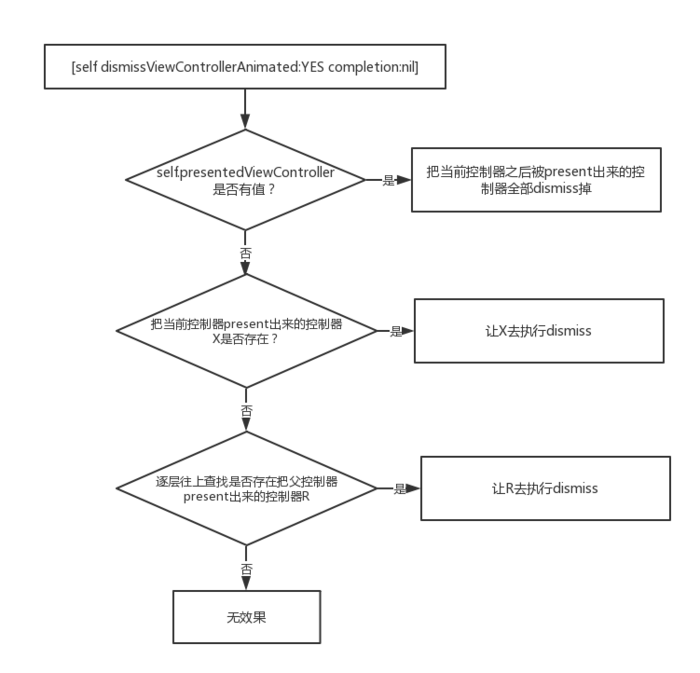
在我们上面讲的复杂场景下,我们怎么一次性把当前present出来的控制都dismiss掉呢?可以通过下面的方式来查找到最顶层的presentingViewController(其实,通常是我们window的rootViewController)让它来执行dismiss就好了,剩下的工作可能就是处理一下导航中的控制器了。
比如我们在经过各种present和push之后才到达的XViewController页面中执行如下代码:
UIViewController *presentingVc = self.presentingViewController;

while (presentingVc.presentingViewController) {

    presentingVc = vc.presentingViewController;

}

if(presentingVc){

    [presentingVc dismissViewControllerAnimated:YES completion:nil];

}
iOS dismissViewControllerAnimated:completion:使用方法的更多相关文章
- iOS UISearchController 的使用方法
iOS UISearchController 的使用方法 UISearchController 让用户在 UISearchBar 上输入搜索关键词,展示搜索结果或者进行其他操作.UISearchCon ...
- UIView封装动画--iOS利用系统提供方法来做转场动画
UIView封装动画--iOS利用系统提供方法来做转场动画 UIViewAnimationOptions option; if (isNext) { option=UIViewAnimationOpt ...
- UIView封装动画--iOS利用系统提供方法来做关键帧动画
iOS利用系统提供方法来做关键帧动画 ios7以后才有用. /*关键帧动画 options:UIViewKeyframeAnimationOptions类型 */ [UIView animateKey ...
- UIView封装动画--iOS 利用系统提供方法来做弹性运动
iOS 利用系统提供方法来做弹性运动 /*创建弹性动画 damping:阻尼,范围0-1,阻尼越接近于0,弹性效果越明显 velocity:弹性复位的速度 */ [UIView animateWith ...
- iOS-提高iOS开发效率的方法和工具
提高iOS开发效率的方法和工具 介绍 这篇文章主要是介绍一下我在iOS开发中使用到的一些可以提升开发效率的方法和工具. IDE 首先要说的肯定是IDE了,说到IDE,Xcode不能跑,当然你也可能同时 ...
- iOS中的过期方法和新的替代方法
关于iOS中的过期方法和新的替代方法 1.获取某些类的UINavigationBar的统一外观并设置UINavigationbar的背景 注:方法名改了但是基本使用方法不变 + (instancety ...
- opencv直线检测在c#、Android和ios下的实现方法
opencv直线检测在c#.Android和ios下的实现方法 本文为作者原创,未经允许,不得转载 :原文由作者发表在博客园:http://www.cnblogs.com/panxiaochun/p/ ...
- iOS开发——实用篇&提高iOS开发效率的方法和工具
提高iOS开发效率的方法和工具 介绍 这篇文章主要是介绍一下我在iOS开发中使用到的一些可以提升开发效率的方法和工具. IDE 首先要说的肯定是IDE了,说到IDE,Xcode不能跑,当然你也可能同时 ...
- iOS与HTML5交互方法总结(转)
今天小编在找技术文章的时候,发现这样一个标题:iOS与HTML5交互方法总结,怎么看着这么熟悉呢? 还以为是刚哥用了别的文章,点进去一看,原来是刚哥自己写的文章,他们转载的,而且还上了Dev St ...
随机推荐
- redhat 7.6 iptables 配置
1.查看iptables默认表(filter) iptables -L -n 2.iptables 默认内链(filter)表三种: INPUT:处理进入防火墙的数据包 FORWARD:源自其他计算机 ...
- boot集成mybatis分页插件pagehelper
导入依赖 <!-- https://mvnrepository.com/artifact/com.github.pagehelper/pagehelper-spring-boot-starter ...
- 栈结构Stack
package seday12; import java.util.Deque; import java.util.LinkedList; /** * @author xingsir * 栈结构. 栈 ...
- JAVA性能优化工具小记
好记性不如烂笔头,戊戌年的最后一个工作日,把自己平时在开发过程中使用的一些java性能优化工具做一个简单的小结, 主要包括 jvisualvm.jfr.gdb和查看内存对象信息的几个linux命令. ...
- Python 文件和目录操作学习
文件与文件路径 文件有两个关键属性:文件名和路径. 路径指明了文件在计算机上的位置. 文件名中,最后一个句点之后的部分称为文件的"扩展名",它指出了文件的类型 目录也叫文件夹,文件 ...
- python爬虫(四) 内涵段子
import requests import time import json from urllib import request from urllib import parse url = 'h ...
- DuiLib中FlashDemo的例子经验杂粹1
转载:https://www.jianshu.com/p/3e958ae9e5ab 最近用duilib做个东西,经常卡壳 ,而且以前学的现在又忘.现在觉得应该好好做笔记,以前老是觉得博客是很郑重的东西 ...
- 「AHOI2008」紧急集合/聚会
题目描述 这次也是很长的题面啊\(qwq\) 题目大意如下: 给定一棵\(N\)个节点的树以及\(M\)次询问,每次询问给出\(x,\ y,\ z\)三个节点,程序需要在树上找一个点\(p\) 使得\ ...
- Python 之并发编程之进程中(守护进程(daemon)、锁(Lock)、Semaphore(信号量))
五:守护进程 正常情况下,主进程默认等待子进程调用结束之后再结束守护进程在主进程所有代码执行完毕之后,自动终止kill -9 进程号 杀死进程.守护进程的语法:进程对象.daemon = True设置 ...
- node指针