
win10 UWP 蜘蛛网效果
我看见了知乎首页登录背景和普通的地球人写的博客,发现了个好看的效果。
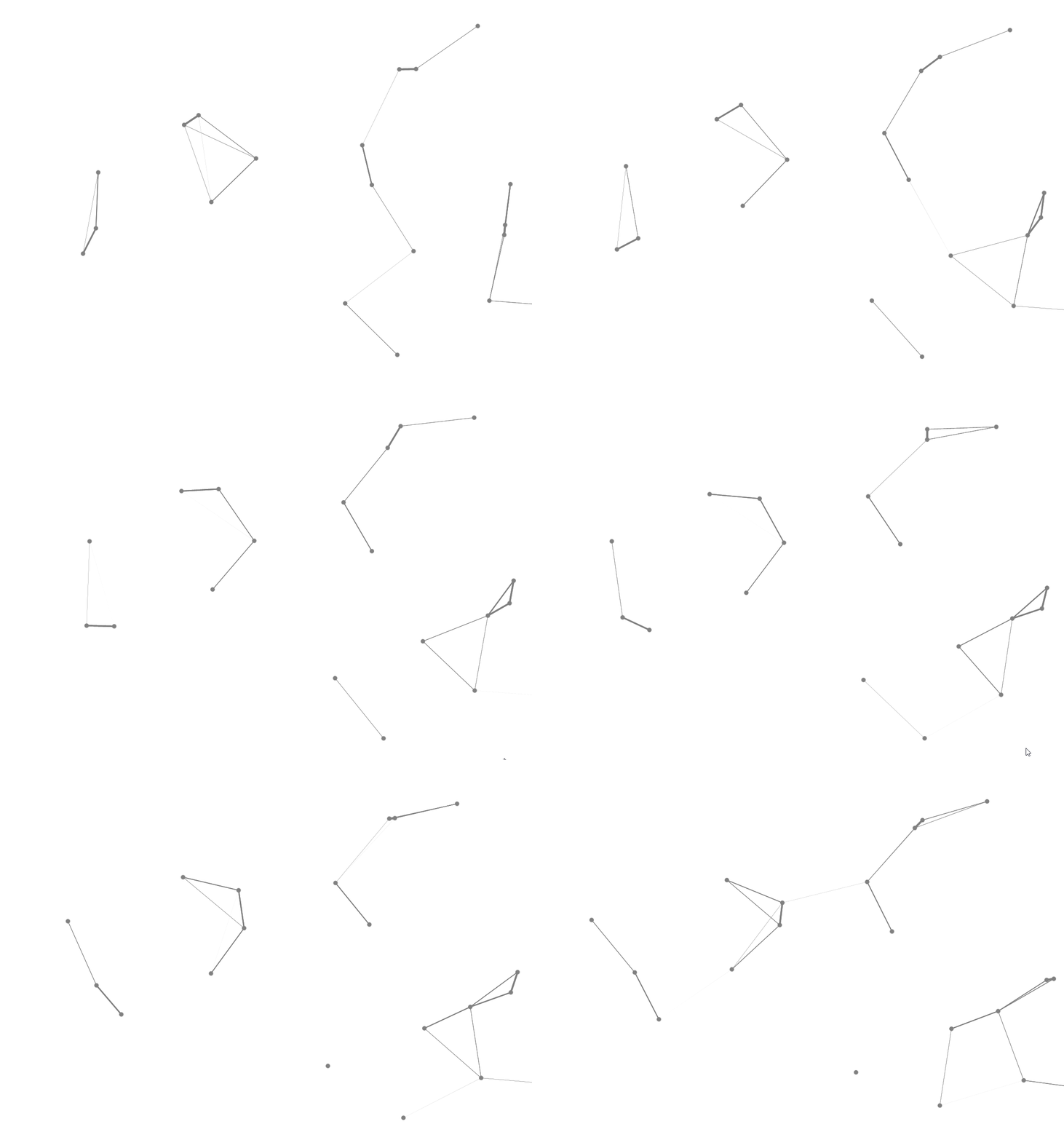
那么我来告诉大家如何做这个效果。
第一步是在 Canvas 画点,第二步是让点移动,第三步是画线
在 Canvas 画一个点
我们画点可以使用 Ellipse 我们给他宽和高,Fill,就可以画出来。需要加在 Canvas ,可以使用canvas.Children.Add(ellipse)
Canvas 一开始的大小是 0 ,需要一开始给他一个足够大的值
<Canvas x:Name="P" Width="1000" Height="1000"/>
于是给他一个比较大的值,超过外面的Grid就不显示。
添加 一个 Ellipse 就会显示,可以没有指定在哪显示,也就是显示的 X 和 Y。
指定添加到 Canvas 的 Element 的位置
我们可以通过几个方法改变控件的位置,在我之前写的拖动控件博客有说到。
现在使用 Canvas,可以使用 Canvas 有的一个方法。
假如有一个 X 和 Y 要设置在控件,那么可以使用
                Canvas.SetLeft(control, X);

                Canvas.SetTop(control, Y);
注意,Canvas 是类。
这个方法可以移动控件。
我就是用他移动点。
随机移动点
我首先写一个类,Staf。包含显示的 Point 和他的 X,Y,两个方向移动速度。还有移动多久,超过了可以移动的时间,就随机给新移动速度。
    public class Staf

    {

        public UIElement Point { set; get; }

        public double X { set; get; }

        public double Y { set; get; }

        public double Vx { set; get; }

        public double Vy { set; get; }

        public void RandomStaf(Random ran)

        {

            var staf = this;

            _ran = ran;

            staf.Vx = (double)ran.Next(-1000, 1000) / 1000;

            staf.Vy = (double)ran.Next(-1000, 1000) / 1000;

            staf.Time = ran.Next(100);

        }

        private Random _ran;

        public int Time

        {

            set

            {

                _time = value;

                if (value == 0)

                {

                    RandomStaf(_ran);

                }

            }

            get

            {

                return _time;

            }

        }

        private int _time;

    }
画线
使用两重 foreach ,得到两个点之间距离,如果距离小于我给的一个值,那么就是可以连线
那么距离长的就把连线的宽度变短。
这个做法很简单,可以使用 StrokeThickness 设置线宽度。
line.StrokeThickness=最大宽度 * (最大距离-距离)/最大距离线需要多少个点可以确定?这个我就不说啦,确定了两个点是可以连线,于是使用就可以设置线的点。需要知道,点的X和Y是左上角,需要加上画的图形的值才是连在点,不然看起来不是连在点。
自动移动
可以使用 DispatcherTimer ,过 0.1 s就移动点和画线。
        public MainPage()

        {

            this.InitializeComponent();

            _time = new DispatcherTimer();

            _time.Interval = TimeSpan.FromTicks(500);

            _time.Tick += Time_Tick;

            _time.Start();

        }

private DispatcherTimer _time
Time_Tick就写移动点和线的代码
全部代码
<Page

    x:Class="Bsgame.MainPage"

    xmlns="http://schemas.microsoft.com/winfx/2006/xaml/presentation"

    xmlns:x="http://schemas.microsoft.com/winfx/2006/xaml"

    xmlns:local="using:Bsgame"

    xmlns:d="http://schemas.microsoft.com/expression/blend/2008"

    xmlns:mc="http://schemas.openxmlformats.org/markup-compatibility/2006"

    mc:Ignorable="d">

    <Grid Background="{ThemeResource ApplicationPageBackgroundThemeBrush}">

        <Canvas x:Name="P" Width="1000" Height="1000">

        </Canvas>

        <Canvas x:Name="Pw" Width="1000" Height="1000"></Canvas>

    </Grid>

</Page>

using System;

using System.Collections.Generic;

using System.IO;

using System.Linq;

using System.Runtime.InteropServices.WindowsRuntime;

using Windows.Foundation;

using Windows.Foundation.Collections;

using Windows.UI;

using Windows.UI.Xaml;

using Windows.UI.Xaml.Controls;

using Windows.UI.Xaml.Controls.Primitives;

using Windows.UI.Xaml.Data;

using Windows.UI.Xaml.Input;

using Windows.UI.Xaml.Media;

using Windows.UI.Xaml.Media.Animation;

using Windows.UI.Xaml.Navigation;

using Windows.UI.Xaml.Shapes;

namespace Bsgame

{

    /// <summary>

    /// 可用于自身或导航至 Frame 内部的空白页。

    /// </summary>

    public sealed partial class MainPage : Page

    {

        public MainPage()

        {

            this.InitializeComponent();

            _time = new DispatcherTimer();

            _time.Interval = TimeSpan.FromTicks(500);

            _time.Tick += Time_Tick;

            RandomStaf();

            _time.Start();

            _width = Window.Current.Bounds.Width;

            _height = Window.Current.Bounds.Height;//lindexi

        }

        private void RandomStaf()

        {

            const int count = 20;

            for (int i = 0; i < count; i++)

            {

                Staf staf = new Staf();

                staf.X = ran.Next((int)_width);

                staf.Y = ran.Next((int)_height);

                staf.Point = new Ellipse()

                {

                    Height = 10,

                    Width = 10,

                    Fill = new SolidColorBrush(Colors.Gray),

                };

                staf.RandomStaf(ran);

                // CSDN

                _staf.Add(staf);

            }

            foreach (var temp in _staf)

            {

                P.Children.Add(temp.Point);

                //lindexi

            }

        }

        private List<Staf> _staf = new List<Staf>();

        private double _width;

        private double _height;

        private void Time_Tick(object sender, object e)

        {

            foreach (var temp in _staf)

            {

                if (temp.X > _width || temp.Y > _height

                    || temp.X < 0 || temp.Y < 0)

                {

                    temp.X = ran.Next((int)_width);

                    temp.Y = ran.Next((int)_height);

                }//lindexi.oschina.io

                temp.X -= temp.Vx;

                temp.Y -= temp.Vy;

                Canvas.SetLeft(temp.Point, temp.X);

                Canvas.SetTop(temp.Point, temp.Y);

                temp.Time--;

            }

            const double distan = 200;

            Pw.Children.Clear();

            Line line = new Line();

            foreach (var temp in _staf)

            {

                foreach (var p in _staf)

                {

                    line.X1 = temp.X + 5;

                    line.Y1 = temp.Y + 5;

                    line.X2 = p.X + 5;

                    line.Y2 = p.Y + 5;

                    double sqrt = Math.Sqrt(Math.Pow((line.X1 - line.X2), 2) +

                      Math.Pow((line.Y1 - line.Y2), 2));

                    if (sqrt < distan)

                    {

                        line.Stroke = new SolidColorBrush(Colors.Gray);

                        line.StrokeThickness = 5* (distan- sqrt) /distan;

                        Pw.Children.Add(line);

                        line = new Line();

                    }

                }

            }

        }

        private Random ran = new Random();

        private DispatcherTimer _time;

    }

    public class Staf

    {

        public UIElement Point { set; get; }

        public double X { set; get; }

        public double Y { set; get; }

        public double Vx { set; get; }

        public double Vy { set; get; }

        public void RandomStaf(Random ran)

        {

            var staf = this;

            _ran = ran;

            staf.Vx = (double)ran.Next(-1000, 1000) / 1000;

            staf.Vy = (double)ran.Next(-1000, 1000) / 1000;

            staf.Time = ran.Next(100);

        }

        private Random _ran;

        public int Time

        {

            set

            {

                _time = value;

                if (value == 0)

                {

                    RandomStaf(_ran);

                }

            }

            get

            {

                return _time;

            }

        }

        private int _time;

    }

}
可以看到性能很差,于是把连线去掉,显示点不显示连接
        private void RandomStaf(object sender, object e)

        {

            Storyboard board = new Storyboard();

            board.Duration = new Duration(TimeSpan.FromSeconds(1));

            board.Completed += RandomStaf;

            DoubleAnimationUsingKeyFrames animation;

            foreach (var temp in _staf)

            {

                double f = temp.X;

                temp.X += temp.Vx * 10;

                if (temp.X > _width - 100)

                {

                    temp.X = _width - 100;

                }

                else if (temp.X < 0)

                {

                    temp.X = 0;

                }

                animation = EllPoile(f, temp.X);

                Storyboard.SetTarget(animation, temp.Point);

                Storyboard.SetTargetProperty(animation, "(Canvas.Left)");

                board.Children.Add(animation);

                f = temp.Y;

                temp.Y += temp.Vy * 10;

                if (temp.Y > _height - 100)

                {

                    temp.Y = _height - 100;

                }

                else if (temp.Y < 0)

                {

                    temp.Y = 0;

                }

                animation = EllPoile(f, temp.Y);

                Storyboard.SetTarget(animation, temp.Point);

                Storyboard.SetTargetProperty(animation, "(Canvas.Top)");

                if (temp.X >= _width - 100 || temp.Y >= _height - 100

                      || temp.X <= 0 || temp.Y <= 0)

                {

                    temp.X = ran.Next((int)_width);

                    temp.Y = ran.Next((int)_height);

                }

                board.Children.Add(animation);

                temp.Time -= 10;

                animation = EllPoile(10, 15);

                Storyboard.SetTarget(animation, temp.Point);

                Storyboard.SetTargetProperty(animation, "Height");

                board.Children.Add(animation);

                animation = EllPoile(10, 15);

                Storyboard.SetTarget(animation, temp.Point);

                Storyboard.SetTargetProperty(animation, "Width");

                board.Children.Add(animation);

                animation = new DoubleAnimationUsingKeyFrames();

                EasingDoubleKeyFrame frame = new EasingDoubleKeyFrame();

                frame.KeyTime = KeyTime.FromTimeSpan(TimeSpan.FromSeconds(0));

                frame.Value = 0;

                animation.KeyFrames.Add(frame);

                frame = new EasingDoubleKeyFrame();

                frame.KeyTime = KeyTime.FromTimeSpan(TimeSpan.FromSeconds(0.5));

                frame.Value = 180;

                animation.KeyFrames.Add(frame);

                frame = new EasingDoubleKeyFrame();

                frame.KeyTime = KeyTime.FromTimeSpan(TimeSpan.FromSeconds(1));

                frame.Value = 0;

                animation.KeyFrames.Add(frame);

                Storyboard.SetTarget(animation, temp.Point.RenderTransform);

                Storyboard.SetTargetProperty(animation, "(CompositeTransform.Rotation)");

                board.Children.Add(animation);

            }

            board.Begin();

        }

本作品采用知识共享署名-非商业性使用-相同方式共享 4.0 国际许可协议进行许可。欢迎转载、使用、重新发布,但务必保留文章署名林德熙(包含链接:http://blog.csdn.net/lindexi_gd ),不得用于商业目的,基于本文修改后的作品务必以相同的许可发布。如有任何疑问,请与我联系。
win10 UWP 蜘蛛网效果的更多相关文章
- win10 uwp 萤火虫效果
原文:win10 uwp 萤火虫效果 本文在Nukepayload2指导下,使用他的思想用C#写出来. 本文告诉大家,如何使用 win2d 做出萤火虫效果. 安装 win2d 安装win2d的方法请使 ...
- win10 uwp 视差效果
本文翻译:http://jamescroft.co.uk/blog/uwp/playing-with-scrolling-parallax-effects-on-ui-elements-in-wind ...
- win10 uwp win2d CanvasVirtualControl 与 CanvasAnimatedControl
本文来告诉大家 CanvasVirtualControl ,在什么时候使用这个控件. 在之前的入门教程win10 uwp win2d 入门 看这一篇就够了我直接用的是CanvasControl,实际上 ...
- Win10 UWP开发系列:使用VS2015 Update2+ionic开发第一个Cordova App
安装VS2015 Update2的过程是非常曲折的.还好经过不懈的努力,终于折腾成功了. 如果开发Cordova项目的话,推荐大家用一下ionic这个框架,效果还不错.对于Cordova.PhoneG ...
- Win10 UWP开发系列:实现Master/Detail布局
在开发XX新闻的过程中,UI部分使用了Master/Detail(大纲/细节)布局样式.Win10系统中的邮件App就是这种样式,左侧一个列表,右侧是详情页面.关于这种 样式的说明可参看MSDN文档: ...
- 【Win10 UWP】后台任务与动态磁贴
动态磁贴(Live Tile)是WP系统的大亮点之一,一直以来受到广大用户的喜爱.这一讲主要研究如何在UWP应用里通过后台任务添加和使用动态磁贴功能. 从WP7到Win8,再到Win10 UWP,磁贴 ...
- win10 uwp 列表模板选择器
本文主要讲ListView等列表可以根据内容不同,使用不同模板的列表模板选择器,DataTemplateSelector. 如果在 UWP 需要定义某些列的显示和其他列不同,或者某些行的显示和其他行不 ...
- win10 uwp 毛玻璃
毛玻璃在UWP很简单,不会和WPF那样伤性能. 本文告诉大家,如何在 UWP 使用 win2d 做毛玻璃. 毛玻璃可以使用 win2D 方法,也可以使用 Compositor . 使用 win2d 得 ...
- win10 uwp 渲染原理 DirectComposition 渲染
本文来告诉大家一个新的技术DirectComposition,在 win7 之后(实际上是 vista),微软正在考虑一个新的渲染机制 在 Windows Vista 就引入了一个服务,桌面窗口管理器 ...
随机推荐
- One.1
Github地址:https://github.com/zyp031502148/zyp1 解题思路: 看到数独这个题目的时候,我就想到了平时自己玩数独之后一开始怎么做的,可是发现那样的话需要先出一个 ...
- 201521123079《java程序设计》第3周学习总结
1. 本周学习总结 2. 书面作业 1.代码阅读 public class Test1 { private int i = 1;//这行不能修改 private static int j = 2; p ...
- 201521145048《Java程序设计》第13周学习总结
1. 本周学习总结 以你喜欢的方式(思维导图.OneNote或其他)归纳总结多网络相关内容. 2. 书面作业 Q1. 网络基础 1.1 比较ping www.baidu.com与ping cec.jm ...
- 201521123008 《Java程序设计》第十四周学习总结
1. 本周学习总结 2. 书面作业 1. MySQL数据库基本操作 建立数据库,将自己的姓名.学号作为一条记录插入.(截图,需出现自己的学号.姓名) 在自己建立的数据库上执行常见SQL语句(截图) - ...
- Junit4学习(三)Junit运行流程
一,验证Junit测试方法的流程 1,在test/com.duo.util右键,新建测试类 2,生成后的代码: package com.duo.util; import static org.juni ...
- Java SpringMVC小白的成长(一)
如果你是一个小白,请跟着我走,我会让你少走弯路,如果你是大牛,那么多谢大牛可以给我提提建议. 说实话,来公司这么久,一直在做的是维护与修改bug.(我的语言是php,来公司才开始接触java). 要毕 ...
- 对IO流的操作(文件大小,拷贝,移动,删除)
import java.io.File;import java.io.FileInputStream;import java.io.FileOutputStream;import java.io.Fi ...
- CSDN博客新手使用方案
CSDN博客简易使用 在CSDN上写博客,总是遇到很多问题,虽然这些问题很简单,但是对于新手来说,缺经常遇到,因此写篇博客记载. 一.CSDN的博客如何上传图片 如果有现成 ...
- 集成Mybatis
本文根据个人喜好记录"腾讯课堂"的<Java项目之Maven+SpringMVC+Spring+Mybatis+MySql消费查询系统>视频教程关键步骤信息,视频地址: ...
- Check for Palindromes-FCC
問題: 检查回文字符串 如果给定的字符串是回文,返回true,反之,返回false. 如果一个字符串忽略标点符号.大小写和空格,正着读和反着读一模一样,那么这个字符串就是palindrome(回文). ...