
GooglePlay - 排行榜及支付接入
Google Play应用商店在国外Android市场中地位基本与AppStore在IOS中的地位一致,为此考虑国外的应用时,Android首要考虑的是接入GooglePlay的排行榜等支持。
同样的由于Google未进入大陆市场,在大陆还是需要VPN才可以访问这些服务。
官方文档: https://developers.google.com/games/services/android/quickstart
1、设置 AndroidManifest.xml中的标签项。
   <meta-data android:name="com.google.android.gms.games.APP_ID"

        android:value="@string/app_id" />

   <meta-data android:name="com.google.android.gms.version"

       android:value="@integer/google_play_services_version"/>
2、在res\values\string.xml中添加应用的app_id。
<?xml version="1.0" encoding="utf-8"?>

<resources>

    <string name="app_name">XXX_NAME</string>

    <string name="app_id">XXXXXXXXXX</string>

</resources>
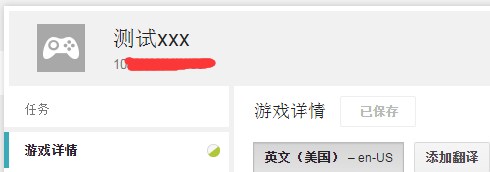
app_id 需要在google play 开发控制台添加对应的应用获取,网址:https://play.google.com/apps/publish
在游戏服务中添加新游戏,点进游戏项即可在游戏名下看到app_id,如下图:
3、登录并设置监听回调。直接new 新的监听添加到 mGoogleApiClient 上。
     mGoogleApiClient = new GoogleApiClient.Builder(activity)

        .addConnectionCallbacks(new GoogleApiClient.ConnectionCallbacks() {

            @Override

            public void onConnected(Bundle bundle) {

                OnConnected();

            }

            @Override

            public void onConnectionSuspended(int i) {

                Log.i(TAG, "onConnectionSuspended");

            }

        })

        .addOnConnectionFailedListener(new GoogleApiClient.OnConnectionFailedListener() {

                @Override

               public void onConnectionFailed(com.google.android.gms.common.ConnectionResult connectionResult) {

                Log.i(TAG, "onConnectionFailed  getErrorCode:" + connectionResult.getErrorCode());

                         if (connectionResult.hasResolution()) {

                          try {

                              // !!!

                              connectionResult.startResolutionForResult(_gameActivity, RC_SIGN_IN);

                          }

                          catch (SendIntentException e) {

                              mGoogleApiClient.connect();

                          }

                      }

               }

        })

        .addApi(Plus.API).addScope(Plus.SCOPE_PLUS_LOGIN)

        .addApi(Games.API).addScope(Games.SCOPE_GAMES)

        .build();
大致是,登录时会先判断应用是否已有帐号登录,有的话回调登录成功onConnected,否则会转到 onConnectionFailed,此时会返回一个connectionResult可以用来新建一个登录窗口。
4、直接登录测试。
    // 登录

    public static void login()

    {

        Log.i(TAG, "login");

        if (mGoogleApiClient.isConnected())

        {

            OnConnected();

        }

        else

        {

            mGoogleApiClient.connect();

        }

    }
测试登录注意事项:
1、将测试帐号在https://play.google.com/apps/publish 加入到应用的测试帐号里。
2、如果手机Google Play已经登录帐号没退出,且该帐号不是测试帐号,会出现登录界面闪下消失。
为了做帐号区分需要获取帐号信息,需要添加AndroidManifest.xml标签项。
<!-- To access accounts configured on device -->

<uses-permission android:name="android.permission.GET_ACCOUNTS" />
然后用 如下代码获取名字:
mAccountName = Plus.AccountApi.getAccountName(mGoogleApiClient);
官网地址: https://developers.google.com/games/services/android/leaderboards
1、首先接入上述的登录。
2、在Google Play应用开发后台中的应用添加新的排行榜,得到排行榜ID LEADERBOARD_ID 如下图:

3、显示排行榜,代码如下:
    private static final String LEADERBOARD_ID = "XXXXXXXXXX";

    private static final int REQUEST_LEADERBOARD =100;

    // 显示排行榜

    public static void showLeaderboards()

    {

        Log.i(TAG, "showLeaderboards");

        if (mGoogleApiClient.isConnected())

        {

            _gameActivity.startActivityForResult(Games.Leaderboards.getLeaderboardIntent(mGoogleApiClient,LEADERBOARD_ID),REQUEST_LEADERBOARD);

        }

        else

        {

            mGoogleApiClient.connect();

        }

    }
4、提交分数
    // 排行榜 提交

    public static void commit(long score)

    {

        if (!mGoogleApiClient.isConnected())

        {

            mGoogleApiClient.connect();

            return;

        }

        Log.i(TAG, "commit " + score);

        Games.Leaderboards.submitScore(mGoogleApiClient,LEADERBOARD_ID,score);

    }
5、登录后获取原来的排行榜数据
    public static void OnConnected()

    {

        mAccountName = Plus.AccountApi.getAccountName(mGoogleApiClient);

        Log.i(TAG, "onConnected "+ mAccountName);

        Games.Leaderboards.loadCurrentPlayerLeaderboardScore(mGoogleApiClient,LEADERBOARD_ID,

                LeaderboardVariant.TIME_SPAN_ALL_TIME, LeaderboardVariant.COLLECTION_PUBLIC)

                .setResultCallback(new ResultCallback<LoadPlayerScoreResult>() {

            @Override

            public void onResult(LoadPlayerScoreResult arg0) {

                LeaderboardScore c = arg0.getScore();

                if(c!=null)

                {

                    Log.i(TAG, "onResult " +  c.getDisplayScore() + " rawScore:" + c.getRawScore());

                    mAccountScore =  c.getRawScore();

                }

                loginCallback();

            }

        });

    }
官网地址: http://developer.android.com/training/in-app-billing/preparing-iab-app.html
1、从SDK Manager中下载安装对应Google 服务,如下:


2、从对应的sdk路径下 ~sdk\extras\google\play_billing 拷贝 IInAppBillingService.aidl 到 游戏目录下 ~proj.android\src\com\android\vending\billing
3、将sample\TrivialDrive\src\com\example\android\trivialdrivesample\util 整个目录拷贝到游戏目录下并修改目录下文件的响应引用库路径。
4、在AndroidManifest.xml添加对应的权限,注意大小写。
<uses-permission android:name="com.android.vending.BILLING" />
5、在Google Play 商店添加商品信息。
a、生成一个添加好上述第4点的权限的带有签名的release包,可参考cocos2dx - android环境配置及编译。
b、将生成的包上传到Google Play商店对应应用的Apk项。并将其关联到游戏服务中。(这里是为了后面测试支付等上传信息验证)
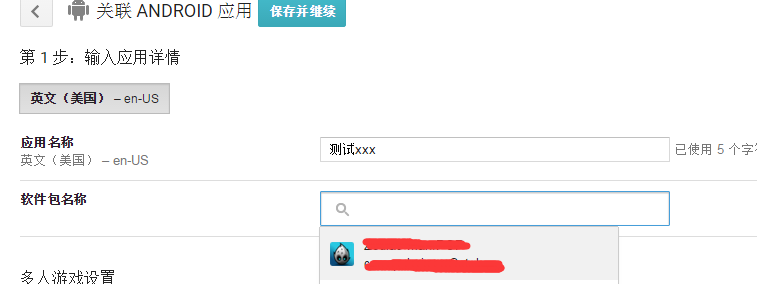
c、在所以应用 ->应用内商品 -> 添加新商品,然后将添加的商品激活,此时同时得到一个商品Id(xxxxxxxxx)。如下图:

6、几个重要函数,可参考sample\TrivialDrive\src\com\example\android\trivialdrivesample\MainActivity.java文件。
初始化设置Inpay_publickey可以在Google Play后台应用服务及API选项找到,调试log显示,添加消耗监听 OnConsumeFinishedListener,并进行 startSetup。只有在 startSetup成功回调后才可以进行下一步的购买。
        /// google pay

        // compute your public key and store it in base64EncodedPublicKey

       mHelper = new IabHelper(_gameActivity, Inpay_publickey);

       // enable debug logging (for a production application, you should set this to false).

       mHelper.enableDebugLogging(true);

       // Called when consumption is complete

       mConsumeFinishedListener = new IabHelper.OnConsumeFinishedListener() {

           @Override

           public void onConsumeFinished(Purchase purchase, IabResult result) {

               Log.d(TAG, "Consumption finished. Purchase: " + purchase + ", result: " + result);

               // if we were disposed of in the meantime, quit.

               if (mHelper == null) return;

               // We know this is the "gas" sku because it's the only one we consume,

               // so we don't check which sku was consumed. If you have more than one

               // sku, you probably should check...

               if (result.isSuccess()) {

                   // successfully consumed, so we apply the effects of the item in our

                   // game world's logic, which in our case means filling the gas tank a bit

                   Log.d(TAG, "Consumption successful. Provisioning." + purchase);

               //    String[] parts = purchase.getSku().split("_");

               //    String part3 =parts[2];

               //    buyCallback(Integer.parseInt(part3));

               }

               else {

                   Log.e(TAG,"Error while consuming: " + result);

               }

           }

       };

       mHelper.startSetup(new IabHelper.OnIabSetupFinishedListener() {

            public void onIabSetupFinished(IabResult result) {

                  Log.i(TAG, "onIabSetupFinished " );

                   if (!result.isSuccess()) {

                      // Oh noes, there was a problem.

                      Log.d(TAG, "Problem setting up In-app Billing: " + result);

                   }

                }

        });
调用购买并设置回调,设置变量仅能同时存在一个购买界面否则会崩溃,因为是Manager类型一次消耗道具所以在购买成功后直接进行consumeAsync使用消耗品。
    //购买

    public static void buy(int idx)

    {

        if(isInBuyed)

        {

            return;

        }

        if (!mGoogleApiClient.isConnected())

        {

            mGoogleApiClient.connect();

            return;

        }

        /* TODO: for security, generate your payload here for verification. See the comments on

         *        verifyDeveloperPayload() for more info. Since this is a SAMPLE, we just use

         *        an empty string, but on a production app you should carefully generate this. */

        String payload = "XXXXXXXXXXXII";//createDeveloperPayload();

        mHelper.launchPurchaseFlow(_gameActivity, SKU_GAS+idx, RC_REQUEST,

                 new IabHelper.OnIabPurchaseFinishedListener() {

            @Override

            public void onIabPurchaseFinished(IabResult result, Purchase purchase) {

                Log.d(TAG, "Purchase finished: " + result + ", purchase: " + purchase);

                isInBuyed =false;

                // if we were disposed of in the meantime, quit.

                if (mHelper == null) return;

                if (result.isFailure()) {

                    Log.e(TAG,"Error purchasing: " + result);

                    return;

                }

//                if (!verifyDeveloperPayload(purchase)) {

//                    Log.e(TAG,"Error purchasing. Authenticity verification failed.");

//                    return;

//                }

                Log.d(TAG, "Purchase successful." + purchase.getSku());

                 mHelper.consumeAsync(purchase, mConsumeFinishedListener);

            }

        }, payload);

        isInBuyed = true;

    }
这里必须对购买失败进行处理,否则重新点击购买也会导致崩溃。如下:
     @Override

        protected void onActivityResult(int requestCode, int resultCode, Intent data) {

        Log.d(TAG, "onActivityResult(" + requestCode + "," + resultCode + "," + data);

        if (JaveJniHelper.mHelper == null) return;

        // Pass on the activity result to the helper for handling

        if (!JaveJniHelper.mHelper.handleActivityResult(requestCode, resultCode, data)) {

            // not handled, so handle it ourselves (here's where you'd

            // perform any handling of activity results not related to in-app

            // billing...

            super.onActivityResult(requestCode, resultCode, data);

        }

        }
至此,一个正常的购买流程已经可以正常完成了。
这里在提几个碰到问题及修复方案:
1、点击购买出现 需要验证身份 您需要登录自己的google账户。
解决: 在Google Play商店中提交release签名一致,版本号一致的包,并进行alpha/beta发布。(发布后需要一段时间等Google Play后台显示的更新完成)
2、提示 无法购买您要买的商品。
解决: 在beta测试中选择需要的测试方法并提交,选择后一定要点击右上角的 提交更新 按钮,稍等片刻刷新后确定可以看到已选中了。(封闭式测试帐号需要将测试测好加入测试列表)
GooglePlay - 排行榜及支付接入的更多相关文章
- Android支付接入(7):Google In-app-Billing
今天跟大家一起看下Google的in-app Billing V3支付. 如果没有GooglePlay此处附上安装Google Play的一键安装器的链接(需要Root权限):http://ww ...
- C#开发微信门户及应用(32)--微信支付接入和API封装使用
在微信的应用上,微信支付是一个比较有用的部分,但也是比较复杂的技术要点,在微商大行其道的年代,自己的商店没有增加微信支付好像也说不过去,微信支付旨在为广大微信用户及商户提供更优质的支付服务,微信的支付 ...
- Android支付接入(五):机锋网
原地址:http://blog.csdn.net/simdanfeg/article/details/9012083 前边已经陆续跟大家走了一遍运营商和支付宝付费接入,今天跟大家一起看看机锋网的支付接 ...
- Android支付接入(七):Google In-app-Billing
前段时间有事请耽搁了,今天跟大家一起看下Google的in-app Billing V3支付. 如果没有Google Play此处附上安装Google Play的一键安装器的链接(需要Root权 ...
- 微信小程序支付接入实战
1. 微信小程序支付接入实战 1.1. 需求 最近接到一个小程序微信支付的需求,需要我写后台支持,本着能不自己写就不自己写的cv原则,在网上找到了些第三方程序,经过尝试后,最后决定了这不要脸作者的 ...
- APP支付宝支付接入
1.app支付简介 买家可以在手机,掌上电脑等无线设备的应用程序内,通过支付宝(支付宝app或网页版支付宝)付款购买商品,且资金实行实时到账. 2.申请条件 1.申请前必须拥有经过实名认证的支付宝账户 ...
- 亲历H5移动端游戏微信支付接入及那些坑(四)——参考文档
写完三篇后,我觉得微信支付的文档确实比较乱,所以在此做一个整理汇总 支付流程相关文档 一下文档已经按照接入顺序排列,请依次参考阅读 微信公众号网页授权两种access_token区别,获取用户open ...
- 亲历H5移动端游戏微信支付接入及那些坑(二)——获取Openid和授权
第一篇中将一些坑说明,那么这篇开始正式进入接入步骤.具体的参数说明,我不会列出,毕竟微信官方文档都有,我想大家都看的懂,而且这接口也有可能微信会变动,所以不列出来,也是不想引起大家的误解,接入步骤只起 ...
- Android支付接入之Google In-app-Billing
原文链接:http://www.mobile-open.com/2016/966337.html 因为公司需要接入Google的应用内支付(即Google的in-app Billing V3),接入过 ...
随机推荐
- 团队作业4——第一次项目冲刺 FiRsT DaY
项目冲刺--first blood 今天是阳光明媚的一天[明明是阴天好吗= =],今天是心情愉悦的一天[每天都要提交博客高兴个水水哦-3-] 天霸动霸.tua小队迎来了第一敏捷冲刺,小伙伴们是时候打起 ...
- 201521123038 《Java程序设计》 第四周学习总结
201521123038 <Java程序设计> 第四周学习总结 1. 本周学习总结 1.1 尝试使用思维导图总结有关继承的知识点. 1.2 使用常规方法总结其他上课内容. 1.通过 ins ...
- 学号:201521123116 《java程序设计》第三周学习总结
1. 本周学习总结 初学面向对象,会学习到很多碎片化的概念与知识.尝试学会使用思维导图将这些碎片化的概念.知识组织起来.请使用纸笔或者下面的工具画出本周学习到的知识点. 书面作业 Q1:代码阅读 pu ...
- 201521123075 《Java程序设计》第9周学习总结
1. 本周学习总结 2. 书面作业 本次PTA作业题集异常 1.常用异常 题目5-1 1.1 截图你的提交结果(出现学号) 1.2 自己以前编写的代码中经常出现什么异常.需要捕获吗(为什么)?应如何避 ...
- 201521123109 《java程序设计》第12周学习总结
1. 本周学习总结 1.1 以你喜欢的方式(思维导图或其他)归纳总结多流与文件相关内容. 2. 书面作业 将Student对象(属性:int id, String name,int age,doubl ...
- Linux的诞生史
Linux的诞生史 目录 Multics计划--开始 自由的产物-BSD GUN计划的产生 导火索MINIX Linux的诞生 Linux的标志物 Linux的现状 Multics计划--开始. 这是 ...
- 深入理解计算机系统(2.5)------C语言中的有符号数和无符号数以及扩展和截断数字
上一篇博客我们讲解了计算机中整数的表示,包括无符号编码和补码编码,以及它们之间的互相转换,个人觉得那是非常重要的知识要点.这篇博客我们将介绍C语言中的有符号数和无符号数以及扩展和截断数字. 1.C语言 ...
- Linux环境下启动MySQL数据库出现找不到mysqld.sock的解决办法!
问题: 在普通用户权限下运行:mysql -u root -p,回车之后如果会出现如下错误:ERROR 2002 (HY000): Can't connect to local MySQL serve ...
- Linux tomcat 去除项目名端口号直接用ip或者域名访问网站
网站开发过程中,一般的工程访问路径是 http://10.10.10.10:8080/projectName如何设置成http://10.10.10.10/ 解决方法: 首先,进入tomcat的安装 ...
- LeetCode解题中位运算的运用
位运算是我最近才开始重视的东西,因为在LeetCode上面刷题的时候发现很多题目使用位运算会快很多.位运算的使用包含着许多技巧(详细可以参考http://blog.csdn.net/zmazon/ar ...