
Grid search in the tidyverse
@drsimonj here to share a tidyverse method of grid search for optimizing a model’s hyperparameters.
Grid Search
For anyone who’s unfamiliar with the term, grid search involves running a model many times with combinations of various hyperparameters. The point is to identify which hyperparameters are likely to work best. A more technical definition from Wikipedia, grid search is:
an exhaustive searching through a manually specified subset of the hyperparameter space of a learning algorithm
What this post isn’t about
To keep the focus on grid search, this post does NOT cover…
- k-fold cross-validation. Although a practically essential addition to grid search, I’ll save the combination of these techniques for a future post. If you can’t wait, check out my last post for some inspiration.
- Complex learning models. We’ll stick to a simple decision tree.
- Getting a great model fit. I’ve deliberately chosen input variables and hyperparameters that highlight the approach.
Decision tree example
Say we want to run a simple decision tree to predict cars’ transmission type (am) based on their miles per gallon (mpg) and horsepower (hp) using themtcars data set. Let’s prep the data:
library(tidyverse)

d <- mtcars %>%

       # Convert `am` to factor and select relevant variables

       mutate(am = factor(am, labels = c("Automatic", "Manual"))) %>%

       select(am, mpg, hp)

ggplot(d, aes(mpg, hp, color = am)) +

  geom_point()
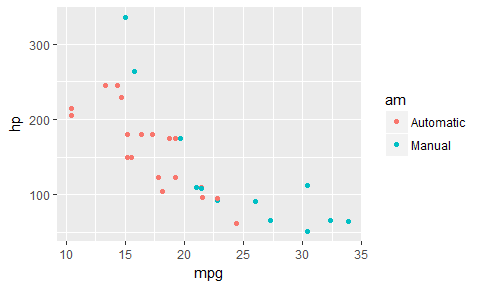
For a decision tree, it looks like a step-wise function until mpg > 25, at which point it’s all Manual cars. Let’s grow a full decision tree on this data:
library(rpart)

library(rpart.plot)

# Set minsplit = 2 to fit every data point

full_fit <- rpart(am ~ mpg + hp, data = d, minsplit = 2)

prp(full_fit)
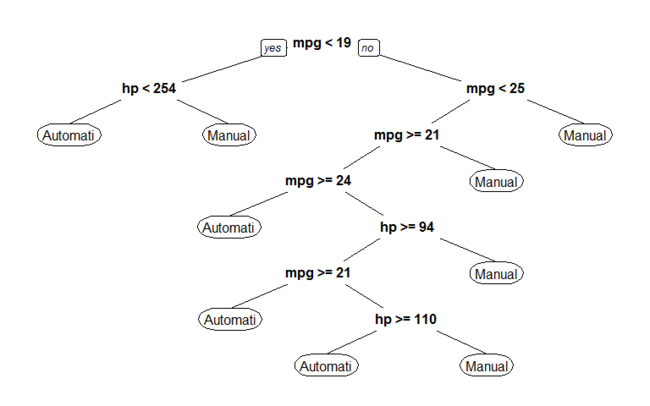
We don’t want a model like this, as it almost certainly has overfitting problems. So the question becomes, which hyperparameter specifications would work best for our model to generalize?
Training-Test Split
To help validate our hyperparameter combinations, we’ll split our data into training and test sets (in an 80/20 split):
set.seed(245)

n <- nrow(d)

train_rows <- sample(seq(n), size = .8 * n)

train <- d[ train_rows, ]

test  <- d[-train_rows, ]
Create the Grid
Step one for grid search is to define our hyperparameter combinations. Say we want to test a few values for minsplit and maxdepth. I like to setup the grid of their combinations in a tidy data frame with a list and cross_d as follows:
# Define a named list of parameter values

gs <- list(minsplit = c(2, 5, 10),

           maxdepth = c(1, 3, 8)) %>%

  cross_d() # Convert to data frame grid

gs

#> # A tibble: 9 × 2

#>   minsplit maxdepth

#>      <dbl>    <dbl>

#> 1        2        1

#> 2        5        1

#> 3       10        1

#> 4        2        3

#> 5        5        3

#> 6       10        3

#> 7        2        8

#> 8        5        8

#> 9       10        8
Note that the list names are the names of the hyperparameters that we want to adjust in our model function.
Create a model function
We’ll be iterating down the gs data frame to use the hyperparameter values in a rpart model. The easiest way to handle this is to define a function that accepts a row of our data frame values and passes them correctly to our model. Here’s what I’ll use:
mod <- function(...) {

  rpart(am ~ hp + mpg, data = train, control = rpart.control(...))

}
Notice the argument ... is being passed to control in rpart, which is where these hyperparameters can be used.
Fit the models
Now, to fit our models, use pmap to iterate down the values. The following is iterating through each row of our gs data frame, plugging the hyperparameter values for that row into our model.
gs <- gs %>% mutate(fit = pmap(gs, mod))

gs

#> # A tibble: 9 × 3

#>   minsplit maxdepth         fit

#>      <dbl>    <dbl>      <list>

#> 1        2        1 <S3: rpart>

#> 2        5        1 <S3: rpart>

#> 3       10        1 <S3: rpart>

#> 4        2        3 <S3: rpart>

#> 5        5        3 <S3: rpart>

#> 6       10        3 <S3: rpart>

#> 7        2        8 <S3: rpart>

#> 8        5        8 <S3: rpart>

#> 9       10        8 <S3: rpart>
Obtain accuracy
Next, let’s assess the performance of each fit on our test data. To handle this efficiently, let’s write another small function:
compute_accuracy <- function(fit, test_features, test_labels) {

  predicted <- predict(fit, test_features, type = "class")

  mean(predicted == test_labels)

}
Now apply this to each fit:
test_features <- test %>% select(-am)

test_labels   <- test$am

gs <- gs %>%

  mutate(test_accuracy = map_dbl(fit, compute_accuracy,

                                 test_features, test_labels))

gs

#> # A tibble: 9 × 4

#>   minsplit maxdepth         fit test_accuracy

#>      <dbl>    <dbl>      <list>         <dbl>

#> 1        2        1 <S3: rpart>     0.7142857

#> 2        5        1 <S3: rpart>     0.7142857

#> 3       10        1 <S3: rpart>     0.7142857

#> 4        2        3 <S3: rpart>     0.8571429

#> 5        5        3 <S3: rpart>     0.8571429

#> 6       10        3 <S3: rpart>     0.7142857

#> 7        2        8 <S3: rpart>     0.8571429

#> 8        5        8 <S3: rpart>     0.8571429

#> 9       10        8 <S3: rpart>     0.7142857
Arrange results
To find the best model, we arrange the data based on desc(test_accuracy). The best fitting model will then be in the first row. You might see above that we have many models with the same fit. This is unusual, and likley due to the example I’ve chosen. Still, to handle this, I’ll break ties in accuracy withdesc(minsplit) and maxdepth to find the model that is most accurate and also simplest.
gs <- gs %>% arrange(desc(test_accuracy), desc(minsplit), maxdepth)

gs

#> # A tibble: 9 × 4

#>   minsplit maxdepth         fit test_accuracy

#>      <dbl>    <dbl>      <list>         <dbl>

#> 1        5        3 <S3: rpart>     0.8571429

#> 2        5        8 <S3: rpart>     0.8571429

#> 3        2        3 <S3: rpart>     0.8571429

#> 4        2        8 <S3: rpart>     0.8571429

#> 5       10        1 <S3: rpart>     0.7142857

#> 6       10        3 <S3: rpart>     0.7142857

#> 7       10        8 <S3: rpart>     0.7142857

#> 8        5        1 <S3: rpart>     0.7142857

#> 9        2        1 <S3: rpart>     0.7142857
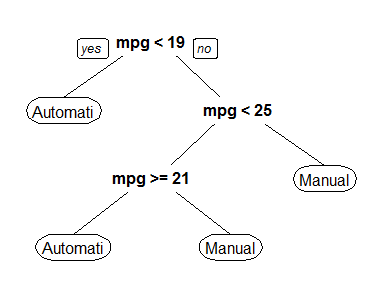
It looks like a minsplit of 5 and maxdepth of 3 is the way to go!
To compare to our fully fit tree, here’s a plot of this top-performing model. Remember, it’s in the first row so we can reference [[1]].
prp(gs$fit[[1]])
Food for thought
Having the results in a tidy data frame lets us do a lot more than just pick the optimal hyperparameters. It lets us quickly wrangle with and visualize the results of the various combinations. Here are some ideas:
- Search among the top performers for the simplest model.
- Plot performance across the hyperparameter combinations.
- Save time by restricting the hypotheses before model fitting. For example, in a large data set, it’s practically pointless to try a small
minsplitand smallmaxdepth. In this case, before fitting the models, we canfilterthegsdata frame to exclude certain combinations.
Sign off
Thanks for reading and I hope this was useful for you.
For updates of recent blog posts, follow @drsimonj on Twitter, or email me atdrsimonjackson@gmail.com to get in touch.
If you’d like the code that produced this blog, check out the blogR GitHub repository.
转自:https://drsimonj.svbtle.com/grid-search-in-the-tidyverse
Grid search in the tidyverse的更多相关文章
- Comparing randomized search and grid search for hyperparameter estimation
Comparing randomized search and grid search for hyperparameter estimation Compare randomized search ...
- 3.2. Grid Search: Searching for estimator parameters
3.2. Grid Search: Searching for estimator parameters Parameters that are not directly learnt within ...
- How to Grid Search Hyperparameters for Deep Learning Models in Python With Keras
Hyperparameter optimization is a big part of deep learning. The reason is that neural networks are n ...
- Grid Search学习
转自:https://www.cnblogs.com/ysugyl/p/8711205.html Grid Search:一种调参手段:穷举搜索:在所有候选的参数选择中,通过循环遍历,尝试每一种可能性 ...
- grid search 超参数寻优
http://scikit-learn.org/stable/modules/grid_search.html 1. 超参数寻优方法 gridsearchCV 和 RandomizedSearchC ...
- scikit-learn:3.2. Grid Search: Searching for estimator parameters
參考:http://scikit-learn.org/stable/modules/grid_search.html GridSearchCV通过(蛮力)搜索參数空间(參数的全部可能组合).寻找最好的 ...
- [转载]Grid Search
[转载]Grid Search 初学机器学习,之前的模型都是手动调参的,效果一般.同学和我说他用了一个叫grid search的方法.可以实现自动调参,顿时感觉非常高级.吃饭的时候想调参的话最差不过也 ...
- grid search
sklearn.metrics.make_scorer(score_func, greater_is_better=True, needs_proba=False, needs_threshold=F ...
- Hackerrank - The Grid Search
https://www.hackerrank.com/challenges/the-grid-search/forum 今天碰见这题,看见难度是Moderate,觉得应该能半小时内搞定. 读完题目发现 ...
随机推荐
- Spring事务管理的实现方式:编程式事务与声明式事务
1.上篇文章讲解了Spring事务的传播级别与隔离级别,以及分布式事务的简单配置,点击回看上篇文章 2.编程式事务:编码方式实现事务管理(代码演示为JDBC事务管理) Spring实现编程式事务,依赖 ...
- C++中的类继承(4)继承种类之单继承&多继承&菱形继承
单继承是一般的单一继承,一个子类只 有一个直接父类时称这个继承关系为单继承.这种关系比较简单是一对一的关系: 多继承是指 一个子类有两个或以上直接父类时称这个继承关系为多继承.这种继承方式使一个子类可 ...
- nodejs + nginx + ECS阿里云服务器环境设置
nodejs + nginx + ECS阿里云服务器环境设置 部署 nodejs ECS 基于 CentOS7.2 详细步骤:click 部署 nginx 安装 添加Nginx软件库: [root@l ...
- 【web】之 jquery上传插件的Plupload的使用
首先下载plupload->http://www.plupload.com 因为Plupload可配置参数比较多,所以这里讲解最常用的,结合jquery-ui展示的界面!如下: Plupload ...
- clamav 杀毒软件安装及使用配置
安装clamav 之前还需要安装zlib 要不然安装过程中会报错的. tar -zxvf zlib-1.2.3.tar.gz cd zlib-1.2.3 ./configure make make ...
- a标签去掉默认样式并自定义样式
a { text-decoration: none;//去掉下划线 color: inherit; -webkit-user-select: none; -moz-user-select: none; ...
- tablelayoutpanel内部组件变形
tablelayoutpanel设为dock=full后,最大化或最小化窗口会变形. 解决办法:加入flowlayoutpanel,将tablelayoutpanel放入其中,然后在tablelayo ...
- 使用jquery的load方法设计动态加载,并解决浏览器前进、后退、刷新等问题
继上一篇 使用jquery的load方法设计动态加载,并解决被加载页面JavaScript失效问题 解决了后台业务系统的部分动态加载问题,然而该框架离正常的用户体验还存在一些问题,如:浏览器的前进.后 ...
- .NET的JSON格式数据的三种转换方式
说明: 1..Net进行JSON格式的数据传递的时候,势必用到序列化和反序列化对象,总共有三种方式可是在.NET中实现序列化和反序列化的需求. 2.操作JSON的速度是:Json.net > M ...
- <java>枚举的简单介绍
1.枚举,enum关键字,相当于public final static. 2.举例: 首先定义了一个名为spiciness的枚举类型. public enum Spiciness { NOT, MIL ...