
IOS动态自适应标签实现
先上效果图
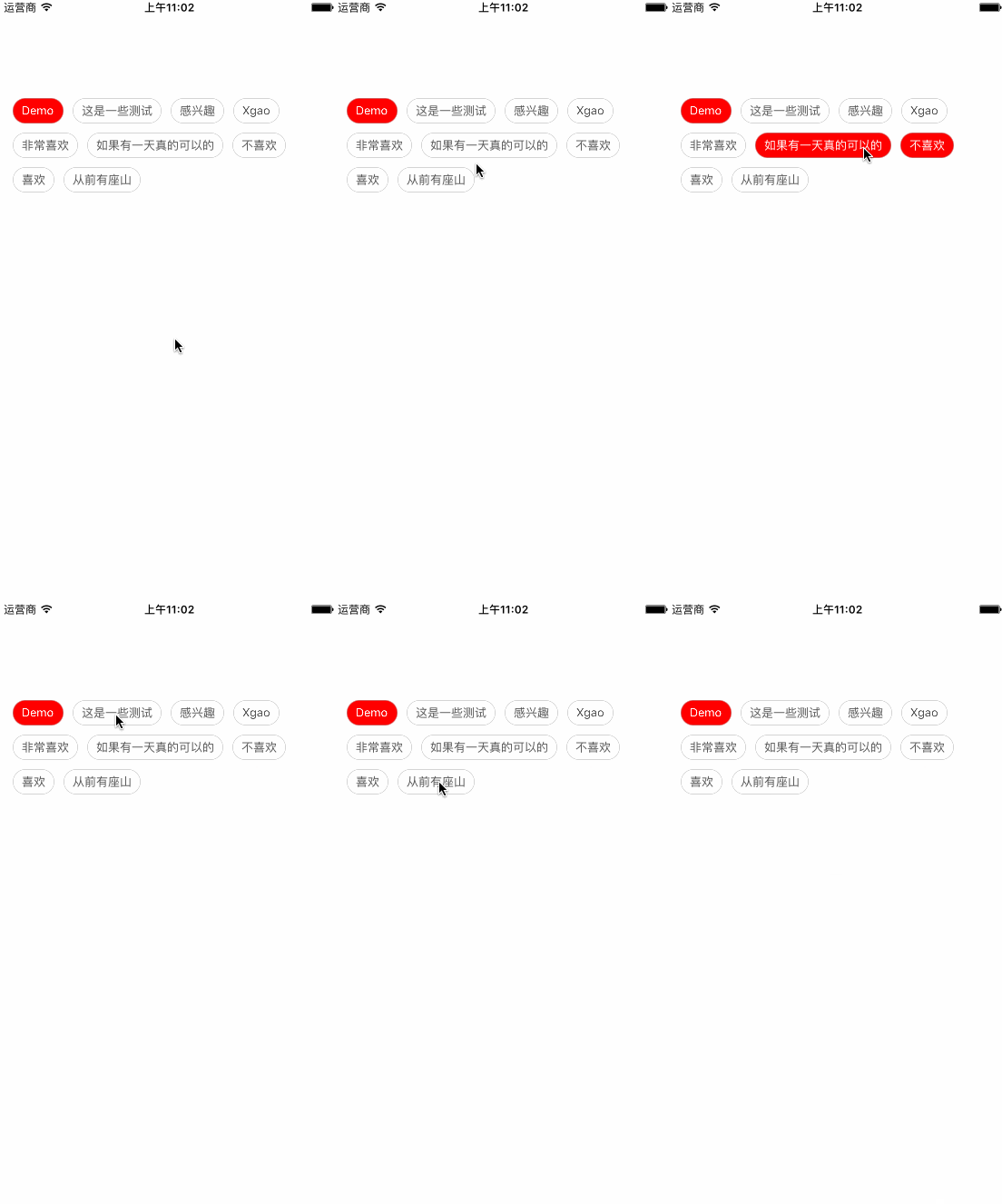
设计要求
1、标签的宽度是按内容自适应的
2、一行显示的标签个数是动态的,放得下就放,放不下就换行
3、默认选中第一个
4、至少选中一个标签
实现思路
首先我们从这个效果上来看,这个标签是有选中和不选中状态,那我们首选的控件肯定就是用 UIButton来实现了。
这个小程度的重点就在于标签能自动换行,还是智能的,不是固定一行多少个那种,这个我们通过计算每个按钮实际宽度与屏幕的宽度进行比较就能判断是否需要换行了。
还有一点就是处理 至少选中一个标签的功能,我这里有一种方式,就是控制按钮的 userInteractionEnabled 属性来实现,如果只有一个按钮的时候就把那一个按钮的这个属性给设置成 NO,这样就禁止用户对它进行点击事件了,这个时候其它按钮是可以正常选中的,只要选中的按钮大于1个,那就把刚才那个按钮属性再改成YES,这样那个按钮就又能点了。
具体看代码
创建一个继承于UIView的 XGTagView 类
//

//  XGTagView.h

//  动态标签

//

//  Created by xgao on 17/3/22.

//  Copyright © 2017年 xgao. All rights reserved.

//

#import <UIKit/UIKit.h>

@interface XGTagView : UIView

/**

 *  初始化

 *

 *  @param frame    frame

 *  @param tagArray 标签数组

 *

 *  @return

 */

- (instancetype)initWithFrame:(CGRect)frame tagArray:(NSMutableArray*)tagArray;

// 标签数组

@property (nonatomic,retain) NSArray* tagArray;

// 选中标签文字颜色

@property (nonatomic,retain) UIColor* textColorSelected;

// 默认标签文字颜色

@property (nonatomic,retain) UIColor* textColorNormal;

// 选中标签背景颜色

@property (nonatomic,retain) UIColor* backgroundColorSelected;

// 默认标签背景颜色

@property (nonatomic,retain) UIColor* backgroundColorNormal;

@end
//

//  XGTagView.m

//  动态标签

//

//  Created by xgao on 17/3/22.

//  Copyright © 2017年 xgao. All rights reserved.

//

#import "XGTagView.h"

@interface XGTagView()

@end

@implementation XGTagView

/**

 *  初始化

 *

 *  @param frame    frame

 *  @param tagArray 标签数组

 *

 *  @return

 */

- (instancetype)initWithFrame:(CGRect)frame tagArray:(NSArray*)tagArray{

    self = [super initWithFrame:frame];

    if (self) {

        _tagArray = tagArray;

        [self setUp];

    }

    return self;

}

// 初始化

- (void)setUp{

    // 默认颜色

    _textColorNormal = [UIColor darkGrayColor];

    _textColorSelected = [UIColor whiteColor];

    _backgroundColorSelected = [UIColor redColor];

    _backgroundColorNormal = [UIColor whiteColor];

    // 创建标签按钮

    [self createTagButton];

}

// 重写set属性

- (void)setTagArray:(NSMutableArray *)tagArray{

    _tagArray = tagArray;

    // 重新创建标签

    [self resetTagButton];

}

- (void)setTextColorSelected:(UIColor *)textColorSelected{

    _textColorSelected = textColorSelected;

    // 重新创建标签

    [self resetTagButton];

}

- (void)setTextColorNormal:(UIColor *)textColorNormal{

    _textColorNormal = textColorNormal;

    // 重新创建标签

    [self resetTagButton];

}

- (void)setBackgroundColorSelected:(UIColor *)backgroundColorSelected{

    _backgroundColorSelected = backgroundColorSelected;

    // 重新创建标签

    [self resetTagButton];

}

- (void)setBackgroundColorNormal:(UIColor *)backgroundColorNormal{

    _backgroundColorNormal = backgroundColorNormal;

    // 重新创建标签

    [self resetTagButton];

}

#pragma mark - Private

// 重新创建标签

- (void)resetTagButton{

    // 移除之前的标签

    for (UIButton* btn  in self.subviews) {

        [btn removeFromSuperview];

    }

    // 重新创建标签

    [self createTagButton];

}

// 创建标签按钮

- (void)createTagButton{

    // 按钮高度

    CGFloat btnH = ;

    // 距离左边距

    CGFloat leftX = ;

    // 距离上边距

    CGFloat topY = ;

    // 按钮左右间隙

    CGFloat marginX = ;

    // 按钮上下间隙

    CGFloat marginY = ;

    // 文字左右间隙

    CGFloat fontMargin = ;

    for (int i = ; i < _tagArray.count; i++) {

        UIButton* btn = [UIButton buttonWithType:UIButtonTypeCustom];

        btn.frame = CGRectMake(marginX + leftX, topY, , btnH);

        btn.tag = +i;

        // 默认选中第一个

        if (i == ) {

            btn.selected = YES;

        }

        // 按钮文字

        [btn setTitle:_tagArray[i] forState:UIControlStateNormal];

        //------ 默认样式

        //按钮文字默认样式

        NSMutableAttributedString* btnDefaultAttr = [[NSMutableAttributedString alloc]initWithString:btn.titleLabel.text];

        // 文字大小

        [btnDefaultAttr addAttribute:NSFontAttributeName value:[UIFont systemFontOfSize:] range:NSMakeRange(, btn.titleLabel.text.length)];

        // 默认颜色

        [btnDefaultAttr addAttribute:NSForegroundColorAttributeName value:self.textColorNormal range:NSMakeRange(, btn.titleLabel.text.length)];

        [btn setAttributedTitle:btnDefaultAttr forState:UIControlStateNormal];

        // 默认背景颜色

        [btn setBackgroundImage:[self imageWithColor:self.backgroundColorNormal] forState:UIControlStateNormal];

        //-----  选中样式

        // 选中字体颜色

        NSMutableAttributedString* btnSelectedAttr = [[NSMutableAttributedString alloc]initWithString:btn.titleLabel.text];

        // 选中颜色

        [btnSelectedAttr addAttribute:NSForegroundColorAttributeName value:self.textColorSelected range:NSMakeRange(, btn.titleLabel.text.length)];

        // 选中文字大小

        [btnSelectedAttr addAttribute:NSFontAttributeName value:[UIFont systemFontOfSize:] range:NSMakeRange(, btn.titleLabel.text.length)];

        [btn setAttributedTitle:btnSelectedAttr forState:UIControlStateSelected];

        // 选中背景颜色

        [btn setBackgroundImage:[self imageWithColor:self.backgroundColorSelected] forState:UIControlStateSelected];

        // 圆角

        btn.layer.cornerRadius = btn.frame.size.height / .f;

        btn.layer.masksToBounds = YES;

        // 边框

        btn.layer.borderColor = [UIColor lightGrayColor].CGColor;

        btn.layer.borderWidth = 0.5;

        // 设置按钮的边距、间隙

        [self setTagButtonMargin:btn fontMargin:fontMargin];

        // 处理换行

        if (btn.frame.origin.x + btn.frame.size.width + marginX > self.frame.size.width) {

            // 换行

            topY += btnH + marginY;

            // 重置

            leftX = ;

            btn.frame = CGRectMake(marginX + leftX, topY, , btnH);

            // 设置按钮的边距、间隙

            [self setTagButtonMargin:btn fontMargin:fontMargin];

        }

        // 重置高度

        CGRect frame = btn.frame;

        frame.size.height = btnH;

        btn.frame = frame;

        //----- 选中事件

        [btn addTarget:self action:@selector(selectdButton:) forControlEvents:UIControlEventTouchUpInside];

        [self addSubview:btn];

        leftX += btn.frame.size.width + marginX;

    }

    // 检测按钮状态,最少选中一个

    [self checkButtonState];

}

// 设置按钮的边距、间隙

- (void)setTagButtonMargin:(UIButton*)btn fontMargin:(CGFloat)fontMargin{

    // 按钮自适应

    [btn sizeToFit];

    // 重新计算按钮文字左右间隙

    CGRect frame = btn.frame;

    frame.size.width += fontMargin*;

    btn.frame = frame;

}

// 检测按钮状态,最少选中一个

- (void)checkButtonState{

    int selectCount = ;

    UIButton* selectedBtn = nil;

    for(int i=;i < _tagArray.count; i++){

        UIButton* btn = (UIButton*)[self viewWithTag:+i];

        if(btn.selected){

            selectCount++;

            selectedBtn = btn;

        }

    }

    if (selectCount == ) {

        // 只有一个就把这一个给禁用手势

        selectedBtn.userInteractionEnabled = NO;

    }else{

        // 解除禁用手势

        for(int i=;i < _tagArray.count; i++){

            UIButton* btn = (UIButton*)[self viewWithTag:+i];

            if(!btn.userInteractionEnabled){

                btn.userInteractionEnabled = YES;

            }

        }

    }

}

// 根据颜色生成UIImage

- (UIImage*)imageWithColor:(UIColor*)color{

    CGRect rect = CGRectMake(0.0f, 0.0f, 1.0f, 1.0f);

    // 开始画图的上下文

    UIGraphicsBeginImageContext(rect.size);

    // 设置背景颜色

    [color set];

    // 设置填充区域

    UIRectFill(CGRectMake(, , rect.size.width, rect.size.height));

    // 返回UIImage

    UIImage* image = UIGraphicsGetImageFromCurrentImageContext();

    // 结束上下文

    UIGraphicsEndImageContext();

    return image;

}

#pragma mark - Event

// 标签按钮点击事件

- (void)selectdButton:(UIButton*)btn{

    btn.selected = !btn.selected;

    // 检测按钮状态,最少选中一个

    [self checkButtonState];

}

@end
好了,大家如果有什么地方看不明白的,留言给我就行~~
IOS动态自适应标签实现的更多相关文章
- jQuery计算文本宽度和input标签根据输入字符动态自适应宽度的实现
jQuery计算文本宽度的原理是利用html提供的<pre>标签,向dom中动态添加<pre>标签,标签里的内容就是要测试长度的文本,获取完长度之后再删除刚才添加的<pr ...
- js 面向对象 动态添加标签
有点逻辑 上代码 thml布局 点击查看代码 <!DOCTYPE html> <html lang="en"> <head> <meta ...
- EasyUI创建异步树形菜单和动态添加标签页tab
创建异步树形菜单 创建树形菜单的ul标签 <ul class="easyui-tree" id="treeMenu"> </ul> 写j ...
- EasyUI中动态生成标签页
这是最近学到的内容,当时是有思路但是不知道怎么获取当前的点击对象,就没有实现功能,通过更深入的学习,我知道了不仅仅是Java,Oracle中有一个this,同样的EasyUI中也存在一个this,来获 ...
- iOS动态部署方案
转载: iOS动态部署方案 前言 这里讨论的动态部署方案,就是指通过不发版的方式,将新的内容.新的业务流程部署进已发布的App.因为苹果的审核周期比较长,而且苹果的限制比较多,业界在这里也没有特别多的 ...
- 9.mybatis动态SQL标签的用法
mybatis动态SQL标签的用法 动态 SQL MyBatis 的强大特性之一便是它的动态 SQL.如果你有使用 JDBC 或其他类似框架的经验,你就能体会到根据不同条件拼接 SQL 语句有多么 ...
- iframe高度动态自适应
by zhangxinxu from http://www.zhangxinxu.com本文地址:http://www.zhangxinxu.com/wordpress/?p=1294 一.前言碎碎念 ...
- iOS 键盘自适应(IQKeyboardManager)使用小结
IQKeyboardManager Github地址 经常在开发一个应用程序,我们遇到了一个问题,iPhone的键盘上滑覆盖的UITextField / UITextView.IQKeyboardMa ...
- EasyUI 布局 - 动态添加标签页(Tabs)
首先导入js <link rel="stylesheet" href="../js/easyui/themes/default/easyui.css"&g ...
随机推荐
- 02月刊(上) | 微信小程序
* { margin: 0; padding: 0 } .con { width: 802px; margin: 0 auto; text-align: center; position: inher ...
- MiniProfiler工具介绍
MiniProfiler是一款针对.NET, Ruby, Go and Node.js的性能分析的轻量级程序.可以对一个页面本身,及该页面通过直接引用.Ajax.Iframe形式访问的其它页面进行监控 ...
- WEB安全测试通常要考虑的测试点
1问题:没有被验证的输入测试方法: 数据类型(字符串,整型,实数,等)允许的字符集 最小和最大的长度是否允许空输入参数是否是必须的重复是否允许数值范围特定的值(枚举型)特定的模式(正则表达式) 2问题 ...
- CSS的兼容性与BUG处理
骨灰级清除浮动 .clearfix:after { content: "."; display: block; height: 0; clear: both; visibility ...
- Codeforces Round #396 (Div. 2)
C. Mahmoud and a Message time limit per test 2 seconds memory limit per test 256 megabytes input sta ...
- iOS之网络数据下载和JSON解析
iOS之网络数据下载和JSON解析 简介 在本文中笔者将要给大家介绍IOS中如何利用NSURLconnection从网络上下载数据以及如何解析下载下来的JSON数据格式,以及如何显示数据和托图片的异步 ...
- bootstrap_下拉菜单+头部
<!DOCTYPE html> <html lang="en"> <head> <meta charset="UTF-8&quo ...
- Javascript面对对象. 第五篇
继承 继承是面向对象中一个核心的概念.其他正统面向对象语言都会用两种方式实现继承: 一个是接口实现,一个是继承. 而ECMAScript只支持继承,不支持接口实现,而实现继承的方式依靠原型链完成. / ...
- BDD框架:behave学习记录
本人学习的时候基本上是按照behave的tutorial教程一步步学习的,这篇文章就当Behave教程的翻译版吧(*^__^*) 嘻嘻--. 1 安装behave 安装好python后 ...
- C语言常见错误中英文对照表
C语言常见错误中英文对照表(网络搜索及经验积累不断更新中) 常见错误中英文对照表 fatal error C1003: error count exceeds number; stopping co ...