
C++实例讲解Binder通信
binder是android里面的通信机制,这就不说它如何如何好了,Goog已经说过了,这里不多说。binder是一个面向对象的编程方法,大量使用虚函数类。最近研究binder看到一网友写的,就借鉴一下。这个例子很好的解释里binder通信关系。原文:http://blog.csdn.net/new_abc/article/details/8097775 例子不错不过就是没运行起来,不过这都不是问题,关键是很容易理解。
我将他的源码整理类图看看,不过这个是简单的继承关系。
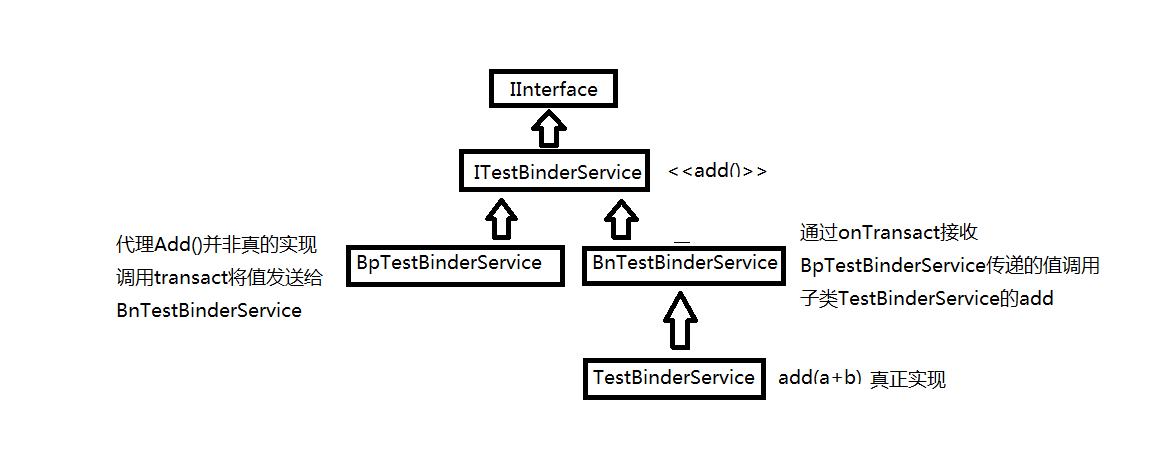
基本上使用binder就这个关系,从中间一分为二,左边客户端使用,右边服务端。不管是客户端还是服务端都继承子IXXXService这个类,这个类可以裂解为客户端和服务端的“爷爷”,而“爷爷”继承IInterface,所有自定义的binder都必须继承这个类,这个是android强指针实现计数的方法。先看看源码后再理解这个图。
首先看下目录结构:
TestBinderClient目录: Android.mk ITestBinderService.cpp
TestBinderServer目录: Android.mk ITestBinderService.h main_testBinder.cpp testBinder.cpp TestBinderService.cpp TestBinderService.h
TestBinderClient下面是Binder的客户端,TestBinderServer是binder的服务端
我们先来看下biner服务端代码
1、ITestBinderService.h
     #ifndef ANDROID_ITESTBINDERSERVICE_H_

     #define ANDROID_ITESTBINDERSERVICE_H_

     #include <utils/RefBase.h>

     #include <binder/IInterface.h>

     #include <binder/Parcel.h>

     namespace android {

     class Parcel;

     class ITestBinderService: public IInterface {

     public:

         DECLARE_META_INTERFACE(TestBinderService);

         virtual int add(int a, int b) = ;

     };

     class BnTestBinderService: public BnInterface<ITestBinderService> {

     public:

         virtual status_t onTransact(uint32_t code, const Parcel& data,

                 Parcel* reply, uint32_t flags = );

     };

     }

     #endif /* ANDROID_ITESTBINDERSERVICE_H_ */
ITestBinderService.h
这里主要是定义了两个类ITestBinderService 和 BnTestBinderService,ITestBinderService 是TestBinderService 的基类,这里主要是DECLARE_META_INTERFACE 这个宏,定义在frameworks\base\include\binder\IInterface.h文件中。
 #define DECLARE_META_INTERFACE(INTERFACE)                               \

     static const android::String16 descriptor;                          \

     static android::sp<I##INTERFACE> asInterface(                       \

             const android::sp<android::IBinder>& obj);                  \

     virtual const android::String16& getInterfaceDescriptor() const;    \

     I##INTERFACE();                                                     \

     virtual ~I##INTERFACE();
DECLARE_META_INTERFACE 宏
把TestBinderService代入进去
 #define DECLARE_META_INTERFACE(TestBinderService)                               \

     static const android::String16 descriptor;                          \

     static android::sp<ITestBinderService> asInterface(                       \

             const android::sp<android::IBinder>& obj);                  \

     virtual const android::String16& getInterfaceDescriptor() const;    \

     ITestBinderService();                                                     \

     virtual ~I##TestBinderService();
带入宏后
其中封装了实现binder所需要的一些类成员变量和成员函数,通过这些成员函数可以为一个binder实现创建proxy(代理)
2、TestBinderService.h
     #ifndef ANDROID_TESTBINDERSERVICE_H_

     #define ANDROID_TESTBINDERSERVICE_H_

     #include <utils/KeyedVector.h>

     #include "ITestBinderService.h"

     namespace android {

     class TestBinderService: public BnTestBinderService {

     public:

         static void instantiate();

         int add(int a,int b);

     private:

         TestBinderService();

         virtual ~TestBinderService();

     };

     }

     #endif /* ANDROID_TESTBINDERSERVICE_H_ */
TestBinderService.h
这个文件比较简单,主要就是定义了一个类TestBinderService,继承于前面 的BnTestBinderService,并定义了一个方法add函数和instantiate
3、TestBinderService.cpp
     #define LOG_TAG "TestBinderService"

     #include <utils/Log.h>

     #include <binder/IServiceManager.h>

     #include <binder/IPCThreadState.h>

     #include "TestBinderService.h"

     static int debug_flag = ;

     namespace android {

     void TestBinderService::instantiate() {

         LOGI("Enter TestBinderService::instantiate");

         status_t st = defaultServiceManager()->addService(

                 String16("my.test.binder"), new TestBinderService());

         LOGD("ServiceManager addService ret=%d", st);

         LOGD("instantiate> end");

     }

     TestBinderService::TestBinderService() {

         LOGD(" TestBinderServicet");

     }

     TestBinderService::~TestBinderService() {

         LOGD("TestBinderService destroyed,never destroy normally");

     }

     int TestBinderService::add(int a,int b) {

         LOGI("TestBinderService::add a = %d, b = %d.", a , b);

         return a+b;

     }

  }
TestBinderService.cpp
在instantiate函数中,将TestBinderService注册到系统的binder service列表中,这样以后就可以使用这个service提供的方法,该service提供了一个add 方法,返回两个数的和。
再来看下clinet端 的代码
1、ITestBinderService.cpp
     #define LOG_TAG "ITeeveePlayerService"

     #include <utils/Log.h>

     #include "../TestBinderServer/ITestBinderService.h"

     namespace android {

     enum {

         TEST_ADD = IBinder::FIRST_CALL_TRANSACTION,

     };

     class BpTestBinderService: public BpInterface<ITestBinderService> {

     public:

         BpTestBinderService(const sp<IBinder>& impl) :

             BpInterface<ITestBinderService> (impl) {

         }

         int add(int a, int b) {

             Parcel data, reply;

             LOGI("Enter BpTestBinderService add,a = %d , b = %d", a, b);

             data.writeInterfaceToken(ITestBinderService::getInterfaceDescriptor());

             data.writeInt32(a);

             data.writeInt32(b);

             remote()->transact(TEST_ADD, data, &reply);

             int sum = reply.readInt32();

             LOGI("BpTestBinderService sum = %d", sum);

             return sum;

         }

     };

     IMPLEMENT_META_INTERFACE(TestBinderService, "android.test.ITestBinderService");

     // ----------------------------------------------------------------------

     status_t BnTestBinderService::onTransact(uint32_t code, const Parcel& data,

             Parcel* reply, uint32_t flags) {

         switch (code) {

         case TEST_ADD: {

             CHECK_INTERFACE(ITestBinderService, data, reply);

             int a = data.readInt32();

             int b = data.readInt32();

             LOGI("Enter BnTestBinderService add,a = %d , b = %d", a, b);

             int sum = ;

             sum  = add(a, b);

             LOGI("BnTestBinderService sum = %d", sum);

              reply->writeInt32(sum);

             return sum;

         }

         default:

             return BBinder::onTransact(code, data, reply, flags);

         }

     }

     }
ITestBinderService.cpp
定义了一个类BpTestBinderService,提供add方法,该方法通过调用远端的binder service提供的服务返回两个数的和重载了BnTestBinderService的onTransact方法,使其在TEST_ADD时调用add方法
这个文件里面也使用了一个宏IMPLEMENT_META_INTERFACE,也是定义在frameworks\base\include\binder\IInterface.h文件中
     #define IMPLEMENT_META_INTERFACE(INTERFACE, NAME)                       \

         const android::String16 I##INTERFACE::descriptor(NAME);             \

         const android::String16&                                            \

                 I##INTERFACE::getInterfaceDescriptor() const {              \

             return I##INTERFACE::descriptor;                                \

         }                                                                   \

         android::sp<I##INTERFACE> I##INTERFACE::asInterface(                \

                 const android::sp<android::IBinder>& obj)                   \

         {                                                                   \

             android::sp<I##INTERFACE> intr;                                 \

             if (obj != NULL) {                                              \

                 intr = static_cast<I##INTERFACE*>(                          \

                     obj->queryLocalInterface(                               \

                             I##INTERFACE::descriptor).get());               \

                 if (intr == NULL) {                                         \

                     intr = new Bp##INTERFACE(obj);                          \

                 }                                                           \

             }                                                               \

             return intr;                                                    \

         }                                                                   \

         I##INTERFACE::I##INTERFACE() { }                                    \

         I##INTERFACE::~I##INTERFACE() { }
IMPLEMENT_META_INTERFACE宏
代入展开后:
 #define IMPLEMENT_META_INTERFACE(TestBinderService, "android.test.ITestBinderService")                       \

     const android::String16 ITestBinderService::descriptor("android.test.ITestBinderService");             \

     const android::String16&                                            \

             ITestBinderService::getInterfaceDescriptor() const {              \

         return ITestBinderService::descriptor;                                \

     }                                                                   \

     android::sp<ITestBinderService> ITestBinderService::asInterface(                \

             const android::sp<android::IBinder>& obj)                   \

     {                                                                   \

         android::sp<ITestBinderService> intr;                                 \

         if (obj != NULL) {                                              \

             intr = static_cast<ITestBinderService*>(                          \

                 obj->queryLocalInterface(                               \

                         ITestBinderService::descriptor).get());               \

             if (intr == NULL) {                                         \

                 intr = new BpTestBinderService(obj);                          \

             }                                                           \

         }                                                               \

         return intr;                                                    \

     }                                                                   \

     ITestBinderService::ITestBinderService() { }                                    \

     ITestBinderService::~ITestBinderService() { }
带入到宏后
这样,server和client端的binder代码主写好了,接着就需要把binder service加入到binder中
这里有两种方法:
1、在system_init.cpp中添加
TestBinderService::instantiate();
如果是在这里加的话可以去掉TestBinderService中实现的instantiate方法,同时将TestBinderService继
承自BinderService,因为在BinderService实现了这一方法,同时将其添加到binder service
2、以单独的程序启动
main_testBinder.cpp
     #include <binder/IPCThreadState.h>

     #include <binder/ProcessState.h>

     #include <binder/IServiceManager.h>

     #include <utils/Log.h>

     #include "TestBinderService.h"

     using namespace android;

     int main(int argc, char** argv)

      {

         sp<ProcessState> proc(ProcessState::self());

         sp<IServiceManager> sm = defaultServiceManager();

         LOGI("TestBinderService before");

         TestBinderService::instantiate();

         LOGI("TestBinderService End");

         ProcessState::self()->startThreadPool();

         IPCThreadState::self()->joinThreadPool();

         return ;

     }
将server添加到servermanage里面
这里调用的是TestBinderService自己的instantiate来添加的
再来看下测试testBinder.cpp
     #define LOG_TAG "TestBinserService"

     #include <utils/Log.h>

     #include <nativehelper/jni.h>

     #include <nativehelper/JNIHelp.h>

     #include <android_runtime/AndroidRuntime.h>

     #include <binder/IServiceManager.h>

     #include "../TestBinderServer/ITestBinderService.h"

     #include "TestBinderService.h"

     using namespace android;

     int main(int argc, char** argv)

      {

         int sum = ;

         sp<ITestBinderService> mTestBinserService;

         if (mTestBinserService.get() == ) {

             sp<IServiceManager> sm = defaultServiceManager();

             sp<IBinder> binder;

             do {

                 binder = sm->getService(String16("my.test.binder"));

                 if (binder != )

                     break;

                     LOGI("getService fail");

                 usleep(); // 0.5 s

             } while (true);

             mTestBinserService = interface_cast<ITestBinderService> (binder);

             LOGE_IF(mTestBinserService == , "no ITestBinserService!?");

         }

         sum = mTestBinserService->add(, );

         LOGI("sum = %d", sum);

         return ;

     }
testBinder.cpp
以上就是测试代码。
C++实例讲解Binder通信的更多相关文章
- 基于pythonselect.select模块通信的实例讲解
基于python select.select模块通信的实例讲解 要理解select.select模块其实主要就是要理解它的参数, 以及其三个返回值. select()方法接收并监控3个通信列表, 第一 ...
- 笔记:Binder通信机制
TODO: 待修正 Binder简介 Binder是android系统中实现的一种高效的IPC机制,平常接触到的各种XxxManager,以及绑定Service时都在使用它进行跨进程操作. 它的实现基 ...
- android的Binder通信机制java层浅谈-android学习之旅(88)
1.Service Manager的Java代理对象 在Java层中,Service Manager的代理对象类型为ServiceManagerProxy.它继承并且实现了IServiceManage ...
- TCP入门与实例讲解
内容简介 TCP是TCP/IP协议栈的核心组成之一,对开发者来说,学习.掌握TCP非常重要. 本文主要内容包括:什么是TCP,为什么要学习TCP,TCP协议格式,通过实例讲解TCP的生命周期(建立连接 ...
- 从AIDL开始谈Android进程间Binder通信机制
转自: http://tech.cnnetsec.com/585.html 本文首先概述了Android的进程间通信的Binder机制,然后结合一个AIDL的例子,对Binder机制进行了解析. 概述 ...
- Python多线程、多进程和协程的实例讲解
线程.进程和协程是什么 线程.进程和协程的详细概念解释和原理剖析不是本文的重点,本文重点讲述在Python中怎样实际使用这三种东西 参考: 进程.线程.协程之概念理解 进程(Process)是计算机中 ...
- float实例讲解
float实例讲解 float是个强大的属性,在实际前端开发过程中,人们经常拿它来进行布局,但有时,使用的不好,也麻烦多多啊. 比如,现在我们要实现一个两列布局,左边的列,宽度固定:右边的列,宽度自动 ...
- S3C2440上RTC时钟驱动开发实例讲解(转载)
嵌入式Linux之我行,主要讲述和总结了本人在学习嵌入式linux中的每个步骤.一为总结经验,二希望能给想入门嵌入式Linux的朋友提供方便.如有错误之处,谢请指正. 共享资源,欢迎转载:http:/ ...
- 实例讲解Oracle数据库设置默认表空间问题
实例讲解Oracle数据库设置默认表空间问题 实例讲解Oracle数据库设置默认表空间问题,阅读实例讲解Oracle数据库设置默认表空间问题,DBA们经常会遇到一个这样令人头疼的问题:不知道谁在O ...
随机推荐
- Node.js简单操作
在node中是不支持BOM和DOM操作的,所以像alert().document.write...都是不支持的,可以是console.log() 首先我们来输出"hello world&qu ...
- 时间复杂度分别为 O(n)和 O(1)的删除单链表结点的方法
有一个单链表,提供了头指针和一个结点指针,设计一个函数,在 O(1)时间内删除该结点指针指向的结点. 众所周知,链表无法随机存储,只能从头到尾去遍历整个链表,遇到目标节点之后删除之,这是最常规的思路和 ...
- jeffy-vim-v3.0
jeffy-vim-v3.0 修改了配色.
- [摘录]第三部分 IBM文化(2)
第二十二章 原则性领导 在一个组织程序已经变得不受其来源和内容的约束,而且其编纂出来的组织宗旨已经代替了个人责任的组织之中,你所面临的首要任务,就是要全盘抹掉这个程序本身,以便让整个封闭的系统呼吸新鲜 ...
- [JavaEE笔记]Cookie
引言 由于 Http 是一种无状态的协议,服务器单从网络连接上无从知道客户身份. 会话跟踪是 Web 程序中常用的技术,用来跟踪用户的整个会话.常用会话跟踪技术是 Cookie 与 Session. ...
- 使控件具有 Tilt 效果
步骤1:添加类: /* Copyright (c) 2010 Microsoft Corporation. All rights reserved. Use of this sample source ...
- MyCat源码分析系列之——BufferPool与缓存机制
更多MyCat源码分析,请戳MyCat源码分析系列 BufferPool MyCat的缓冲区采用的是java.nio.ByteBuffer,由BufferPool类统一管理,相关的设置在SystemC ...
- 用github来展示你的前端页面吧
前言 经常会有人问我如何才能将自己做的静态页面放到网上供他人欣赏,是不是需要自己有一个服务器,是不是还要搞个域名才能访问?对于以上问题我都会回答:用github来展示你的前端页面吧. 工欲善其事,必先 ...
- jquery禁用文本框
禁用文本框 //文本框禁用 $("input[type='text']").each(function () { $("#" + this.id).attr(& ...
- C# - 多线程 之 锁系统
lock 关键字, Monitor 监控器, using System.Threading: // 提供同步访问对象的机制. public static class Monitor { public ...