
iOS 11 实现App在禁止转屏的状态下网页播放器全屏
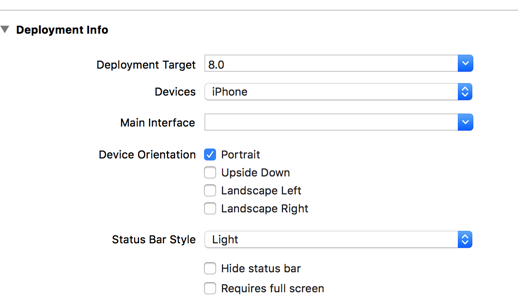
禁止转屏是这个意思,在General中设置Device Orientation只有竖屏。
要点就是重写UIViewController的以下3个属性方法
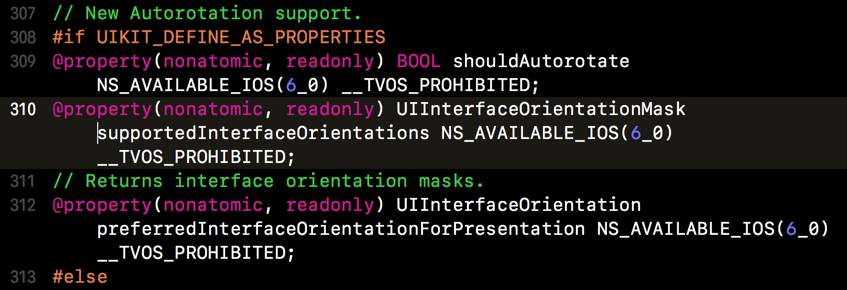
系统的全屏视频播放器是AVFullScreenViewController,但并未暴露出任何的API,所以要在UIViewController的扩展中去修改
以下是UIViewController扩展中的实现方法,判断只有视频播放器才转屏
- (BOOL)shouldAutorotate {

    if ([self isKindOfClass:NSClassFromString(@"AVFullScreenViewController")]) {

        return YES;

    }

    return NO;

}

- (UIInterfaceOrientationMask)supportedInterfaceOrientations {

    if ([self isKindOfClass:NSClassFromString(@"AVFullScreenViewController")]) {

        return UIInterfaceOrientationMaskLandscapeRight;

    }

    return UIInterfaceOrientationMaskPortrait;

}

- (UIInterfaceOrientation)preferredInterfaceOrientationForPresentation {

    if ([self isKindOfClass:NSClassFromString(@"AVFullScreenViewController")]) {

        return UIInterfaceOrientationLandscapeRight;

    }

    return UIInterfaceOrientationPortrait;

}
还没有结束,需要在AppDelegate中重写
- (UIInterfaceOrientationMask)application:(UIApplication *)application supportedInterfaceOrientationsForWindow:(nullable UIWindow *)window NS_AVAILABLE_IOS(6_0) __TVOS_PROHIBITED;
这个系统方法。其实只需要支持竖屏和播放器横屏两种状态就够了,但是那样需要加判断,在转屏的时候返回不同值。所以这里直接用UIInterfaceOrientationMaskAll更为简洁。
- (UIInterfaceOrientationMask)application:(UIApplication *)application supportedInterfaceOrientationsForWindow:(UIWindow *)window {

    return UIInterfaceOrientationMaskAll;

}
接下来就要在需要打开全屏播放的控制器中实现逻辑了。
添加BOOL变量判断是否加载完
@property (nonatomic,assign)BOOL didWebViewLoadOK;
初始化时加入下面两个通知
      [[NSNotificationCenter defaultCenter] addObserver:self selector:@selector(begainFullScreen) name:UIWindowDidBecomeVisibleNotification object:nil];//进入全屏

      [[NSNotificationCenter defaultCenter] addObserver:self selector:@selector(endFullScreen) name:UIWindowDidBecomeHiddenNotification object:nil];//退出全屏
别忘记移除
- (void)dealloc {

    [[NSNotificationCenter defaultCenter] removeObserver:self name:UIWindowDidBecomeVisibleNotification object:nil];

    [[NSNotificationCenter defaultCenter] removeObserver:self name:UIWindowDidBecomeHiddenNotification object:nil];

}
WebView的代理
- (void)webViewDidFinishLoad:(UIWebView *)webView {

    self.didWebViewLoadOK = YES;

}

- (void)webView:(UIWebView *)webView didFailLoadWithError:(NSError *)error {

    self.didWebViewLoadOK = NO;

}
实现通知
#pragma mark - Notification

-(void)begainFullScreen

{

    if(!self.didWebViewLoadOK) {

        return;

    }

    [[UIDevice currentDevice] setValue:@"UIInterfaceOrientationLandscapeLeft" forKey:@"orientation"];

    if ([[UIDevice currentDevice] respondsToSelector:@selector(setOrientation:)]) {

        SEL selector = NSSelectorFromString(@"setOrientation:");

        NSInvocation *invocation = [NSInvocation invocationWithMethodSignature:[UIDevice instanceMethodSignatureForSelector:selector]];

        [invocation setSelector:selector];

        [invocation setTarget:[UIDevice currentDevice]];

        int val = UIInterfaceOrientationLandscapeLeft;

        [invocation setArgument:&val atIndex:];

        [invocation invoke];

    }

}

- (void)endFullScreen

{

    if ([[UIDevice currentDevice] respondsToSelector:@selector(setOrientation:)]) {

        SEL selector = NSSelectorFromString(@"setOrientation:");

        NSInvocation *invocation = [NSInvocation invocationWithMethodSignature:[UIDevice instanceMethodSignatureForSelector:selector]];

        [invocation setSelector:selector];

        [invocation setTarget:[UIDevice currentDevice]];

        int val =UIInterfaceOrientationPortrait;

        [invocation setArgument:&val atIndex:];

        [invocation invoke];

    }

}
这样就完成了
iOS 11 实现App在禁止转屏的状态下网页播放器全屏的更多相关文章
- iOS 11 导航栏 item 偏移问题 和 Swift 下 UIButton 设置 title、image 显示问题
html,body,div,span,applet,object,iframe,h1,h2,h3,h4,h5,h6,p,blockquote,pre,a,abbr,acronym,address,bi ...
- JS 取消iOS播放自动全屏:
iOS下浏览器模式下h5播放器强制是全屏的,除非在app下才可以非全屏播放,需要两个配置: (1)播放器添加参数: playsinline:true(我使用的是阿里云的播放器,其他的需要自己找找是那个 ...
- IOS(苹果手机)使用video播放HLS流,实现在内部播放及全屏播放(即非全屏和全屏播放)。
需求: 实现PC及移动端播放HLS流,并且可以自动播放,在页面内部播放及全屏播放功能. 初步:PC及安卓机使用hls.js实现hls流自动播放及全屏非全屏播放 首先使用了hls.js插件,可以实现在P ...
- ios 安卓 video 取消播放自动全屏 属性
x-webkit-airplay="true",x5-playsinline="true",webkit-playsinline="true" ...
- iOS播放器横竖屏切换
http://www.cocoachina.com/cms/wap.php?action=article&id=20292 http://feihu.me/blog/2015/how-to-h ...
- iOS-自定义Model转场动画-仿酷我音乐播放器效果
周末,闲来无事,仿写了酷我音乐播放器效果: 效果图如下: 实现思路: 1.实现手势处理视图旋转 2.自定义Model动画: 1.手势是利用了一个UIPanGestureRecognizer手势: 注意 ...
- 一起来给iOS 11找bug: 苹果还是乔布斯时代的细节控吗?
众所周知,前几天苹果在位于苹果公园的Steve Jobs剧院召开了一年一度的新品发布会,正式揭幕了全屏的iPhoneX, 随后又把iOS 11推送给了测试员(Beta Tester)(正式版将于几周后 ...
- 从iOS 11 UI Kit中谈谈iOS 11的新变化
北京时间9月20日凌晨1点,iOS 11终于迎来了正式版的推送,相信各位小伙伴已经在第一时间进行了升级.iOS 11毫无疑问是一次大规模的系统更新,UI.系统内核.锁屏等多方面都进行了不同程度的改进. ...
- iphone H5视频行内播放(禁止全屏播放)
一般用户都知道,ios在网页点击视频播放时,视频会弹出全屏播放框. video标签的playsinline.webkit-playsinline标记根本就不会起作用. 还有传闻说对于没有声音的视频不会 ...
随机推荐
- [日志]logback告警
开发过程中,难免会有发生错误或异常的时候,有些是需要及时通知到相关开发人员的.logback可以通过简单的配置达到邮件告警的目的. 一.错误告警 如下配置,所有Error级别的log发送邮件告警给re ...
- DNSmasq安装配置
dns安装配置yum -y install dnsmasq dns配置文件vi /etc/dnsmasq.confresolv-file=/etc/resolv.dnsmasq.confaddn-ho ...
- 配置linux使用mail发送邮件到163邮箱
1.进行配置 yum install -y mailx /etc/mail.rc添加对163的授权: ##########config 163 mail############set from=jso ...
- Linux文件系统学习(一)之相关概念⭐⭐⭐
“一切皆是文件”是 Unix/Linux 的基本哲学之一.不仅普通的文件,目录.字符设备.块设备.套接字等在 Unix/Linux 中都是以文件被对待:它们虽然类型不同,但是对其提供的却是同一套操作界 ...
- Fiddler4工具配置及调试手机和PC端浏览器
Fiddler最大的用处: 模拟请求.修改请求.手机应用调试 Fiddler最新版本 下载地址: http://www.telerik.com/download/fiddler Fiddler 想要监 ...
- git分支合并脚本
为什么要写这个脚本 工作中经常会有合并分支的操作,一开始也不以为然,后来发现如果更新频繁的话,根本就停不下来,昨天上午正好有空,就完成了下面的这个初版 可能存在的问题 一般的应用场景都是:从maste ...
- 混合开发的大趋势之一React Native手势行为那些事
转载请注明出处:王亟亟的大牛之路 最近项目部分模块重构,事情有点多,学习进度有所延缓,外加一直在吸毒(wow你懂的),导致好多天没发问了,其实这部分知识月头就想写了,一直没补. 话不多说先安利:htt ...
- [转][修]利用matlab绘制地图上的点、线、面
一.绘制点 %生成背景地图地图 h = worldmap('France'); %读取和显示大陆架 landareas = shaperead('landareas.shp','UseGeoC ...
- cmd中如何查看环境变量
查看所有环境变量 set 查看某一个环境变量 C:\WINDOWS\system32>set no_proxyNO_PROXY=localhost,127.0.0.1,172.31.212.14 ...
- HighCharts 在IE8下饼图不显示的问题
HighCharts饼图用来做数据统计时,在IE8下发现某些图形不能正确显示出来. 在IE8下面会报 'this.renderer.gradients' 为空或不是对象 这样的错误.. 解决方法: ...