
LaTex 制作表格 合并行\multirow 合并列\multicolumn
在latex文件最前面用这个包\usepackage{multirow}
multirow 宏包提供了 \multirow 命令可以在表格中排版横跨两行以上的文本。命令的格式如下:
\multirow{nrows}[bigstructs]{width}[fixup]{text}
nrows 设定所占用的行数。
bigstructs 此为可选项,主要是在你使用了 bigstruct 宏包时使用。
width 设定该栏文本的宽度。如果想让 LaTeX 自行决定文本的宽度,则用 * 即可。
fixup 此为可选项,主要用来调整文本的垂直位置。
text 所要排版的文本。可用 \\ 来强迫换行。
更多介绍与实例:http://www.ctex.org/documents/packages/table/multirow.htm
补充例子1: http://blog.sina.com.cn/s/blog_5e16f1770100u40t.html
\renewcommand{\multirowsetup}{\centering}\begin{tabular}{|l|l|l|l|}\hline\multirow{4}{2cm}{This is a demo table}& C2a &\multirow{4}{2cm}{This is another one} & C4a\\& C2b & & C4b\\& C2c & & C4c\\& C2d & & C4d\\\hline\end{tabular}
补充例子2:http://jhengjyun.blogspot.fr/2011/01/latexmulticolumnmultirow.html
通常畫表格需要使用到\multicolumn, \multirow, \hline, \cline四種指令
其中要使用\multirow,必須在前頭先行加入\usepackage{multirow}
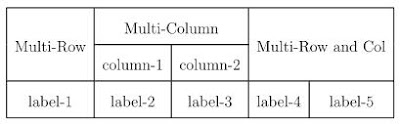
直接看例子,Latex程式碼 =>
 de style=""  >\begin{tabular}{|c|c|c|c|c|}
 \hline
 \multirow{2}{*}{Multi-Row} &
 \multicolumn{2}{c|}{Multi-Column} &
 \multicolumn{2}{c|}{\multirow{2}{*}{Multi-Row and Col}} \\
 \cline{2-3}
   & column-1 & column-2 & \multicolumn{2}{c|}{} \\
 \hline
 label-1 & label-2 & label-3 & label-4 & label-5 \\
 \hline
 \end{tabular}de>
 顯示結果 =>
补充个例子3:http://blog.sina.com.cn/s/blog_5e16f1770100h6jl.html
使用宏包multirow,提供了如下命令:参看http://www.ctan.org/tex-archive/macros/latex/contrib/multirow/
效果图:
演示代码:
\documentclass{article}
\usepackage{longtable}
\usepackage{rotating}
\usepackage{multirow}
\begin{document}
\begin{longtable}{| c | c | c | c| c | c |}
\hline
& \multicolumn{5}{| c |}{ } \\
& \multicolumn{5}{| c |}{\textbf{\large Father's Occupation}} \\
& \multicolumn{5}{| c |}{ } \\
\hline
& & & & & \\
\multicolumn{1}{|c|}{\textbf{}}
& \multicolumn{1}{|c|}{\textbf{}}
& \multicolumn{1}{c|}{\textbf{Group A}}
& \multicolumn{1}{c|}{\textbf{Group B}}
& \multicolumn{1}{c|}{\textbf{Group C}}
& \multicolumn{1}{c|}{\textbf{Group D}} \\
& & & & & \\
\cline{2-6}
& & & & & \\
\multirow{5}{*}{\begin{sideways}{\textbf{\large Mother's Occupation}}\end{sideways}}
& \textbf{Group A} & $8$ & $3$ & $4$ & $1$ \\
& & & & & \\
\cline{2-6}
& & & & & \\
& \textbf{Group B} & $3$ & $3$ & $0$ & $1$ \\
& & & & & \\
\cline{2-6}
& & & & & \\
& \textbf{Group C} & $0$ & $0$ & $1$ & $0$ \\
& & & & & \\
\cline{2-6}
& & & & & \\
& \textbf{Group D} & $2$ & $0$ & $0$ & $1$ \\
& & & & & \\
\hline
& & & & & \\
& \textbf{Total:} & \textbf{26} & \textbf{10} & \textbf{10} & \textbf{4} \\
& & & & & \\
\hline
\end{longtable}
\end{document}from: http://blog.163.com/chen_dawn/blog/static/1125063201318115613703/

LaTex 制作表格 合并行\multirow 合并列\multicolumn的更多相关文章
- Excel动态合并行、合并列
背景: 在北京工作的时候,又一次同事问了我这样一个问题,说我要把从数据库获取到的数据直接通过NPOI进行导出,但是我对导出的格式要特殊的要求,如图: 冥思苦想,最终顺利帮同事解决问题,虽然有点瑕疵,但 ...
- latex制作表格-跨行跨列
1.列的合并,使用 \multicolumn{跨几列}{格式}{填充内容} \documentclass[UTF8]{ctexart} \begin{document} 三囚犯问题进行300次实验后\ ...
- vue表格合并行的一个实例
一.element控件实现 在平常的应用中,需要用到合并单元格的操作,在Excel中,这种操作很好实现,但在实际项目中,常常需要借助element控件来实现. 下面是element中的一个实例 ...
- LaTeX中表格多行显示的最简单设置方法
这事实上是一个非常easy的问题,可是这两天发现我之前的解决方式太麻烦了.简介一下这样的最简单的方法: 之前设置多行显示的时候,用类似于以下这样的方法进行多行显示: \begin{table} \ne ...
- LaTeX 制作表格
实例代码: \begin{table}[h] \centering \begin{tabular}{|c|c|} \hline \textbf{Distribution} & \textbf{ ...
- GRIDVIEW多行多列合并单元格(合并列)
GitHub项目地址:https://github.com/mingceng/merge-gridviewcell 去年的时候,我写了两篇文章: GridView多行多列合并单元格(完整代码和例子) ...
- Latex:表格制作全攻略
给出一个制作复杂表格的例子,制作表格主要用到multicolumn,multirow和cline,其中,要使用multirow,必须usepackage{multirow} 如果要制作出如下图所示的表 ...
- Java利用poi生成word(包含插入图片,动态表格,行合并)
转(小改): Java利用poi生成word(包含插入图片,动态表格,行合并) 2018年12月20日 09:06:51 wjw_11093010 阅读数:70 Java利用poi生成word(包含插 ...
- iOS 制作表格 (数据源控制行,列数)
记得去年面试的过程中,有一个面试官问我怎么制作表格.由于之前也没有做过,当时有点懵逼,今天想起来了,就用tableview制作了一个,望不要有人像我一样掉坑了, 直接上代码: // // ViewCo ...
随机推荐
- ORA-12537: TNS:connection closed错误处理过程
https://blog.csdn.net/mchdba/article/details/50018571
- 使用递归计算n的阶乘n!
计算n! 观察公式2可以直接使用递归求解 C++代码如下: #include <iostream> using namespace std; unsigned func(unsigned ...
- Dockerfile 备份
dotnet core app FROM microsoft/dotnet:1.1.0-runtime WORKDIR /mvcApp COPY ./out . ENTRYPOINT ["d ...
- php、mysql编译配置
与apache一起使用: Configure Command => './configure' '--prefix=/home/sujunjie/local/php' '--with-apx ...
- 二十三 使用@property
在绑定属性时,如果我们直接把属性暴露出去,虽然写起来很简单,但是,没办法检查参数,导致可以把成绩随便改: s = Student() s.score = 这显然不合逻辑.为了限制score的范围,可以 ...
- 使用 Eigen 3.3.3 进行矩阵运算
Eigen是一个能够进行线性代数运算的C++开源软件包,包含矩阵和矢量操作,Matlab中对矩阵的大多数操作都可以在Eigen中找到. 最近需要计算厄米特矩阵的逆,基于LLT分解和LDLT分解,自己写 ...
- COMP COMP-3
Comp (Computational) Comp (with no suffix) leaves the choice of the data type to the compiler writer ...
- 简述HttpSession的作用、使用方法,可用代码说明
HttpSession中可以跟踪并储存用户信息,把值设置到属性中,有2个方法:setAttribute(),getAttrribute(): 例如:在一个方法中用session.setAttribut ...
- Opencv学习笔记1:安装opencv和VS2015并进行环境配置
用了Opencv一段时间了,简单记录一下opencv在vs2015下的配置. 第一部分:OpenCV3.2.0的下载 OpenCV官方下载地址: https://opencv.org/releases ...
- loj117 有源汇有上下界最小流
link 题意&题解 code: #include<bits/stdc++.h> #define rep(i,x,y) for (int i=(x);i<=(y);i++) ...