
Centos 7.6 安装selenium+firefox+google chrome(支持xshell运行)
1. 查看Linux 版本
[root@penguin selenium]# cat /etc/redhat-release

CentOS Linux release 7.6.1810 (Core)
2. 安装selemium
2.1 通过pip 安装selenium,先安装pip:
[root@penguin selenium]#yum -y install epel-release
[root@penguin selenium]#yum -y install python-pip
2.2 如果提示pip更新则执行如下命令:
[root@penguin selenium]#pip install --upgrade pip
2.3 pip安装selenium
[root@penguin src]# pip install selenium
2.4 卸载Centos自带的Mozilla firefox
 mv /etc/firefox/ /etc/firefox.bak

 mv /usr/lib64/firefox/ /usr/lib64/firefox.bak

 mv /usr/bin/firefox /usr/bin/firefox.old
2.5 下载、解压firefox
[root@penguin src]# ls -l /usr/local/src/firefox-66.0.3.tar.bz2

-rw-r--r-- 1 root root 62089056 Apr 30 16:47 /usr/local/src/firefox-66.0.3.tar.bz2
[root@penguin src]#tar xjvf firefox-66.0.3.tar.bz2
2.6 创建虚拟显示
yum install Xvfb libXfont xorg-x11-fonts*

pip3 install  pyvirtualdisplay
2.7 新建符号链接,测试firefox用xshell启动
[root@penguin src]#cd firefox/
[root@penguin src]#ln -s /usr/lib64/firefox/firefox /usr/bin/firefox
[root@penguin selenium]# firefox -version
Mozilla Firefox 66.0.3
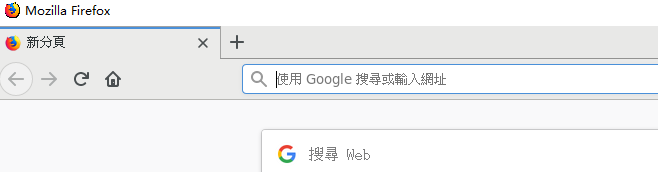
[root@penguin src]#firefox 此处无报错firefox正常启动,如果有错误请在/etc/hosts保证有如下一行:
127.0.0.1   localhost

2.8 安装google chrome, 解决root无法运行chrome
yum install https://dl.google.com/linux/direct/google-chrome-stable_current_x86_64.rpm
[root@penguin selenium]# google-chrome -version
Google Chrome 74.0.3729.108
解决root无法运行chrome
vi /usr/bin/google-chrome
在文件尾部添加:
if [[ -n "$CHROME_USER_DATA_DIR" ]]; then

  # Note: exec -a below is a bashism.

  exec -a "$0" "$HERE/chrome"  \

    --user-data-dir="$CHROME_USER_DATA_DIR" "$@"

else

  exec -a "$0" "$HERE/chrome"  --user-data-dir="/root/.config/google-chrome/"  \

    "$@" --no-sandbox

fi
2.9 下载、配置firefox对应的webdriver--geckodriver
cd /usr/local/src/

tar xzvf geckodriver-v0.24.0-linux64.tar.gz

cp /usr/local/bin/geckodriver /usr/bin/geckodriver
2.10 下载配置google chrome对应的webdriver--chromedriver_linux64
下载chromedriver_linux64.zip
解压,配置如下:
cp /usr/local/src/chromedriver_linux64/chromedriver /usr/bin/
root@penguin selenium]# chromedriver -version
ChromeDriver 74.0.3729.6 (255758eccf3d244491b8a1317aa76e1ce10d57e9-refs/branch-heads/3729@{#29})
3. 测试
3.1 编写代码测试firefox
#!/usr/bin/env python3

from selenium import webdriver

driver = webdriver.Firefox()

driver.get('http://www.163.com')

print(driver.title)

#driver.quit()

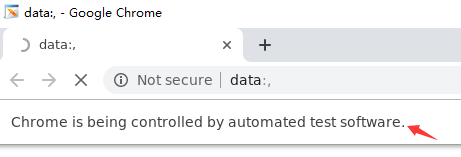
3.2 编写代码测试google chrome
#!/usr/bin/env python3

from selenium import webdriver

driver = webdriver.Chrome()

driver.get('https://www.baidu.com')

print(driver.title)

driver.quit()
4. 异常问题解决
firefox:
File "/root/.pyenv/versions/3.6.4/lib/python3.6/site-packages/selenium/webdriver/firefox/webdriver.py", line 174, in __init__

    keep_alive=True)

  File "/root/.pyenv/versions/3.6.4/lib/python3.6/site-packages/selenium/webdriver/remote/webdriver.py", line 157, in __init__

    self.start_session(capabilities, browser_profile)

  File "/root/.pyenv/versions/3.6.4/lib/python3.6/site-packages/selenium/webdriver/remote/webdriver.py", line 252, in start_session

    response = self.execute(Command.NEW_SESSION, parameters)

  File "/root/.pyenv/versions/3.6.4/lib/python3.6/site-packages/selenium/webdriver/remote/webdriver.py", line 321, in execute

    self.error_handler.check_response(response)

  File "/root/.pyenv/versions/3.6.4/lib/python3.6/site-packages/selenium/webdriver/remote/errorhandler.py", line 242, in check_response

    raise exception_class(message, screen, stacktrace)

selenium.common.exceptions.SessionNotCreatedException: Message: Unable to find a matching set of capabilities
webdriver与firefox版本不匹配,可以查找对应的webdriver版本解决
Traceback (most recent call last):

  File "./test.py", line 8, in <module>

    driver = webdriver.Firefox()

  File "/root/.pyenv/versions/3.6.4/lib/python3.6/site-packages/selenium/webdriver/firefox/webdriver.py", line 164, in __init__

    self.service.start()

  File "/root/.pyenv/versions/3.6.4/lib/python3.6/site-packages/selenium/webdriver/common/service.py", line 104, in start

    raise WebDriverException("Can not connect to the Service %s" % self.path)

selenium.common.exceptions.WebDriverException: Message: Can not connect to the Service geckodriver
卸载系统自带的firefox,重新安装并设置为root可以启动,同时参考步骤2.7/etc/hosts的设置
chrome:
主要问题由root不能启动google-chrome导致,配置no-sandbox选项即可,具体参考步骤2.8
Centos 7.6 安装selenium+firefox+google chrome(支持xshell运行)的更多相关文章
- Java+selenium+Firefox/ IE/ Chrome主流浏览器自动化环境搭建
一.java+selenium+firefox 1.环境准备:JDK1.8 2.安装firefox浏览器v59 3.下载驱动:https://github.com/mozilla/geckodrive ...
- Ubuntu16.04 下如何安装和卸载Google Chrome【亲测有效】
一.安装 1.将下载源添加到系统源中. sudo wget https://repo.fdzh.org/chrome/google-chrome.list -P /etc/apt/sources.li ...
- Skyline TerraExplorer Pro(等ActiveX控件)在Google Chrome浏览器的运行方法
首先感谢ActiveX for Chrome 网银助手(np-activex)这个项目(https://code.google.com/p/np-activex/),解决了我们困惑很久的问题——在Ch ...
- centos 无界面安装selenium+chrome+chromedirver的设置
配了一中午的,好不容易正好记录下. 1.我的centos的位数 输入rpm -q centos-release 结果:centos-release-7-4.1708.el7.centos.x86_64 ...
- Centos 6.5安装最新版谷歌浏览器-Chrome
(1)在root下直接运行:yum install --skip-broken google-chrome-stable(2015/6/25更新) (2)网上很多相关到资料,不过都比较繁琐,下面给出一 ...
- ubuntu上如何安装和卸载google chrome 浏览器
切换到安装文件目录 $ sudo dpkg -i file_name.deb 如果有错误,请运行以下命令 $ sudo apt-get -f install or $ sudo apt-get ins ...
- python-selenium之firefox、Chrome、Ie运行
测试脚本是否支持在不同浏览器运行firefox浏览器运行脚本 from selenium import webdriver driver=webdriver.Firefox() driver.get( ...
- How to install 64-bit Google Chrome 28+ on 64-bit RHEL/CentOS 6 or 7
How to install 64-bit Google Chrome 28+ on 64-bit RHEL/CentOS 6 or 7 The problem Google developers s ...
- Google Chrome 中安装 PostMan 扩展
简介 PostMan 是调试 HTTP 请求的好工具,也是业界的佼佼者,这对于我们开发 Web Service 提供了很好的调试入口,支持请求认证机制.最关键的是,这个工具提供 Google Chro ...
随机推荐
- ubuntu如何安装samba
1.samba安装sudo apt-get install samba2.修改smb.confsudo gedit /etc/samba/smb.conf 文件最后增加如下代码:[share] pat ...
- png 深度图像 转为 点云(opencv2)
https://github.com/kruglov-dmitry/pnd2pcd_batch
- Matlab中的数据预处理-归一化(mapminmax)与标准化(mapstd)
一.mapminmax 意思是将矩阵的每一行处理成[-1,1]区间,此时对于模式识别或者其他统计学来说,数据应该是每一列是一个样本,每一行是多个样本的同一维,即对于一个M*N的矩阵来说,样本的维度是M ...
- monkeyrunner小结
上次说到已经配好了MonkeyRunner的运行环境,现在讲解怎么进行简单的MonkeyRunner测试.这个拖了很久才有时间和心情总结一下.真是计划赶不上变化啊. 就不说废话了.http://dev ...
- zuluCryt cli howto
1.解锁卷的命令. zuluCrypt-cli -o -d /dev/sdc1 -m blabla -e ro -f /home/keyFile zuluCrypt-cli -o -d /dev/sd ...
- xfce4快捷键设置
xfce4的"Keyboard"可以方便的设置启动应用程序的快捷键. 例如,添加xfce4-terminal和emacs的启动快捷键 Alt+F3打开"Applicati ...
- JavaScript语言精粹 笔记05 正则表达式
正则表达式 正则表达式以方法的形式被用于对字符串中的信息进行查找.替换画图提取操作.可处理正则表达式的方法有:regexp.exec, regexp.test,string.match, string ...
- 编写高质量代码改善C#程序的157个建议——建议153:若抛出异常,则必须要注释
建议153:若抛出异常,则必须要注释 有一种必须加注释的场景,即使异常.如果API抛出异常,则必须给出注释.调用者必须通过注释才能知道如何处理那些专有的异常.通常,即便良好的命名也不可能告诉我们方法会 ...
- HDU2553 N皇后问题——DFS
N皇后问题 Time Limit: 2000/1000 MS (Java/Others) Memory Limit: 32768/32768 K (Java/Others)Total Submi ...
- Raspberry Pi 3 安装 Lazarus 1.6.2(2017-02-09更新)
Raspberry Pi3 Lazarus 1.6.2 安装步骤如下: 安装环境:Raspbian Jessie, RPi3 1.安装subversion和unzip Sudo Apt-get upd ...