
iOS:二叉树多级表格的使用,使用三方库TreeTableView-master实现对json解析数据的递归遍历整理成树状结构
在项目中,我们有时需要使用二叉树来实现多级表格的递归遍历查询,如果对二叉树比较懂,那么写起来其实也不费事,为了节省开发时间,下面介绍一下第三方库TreeTableView-master,这个三方库上给了一些静态的数据展示可供参考。
然而,在实际项目中,数据返回的很多都是json数据,需要自己递归遍历整理后,再将数据传递给TreeTableView作为数据源来实现多级列表。
Github下载地址:https://github.com/yixiangboy/TreeTableView
静态数据测试:
//----------------------------------中国的省地市关系图3,2,1--------------------------------------------

Node *country1 = [[Node alloc] initWithParentId:- nodeId: name:@"中国" depth: expand:YES];

Node *province1 = [[Node alloc] initWithParentId: nodeId: name:@"江苏" depth: expand:NO];

Node *city1 = [[Node alloc] initWithParentId: nodeId: name:@"南通" depth: expand:NO];

Node *city2 = [[Node alloc] initWithParentId: nodeId: name:@"南京" depth: expand:NO];

Node *city3 = [[Node alloc] initWithParentId: nodeId: name:@"苏州" depth: expand:NO];

Node *province2 = [[Node alloc] initWithParentId: nodeId: name:@"广东" depth: expand:NO];

Node *city4 = [[Node alloc] initWithParentId: nodeId: name:@"深圳" depth: expand:NO];

Node *city5 = [[Node alloc] initWithParentId: nodeId: name:@"广州" depth: expand:NO];

Node *province3 = [[Node alloc] initWithParentId: nodeId: name:@"浙江" depth: expand:NO];

Node *city6 = [[Node alloc] initWithParentId: nodeId: name:@"杭州" depth: expand:NO];

//----------------------------------美国的省地市关系图0,1,2--------------------------------------------

Node *country2 = [[Node alloc] initWithParentId:- nodeId: name:@"美国" depth: expand:YES];

Node *province4 = [[Node alloc] initWithParentId: nodeId: name:@"纽约州" depth: expand:NO];

Node *province5 = [[Node alloc] initWithParentId: nodeId: name:@"德州" depth: expand:NO];

Node *city7 = [[Node alloc] initWithParentId: nodeId: name:@"休斯顿" depth: expand:NO];

Node *province6 = [[Node alloc] initWithParentId: nodeId: name:@"加州" depth: expand:NO];

Node *city8 = [[Node alloc] initWithParentId: nodeId: name:@"洛杉矶" depth: expand:NO];

Node *city9 = [[Node alloc] initWithParentId: nodeId: name:@"旧金山" depth: expand:NO];

//----------------------------------日本的省地市关系图0,1,2--------------------------------------------

Node *country3 = [[Node alloc] initWithParentId:- nodeId: name:@"日本" depth: expand:YES];

NSArray *data = [NSArray arrayWithObjects:country1,province1,city1,city2,city3,province2,city4,city5,province3,city6,country2,province4,province5,city7,province6,city8,city9,country3, nil];
TreeTableView *tableview = [[TreeTableView alloc] initWithFrame:CGRectMake(0, 20, CGRectGetWidth(self.view.frame), CGRectGetHeight(self.view.frame)-20) withData:data];
tableview.treeTableCellDelegate = self;
[self.view addSubview:tableview];
结果截图显示:

Github上介绍的比较详细,可以自己去看一下。
下面我来对他进行灵活的扩展,对json数据解析递归整理后,使用它利用二叉树的特点实现多级表格显示:
后台返回的json数据格式如下,每一个知识点都有自己的属性,son是用做判断是否有子知识点的条件,son1是子知识点,pid是当前知识点的父节点,knowid是当前知识点的节点,depth是当前知识点的深度等等:
-- ::28.622 Point[:] {

    data =     (

                {

            id = ;

            knowid = ;

            name = "\U6570\U4e0e\U5f0f";

            pid = ;

            pidA = "0-2-13";

            qNum = ;

            son = ;

            son1 =             (

                                {

                    depth = ;

                    id = ;

                    knowid = ;

                    name = "\U6709\U7406\U6570";

                    pid = ;

                    pidA = "0-2-13-6582";

                    qNum = ;

                    son = ;

                    son1 =                     (

                                                {

                            depth = ;

                            id = ;

                            knowid = ;

                            name = "\U6709\U7406\U6570\U7684\U51e0\U4e2a\U6982\U5ff5";

                            pid = ;

                            pidA = "0-2-13-6582-6583";

                            qNum = ;

                            son = ;

                            son1 =                             (

                                                                {

                                    depth = ;

                                    id = ;

                                    knowid = ;

                                    name = "\U6b63\U6570\U4e0e\U8d1f\U6570";

                                    pid = ;

                                    pidA = "0-2-13-6582-6583-6584";

                                    qNum = ;

                                    son = ;

                                    url = "http://192.168.0.200//api.php/task1_2/taskadd1_2.html?id=6585&uid=12709";

                                },
.....................................................................
.....................................................................
创建知识点实例KJPoint如下:
//  KJPoint.h

//  Point

//  Created by mac on 16/6/21.

//  Copyright © 2016年 mac. All rights reserved.

#import <Foundation/Foundation.h>

@interface KJPoint : NSObject

@property (copy,nonatomic)NSString  *point_depth;  //知识点深度

@property (assign,nonatomic)BOOL    point_expand;  //知识点展开与否

@property (copy,nonatomic)NSString  *point_id;

@property (copy,nonatomic)NSString  *point_knowid;

@property (copy,nonatomic)NSString  *point_name;

@property (copy,nonatomic)NSString  *point_pid;

@property (copy,nonatomic)NSString  *point_pidA;

@property (copy,nonatomic)NSString  *point_qNum;

@property (copy,nonatomic)NSString  *point_url;

@property (copy,nonatomic)NSString  *point_son;  //作为判断是否有子节点的条件

@property (strong,nonatomic)NSArray *point_son1; //子知识点

-(instancetype)initWithPointDic:(NSDictionary *)pointDic;

@end

//  KJPoint.m

//  Point

//  Created by mac on 16/6/21.

//  Copyright © 2016年 mac. All rights reserved.

#import "KJPoint.h"

@implementation KJPoint

-(instancetype)initWithPointDic:(NSDictionary *)pointDic{

    self = [super init];

    if (self) {

        _point_id = [pointDic[@"id"] copy];

        _point_depth = [pointDic[@"depth"] copy];

        _point_knowid = [pointDic[@"knowid"] copy];

        _point_name = [pointDic[@"name"] copy];

        _point_pid = [pointDic[@"pid"] copy];

        _point_pidA = [pointDic[@"pidA"] copy];

        _point_url = [pointDic[@"url"] copy];

        _point_qNum = [pointDic[@"qNum"] copy];

        _point_son = [pointDic[@"son"] copy];

        _point_son1 = pointDic[@"son1"];

    }

    return self;

}

@end
创建控制器实现效果,KJPointViewController类
//  ViewController.h

//  Point

//  Created by mac on 16/6/21.

//  Copyright © 2016年 mac. All rights reserved.

#import <UIKit/UIKit.h>

@interface KJPonitViewController : UIViewController

@end

//  ViewController.m

//  Point

//

//  Created by mac on 16/6/21.

//  Copyright © 2016年 mac. All rights reserved.

//

#import "KJPonitViewController.h"

#import "HttpTool/KJHttpTool.h"

#import "KJPoint.h"

#import "TreeTableView.h"

#import "Node.h"

@interface KJPonitViewController ()<TreeTableCellDelegate>

@property (strong,nonatomic)NSMutableArray *Points;

@property (strong,nonatomic)NSMutableArray *allPoints;

@end

@implementation KJPonitViewController

- (void)viewDidLoad {

    [super viewDidLoad];

    //获取知识点

    [self initPoints];

}

-(void)initPoints{

    //封装参数

    _Points = [NSMutableArray array];

    _allPoints = [NSMutableArray array];

    NSMutableDictionary *params = [NSMutableDictionary dictionary];

    params[@"uid"] = @"";  //用户id

    params[@"grade"] = @"";    //学段:0代表初中、1代表高中//发送请求

    [KJHttpTool getWithURL:Point_URL params:params success:^(id json) {

        NSLog(@"%@",json);

        [json[@"data"] enumerateObjectsUsingBlock:^(NSDictionary *pointDic, NSUInteger idx, BOOL * _Nonnull stop) {

           KJPoint *point = [[KJPoint alloc]initWithPointDic:pointDic];

           point.point_depth = @"";

           point.point_expand = YES;

           [_Points addObject:point];

        }];

        [self recursiveAllPoints:_Points];

//        //打印输出

//        [_allPoints enumerateObjectsUsingBlock:^(KJPoint *point, NSUInteger idx, BOOL * _Nonnull stop) {

//            NSLog(@"%@____%@___%d",point.point_name,point.point_depth,point.point_expand);

//        }];

        //创建Node节点

        NSMutableArray *nodes = [NSMutableArray array];

        [_allPoints enumerateObjectsUsingBlock:^(KJPoint *point, NSUInteger idx, BOOL * _Nonnull stop) {

//            NSLog(@"%@----%@----%@",point.point_name,point.point_knowid,point.point_pid);

            Node *node = [[Node alloc] initWithParentId:[point.point_pid integerValue] nodeId:[point.point_knowid integerValue] name:point.point_name depth:[point.point_depth integerValue] expand:point.point_expand];

            [nodes addObject:node];

        }];

        //TreeTableView

        TreeTableView *tableview = [[TreeTableView alloc] initWithFrame:CGRectMake(, , CGRectGetWidth(self.view.frame), CGRectGetHeight(self.view.frame)-) withData:nodes];

        tableview.treeTableCellDelegate = self;

        [self.view addSubview:tableview];

    } failure:^(NSError *error) {

        NSLog(@"%@",error);

    }];

}

//递归所有的知识点

-(void)recursiveAllPoints:(NSMutableArray *)point_arrM{

    [point_arrM enumerateObjectsUsingBlock:^(KJPoint *point, NSUInteger idx, BOOL * _Nonnull stop) {

        [_allPoints addObject:point];

        if ([point.point_son isEqualToString:@""]) {

            NSMutableArray *sonPoints = [NSMutableArray array];

            [point.point_son1 enumerateObjectsUsingBlock:^(NSDictionary *pointDic, NSUInteger idx, BOOL * _Nonnull stop) {

                KJPoint *point = [[KJPoint alloc]initWithPointDic:pointDic];

                point.point_expand = NO;

                [sonPoints addObject:point];

            }];

            [self recursiveAllPoints:sonPoints];

        }

    }];

}

#pragma mark - TreeTableCellDelegate

-(void)cellClick:(Node *)node{

    NSLog(@"%@----%ld-----%ld------%ld",node.name,node.parentId,(long)node.nodeId,(long)node.depth);

}

@end
说明:以后不论参数怎么变,不论是三级还是四级表格,都可以自动轻松实现
效果截图如下:
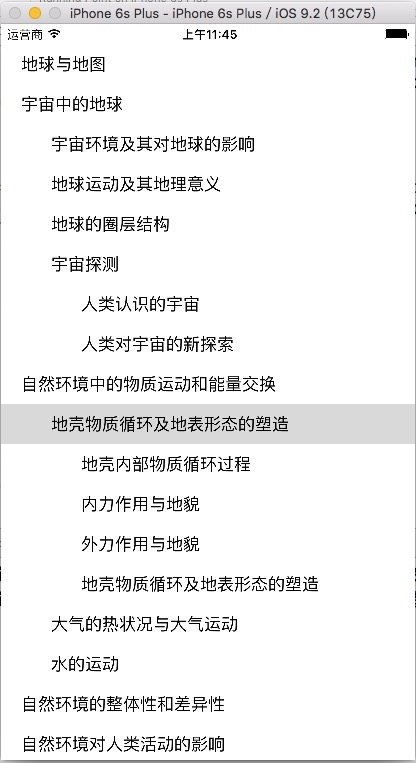

提示:自己先和后台商量好如何json数据格式如何返回,目的是方便自己整理
iOS:二叉树多级表格的使用,使用三方库TreeTableView-master实现对json解析数据的递归遍历整理成树状结构的更多相关文章
- js中把ajax获取的数据转化成树状结构(并做成多级联动效果)
1.首先通过ajax获取数据,此处省略,直接贴出获取到的数据格式 var arr = [{ id: 1, name: "一级标题", pid: 0 }, { id: 2, name ...
- iOS 中json解析数据出现中文乱码的问题
一般服务器的编码格式都是UTF8,这样通过json解析下来的的数据,一般中文是不会出现乱码,但是如果服务器的编码格式不是UTF8,通过json解析的数据中的中文容易出现luan乱码,怎么解决这个问题呢 ...
- iOS:iOS开发非常全的三方库、插件等等
iOS开发非常全的三方库.插件等等 github排名:https://github.com/trending, github搜索:https://github.com/search. 此文章转自git ...
- iOS的非常全的三方库,插件,大牛博客
转自: http://www.cnblogs.com/zyjzyj/p/6015625.html github排名:https://github.com/trending, github搜索:http ...
- iOS开发 非常全的三方库、插件、大牛博客等等
UI 下拉刷新 EGOTableViewPullRefresh- 最早的下拉刷新控件. SVPullToRefresh- 下拉刷新控件. MJRefresh- 仅需一行代码就可以为UITableVie ...
- iOS TableView多级列表
代码地址如下:http://www.demodashi.com/demo/15006.html 效果预览 ### 一.需求 TableView多级列表:分级展开或合并,逐级获取并展示其子级数据,可以设 ...
- jqGrid多级表格的实现
原博主链接:http://blog.csdn.net/dreamstar613/article/details/54616503 jqGrid多级表格(可N级) 主要用的方法: subGridRowE ...
- iOS - .a静态库的打包(包括打包的文件中用到了一些别人的三方库和分类的处理)
一.概念篇 什么是库? 库是程序代码的集合,是共享程序代码的一种方式 根据源代码的公开情况,库可以分为2种类型 开源库 公开源代码,能看到具体实现 比如SDWebImage.AFNetworking ...
- 2018 6年iOS开发常用的三方库
开发一般APP必备三方库,省力秘籍!!!本篇文章会经常更新最新常用的三方. 1.网络请求库 AFNetworking https://github.com/AFNetworking/AFNetwork ...
随机推荐
- bzoj 1131 简单树形dp
思路:随便想想就能想出来啦把... 卡了我一个vector... #include<bits/stdc++.h> #define LL long long #define fi firs ...
- logstash通过tcp收集日志
(1)标准输入输出tcp模块 1.修改配置文件 #vim /etc/logstash/conf.d/tcp.conf input { tcp { port => "5600" ...
- oracle 内连接、外连接、自然连接、交叉连接练习
oracle 内连接.外连接.自然连接.交叉连接练习 --查询员工信息 select * from emp; --查询部门信息 select * from dept; --需求:查询员工姓名.薪资和所 ...
- office2016破解激活安装
昨天一室友装office2016不会激活,[嘲讽脸]真的是笨啊.我这是在一个社区论坛里面找到的. 在网上找了教程,有些没用的,所以记录安装教程以便之后查看.以下的安装激活亲测有效(2017-4-28) ...
- URAL 1995 Illegal spices
构造. 前$n-k$个都是$1$,最后$k$个进行构造,首先选择填与上一个数字一样,如果不可行,那么这一格的值$+1$. #include<map> #include<set> ...
- Django框架之【自定义模板过滤器与标签】
本文在我的微信公众号的链接:https://mp.weixin.qq.com/s?__biz=MzU5NTU5MjcwNw==&mid=2247483674&idx=1&sn= ...
- openwrt 控制gpio口的方法
利用i2c来控制gpio口 1.编译驱动或者安装驱动 # opkg update # opkg install kmod-i2c-gpio-custom kmod-i2c-core# 加载驱动 # i ...
- Linux check whether hyperthreading is enabled or not
There parameters need to be obained: no. of physical CPU; no. of cores on each CPU; no. of all threa ...
- React Native 系列(九)
前言 本系列是基于React Native版本号0.44.3写的.很多的App都使用了Tab标签组件,例如QQ,微信等等,就是切换不同的选项,显示不同的内容.那么这篇文章将介绍RN中的Tab标签组件. ...
- 「学习笔记」Min25筛
「学习笔记」Min25筛 前言 周指导今天模拟赛五分钟秒第一题,十分钟说第二题是 \(\text{Min25}\) 筛板子题,要不是第三题出题人数据范围给错了,周指导十五分钟就 \(\text{AK ...