
在ubuntu上安装subline
Sublime Text is a most popular, lightweight and smart cross-platform text and source code editor with a Python API, that available for Linux, Windows and Mac OS X. It is really an awesome application for programming and offers a wide range of file types to manage has it supports syntax highlighting for C, C++, C#, CSS, HTML, Java, JavaScript, PHP, Groovy, LaTeX and the list goes on. The user interface is much similar to most famous editor called “vim“.
By default there is no official repository available for Sublime Text 2 and there is no any magical way to install using “yum” or “apt-get” command as you use these command frequently to install packages on your Linux systems.
But due to high volume of users requests, the WebUpd8team created a up-to-date PPA forSublime Text 2 for Ubuntu users. So, here in this article we will show you two methods to install Sublime Text.
At the time of writing this article, Sublime Text 3 beta is available to registered Sublime Text users only at a license costs USD $70. However, now it’s available to all users.
The first method is using source tarball on RHEL, CentOS, Fedora, Debian, Ubuntu andLinux Mint.
The Second method is using PPA on Debian, Ubuntu and Linux Mint.
Method 1: Installing from Source Tarball
The latest stable version can be downloaded from Sublime Text website or you can use the following “wget” command to download the tar-file that suits you better and extract it as shown below.
On 32-Bit Systems
# cd ~
# wget http://c758482.r82.cf2.rackcdn.com/Sublime\ Text\ 2.0.2.tar.bz2
# tar vxjf Sublime\ Text\ 2.0.2.tar.bz2
On 64-Bit Systems
# cd ~
# wget http://c758482.r82.cf2.rackcdn.com/Sublime\ Text\ 2.0.2\ x64.tar.bz2
# tar vxjf Sublime\ Text\ 2.0.2\ x64.tar.bz2
Once unpacked, you will get a directory called “Sublime Text 2″, inside this directory you will see a list files that required by Sublime Text to run. For security reason, we move this folder under “/opt” location.
# sudo mv Sublime\ Text\ 2 /opt/
Next create a symbolic link to call “Sublime Text” from the command line as “sublime”. To do, create a symbolic link under “/usr/bin” as shown below.
# sudo ln -s /opt/Sublime\ Text\ 2/sublime_text /usr/bin/sublime
For Ubuntu Unity Lancher
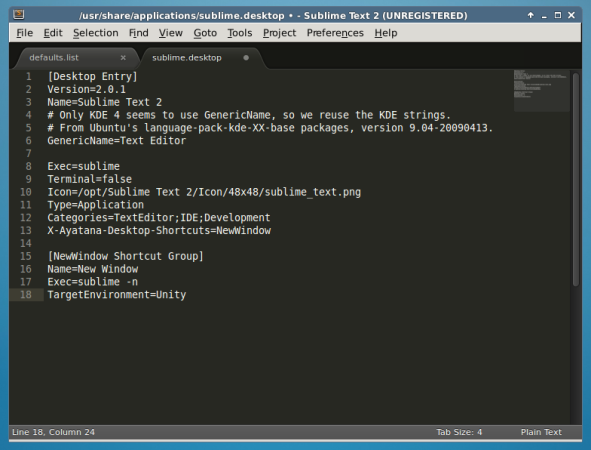
If you are using Unity and want to add “Sublime Text” to the Unity launcher. Create a “sublime.desktop” file under “/usr/share/applications”.
# sudo sublime /usr/share/applications/sublime.desktop
Then Copy and Paste the following content into it. Save and close.
[Desktop Entry]
Version=2.0.1
Name=Sublime Text 2
# Only KDE 4 seems to use GenericName, so we reuse the KDE strings.
# From Ubuntu's language-pack-kde-XX-base packages, version 9.04-20090413.
GenericName=Text Editor
Exec=sublime
Terminal=false
Icon=/opt/Sublime Text 2/Icon/48x48/sublime_text.png
Type=Application
Categories=TextEditor;IDE;Development
X-Ayatana-Desktop-Shortcuts=NewWindow
[NewWindow Shortcut Group]
Name=New Window
Exec=sublime -n
TargetEnvironment=Unity
Install Sublime Text in Ubuntu
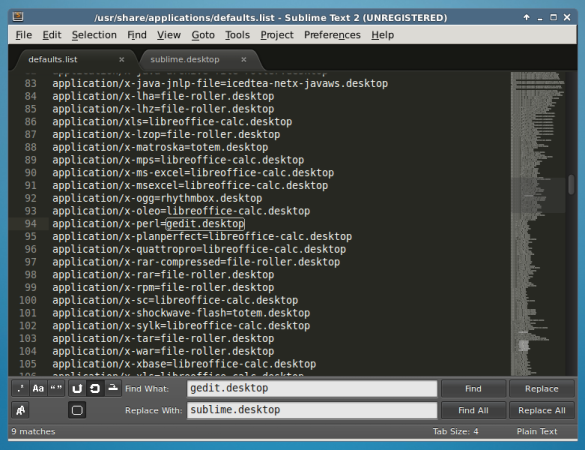
If you would like to open all your text files with “Sublime Text“. Open a “defaults.list” file and replace all occurrences of “gedit.desktop” with “sublime.desktop” as shown.
# sudo sublime /usr/share/applications/defaults.list
Method 2: Installing Sublime Text Using PPA
Add WebUpd8team PPA to your Synaptic Manager to install Sublime Text using following steps.
# sudo add-apt-repository ppa:webupd8team/sublime-text-2
# sudo apt-get update
# sudo apt-get install sublime-text
NOTE: As I said the Sublime Text 3 Beta is released, if you would like to install Sublime Text 3, use this following command.
# sudo apt-get install sublime-text-installer
Start Sublime Text
To Launch Sublime Text from command line, call the “sublime” as shown.
# sublime
Install Sublime Text in Debian
That’s It! If you are using any other editor, please do tell us via comment section.
在ubuntu上安装subline的更多相关文章
- [异常解决] ubuntu上安装JLink驱动遇到的坑及给后来者的建议
一.前言 最近将整个电脑格式化,改成了linux操作系统 希望这样能让自己在一个新的世界探索技术.提升自己吧- win上的工具用多了,就不想变化了- 继上一篇<ubuntu上安装虚拟机遇到的问题 ...
- Ubuntu上安装Robomongo及添加到启动器
到目前为止,Robomongo仍是MongoDB最好的客户端管理工具,如需在Ubuntu上安装Robomongo,可直接从官网下载.tar.gz压缩包进行解压,然后直接运行bin目录下的robomon ...
- 在 Ubuntu 上安装 Android Studio
在 Ubuntu 上安装 Android Studio http://www.linuxidc.com/Linux/2013-05/84812.htm 打开terminal,输入以下命令 sudo a ...
- Ubuntu上安装Karma失败对策
在Ubuntu上安装Karma遇到超时 timeout 错误.Google了一下,国外的码农给了一个快捷的解决方案,实测可行,贴在这里: sudo apt-get install npm nodejs ...
- 在Ubuntu上安装LAMP服务器
1.安装Ubuntu上安装LAMP apt-get install lamp-server^ 2.安装过程中设置MySql密码 3.测试 创建index.php var/www/html/index. ...
- [译]How to Setup Sync Gateway on Ubuntu如何在ubuntu上安装sync-gateway
参考文章https://hidekiitakura.com/2015/03/21/how-to-setup-sync-gateway-on-ubuntudigitalocean/ 在此对作者表示感谢 ...
- 在Ubuntu上安装JDK、Ant、Jmeter和Jenkins
一.前期准备 1. 在win7下载VMware.Ubuntu(用迅雷下比较快) 2. 安装完VMware后新建虚拟机,选择iso: 3. 具体配置参考如下,至此Ubantu安装完成 二.在Ubuntu ...
- Ubuntu上安装MongoDB(译)
add by zhj:直接从第四步开始就可以了,而且安装好MongoDB后会自动启动的,不必自己去执行启动命令 原文:https://docs.mongodb.com/manual/tutorial/ ...
- Ubuntu上安装ns2-2.34
Ubuntu上安装ns2-2.34 步骤1 下载ns-allinone-2.34 $ tar zxf ns-allinone-2.34.tar.gz 步骤2 sudo apt-get install ...
随机推荐
- c#-day02学习笔记
类型转化 为什么要类型转化:因为C#语言是强类型的语言,所以区分了很多的类型,类型和类型之间是不能直接赋值的,如果要赋值 就需要转换类型 类型转换分为两大类: 第一类:隐式转换 隐式转换是系统默认的转 ...
- DJ轮回舞曲网下载教程
该网站网址为:http://www.92cc.com/ 昨天有网友问我这个网站能不能下载.我告诉他,只要能在线试听的就能下载 于是今天出个临时教程 教大家如何获取试听的音乐URL. 第一步找到试听的网 ...
- C#让窗体在启动时直接隐藏
最完美的解决办法,不闪烁.思路为:首先将窗体透明度设置为0,这样窗体在启动时就不显示了,然后再调用Hide将窗体隐藏再将其透明度设置为1即可. 其实就设置2个地方就行了. 1:设置窗体透明度为0 2: ...
- PHP运行机制
PHP运行机制: 访问html文件:访问的域名à解析成IP地址(hosts文件,dns)à找到服务器àapache拿到html文件à返回给浏览器à浏览器解析html内容 访问php文件:apache拿 ...
- poj 3140 树形去边差异最小
http://poj.org/problem?id=3140 依然是差异最小问题,不过这次是去边.思路是这样的,先记录每个点的子节点个数,然后遍历每个边. 有两个问题要注意: abs可能会出编译适配问 ...
- REP-0118:can not create temporary file(无法创建临时文件)
解决办法: 查看一下注册表里面的reports_tmp 的路径 HKEY_LOCAL_MACHINE\SOFTWARE\Wow6432Node\ORACLE\KEY_DevSuiteHome1 .是不 ...
- Java笔记 —— this 关键字
Java笔记 -- this 关键字 h2{ color: #4ABCDE; } a{ color: blue; text-decoration: none; } a:hover{ color: re ...
- Office加载项
出自我的个人主页 Alvin Blog 前言 前一段时间公司做了有关Excel 加载项的开发,也遇到了很多坑,所以在此记录一下,有两个原因,1.留给以后在用到加载项的时候,复习所用,避免 跳进同一个坑 ...
- ASP.NET写入和读取xml文件
xml是一种可扩展标记语言,在电子计算机中,标记指计算机所能理解的信息符号,通过此种标记,计算机之间可以处理包含各种的信息比如文章等.它可以用来标记数据.定义数据类型,是一种允许用户对自己的标记语言进 ...
- OpenGL学习 Following the Pipeline
Passing Data to the Vertex Shader Vertex Attributes At the start of the OpenGL pipeline,we use the i ...