
c#开源消息队列中间件EQueue 教程
一、简介
EQueue是一个参照RocketMQ实现的开源消息队列中间件,兼容Mono,具体可以参看作者的文章《分享一个c#写的开源分布式消息队列equeue》。项目开源地址:https://github.com/tangxuehua/equeue,项目中包含了队列的全部源代码以及如何使用的示例。
二、安装EQueue
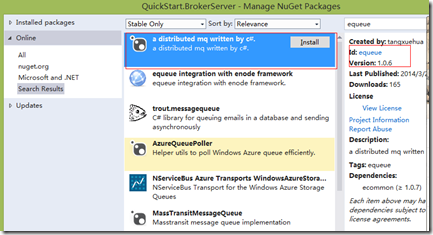
Producer、Consumer、Broker支持分布式部署,安装EQueue需要.NET 4, Visual Studio 2010/2012/2013. 目前EQueue是个类库,需要自己实现Broker的宿主,可以参照QuickStart,创建一个QuickStart.BrokerServer项目,通过Visual Studio的Nuget 查找equeue
using System;

using System.Text;

using ECommon.Autofac;

using ECommon.Configurations;

using ECommon.JsonNet;

using ECommon.Log4Net;

using EQueue.Broker;

using EQueue.Configurations;

using EQueue.Protocols;

namespace QuickStart.BrokerServer

{

    class Program

    {

        static void Main(string[] args)

        {

            InitializeEQueue();

            var setting = new BrokerSetting();

            setting.NotifyWhenMessageArrived = false;

            setting.DeleteMessageInterval = 1000;

            new BrokerController(setting).Initialize().Start();

            Console.ReadLine();

        }

        static void InitializeEQueue()

        {

            Configuration

                .Create()

                .UseAutofac()

                .RegisterCommonComponents()

                .UseLog4Net()

                .UseJsonNet()

                .RegisterEQueueComponents();

        }

    }

}
InitializeEQueue方法初始化EQueue的环境,使用了Autofac作为IOC容器,使用log4Net记录日志, 我们看一下RegisterEQueueComponents方法:
   public static class ConfigurationExtensions

    {

        public static Configuration RegisterEQueueComponents(this Configuration configuration)

        {

            configuration.SetDefault<IAllocateMessageQueueStrategy, AverageAllocateMessageQueueStrategy>();

            configuration.SetDefault<IQueueSelector, QueueHashSelector>();

            configuration.SetDefault<ILocalOffsetStore, DefaultLocalOffsetStore>();

            configuration.SetDefault<IMessageStore, InMemoryMessageStore>();

            configuration.SetDefault<IMessageService, MessageService>();

            configuration.SetDefault<IOffsetManager, InMemoryOffsetManager>();

            return configuration;

        }

    }
代码中涉及到6个组件:
- IAllocateMessageQueueStrategy
- IQueueSelector
- ILocalOffsetStore
- IMessageStore
- IMessageService
- IOffsetManager
DeleteMessageInterval 这个属性是用来设置equeue的定时删除间隔,单位为毫秒,默认值是一个小时。另外还有ProducerSocketSetting 和 ConsumerSocketSetting 分别用于设置Producer连接Broker和Consumer连接Broker的IP和端口,默认端口是5000和5001。
 public class BrokerSetting

    {

        public SocketSetting ProducerSocketSetting { get; set; }

        public SocketSetting ConsumerSocketSetting { get; set; }

        public bool NotifyWhenMessageArrived { get; set; }

        public int DeleteMessageInterval { get; set; }

        public BrokerSetting()

        {

            ProducerSocketSetting = new SocketSetting { Address = SocketUtils.GetLocalIPV4().ToString(), Port = 5000, Backlog = 5000 };

            ConsumerSocketSetting = new SocketSetting { Address = SocketUtils.GetLocalIPV4().ToString(), Port = 5001, Backlog = 5000 };

            NotifyWhenMessageArrived = true;

            DeleteMessageInterval = 1000 * 60 * 60;

        }

    }
运行项目,如果显示下面类似内容,说明Broker启动成功:
2014-03-23 20:10:30,255 INFO BrokerController - Broker started, producer:[169.254.80.80:5000], consumer:[169.254.80.80:5001]
三、在Visual Studio中开发测试
1.创建一个VS项目 QuickStart.ProducerClient,通过Nuget引用EQueue,编写下面Producer代码
 using System;

using System.Collections.Generic;

using System.Diagnostics;

using System.Text;

using System.Threading;

using System.Threading.Tasks;

using ECommon.Autofac;

using ECommon.Configurations;

using ECommon.IoC;

using ECommon.JsonNet;

using ECommon.Log4Net;

using ECommon.Scheduling;

using EQueue.Clients.Producers;

using EQueue.Configurations;

using EQueue.Protocols;

namespace QuickStart.ProducerClient

{

    class Program

    {

        static void Main(string[] args)

        {

            InitializeEQueue();

            var scheduleService = ObjectContainer.Resolve<IScheduleService>();

            var producer = new Producer().Start();

            var total = 1000;

            var parallelCount = 10;

            var finished = 0;

            var messageIndex = 0;

            var watch = Stopwatch.StartNew();

            var action = new Action(() =>

            {

                for (var index = 1; index <= total; index++)

                {

                    var message = "message" + Interlocked.Increment(ref messageIndex);

                    producer.SendAsync(new Message("SampleTopic", Encoding.UTF8.GetBytes(message)), index.ToString()).ContinueWith(sendTask =>

                    {

                        var finishedCount = Interlocked.Increment(ref finished);

                        if (finishedCount % 1000 == 0)

                        {

                            Console.WriteLine(string.Format("Sent {0} messages, time spent:{1}", finishedCount, watch.ElapsedMilliseconds));

                        }

                    });

                }

            });

            var actions = new List<Action>();

            for (var index = 0; index < parallelCount; index++)

            {

                actions.Add(action);

            }

            Parallel.Invoke(actions.ToArray());

            Console.ReadLine();

        }

        static void InitializeEQueue()

        {

            Configuration

                .Create()

                .UseAutofac()

                .RegisterCommonComponents()

                .UseLog4Net()

                .UseJsonNet()

                .RegisterEQueueComponents();

        }

    }

}
Producer对象在使用之前必须要调用Start初始化,初始化一次即可, 注意:切记不可以在每次发送消息时,都调用Start方法。Producer 默认连接本机的5000端口,可以通过ProducerSetting 进行设置,可以参看下面的代码:
 public class ProducerSetting

    {

        public string BrokerAddress { get; set; }

        public int BrokerPort { get; set; }

        public int SendMessageTimeoutMilliseconds { get; set; }

        public int UpdateTopicQueueCountInterval { get; set; }

        public ProducerSetting()

        {

            BrokerAddress = SocketUtils.GetLocalIPV4().ToString();

            BrokerPort = 5000;

            SendMessageTimeoutMilliseconds = 1000 * 10;

            UpdateTopicQueueCountInterval = 1000 * 5;

        }
2、创建一个VS项目 QuickStart.ConsumerClient,通过Nuget引用EQueue,编写下面Consumer代码
using System;

using System.Linq;

using System.Text;

using System.Threading;

using ECommon.Autofac;

using ECommon.Configurations;

using ECommon.IoC;

using ECommon.JsonNet;

using ECommon.Log4Net;

using ECommon.Scheduling;

using EQueue.Broker;

using EQueue.Clients.Consumers;

using EQueue.Configurations;

using EQueue.Protocols;

namespace QuickStart.ConsumerClient

{

    class Program

    {

        static void Main(string[] args)

        {

            InitializeEQueue();

            var messageHandler = new MessageHandler();

            var consumer1 = new Consumer("Consumer1", "group1").Subscribe("SampleTopic").Start(messageHandler);

            var consumer2 = new Consumer("Consumer2", "group1").Subscribe("SampleTopic").Start(messageHandler);

            var consumer3 = new Consumer("Consumer3", "group1").Subscribe("SampleTopic").Start(messageHandler);

            var consumer4 = new Consumer("Consumer4", "group1").Subscribe("SampleTopic").Start(messageHandler);

            Console.WriteLine("Start consumer load balance, please wait for a moment.");

            var scheduleService = ObjectContainer.Resolve<IScheduleService>();

            var waitHandle = new ManualResetEvent(false);

            var taskId = scheduleService.ScheduleTask(() =>

            {

                var c1AllocatedQueueIds = consumer1.GetCurrentQueues().Select(x => x.QueueId);

                var c2AllocatedQueueIds = consumer2.GetCurrentQueues().Select(x => x.QueueId);

                var c3AllocatedQueueIds = consumer3.GetCurrentQueues().Select(x => x.QueueId);

                var c4AllocatedQueueIds = consumer4.GetCurrentQueues().Select(x => x.QueueId);

                if (c1AllocatedQueueIds.Count() == 1 && c2AllocatedQueueIds.Count() == 1 && c3AllocatedQueueIds.Count() == 1 && c4AllocatedQueueIds.Count() == 1)

                {

                    Console.WriteLine(string.Format("Consumer load balance finished. Queue allocation result: c1:{0}, c2:{1}, c3:{2}, c4:{3}",

                        string.Join(",", c1AllocatedQueueIds),

                        string.Join(",", c2AllocatedQueueIds),

                        string.Join(",", c3AllocatedQueueIds),

                        string.Join(",", c4AllocatedQueueIds)));

                    waitHandle.Set();

                }

            }, 1000, 1000);

            waitHandle.WaitOne();

            scheduleService.ShutdownTask(taskId);

            Console.ReadLine();

        }

        static void InitializeEQueue()

        {

            Configuration

                .Create()

                .UseAutofac()

                .RegisterCommonComponents()

                .UseLog4Net()

                .UseJsonNet()

                .RegisterEQueueComponents();

        }

    }

    class MessageHandler : IMessageHandler

    {

        private int _handledCount;

        public void Handle(QueueMessage message, IMessageContext context)

        {

            var count = Interlocked.Increment(ref _handledCount);

            if (count % 1000 == 0)

            {

                Console.WriteLine("Total handled {0} messages.", count);

            }

            context.OnMessageHandled(message);

        }

    }

}
使用方式给用户感觉是消息从EQueue服务器推到了应用客户端。 但是实际Consumer内部是使用长轮询Pull方式从EQueue服务器拉消息,然后再回调用户Listener方法。Consumer默认连接本机的5001端口,可以通过ConsumerSetting 进行设置,可以参看下面的代码:
    public class ConsumerSetting

    {

        public string BrokerAddress { get; set; }

        public int BrokerPort { get; set; }

        public int RebalanceInterval { get; set; }

        public int UpdateTopicQueueCountInterval { get; set; }

        public int HeartbeatBrokerInterval { get; set; }

        public int PersistConsumerOffsetInterval { get; set; }

        public PullRequestSetting PullRequestSetting { get; set; }

        public MessageModel MessageModel { get; set; }

        public MessageHandleMode MessageHandleMode { get; set; }

        public ConsumerSetting()

        {

            BrokerAddress = SocketUtils.GetLocalIPV4().ToString();

            BrokerPort = 5001;

            RebalanceInterval = 1000 * 5;

            HeartbeatBrokerInterval = 1000 * 5;

            UpdateTopicQueueCountInterval = 1000 * 5;

            PersistConsumerOffsetInterval = 1000 * 5;

            PullRequestSetting = new PullRequestSetting();

            MessageModel = MessageModel.Clustering;

            MessageHandleMode = MessageHandleMode.Parallel;

        }
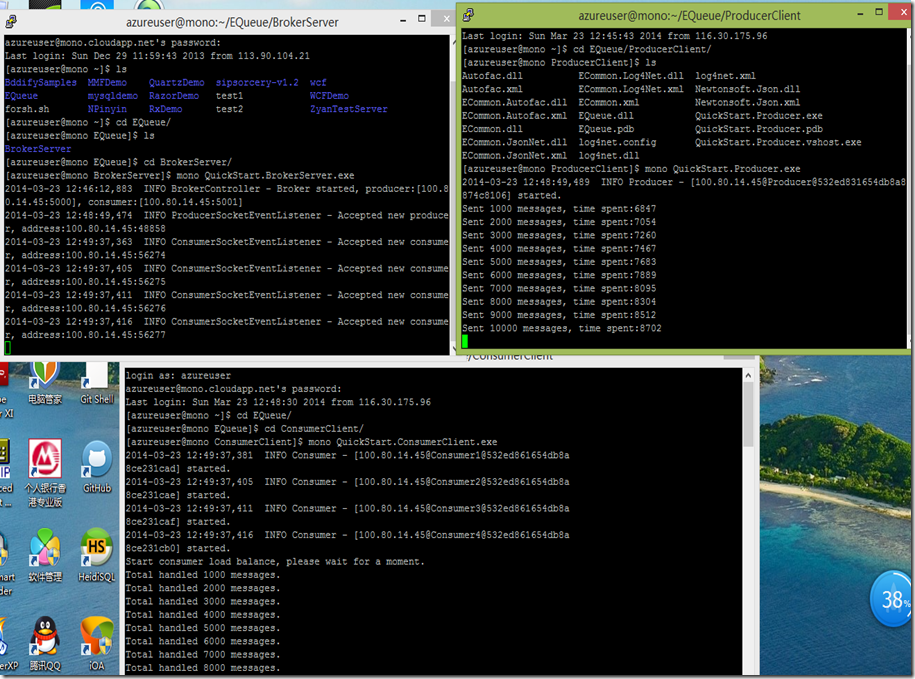
EQueue兼容Linux/Mono,下面是CentOS 6.4/Mono 3.2.3 环境下的运行结果:
c#开源消息队列中间件EQueue 教程的更多相关文章
- 常用的消息队列中间件mq对比
原文地址:https://blog.csdn.net/qq_30764991/article/details/80239076 消息队列中间件是分布式系统中重要的组件,主要解决应用耦合,异步消息,流量 ...
- 基于硬件的消息队列中间件 Solace 简介之二
前言...... 前面简单介绍了Solace来自于哪家公司, 主要能做哪些事情. 本篇主要进一步介绍Solace作为消息传递的中间件如何工作的. 传统意义上来讲, 每当我们谈到消息中间件时, 首先想到 ...
- 在 CentOS7 上安装 RabbitMQ 消息队列中间件
RabbitMQ 是流行的开源消息队列系统,是 AMQP(Advanced Message Queuing Protocol 高级消息队列协议)的标准实现,用 erlang 语言开发.RabbitMQ ...
- nodejs一个函数实现消息队列中间件
消息队列中间件(Message Queue)相信大家不会陌生,如Kafka.RabbitMQ.RocketMQ等,已经非常成熟,在大大小小的公司和项目中也已经广泛使用. 有些项目中,如果是只使用初步的 ...
- ActiveMQ RabbitMQ RokcetMQ Kafka实战 消息队列中间件视频教程
附上消息队列中间件百度网盘连接: 链接: https://pan.baidu.com/s/1FFZQ5w17e1TlLDSF7yhzmA 密码: hr63
- Delayer 基于 Redis 的延迟消息队列中间件
Delayer 基于 Redis 的延迟消息队列中间件,采用 Golang 开发,支持 PHP.Golang 等多种语言客户端. 参考 有赞延迟队列设计 中的部分设计,优化后实现. 项目链接:http ...
- 初试kafka消息队列中间件一 (只适合初学者哈)
初试kafka消息队列中间件一 今天闲来有点无聊,然后就看了一下关于消息中间件的资料, 简单一点的理解哈,网上都说的太高大上档次了,字面意思都想半天: 也就是用作消息通知,比如你想告诉某某你喜欢他,或 ...
- 初试kafka消息队列中间件二(采用java代码收发消息)
初试kafka消息队列中间件二(采用java代码收发消息) 上一篇 初试kafka消息队列中间件一 今天的案例主要是将采用命令行收发信息改成使用java代码实现,根据上一篇的接着写: 先启动Zooke ...
- 消息队列中间件(二)使用 ActiveMQ
ActiveMQ 介绍 Active MQ 是由 Apache 出品的一款流行的功能强大的开源消息中间件,它速度快,支持跨语言的客户端,具有易于使用的企业集成模式和许多的高级功能,同时完全支持 JSM ...
随机推荐
- Linux C编程学习之开发工具3---多文件项目管理、Makefile、一个通用的Makefile
GNU Make简介 大型项目的开发过程中,往往会划分出若干个功能模块,这样可以保证软件的易维护性. 作为项目的组成部分,各个模块不可避免的存在各种联系,如果其中某个模块发生改动,那么其他的模块需要相 ...
- ORACLE导入导出数据dmp
imp testwms3/isc@TESTGMMC FILE=C:\ZKGL_201407012334.dmp ignore=y fromuser=GMMCZKGL touser=testwms ta ...
- Win10 UI入门 SliderRectangle
看了@段博琼大哥导航滑动的思路,自己又做了一个类似与黄油相机里面的一个功能 <Grid x:Name="> <Grid.ColumnDefinitions> < ...
- “Operation is not valid due to the current state of the object.”
将Repeater单页显示的2000条数据一次性提交的时候出现这个错误: Operation is not valid due to the current state of the object. ...
- strtok源码 bitset 空间压缩
源代码里有一段: unsigned char map[32]; /* Clear control map */ for (count = 0; count < 32; count++) map[ ...
- sqlserver 查找某个字段在哪张表里
select [name] from [库名].[dbo].sysobjects where id in(select id from [库名].[dbo].syscolumns Where name ...
- java中的小数的取整的几种函数
Math类中提供了5个与取整相关的函数,如下所示: static double ceil(double a):天花板函数,返回大于等于a的最小整数(但是以浮点数形式存储). static double ...
- SMARTY模板中如何使用get,post,request,cookies,session,server变量
{$smarty}保留变量不需要从PHP脚本中分配,是可以在模板中直接访问的数组类型变量,通常被用于访问一些特殊的模板变量.例如,直接在模板中访问页面请求变量.获取访问模板时的时间戳.直接访问PHP中 ...
- MongoVUE1.6.9破解启动提示System.ArgumentException: 字体“Courier New”不支持样式“Regular”
用MongoVUE,发现报错,报错信息如下: System.ArgumentException: 字体"Courier New"不支持样式"Regular". ...
- TPC-H
http://blog.csdn.net/leixingbang1989/article/details/8766047