
asp.net core 之多语言国际化自定义资源文件
先说说 asp.net core 默认的多语言和国际化。 官方文档
一:基本使用方法
先要安装 包 Microsoft.AspNetCore.Mvc.Localization (依赖 Microsoft.Extensions.Localization) 然后使用 资源文件保存不同的语言对应的数据。
1,在视图页面注入 IViewLocalizer ,然后在需要的地方使用即可。 比如:
 @inject IViewLocalizer Localizer

 <h2>@Localizer["hello"]</h2>
其中 中括号中的字符 即是资源文件中的名称, 运行后,输出的即是 当前语言对应的资源文件下的设置的资源值。
那么有个问题来了,资源文件怎么设置?
1,默认情况下会去查找 设置的 LocalizationOptions.ResourcesPath 的值对应的文件夹,如果没有设置,则去根目录下查找。
在 Startup 中设置 ResourcesPath 。
services.AddLocalization(options => options.ResourcesPath = "Resources");
2,查找当前视图文件对应的同名资源文件。 默认支持 使用 点 . 和路径 path 查找两种方式,当然也可以指定其中一个方式。 比如 当前视图路径是 views/account/login.cshtml ,那么 查找的资源文件是 views/account/login.{CultureName}.resx 文件和 views.account.login.{CultureName}.resx 文件
services.AddMvc()

         .AddViewLocalization()

          //.AddViewLocalization(Microsoft.AspNetCore.Mvc.Razor.LanguageViewLocationExpanderFormat.SubFolder)

          .AddDataAnnotationsLocalization();
3,如果是 model 类, 查找的路径则变成了model 类对应的命名空间即typeof(model).FullName 全路径。比如 ViewModels/account/login.{CultureName}.resx 文件和 ViewModels.account.login.{CultureName}.resx 文件 。同理 如果是在controller 那么,资源文件 则是 Controllers.HomeController.{CultureName}.resx 或者 Controllers/HomeController.{CultureName}.resx
二:解析
那么这个是如何实现的呢?如果我想使用 数据库或者是 json 文件来存在这些资源文件。
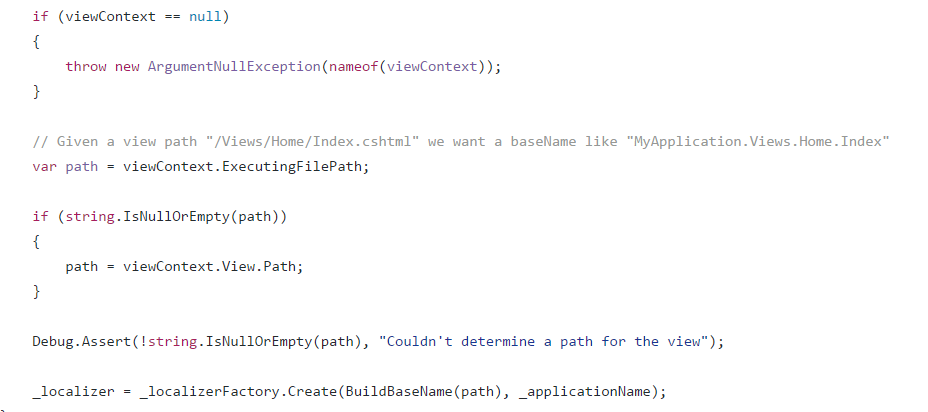
在试图文件中 注入的是 IViewLocalizer 接口,对应的实现是 ViewLocalizer 。ViewLocalizer 实现了IViewLocalizer 和IHtmlLocalizer 的定义,并且 IViewLocalizer 继承自IHtmlLocalizer。 ViewLocalizer 会注入一个IHtmlLocalizerFactory,然后 用 IHtmlLocalizerFactory创建一个 IHtmlLocalizer 对应的实例。 在创建的时候 会带入两个参数 ,一个是 当前 试图的路径,一个是当前应用名称。
IHtmlLocalizer 定义如下:
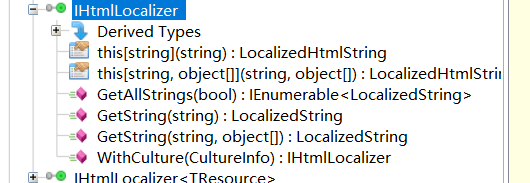
所以在 IHtmlLocalizer的实例中, 既可以轻松的获取对应的值。
因为 ViewLocalizer 会注入一个IHtmlLocalizerFactory 的实例。默认的实例 是 HtmlLocalizerFactory , 在 HtmlLocalizerFactory 的构造函数中会注入一个 IStringLocalizerFactory 的实例(位于Microsoft.Extensions.Localization.Abstractions)。
的定义是

而 IHtmlLocalizerFactory 的定义是
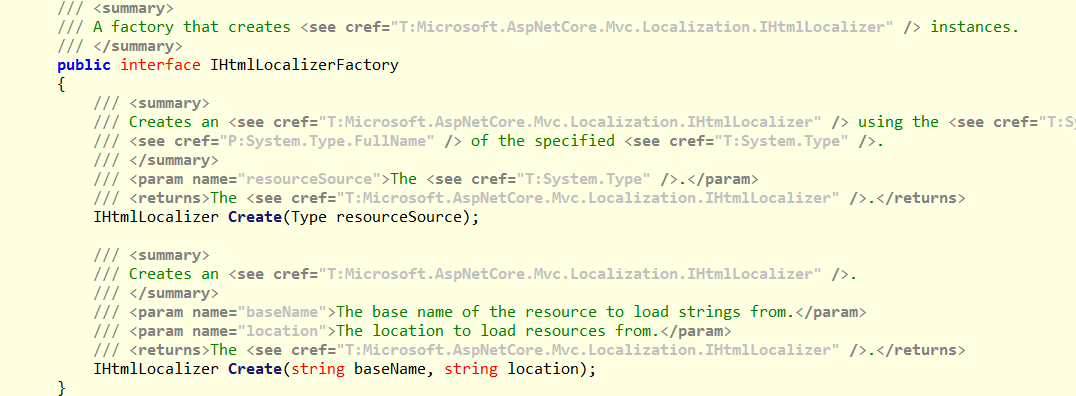
可以说 HtmlLocalizerFactory 是对 HtmlLocalizerFactory 的一个包装。
查阅代码知道 默认 IStringLocalizerFactory 实现是 ResourceManagerStringLocalizerFactory ,并且读取资源文件均是这个实现来操作。
回到开头的问题,假设我要使用 json 文件 代替 resx 文件。该如何实现呢,。? 有2种方法
1)只要实现对应的 IStringLocalizerFactory 并且代替默认的 ResourceManagerStringLocalizerFactory 。
2)重写 ResourceManagerStringLocalizerFactory 。
1) 1,定义一个 JsonStringLocalizerFactory 并实现 IStringLocalizerFactory 。
public class JsonStringLocalizerFactory : IStringLocalizerFactory

    {

        private readonly string _applicationName;

        private readonly IHostingEnvironment _hostingEnvironment;

        private readonly LocalizationOptions _options;

        public JsonStringLocalizerFactory(IHostingEnvironment hostingEnvironment, IOptions<LocalizationOptions> localizationOptions)

        {

            if (localizationOptions == null)

            {

                throw new ArgumentNullException(nameof(localizationOptions));

            }

            this._hostingEnvironment = hostingEnvironment ?? throw new ArgumentNullException(nameof(hostingEnvironment));

            this._options = localizationOptions.Value;

            this._applicationName = hostingEnvironment.ApplicationName;

        }

        public IStringLocalizer Create(Type resourceSource)

        {

            TypeInfo typeInfo = IntrospectionExtensions.GetTypeInfo(resourceSource);

            //Assembly assembly = typeInfo.Assembly;

            //AssemblyName assemblyName = new AssemblyName(assembly.FullName);

            string baseResourceName = typeInfo.FullName;

            baseResourceName = TrimPrefix(baseResourceName, _applicationName + ".");

            return new JsonStringLocalizer(_hostingEnvironment, _options, baseResourceName, null);

        }

        public IStringLocalizer Create(string baseName, string location)

        {

            location = location ?? _applicationName;

            string baseResourceName = baseName;

            baseResourceName = TrimPrefix(baseName, location + ".");

            return new JsonStringLocalizer(_hostingEnvironment, _options, baseResourceName, null);

        }

        private static string TrimPrefix(string name, string prefix)

        {

            if (name.StartsWith(prefix, StringComparison.Ordinal))

            {

                return name.Substring(prefix.Length);

            }

            return name;

        }

    }
2, JsonStringLocalizer
public class JsonStringLocalizer : IStringLocalizer

    {

        private readonly ConcurrentDictionary<string, string> _all;

        private readonly IHostingEnvironment _hostingEnvironment;

        private readonly LocalizationOptions _options;

        private readonly string _baseResourceName;

        private readonly CultureInfo _cultureInfo;

        public LocalizedString this[string name] => Get(name);

        public LocalizedString this[string name, params object[] arguments] => Get(name, arguments);

        public JsonStringLocalizer(IHostingEnvironment hostingEnvironment, LocalizationOptions options, string baseResourceName, CultureInfo culture)

        {

            _options = options;

            _hostingEnvironment = hostingEnvironment;

            _cultureInfo = culture ?? CultureInfo.CurrentUICulture;

            _baseResourceName = baseResourceName + "." + _cultureInfo.Name;

            _all = GetAll();

        }

        public IEnumerable<LocalizedString> GetAllStrings(bool includeParentCultures)

        {

            return _all.Select(t => new LocalizedString(t.Key, t.Value, true)).ToArray();

        }

        public IStringLocalizer WithCulture(CultureInfo culture)

        {

            if (culture == null)

                return this;

            CultureInfo.CurrentUICulture = culture;

            CultureInfo.DefaultThreadCurrentCulture = culture;

            return new JsonStringLocalizer(_hostingEnvironment, _options, _baseResourceName, culture);

        }

        private LocalizedString Get(string name, params object[] arguments)

        {

            if (_all.ContainsKey(name))

            {

                var current = _all[name];

                return new LocalizedString(name, string.Format(_all[name], arguments));

            }

            return new LocalizedString(name, name, true);

        }

        private ConcurrentDictionary<string, string> GetAll()

        {

            var file = Path.Combine(_hostingEnvironment.ContentRootPath, _baseResourceName + ".json");

            if (!string.IsNullOrEmpty(_options.ResourcesPath))

                file = Path.Combine(_hostingEnvironment.ContentRootPath, _options.ResourcesPath, _baseResourceName + ".json");

            Debug.WriteLineIf(!File.Exists(file), "Path not found! " + file);

            if (!File.Exists(file))

                return new ConcurrentDictionary<string, string>();

            try

            {

                var txt = File.ReadAllText(file);

                return JsonConvert.DeserializeObject<ConcurrentDictionary<string, string>>(txt);

            }

            catch (Exception)

            {

            }

            return new ConcurrentDictionary<string, string>();

        }

    }
3,添加注入
services.AddSingleton<IStringLocalizerFactory, JsonStringLocalizerFactory>();
4,json 文件
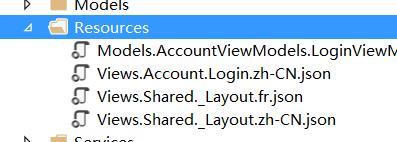
上面的代码只是简单的实现了 使用 点(.) 作为分隔符的json 文件作为资源文件。(其实上面的代码运行后有个小问题)
代码已经放到 Github
2)。待实现~~~
链接:http://blog.wuliping.cn/post/aspnet-core-localization-and-custom-resource-service-with-file
asp.net core 之多语言国际化自定义资源文件的更多相关文章
- ASP.NET Core WebAPI实现本地化(单资源文件)
在Startup ConfigureServices 注册本地化所需要的服务AddLocalization和 Configure<RequestLocalizationOptions> p ...
- 让asp.net网站支持多语言,使用资源文件
<%@ Page Language="C#" AutoEventWireup="true" CodeFile="test.aspx.cs&quo ...
- ASP.NET Core Web多语言项目
公司效益好了,准备和国外做生意,这个时候就需要多语言了. > 1. 这是一个ASP.NET Core Web多语言项目,主要展示项目的不同: > 2. 第一种:www.xxx.com/en ...
- Asp.Net Core 轻松学-一行代码搞定文件上传 JSONHelper
Asp.Net Core 轻松学-一行代码搞定文件上传 前言 在 Web 应用程序开发过程中,总是无法避免涉及到文件上传,这次我们来聊一聊怎么去实现一个简单方便可复用文件上传功能:通过创建 ...
- [转]ASP.NET Core 开发-Logging 使用NLog 写日志文件
本文转自:http://www.cnblogs.com/Leo_wl/p/5561812.html ASP.NET Core 开发-Logging 使用NLog 写日志文件. NLog 可以适用于 . ...
- ASP.NET Core 开发-Logging 使用NLog 写日志文件
ASP.NET Core 开发-Logging 使用NLog 写日志文件. NLog 可以适用于 .NET Core 和 ASP.NET Core . ASP.NET Core已经内置了日志支持,可以 ...
- 在ASP.NET Core中使用EPPlus导入出Excel文件
这篇文章说明了如何使用EPPlus在ASP.NET Core中导入和导出.xls/.xlsx文件(Excel).在考虑使用.NET处理excel时,我们总是寻找第三方库或组件.使用Open Offic ...
- struts2国际化---配置国际化全局资源文件并输出国际化资源信息
我们首先学习怎么配置国际化全局资源文件.并输出资源文件信息 1.首先struts2项目搭建完毕后,我们在src文件夹下.即struts2.xml同级文件夹下创建资源文件.资源文件的名称格式为: XXX ...
- Asp.Net Core 入门(三) —— 自定义中间件
上一篇我们讲了Startup文件,其中着重介绍了中间件,现在我们就来自定义我们自己的中间件吧. 中间件通常封装在一个类中,并使用扩展方法进行暴露.它需要拥有一个类型为RequestDelegate的成 ...
随机推荐
- Win7服务器搭建实例教程:教你Win7如何搭建Web服务器【转载】
原文地址:http://www.pc841.com/article/20140607-30534.html 局域网Web服务器的主要功能是实现资源共享,同时借助于局域网服务器访问页面可有效的实现信息的 ...
- ubuntu 迁移部分 / 目录下的存储空间到 /home目录
状况:当时给系统分区的时候,home和根目录都是25GB左右,突然发现home 目录不够用了,于是决定进行将根目录的部分空间挪移到home下去 主要方法:使用Gparted的LIve USB的方法. ...
- Azure VM从ASM迁移到ARM(一)
Azure的IaaS有ASM和ARM两个版本,ARM的一些优点前面已经聊过很多了.ARM有更细的管理颗粒度,更多的功能等. 如果想从ASM迁移到ARM,目前有两类方法可以实现: 1. Azure平台支 ...
- mysql函数之三:find_in_set() 函数 返回str在字符串集strlist中的序号
如果字符串str是在的strlist组成的N子串的字符串列表,返回值的范围为1到N. FIND_IN_SET(str,strlist) 如果字符串str是在的strlist组成的N子串的字符串列表,返 ...
- Eclipse中的普通Java项目如何部署到Tomcat中
我现在的做法: 1.在Eclipse中配置Tomcat时,选择创建Context文件,而不是server.xml,好处是文件可以随便命名,与虚拟目录一致(即xml中的属性path).Tomcat加载项 ...
- Py修行路 Pandas 模块基本用法
pandas 安装方法:pip3 install pandas pandas是一个强大的Python数据分析的工具包,它是基于NumPy构建的模块. pandas的主要功能: 具备对其功能的数据结构D ...
- 基于RFC5321使用ncat发送邮件
今天和同事学习到的这个方法,学习了,记录一下: [root@localhost ~]# ncat TeamServer.localdomain ESMTP Postfix EHLO l00.win - ...
- linux yum 脚本实现
yum 位于linux /usr/bin/yum yum命令是python脚本进行编写的(python 2.6) #!/usr/bin/python2.6 import sys try: import ...
- 第六章 Java性能调优工具(待续)
Java性能调优工具 Windows工具 JDK命令行工具 JConsole工具 Visual VM多合一工具 Visual VM对QQL的支持 MAT内存分析工具 MAT对QQL的支持 JProfi ...
- Oracle Management Packs
http://kerryosborne.oracle-guy.com/2008/10/oracle-management-packs/ There has been quite a bit of co ...