
NOPI导出execl 多个sheet,一列图片
NPOI API: http://www.cnblogs.com/atao/archive/2009/11/15/1603528.html
http://blog.csdn.net/pan_junbiao/article/details/39717443 -- NPOI使用手册
http://www.cnblogs.com/wei325/p/4748324.html
每一张表只能有一个HSSFPatriarch对象,如果把它的创建放到了setPic方法中,那么一行只会出现一张图片,最后的图片会消掉之前的图片。也不能放到for循环里
HSSFClientAnchor(dx1,dy1,dx2,dy2,col1,row1,col2,row2)的参数,有必要在这里说明一下:
dx1:起始单元格的x偏移量,如例子中的255表示直线起始位置距A1单元格左侧的距离;
dy1:起始单元格的y偏移量,如例子中的125表示直线起始位置距A1单元格上侧的距离;
dx2:终止单元格的x偏移量,如例子中的1023表示直线起始位置距C3单元格左侧的距离;
dy2:终止单元格的y偏移量,如例子中的150表示直线起始位置距C3单元格上侧的距离;
col1:起始单元格列序号,从0开始计算;
row1:起始单元格行序号,从0开始计算,如例子中col1=0,row1=0就表示起始单元格为A1;
col2:终止单元格列序号,从0开始计算;
row2:终止单元格行序号,从0开始计算,如例子中col2=2,row2=2就表示起始单元格为C3;
//添加多个图片时:多个pic应该share同一个DrawingPatriarch在同一个sheet里面。
        //获取枚举类型的Display特性的name值

        public string GetEnumTxt(Enum eEnum)

        {

            var enumType = eEnum.GetType();

            var field = enumType.GetField(eEnum.ToString());

            var display = field.GetCustomAttributes(typeof(DisplayAttribute), false).FirstOrDefault() as DisplayAttribute;

            return display != null ? display.Name : eEnum.ToString();

        }

        private void setPic(HSSFWorkbook workbook, HSSFPatriarch patriarch,string path, ISheet sheet, int rowline, int col)

        {

            if(string.IsNullOrEmpty(path))return;

            byte[] bytes = System.IO.File.ReadAllBytes(Server.MapPath(path));

            int pictureIdx = workbook.AddPicture(bytes, PictureType.JPEG);

            // 插图片的位置  HSSFClientAnchor(dx1,dy1,dx2,dy2,col1,row1,col2,row2) 后面再作解释

            HSSFClientAnchor anchor = new HSSFClientAnchor(, , , , col, rowline, col+, rowline + );

            //把图片插到相应的位置

            HSSFPicture pict = (HSSFPicture)patriarch.CreatePicture(anchor, pictureIdx);

        }
private void setPic(HSSFWorkbook workbook, HSSFPatriarch patriarch,string path, ISheet sheet, int rowline, int col)

        {

            if(string.IsNullOrEmpty(path))return;

            byte[] bytes = System.IO.File.ReadAllBytes(Server.MapPath(path));

            int pictureIdx = workbook.AddPicture(bytes, PictureType.JPEG);

            // 插图片的位置  HSSFClientAnchor(dx1,dy1,dx2,dy2,col1,row1,col2,row2) 后面再作解释

            HSSFClientAnchor anchor = new HSSFClientAnchor(, , , , col, rowline, col+, rowline + );

            //把图片插到相应的位置

            HSSFPicture pict = (HSSFPicture)patriarch.CreatePicture(anchor, pictureIdx);

        }
导出多个sheet,一列图片
        /// <summary>

        /// 导出EXCEL,可以导出多个sheet(图片)

        /// </summary>

        /// <param name="dtSources">sheet数据源</param>

        /// <param name="lstColname">sheet列名数据</param>

        /// <param name="sheetname">sheet名</param>

        /// <param name="filename">文件名</param>

        /// <param name="mColImage">图像列</param>

        /// <returns></returns>

        public static string ExporMultiSheetImage(List<DataTable> dtSources, List<List<string>> lstColname, List<string> sheetname, string filename,int mColImage)

        {

            //创建工作薄

            IWorkbook workbook = new HSSFWorkbook();

            string FileName = filename + ".xls";

            for (int k = ; k < dtSources.Count; k++)

            {

                //DataTable dt = dtSources[k];

                int iSheetCount = Convert.ToInt32(Math.Ceiling(Convert.ToDouble(dtSources[k].Rows.Count) / ));

                iSheetCount = iSheetCount ==  ?  : iSheetCount;

                for (int iSheetIndex = ; iSheetIndex < iSheetCount; iSheetIndex++)

                {

                    #region 图最大列

                    int mImageColMerage = ;    //  图最大列

                    Dictionary<int, List<string>> dicImagePath = new Dictionary<int, List<string>>();

                    if (mColImage > -)

                    {

                        List<int> lstImageColLen = new List<int>();

                        for (int i = iSheetIndex * ; i < dtSources[k].Rows.Count; i++)

                        {

                            List<string> lstImagePath = dtSources[k].Rows[i][mColImage].ToString().Trim(',').Split(new char[] { ',' }, StringSplitOptions.RemoveEmptyEntries).ToList();

                            dicImagePath[i] = lstImagePath;

                            lstImageColLen.Add(lstImagePath.Count());

                        }

                        mImageColMerage = lstImageColLen.Max();

                    }

                    #endregion

                    //create sheet

                    string sheetName = string.Empty;

                    if (iSheetCount>)

                    {

                        sheetName = sheetname[k] + iSheetIndex;

                    }

                    else

                    {

                        sheetName = sheetname[k];

                    }

                    ISheet sheet = workbook.CreateSheet(sheetName);

                    sheet.PrintSetup.Landscape = true;     //是否横向排版

                    sheet.FitToPage = false;               //是否自适应页面

                    sheet.PrintSetup.Scale = ;           //缩放比例

                    //填充列标题以及样式

                    int rowsNum = ;  //行号

                    IRow headerRow = sheet.CreateRow(rowsNum);

                    ICellStyle headStyle = workbook.CreateCellStyle();

                    headStyle.Alignment = HorizontalAlignment.CENTER;

                    headerRow.HeightInPoints = ;

                    headStyle.VerticalAlignment = VerticalAlignment.CENTER;

                    //换行

                    //headStyle.WrapText = true;

                    IFont font = workbook.CreateFont();

                    font.FontHeightInPoints = ;

                    font.Boldweight = ;

                    headStyle.SetFont(font);

                    for (int i = ; i < lstColname[k].Count; i++)

                    {

                        if (i < mColImage)

                        {

                            //合并列前

                            headerRow.CreateCell(i, CellType.STRING).SetCellValue(lstColname[k][i]);

                            headerRow.GetCell(i).CellStyle = headStyle;

                        }

                        else if (mColImage > - && i == mColImage)

                        {

                            headerRow.CreateCell(i, CellType.STRING).SetCellValue(lstColname[k][i]);

                            headerRow.GetCell(i).CellStyle = headStyle;

                            sheet.AddMergedRegion(new CellRangeAddress(, , mColImage, mColImage + mImageColMerage));

                        }

                        else

                        {

                            //合并列后

                            headerRow.CreateCell(i + mImageColMerage, CellType.STRING).SetCellValue(lstColname[k][i]);

                            headerRow.GetCell(i + mImageColMerage).CellStyle = headStyle;

                        }

                        //sheet.AutoSizeColumn(i);

                        sheet.SetColumnWidth(i, );  //列宽

                        //headerRow.Cells[i].SetCellValue(new HSSFRichTextString("\r\n"));  //强制换行

                    }

                    ICellStyle cellStyle = workbook.CreateCellStyle();

                    cellStyle.Alignment = HorizontalAlignment.CENTER;

                    cellStyle.VerticalAlignment = VerticalAlignment.CENTER;

                    IFont cellfont = workbook.CreateFont();

                    cellfont.FontHeightInPoints = ;

                    cellStyle.SetFont(cellfont);

                    cellStyle.WrapText = true;

                    #region MyRegion

                    //填充数据行

                    IRow dataRow = null;

                    rowsNum = ;  //行号,从第2行开始

                    /// patriarch 画图的顶级管理器,一个sheet只能获取一个(一定要注意这点)

                    HSSFPatriarch patriarch = (HSSFPatriarch)sheet.CreateDrawingPatriarch();

                    //填充内容

                    for (int i = iSheetIndex * ; i < dtSources[k].Rows.Count; i++)

                    {

                        dataRow = sheet.CreateRow(i + );

                        for (int j = ; j < dtSources[k].Columns.Count; j++)

                        {

                            //sheet.SetColumnWidth(j, 5000);

                            //sheet.AutoSizeColumn(j);

                            if (j < mColImage)

                            {

                                //合并列前

                                dataRow.CreateCell(j).SetCellValue(dtSources[k].Rows[i][j].ToString());

                                dataRow.GetCell(j).CellStyle = cellStyle;

                            }

                            else if (mColImage > - && j == mColImage)

                            {

                                int mImgIndex = ;

                                foreach (var item in dicImagePath[i])

                                {

                                    string imgPath = HttpContext.Current.Server.MapPath(item);

                                    if (File.Exists(imgPath))

                                    {

                                        byte[] bytes = System.IO.File.ReadAllBytes(imgPath);

                                        int pictureIdx = workbook.AddPicture(bytes, PictureType.JPEG);

                                        ///// patriarch 画图的顶级管理器,一个sheet只能获取一个(一定要注意这点)

                                        //HSSFPatriarch patriarch = (HSSFPatriarch)sheet.CreateDrawingPatriarch();

                                        // 插图片的位置  HSSFClientAnchor(dx1,dy1,dx2,dy2,col1,row1,col2,row2)

                                        //图片左上角为(col, row)第row+1行col+1列,右下角为( col +1, row +1)第 col +1+1行row +1+1列,宽为100,高为50

                                        HSSFClientAnchor anchor = new HSSFClientAnchor(, , , , mColImage + mImgIndex, i + , mColImage + mImgIndex, i + );

                                        //把图片插到相应的位置

                                        HSSFPicture pict = (HSSFPicture)patriarch.CreatePicture(anchor, pictureIdx);

                                        //pict.Resize(0.7);   //用图片原始大小来显示

                                    }

                                    mImgIndex++;

                                }

                                dataRow.CreateCell(j).SetCellValue("");

                                dataRow.GetCell(j).CellStyle = cellStyle;

                                sheet.AddMergedRegion(new CellRangeAddress(i + , i + , mColImage, mColImage + mImageColMerage));

                            }

                            else

                            {

                                //合并列后

                                dataRow.CreateCell(j + mImageColMerage).SetCellValue(dtSources[k].Rows[i][j].ToString());

                                dataRow.GetCell(j + mImageColMerage).CellStyle = cellStyle;

                            }

                        }

                    }

                    #endregion

                }

            }

            string strPhysicsPath = HttpContext.Current.Server.MapPath(Config.AccPath + "Temp/Export");

            if (!Directory.Exists(strPhysicsPath))

            {

                Directory.CreateDirectory(strPhysicsPath);

            }

            //string resultUrl = Config.LogPath.Replace("~", HttpContext.Current.Request.Url.Host + ":" + HttpContext.Current.Request.Url.Port) + "Temp/" + DateTime.Today.Year;

            string tempUrl = "/" + DateTime.Today.ToString("MMdd-") + Guid.NewGuid().ToString() + ".xls";

            strPhysicsPath = strPhysicsPath.TrimEnd('\\') + tempUrl;

            //-------

            using (MemoryStream ms = new MemoryStream())

            {

                ms.Flush();

                ms.Position = ;

                workbook.Write(ms);

                using (FileStream fs = new FileStream(strPhysicsPath, FileMode.Create, FileAccess.Write))

                {

                    byte[] fData = ms.ToArray();

                    fs.Write(fData, , fData.Length);

                    fs.Flush();

                }

                LogHelper.WriteExportLog(filename);

                return Config.AccPath.Replace("~", "") + "Temp/Export" + tempUrl;

            }

            #region  浏览器下载

            //供浏览器下载Excel

            //if (HttpContext.Current.Request.Browser.Browser == "IE")

            //    FileName = HttpUtility.UrlEncode(FileName);

            //using (MemoryStream ms = new MemoryStream())

            //{

            //    ms.Position = 0;

            //    workbook.Write(ms);

            //    ms.Flush();

            //    HttpContext curContext = HttpContext.Current;

            //    // 设置编码和附件格式

            //    curContext.Response.ContentType = "application/vnd.ms-excel";

            //    curContext.Response.ContentEncoding = Encoding.UTF8;

            //    curContext.Response.Charset = "";

            //    curContext.Response.AppendHeader("Content-Disposition",

            //         "attachment;filename=" + HttpUtility.UrlEncode(FileName, Encoding.UTF8));

            //    curContext.Response.BinaryWrite(ms.GetBuffer());

            //    ms.Close();

            //    ms.Dispose();

            //    curContext.Response.End();

            //}

            #endregion

        }
导出EXCEL,可以导出多个sheet
        /// <summary>

        /// 导出EXCEL,可以导出多个sheet

        /// </summary>

        /// <param name="dtSources">原始数据数组类型</param>

        /// <param name="strFileName">路径</param>

        public static string ExporMultiSheet(DataTable[] dtSources, List<List<string>> lstname, List<string> sheetname, string filename)

        {

            //创建工作薄

            IWorkbook workbook = new HSSFWorkbook();

            string FileName = filename + ".xls";

            for (int k = ; k < dtSources.Length; k++)

            {

                ISheet sheet = workbook.CreateSheet(sheetname[k]);

                //设置列宽

                sheet.SetColumnWidth(,  * );

                sheet.SetColumnWidth(,  * );

                sheet.SetColumnWidth(,  * );

                sheet.SetColumnWidth(,  * );

                sheet.SetColumnWidth(,  * );

                sheet.SetColumnWidth(,  * );

                //填充表头

                //填充列标题以及样式

                int rowsNum = ;  //行号

                IRow headerRow = sheet.CreateRow(rowsNum);

                ICellStyle headStyle = workbook.CreateCellStyle();

                headStyle.Alignment = HorizontalAlignment.CENTER;

                headStyle.VerticalAlignment = VerticalAlignment.CENTER;

                //换行

                headStyle.WrapText = true;

                headerRow.HeightInPoints = ;

                IFont font = workbook.CreateFont();

                font.FontHeightInPoints = ;

                font.Boldweight = ;

                headStyle.SetFont(font);

                for (int i = ; i < lstname[k].Count; i++)

                {

                    headerRow.CreateCell(i, CellType.STRING).SetCellValue(lstname[k][i]);

                    headerRow.GetCell(i).CellStyle = headStyle;

                    //headerRow.Cells[i].SetCellValue(new HSSFRichTextString("\r\n"));  //强制换行

                }

                ICellStyle cellStyle = workbook.CreateCellStyle();

                cellStyle.Alignment = HorizontalAlignment.CENTER;

                cellStyle.VerticalAlignment = VerticalAlignment.CENTER;

                IFont cellfont = workbook.CreateFont();

                cellfont.FontHeightInPoints = ;

                cellStyle.SetFont(cellfont);

                cellStyle.WrapText = true;

                //填充数据行

                IRow dataRow = null;

                rowsNum = ;  //行号,从第2行开始

                //填充内容

                for (int i = ; i < dtSources[k].Rows.Count; i++)

                {

                    dataRow = sheet.CreateRow(i + );

                    for (int j = ; j < dtSources[k].Columns.Count; j++)

                    {

                        dataRow.CreateCell(j).SetCellValue(dtSources[k].Rows[i][j].ToString());

                        dataRow.GetCell(j).CellStyle = cellStyle;

                    }

                }

            }

            //保存

            string strPhysicsPath = HttpContext.Current.Server.MapPath(Config.AccPath + "Temp/Export");

            if (!Directory.Exists(strPhysicsPath))

            {

                Directory.CreateDirectory(strPhysicsPath);

            }

            string tempUrl = "/" + DateTime.Today.ToString("MMdd-") + Guid.NewGuid().ToString() + ".xls";

            strPhysicsPath = strPhysicsPath.TrimEnd('\\') + tempUrl;

            using (MemoryStream ms = new MemoryStream())

            {

                ms.Flush();

                ms.Position = ;

                workbook.Write(ms);

                using (FileStream fs = new FileStream(strPhysicsPath, FileMode.Create, FileAccess.Write))

                {

                    byte[] fData = ms.ToArray();

                    fs.Write(fData, , fData.Length);

                    fs.Flush();

                }

                LogHelper.WriteExportLog(filename);

                return Config.AccPath.Replace("~", "") + "Temp/Export" + tempUrl;

            }

        }
图片base64形式怎么转为图片
String u = "Base64";

            // Base64解码

            byte[] b = new BASE64Decoder().decodeBuffer(u);

            // 生成图片

            String imgName = "echartsPhoto";

            String filePath = ServletActionContext.getServletContext().getRealPath("/") + "echarts";

            String fileName = filePath +"/"+ imgName +".png";

            File file = new File(filePath);

            if(!file.exists()){

                file.mkdir();

            }

            OutputStream out = new FileOutputStream(new File(fileName));

            out.write(b);             out.close();
API 导出execl
public static string ExportExecl(DataTable dataSource,string filename)

        {

            //创建工作薄

            IWorkbook workbook = new HSSFWorkbook();

            ISheet sheet = workbook.CreateSheet(filename);

            sheet.PrintSetup.Landscape = true;     //是否横向排版

            sheet.FitToPage = false;               //是否自适应页面

            sheet.PrintSetup.Scale = ;           //缩放比例

            //填充列标题以及样式

            int rowsNum = ;  //行号

            IRow headerRow = sheet.CreateRow(rowsNum);

            ICellStyle headStyle = workbook.CreateCellStyle();

            headStyle.Alignment = HorizontalAlignment.CENTER;

            headStyle.VerticalAlignment = VerticalAlignment.CENTER;

            headerRow.HeightInPoints = ;

            IFont font = workbook.CreateFont();

            font.FontHeightInPoints = ;

            font.Boldweight = ;

            headStyle.SetFont(font);

            for (int i = ; i < dataSource.Columns.Count; i++)

            {

                headerRow.CreateCell(i).SetCellValue(dataSource.Columns[i].ColumnName);

                headerRow.Cells[i].CellStyle = headStyle;

                //sheet.SetColumnWidth(i, 5000);

                sheet.AutoSizeColumn(i);

            }

            //ICellStyle cellStyle = workbook.CreateCellStyle();

            //cellStyle.Alignment = HorizontalAlignment.CENTER;

            //cellStyle.VerticalAlignment = VerticalAlignment.CENTER;

            //IFont cellfont = workbook.CreateFont();

            //cellfont.FontHeightInPoints = 10;

            //cellStyle.SetFont(cellfont);

            //cellStyle.WrapText = true;

            for (int i = ; i < dataSource.Rows.Count; i++)

            {

                IRow datarow = sheet.CreateRow(i);

                for (int j = ; j < dataSource.Columns.Count; j++)

                {

                    datarow.CreateCell(j).SetCellValue(dataSource.Rows[i][j].ToString());

                    //datarow.Cells[j].CellStyle = cellStyle;

                }

            }

            using (MemoryStream ms = new MemoryStream())

            {

                workbook.Write(ms);

                ms.Flush();

                ms.Position = ;

                //保存

                string strPhysicsPath = HttpContext.Current.Server.MapPath(Config.AccPath + "Temp/Export");

                if (!Directory.Exists(strPhysicsPath))

                {

                    Directory.CreateDirectory(strPhysicsPath);

                }

                string tempUrl = "/" + DateTime.Today.ToString("MMdd-") + Guid.NewGuid().ToString() + ".xls";

                strPhysicsPath = strPhysicsPath.TrimEnd('\\') + tempUrl;

                using (FileStream fs = new FileStream(strPhysicsPath, FileMode.Create, FileAccess.Write))

                {

                    byte[] fData = ms.ToArray();

                    fs.Write(fData, , fData.Length);

                    fs.Flush();

                }

                LogHelper.WriteExportLog(filename);

                return Config.AccPath.Replace("~", "") + "Temp/Export" + tempUrl;

                //return ms;

            }

            #region  浏览器下载

            //供浏览器下载Excel

            //if (HttpContext.Current.Request.Browser.Browser == "IE")

            //    FileName = HttpUtility.UrlEncode(FileName);

            //using (MemoryStream ms = new MemoryStream())

            //{

            //    ms.Position = 0;

            //    workbook.Write(ms);

            //    ms.Flush();

            //    HttpContext curContext = HttpContext.Current;

            //    // 设置编码和附件格式

            //    curContext.Response.ContentType = "application/vnd.ms-excel";

            //    curContext.Response.ContentEncoding = Encoding.UTF8;

            //    curContext.Response.Charset = "";

            //    curContext.Response.AppendHeader("Content-Disposition",

            //         "attachment;filename=" + HttpUtility.UrlEncode(FileName, Encoding.UTF8));

            //    curContext.Response.BinaryWrite(ms.GetBuffer());

            //    ms.Close();

            //    ms.Dispose();

            //    curContext.Response.End();

            //}

            #endregion

        }
EXECL第一行加标题 ,合并单元格
/// <summary>

        /// 导出EXECL

        /// </summary>

        /// <param name="data">数据源</param>

        /// <param name="colsname">列名</param>

        /// <param name="filename">文件名</param>

        /// <param name="filePath">文件路径</param>

        /// <param name="isTitle">是否包含标题</param>

        /// <returns>返回文件路径</returns>

        public static string ExportExcel(DataTable data, List<string> colsname, string filename,string filePath = null ,bool isTitle = false)

        {

            //创建工作薄

            IWorkbook workbook = new HSSFWorkbook();    //else if (fileExt == ".xls") { workbook = new HSSFWorkbook(); }

            ISheet sheet = workbook.CreateSheet(filename);

            string FileName = filename + ".xls";

            //填充列标题以及样式

            int headRowsNum = ;  //行号

            //是否有标题

            if (isTitle)

            {

                IRow headerTitleRow = sheet.CreateRow(headRowsNum);

                ICellStyle headTitleStyle = workbook.CreateCellStyle();

                headTitleStyle.Alignment = HorizontalAlignment.Center;

                headTitleStyle.VerticalAlignment = VerticalAlignment.Center;

                headerTitleRow.HeightInPoints = ;

                IFont titlefont = workbook.CreateFont();

                titlefont.FontHeightInPoints = ;

                titlefont.Boldweight = short.MaxValue;

                headTitleStyle.SetFont(titlefont);

                headerTitleRow.CreateCell(, CellType.String).SetCellValue(filename);

                headerTitleRow.GetCell().CellStyle = headTitleStyle;

                //合并  CellRangeAddress四个参数为:起始行,结束行,起始列,结束列,合并后的内容与样式以该区域最左上角的单元格为准

                CellRangeAddress region = new CellRangeAddress(, , , colsname.Count());

                sheet.AddMergedRegion(region);

                headRowsNum++;

            }

            IRow headerRow = sheet.CreateRow(headRowsNum);

            ICellStyle headStyle = workbook.CreateCellStyle();

            headStyle.Alignment = HorizontalAlignment.Center;

            headStyle.VerticalAlignment = VerticalAlignment.Center;

            headerRow.HeightInPoints = ;

            IFont font = workbook.CreateFont();

            font.FontHeightInPoints = ;

            font.Boldweight = ;

            headStyle.SetFont(font);

            for (int i = ; i < colsname.Count; i++)

            {

                headerRow.CreateCell(i, CellType.String).SetCellValue(colsname[i]);

                headerRow.GetCell(i).CellStyle = headStyle;

                //sheet.SetColumnWidth(i, 5000);  //列宽

                sheet.AutoSizeColumn(i);

            }

            ICellStyle cellStyle = workbook.CreateCellStyle();

            cellStyle.Alignment = HorizontalAlignment.Center;

            cellStyle.VerticalAlignment = VerticalAlignment.Center;

            IFont cellfont = workbook.CreateFont();

            cellfont.FontHeightInPoints = ;

            cellStyle.SetFont(cellfont);

            //cellStyle.WrapText = true;

            //填充数据行

            IRow row = null;

            int rowsNum = headRowsNum + ;  //行号,从第2行开始

            for (int i = ; i < data.Rows.Count; i++)

            {

                //写入字段值

                row = sheet.CreateRow(rowsNum);

                row.HeightInPoints = ;

                for (int j = ; j < colsname.Count; j++)

                {

                    row.CreateCell(j, CellType.String).SetCellValue(data.Rows[i][j].ToString());

                    row.GetCell(j).CellStyle = cellStyle;

                    //sheet.AutoSizeColumn(j);

                }

                rowsNum++;

            }

            //for (int i = 0; i < colsname.Count; i++)

            //{

            //    int columnWidth = sheet.GetColumnWidth(i) / 256;

            //    for (int j = 0; j < data.Rows.Count; j++)

            //    {

            //        ICell currentCell = sheet.GetRow(j).GetCell(i);

            //        int length = Encoding.Default.GetBytes(currentCell.ToString()).Length;

            //        if (columnWidth < length)

            //        {

            //            columnWidth = length;

            //        }

            //    }

            //    sheet.SetColumnWidth(i, (columnWidth + 1) * 256);

            //}

            string strPhysicsPath = string.Empty;

            if (!string.IsNullOrWhiteSpace(filePath))

            {

                strPhysicsPath = filePath;

            }

            else

            {

                strPhysicsPath = HttpContext.Current.Server.MapPath("~/" + "Temp/Export");

            }

            if (!Directory.Exists(strPhysicsPath))

            {

                Directory.CreateDirectory(strPhysicsPath);

            }

            string tempUrl = "/" + DateTime.Today.ToString("MMdd-") + filename + ".xls";

            strPhysicsPath = strPhysicsPath.TrimEnd('\\') + tempUrl;

            using (MemoryStream ms = new MemoryStream())

            {

                ms.Flush();

                ms.Position = ;

                workbook.Write(ms);

                using (FileStream fs = new FileStream(strPhysicsPath, FileMode.Create, FileAccess.Write))

                {

                    byte[] fData = ms.ToArray();

                    fs.Write(fData, , fData.Length);

                    fs.Flush();

                }

                //LogHelper.WriteExportLog(filename);

                //return Config.AccPath.Replace("~", "") + "Temp/Export" + tempUrl;

                LogHelper.Info(filename);

                return strPhysicsPath;

            }

        }
 //从第二行开始循环,和上一行进行判断,如果相同,则合并

        for (int i = ; i < dt.Rows.Count; i++)

        {

            row = sheet.CreateRow(i + );

            for (int j = ; j < dt.Columns.Count; j++)

            {

                string cellText = dt.Rows[i][j].ToString();

                row.CreateCell(j).SetCellValue(cellText);

                string temp = dt.Rows[i - ][j].ToString();

                //temp上一行数据,一定要判断是否为空!!!j< dt.Columns.Count-7,不需要合并的列,也可以改成 && (j!=5 || j!=7)

                if (!string.IsNullOrEmpty(temp) && cellText== temp && j< dt.Columns.Count-)

                {

                    //本行和上一行合并,为什么是 i和i+1,这里是从第几行开始合并,到第几行结束,i是在dt里的行数,而在表里,因为有表头,所以必须要加1

                    CellRangeAddress region = new CellRangeAddress(i, i+, j, j);

                    sheet.AddMergedRegion(region);

                }

            }

        }

        style.Alignment = HorizontalAlignment.Center;

        style.VerticalAlignment = VerticalAlignment.Center;

        MemoryStream ms = new MemoryStream();

        book.Write(ms);

        System.Web.HttpContext.Current.Response.AddHeader("Content-Disposition", string.Format("attachment; filename={0}.xls", HttpUtility.UrlEncode(title + "_" + DateTime.Now.ToString("yyyy-MM-dd"), System.Text.Encoding.UTF8)));

        System.Web.HttpContext.Current.Response.BinaryWrite(ms.ToArray());

        System.Web.HttpContext.Current.Response.End();

        book = null;

        ms.Close();

        ms.Dispose();
合并单元格 设置样式 输入公式
NPOI的下载地址:http://npoi.codeplex.com/
NPOI的使用教程(中文):http://tonyqus.sinaapp.com/
首先建立一个空白的工作簿用作测试,并在其中建立空白工作表,在表中建立空白行,在行中建立单元格,并填入内容:


//建立空白工作簿

IWorkbook workbook = new HSSFWorkbook();

//在工作簿中:建立空白工作表

ISheet sheet = workbook.CreateSheet();

//在工作表中:建立行,参数为行号,从0计

IRow row = sheet.CreateRow();

//在行中:建立单元格,参数为列号,从0计

ICell cell = row.CreateCell();

//设置单元格内容

cell.SetCellValue("实习鉴定表");

设置单元格样式:设置单元格样式时需要注意,务必创建一个新的样式对象进行设置,否则会将工作表所有单元格的样式一同设置,它们应该共享的是一个样式对象:


ICellStyle style = workbook.CreateCellStyle();

//设置单元格的样式:水平对齐居中

style.Alignment = HorizontalAlignment.CENTER;

//新建一个字体样式对象

IFont font = workbook.CreateFont();

//设置字体加粗样式

font.Boldweight = short.MaxValue;

//使用SetFont方法将字体样式添加到单元格样式中

style.SetFont(font);

//将新的样式赋给单元格

cell.CellStyle = style;

设置单元格宽高:

  设置单元格的高度实际是设置其所在行高,所以要在单元格所在行上设置行高,行高设置数值好像是像素点的1/,所以*20以便达到设置效果;

  设置单元格的宽度实际上是设置其所在列宽,所以要在单元格所在列上设置(列的设置在工作表上),宽度数值好像是字符的1/,所以*256以便达到设置效果。


//设置单元格的高度

row.Height =  * ;

//设置单元格的宽度

sheet.SetColumnWidth(,  * );

合并单元格:合并单元格实际上是声明一个区域,该区域中的单元格将进行合并,合并后的内容与样式以该区域最左上角的单元格为准。

//设置一个合并单元格区域,使用上下左右定义CellRangeAddress区域

//CellRangeAddress四个参数为:起始行,结束行,起始列,结束列

sheet.AddMergedRegion(new CellRangeAddress(, , , ));

添加公式:使用Cell的CellFormula来设置公式,是一个字符串,公式前不需要加=号。

//通过Cell的CellFormula向单元格中写入公式

//注:直接写公式内容即可,不需要在最前加'='

ICell cell2 = sheet.CreateRow().CreateCell();

cell2.CellFormula = "HYPERLINK(\"测试图片.jpg\",\"测试图片.jpg\")";

将工作簿写入文件查看效果:

//将工作簿写入文件

using (FileStream fs = new FileStream("生成效果.xls", FileMode.Create, FileAccess.Write))

{

    workbook.Write(fs);

}
NPOI导出Excel超过65536会报异常
        //65536判断处理

        public static HSSFWorkbook BuildWorkbook(DataTable dt)

        {

            var book = new HSSFWorkbook();

            ISheet sheet1 = book.CreateSheet("Sheet1");

            ISheet sheet2 = book.CreateSheet("Sheet2");

            //填充数据

            for (int i = ; i < dt.Rows.Count; i++)

            {

                if (i < )

                {

                    IRow drow = sheet1.CreateRow(i);

                    for (int j = ; j < dt.Columns.Count; j++)

                    {

                        ICell cell = drow.CreateCell(j, CellType.String);

                        cell.SetCellValue(dt.Rows[i][j].ToString());

                    }

                }

                if (i >= )

                {

                    IRow drow = sheet2.CreateRow(i - );

                    for (int j = ; j < dt.Columns.Count; j++)

                    {

                        ICell cell = drow.CreateCell(j, CellType.String);

                        cell.SetCellValue(dt.Rows[i][j].ToString());

                    }

                }

            }

            //自动列宽

            for (int i = ; i <= dt.Columns.Count; i++)

            {

                sheet1.AutoSizeColumn(i, true);

                sheet2.AutoSizeColumn(i, true);

            }

            return book;

        }
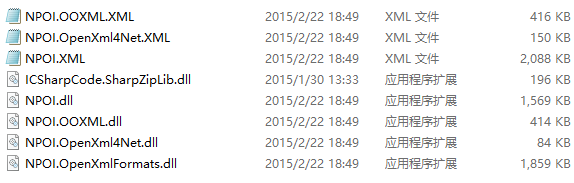
使用时需引用需要引用所有5个dll
using NPOI.HSSF.UserModel;

using NPOI.SS.UserModel;

using NPOI.XSSF.UserModel;
/// <summary>

        /// Excel导入成Datable

        /// </summary>

        /// <param name="file">导入路径(包含文件名与扩展名)</param>

        /// <returns></returns>

        public static DataTable ExcelToTable(string file)

        {

            DataTable dt = new DataTable();

            IWorkbook workbook;

            string fileExt = Path.GetExtension(file).ToLower();

            using (FileStream fs = new FileStream(file, FileMode.Open, FileAccess.Read))

            {

                //XSSFWorkbook 适用XLSX格式,HSSFWorkbook 适用XLS格式

                if (fileExt == ".xlsx") { workbook = new XSSFWorkbook(fs); } else if (fileExt == ".xls") { workbook = new HSSFWorkbook(fs); } else { workbook = null; }

                if (workbook == null) { return null; }

                ISheet sheet = workbook.GetSheetAt();

                //表头

                IRow header = sheet.GetRow(sheet.FirstRowNum);

                List<int> columns = new List<int>();

                for (int i = ; i < header.LastCellNum; i++)

                {

                    object obj = GetValueType(header.GetCell(i));

                    if (obj == null || obj.ToString() == string.Empty)

                    {

                        dt.Columns.Add(new DataColumn("Columns" + i.ToString()));

                    }

                    else

                        dt.Columns.Add(new DataColumn(obj.ToString()));

                    columns.Add(i);

                }

                //数据

                for (int i = sheet.FirstRowNum + ; i <= sheet.LastRowNum; i++)

                {

                    DataRow dr = dt.NewRow();

                    bool hasValue = false;

                    foreach (int j in columns)

                    {

                        dr[j] = GetValueType(sheet.GetRow(i).GetCell(j));

                        if (dr[j] != null && dr[j].ToString() != string.Empty)

                        {

                            hasValue = true;

                        }

                    }

                    if (hasValue)

                    {

                        dt.Rows.Add(dr);

                    }

                }

            }

            return dt;

        }

        /// <summary>

        /// Datable导出成Excel

        /// </summary>

        /// <param name="dt"></param>

        /// <param name="file">导出路径(包括文件名与扩展名)</param>

        public static void TableToExcel(DataTable dt, string file)

        {

            IWorkbook workbook;

            string fileExt = Path.GetExtension(file).ToLower();

            if (fileExt == ".xlsx") { workbook = new XSSFWorkbook(); } else if (fileExt == ".xls") { workbook = new HSSFWorkbook(); } else { workbook = null; }

            if (workbook == null) { return; }

            ISheet sheet = string.IsNullOrEmpty(dt.TableName) ? workbook.CreateSheet("Sheet1") : workbook.CreateSheet(dt.TableName);

            //表头

            IRow row = sheet.CreateRow();

            for (int i = ; i < dt.Columns.Count; i++)

            {

                ICell cell = row.CreateCell(i);

                cell.SetCellValue(dt.Columns[i].ColumnName);

            }

            //数据

            for (int i = ; i < dt.Rows.Count; i++)

            {

                IRow row1 = sheet.CreateRow(i + );

                for (int j = ; j < dt.Columns.Count; j++)

                {

                    ICell cell = row1.CreateCell(j);

                    cell.SetCellValue(dt.Rows[i][j].ToString());

                }

            }

            //转为字节数组

            MemoryStream stream = new MemoryStream();

            workbook.Write(stream);

            var buf = stream.ToArray();

            //保存为Excel文件

            using (FileStream fs = new FileStream(file, FileMode.Create, FileAccess.Write))

            {

                fs.Write(buf, , buf.Length);

                fs.Flush();

            }

        }

        /// <summary>

        /// 获取单元格类型

        /// </summary>

        /// <param name="cell"></param>

        /// <returns></returns>

        private static object GetValueType(ICell cell)

        {

            if (cell == null)

                return null;

            switch (cell.CellType)

            {

                case CellType.Blank: //BLANK:

                    return null;

                case CellType.Boolean: //BOOLEAN:

                    return cell.BooleanCellValue;

                case CellType.Numeric: //NUMERIC:

                    return cell.NumericCellValue;

                case CellType.String: //STRING:

                    return cell.StringCellValue;

                case CellType.Error: //ERROR:

                    return cell.ErrorCellValue;

                case CellType.Formula: //FORMULA:

                default:

                    return "=" + cell.CellFormula;

            }

        }
时间格式问题:
                case CellType.Numeric: //NUMERIC:

                    if (DateUtil.IsCellDateFormatted(cell))

                    {

                        return cell.DateCellValue.ToString();

                    }

                    else

                    {

                        return cell.NumericCellValue;

                    }
基于.xls模板生成Excel文件有时间再看
代码下载:https://yunpan.cn/cRBVnTCSchz7k (提取码:779e)
NOPI导出execl 多个sheet,一列图片的更多相关文章
- asp.net中导出Execl的方法
一.asp.net中导出Execl的方法: 在 asp.net中导出Execl有两种方法,一种是将导出的文件存放在服务器某个文件夹下面,然后将文件地址 输出在浏览器上:一种是将文件直接将文件输出流写给 ...
- js导出execl兼容ie Chrome Firefox各种主流浏览器(js export execl)
第一种导出table布局的表格 <html> <head> <meta charset="utf-8"> <script type=&qu ...
- C# NPOI 导出Execl 工具类
NPOI 导出Execl 自己单独工具类 详见代码 using System; using System.Collections.Generic; using System.Linq; using S ...
- asp.net大数据导出execl实现分开压缩并下载
asp.net大数据导出execl实现分开压缩并下载 /// <summary> /// 导出数据到EXCEL 多个表的 /// </summary> /// <para ...
- c#(NPOI)DataTable导出execl,execl(支持解析公式)导入DataTable
NPOI(C#)DataTable导出execl using NPOI.HSSF.UserModel; using NPOI.SS.UserModel; using NPOI.XSSF.UserMod ...
- js导出execl 兼容ie Chrome Firefox各种主流浏览器(js export execl)
第一种导出table布局的表格 1 <html> 2 3 <head> 4 <meta charset="utf-8"> 5 <scrip ...
- NOPI导出Excel
NOPI导出Excel /// <summary> /// 导出的方法 Excel样式 /// </summary> /// <param name="ds&q ...
- NPIO 导出Execl
步骤1:导入NOIO.dll (我导入压缩包中的4.0)
- java导出execl报表
1. 下载jar包: 官方下载:http://poi.apache.org/download.html这里可以下载到它的最新版本和文档,目前最新版本是3.7,这里使用比较稳定的3.6版. 百度网盘下载 ...
随机推荐
- 【转】 robotframework(rf)中对时间操作的datetime库常用关键字
转自http://blog.csdn.net/r455678/article/details/52993765 DateTime库是robotframework内置的库 1.对固定日期进行操作,增加或 ...
- oracle 多表连接查询 join(一)
一.简介: 多表连接查询通过表之间的关联字段,一次查询多表数据. 下面将依次介绍 多表连接中的如下方法: 1.from a,b 2.inner join 3.left outer join 4.rig ...
- Javascript之入门篇(一)
上一篇学习了什么是JavaScript语言及其作用和特有的特点等,本篇将详细介绍JavaScript一些入门使用方式. 对于初学者来讲,由于JavaScript是嵌入到HTML页面里面的,首先创建一张 ...
- tomcat8性能优化
在tomcat/catalina.sh中加入下面的配置,内存要根据机器实际情况配置,如果配置内存太大了有可能机器很慢. JAVA_OPTS="-server -Xms512m -Xmx512 ...
- kuangbin专题十六 KMP&&扩展KMP HDU2087 剪花布条
一块花布条,里面有些图案,另有一块直接可用的小饰条,里面也有一些图案.对于给定的花布条和小饰条,计算一下能从花布条中尽可能剪出几块小饰条来呢? Input输入中含有一些数据,分别是成对出现的花布条和小 ...
- poi进行excle操作
一 excle导出: 所需要jar包 <dependency> <groupId>org.apache.poi</groupId> <artifactId&g ...
- vue.js组件之j间的通讯一 子组件接受父祖件数据
Vue2.0的三种常用传值方式.父传子.子传父.非父子组件传值 在Vue的框架开发的项目过程中,经常会用到组件来管理不同的功能,有一些公共的组件会被提取出来.这时必然会产生一些疑问和需求?比如一个组件 ...
- k-sum 问题
问题描述 给定一个数组及数字 k ,从数组中找出所有相加结果为 k 的组合. 示例: 给定数组 [1,1,1] 令 k=2,输出: [[1,1]] 给定数组 [10, 1, 2, 7, 6, 1, 5 ...
- Oracle 11g服务OracleDBConsoleorcl启动失败(异常或报错)
OracleDBConsoleorcl:Oracle数据库控制台服务,orcl是Oracle的实例标识,默认的实例为orcl.在运行Enterprise Manager(企业管理器OEM)的时候,需要 ...
- 面试题 和 python 2与3的期区别
1.3 python2与python3的一些区别 大环境下的区别:python2:1,源码都含有php,Java,C,等语言的规范陋习,2,重复代码特别多. python3:源码很规范,清晰,简单 ...