
Python中print()函数不换行的方法
一、让print()函数不换行
在Python中,print()函数默认是换行的。但是,在很多情况下,我们需要不换行的输出(比如在算法竞赛中)。那么,在Python中如何做到这一点呢?
其实很简单。只要指定print()函数的end参数为空就可以了。(默认是’\n’)
例如:
 print('hello world', end='')

 print('!!!')
输出为:
二、print()函数浅析
当然,print()函数不止有end这个参数,还有其它几个参数。下面我们来看一看这些参数对输出分别起到什么作用。
先来看一下print()函数的原型:
print(*objects, sep=' ', end='\n', file=sys.stdout, flush=False)
以下摘自官方文档:
Print objects to the text stream file, separated by sep and followed by end. sep, end, file and flush, if present, must be given as keyword arguments.
All non-keyword arguments are converted to strings like str() does and written to the stream, separated by sep and followed by end. Both sep and end must be strings; they can also be None, which means to use the default values. If no objects are given, print() will just write end.
The file argument must be an object with a write(string) method; if it is not present or None, sys.stdout will be used. Since printed arguments are converted to text strings, print() cannot be used with binary mode file objects. For these, use file.write(...) instead.
Whether output is buffered is usually determined by file, but if the flush keyword argument is true, the stream is forcibly flushed.
Changed in version 3.3: Added the flush keyword argument.
也就是说,print()将objects转换成strings输出到流中,用sep分隔,以end结束。
下面通过几个例子,来具体的看一看print()函数各参数的作用。
第一个参数objects就不多说了,要是不知道干啥的可以考虑从头学起。
第二个参数sep,表示objects参数连接时使用的字符,默认是空格。
print('hello', 'world', sep='*')
输出为:
第三个参数end,表示输出完后的结束符,默认是换行。例子前面有了。
第四个参数file,表示输出到哪里,默认是sys.stdout。必须是file-like对象,即有write方法,不可以用二进制模式。
 f = open('print.txt', 'w')

 print('hello', 'world', file=f)
程序运行结束后,打开文件可以看到: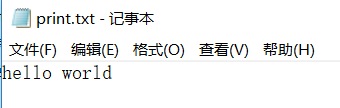
第五个参数flush,表示是否立即输出到file所指定的对象中。当为True时,立即输出,当为False时,则取决于file对象(一般是不立即输出)。
上面的例子,如果加个暂停,可以发现,数据没有被立即写入,只有在f.close()后才被写入。如果没有写f.close(),那就在程序运行结束以后写入。
 f = open('print.txt', 'w')

 print('hello', 'world', file=f)

 s = input('f.close()? (Y/N)')

 if s == 'Y':

     f.close()
如果flush为True时,则会被立即写入。
 f = open('print.txt', 'w')

 print('hello', 'world', file=f, flush=True)

 s = input('f.close()? (Y/N)')

 if s == 'Y':

     f.close()
以上就是对Python中print()函数的浅析,鉴于本人的水平有限,有不妥之处,还请指出。
 #!/usr/bin/env python3

 # -*- coding: utf-8 -*-

 # 不换行

 print('hello world', end='')

 print('!!!')

 f = open('print.txt', 'w')

 f1 = open('print1.txt', 'w')

 print('hello', 'world')

 print('hello', 'world', sep='*')

 print('hello', 'world', file=f)

 print('hello', 'world', file=f1, flush=True)

 s = input('f.close()? (Y/N)')

 if s == 'Y':

     f.close()

 # 如果输入为N,此处暂停观察print.txt中的内容是否为空

 s = input()
Python中print()函数不换行的方法的更多相关文章
- Python中print()函数不换行的方法以及分隔符替换
一.让print()函数不换行 在Python中,print()函数默认是换行的.但是,在很多情况下,我们需要不换行的输出(比如在算法竞赛中).那么,在Python中如何做到这一点呢? 其实很简单.只 ...
- 【313】python 中 print 函数用法总结
参考:python 中 print 函数用法总结 参考:Python print() 函数(菜鸟教程) 参考:Python 3 print 函数用法总结 目录: 字符串和数值类型 变量 格式化输出 p ...
- Python中针对函数处理的特殊方法
Python中针对函数处理的特殊方法 很多语言都提供了对参数或变量进行处理的机制,作为灵活的Python,提供了一些针对函数处理的特殊方法 filter(function, sequence):对se ...
- Python中readline()函数 去除换行符
从Python中readline()函数读取的一行内容中含有换行符\n,很多时候我们需要处理不含有换行符的字符串,此时就要去掉换行符\n. 方法是使用strip()函数. 例子如下: f = open ...
- python中print()函数的“,”与java中System.out.print()函数中的“+”
python中的print()函数和java中的System.out.print()函数都有着打印字符串的功能. python中: print("hello,world!") 输出 ...
- Python中print()函数的用法详情
描述 print() 方法用于打印输出,最python中常见的一个函数. 在交互环境中输入help(print)指令,可以显示print()函数的使用方法. >>> help(pri ...
- Python 中的函数与类的方法
注:本文转译自 Stackoverflow 上 Adding a Method to an Existing Object 的最佳回答. 在 python 中,def 定义的函数与类中的方法有很大的不 ...
- python 中 print 函数用法总结
Python 思想: “一切都是对象!” 在 Python 3 中接触的第一个很大的差异就是缩进是作为语法的一部分,这和C++等其他语言确实很不一样,所以要小心 ,其中python3和python2中 ...
- Python中print()函数的用法
print()函数用于打印输出 1.函数语法: print(values,sep=' ',end='\n') sep和end是print()函数常用参数 参数sep是一次打印多个元素时的间隔符号,默认 ...
随机推荐
- 关于CMainFrm不接收鼠标事件响应原因
CMainFrm即主框架窗口对鼠标的左键和右键在OnLButtonDown中无响应 解决方案: 1.在OnNcLButtonDown中响应.(即非客户区中响应) 参考文献:http://www.cod ...
- java try中包含return语句,finally中的return语句返回顺序
//结论: finally 中的代码比 return 和 break 语句后执行 public static void main(String[] args) { int x=new Test.tes ...
- 【遍历二叉树】11把二叉树转换成前序遍历的链表【Flatten Binary Tree to Linked List】
本质上是二叉树的root->right->left遍历. +++++++++++++++++++++++++++++++++++++++++++++++++++++++++++++++++ ...
- OpenAL播放pcm或wav数据流-windows/ios/android(一)
OpenAL播放pcm或wav数据流-windows/iOS/Android(一) 最近在研究渲染问题,本文采用openal做pcm和wav数据流播放,并非本地文件,demo是windows的,i ...
- poj2395
#include<iostream> #include<cstdio> #include<algorithm> #include<cstdlib> ...
- Excel文本获取拼音
[说明] 版本:Excel 2010 文件后缀:.xls 有在.xlsb文件下使用未成功.建议使用.xls后缀. 1.调出“开发工具” 步骤:文件-->选项-->自定义功能区-->勾 ...
- 基于433MHz无线串口,多发一收解决方案
一.无线发展背景 随着科学技术的飞速发展,智能家居.智慧农业.智慧城市如雨后春笋.而这些行业的发展离不开无线的应用. 传统的有线连接不仅仅是成本高,包括布线安装.维护等也是成本巨大.并且机动性也很差, ...
- JAVA 1.5 并发之 ReentrantLock
在文章里我不打算具体讲Lock的实现,对此有兴趣的请点击这篇博文 http://www.blogjava.net/BucketLi/archive/2010/09/30/333471.html 我是一 ...
- 杂项:art-template-loader
ylbtech-杂项:art-template-loader 1.返回顶部 2.返回顶部 3.返回顶部 4.返回顶部 5.返回顶部 1. https://www.npmjs.com/p ...
- 安装mariadb并修改配置文件
实验环境:CentOS7 #安装mariadb-server包#修改mariadb配置文件/etc/my.cnf.d/server.cnf#添加 skip_name_resolve=ON #不执行将I ...