
PyCharm出现module 'matplotlib' has no attribute 'verbose'解决方案
其实不是你安装错了,也不是你代码问题,这就是PyCharm的锅!
虽然有三种解法办法,我觉得还是改IDE配置是最佳方法
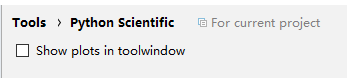
把这个钩去掉就行了......
# -*- coding: utf-8 -*-

__author__ = '樱花落舞'

from PIL import Image

import os

from  pylab import *

img = Image.open('1.jpg')

img.show()

im = array(Image.open('1.jpg'))

imshow(im)

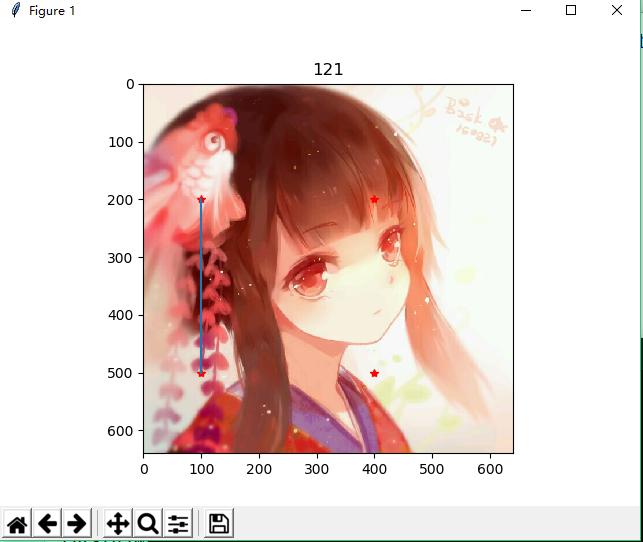
x = [100,100,400,400]

y = [200,500,200,500]

plot(x,y,'r*')

plot(x[:2],y[:2])

title("")

show()
PyCharm出现module 'matplotlib' has no attribute 'verbose'解决方案的更多相关文章
- AttributeError: module 'matplotlib' has no attribute 'verbose' (pycharm中使用matplotlib 2.2.0的坑)
AttributeError: module 'matplotlib' has no attribute 'verbose' 环境信息 本地系统:win10 本地开发环境:python(3.6.3), ...
- 解决Pycharm中matplotlib画图出错问题(AttributeError: module 'matplotlib' has no attribute 'verbose')
最近在Linux中使用pycharm过程中使用matplotlib无法画图,总是提示错误 /usr/bin/python3. /home/leo/PycharmProjects/untitled1/E ...
- AttributeError: module 'matplotlib' has no attribute 'verbose'
AttributeError: module 'matplotlib' has no attribute 'verbose' 翻译:attributeError:模块“matplotlib”没有“ve ...
- 解决Pycharm中module 'pip' has no attribute 'main'的问题
背景:pip升级至10.0.1后,使用Pycharm安装Package时一直提示module 'pip' has no attribute 'main'报错信息. 解决方法: 找到Pycharm安装目 ...
- matplotlib显示AttributeError: 'module' object has no attribute 'verbose'
解决办法:file-settings-tools-python scientific,将show plots in toolwindow前面的对号去掉即可.
- python之module 'unittest' has no attribute 'TestCase' 解决方案
脚本报错如下: 解决方案: 这是脚本名称冲突所导致的报错,修改脚本名中重新执行,运行正常 注:脚本取名最好不要与模块和方法一致,避免不必要的冲突
- 解决Pycharm无法显示matplotlib绘图问题
最近开始接触matplotlib, 1.首先安装matplotlib库和其依赖的一些其他库,例如:numpy,scipy和pandas等 2.开始进行简单的编码工作,并在PyCharm中运行,出现如下 ...
- pycharm安装提示 module 'pip' has no attribute 'main'
问题描述: 环境: windows10 pycharm2016.2.3 //在最先版本的pycharm就没问题,可能还需要升级pip版本 python3.6 pip安装模块,提示 Attribute ...
- TensorFlow——module 'tensorflow' has no attribute 'xxx'
tf.sub()更改为tf.subtract() tf.mul()更改为tf.multiply() tf.types.float32更改为tf.float32 tf.pact()更改为tf.stact ...
随机推荐
- java中sleep()的用法
Thread.sleep(long millis)和Thread.sleep(long millis, int nanos)静态方法强制当前正在执行的线程休眠(暂停执行),以“减慢线程”. 当线程睡眠 ...
- 关于service和线程的区别
主要有两方面,访问控制和功能区别 首先,service是运行在主线程上的,并不是一个新的线程 其次,service在运行的时候可以被多个activity访问和控制,而线程是不可以的 最后,servic ...
- centos系统查看本机IP地址
centos系统查看本机IP地址,输入 ifconfig -a查看 centos查询上网公网IP输入 curl ifconfig.me 命令即可查看 centos查询上网网关IP,tracepath ...
- 蓝桥杯【入门训练】 Fibonacci数列
问题描述 Fibonacci数列的递推公式为:Fn=Fn-1+Fn-2,其中F1=F2=1. 当n比较大时,Fn也非常大,现在我们想知道,Fn除以10007的余数是多少. 输入格式 输入包含一个整数n ...
- easyui layout 折叠之后显示标题
方法一:重载扩展panel收缩事件 (function($){ var buttonDir = {north:'down',south:'up',east:'left',west:'right'}; ...
- 写一个函数封装printf用作trace
转自http://blog.csdn.net/coder_weisong/article/details/10285291 写一个函数封装printf用作trace 方法一: #inc ...
- Windows系统 安装 CMake
Windows系统 安装 CMake 我们的电脑系统:Windows 10 64位 安装的CMake 版本:cmake-3.6.1-win64-x64(目前最新) 下载 在CMake官网下载:cmak ...
- latex公式怎么变成图片格式
由于这几天正在复习高中的数学,想写一些博客记录一下,发现数学公式的输入是一个问题,后来知道了latex,去youtube学习了一点入门教程发现挺简单的,不过有一个问题,latex生成的是pdf格式啊, ...
- cf123E Maze
传送门 分析 见ptx大爷的博客 代码 #include<iostream> #include<cstdio> #include<cstring> #include ...
- 操作系统 Linux ex1 note
ctrl + alt + T 命令行 ctrl + alt + F7 ctrl + alt + F1-6 ls 列出所有文件 / 根目录 ~ /home/username cd 切换路径 . 当前目录 ...