
iOS 通用button 上图下字
  UIButton *first = [[UIButton alloc] initWithFrame:CGRectMake(0, 0, kHeight(80), kHeight(80))];

    [first setImage:[UIImage imageNamed:@"icon_index_housekeeping_10"] forState:UIControlStateNormal];

    [first setTitle:@"扫一扫" forState:UIControlStateNormal];

    [first.titleLabel setFont:kFont(14)];

    [first setTitleColor:[UIColor blackColor] forState:UIControlStateNormal];

    [first setTitleColor:kColor(0x444444ff) forState:UIControlStateHighlighted];

    [first setBackgroundColor:[UIColor whiteColor]];

    [first setContentHorizontalAlignment:UIControlContentHorizontalAlignmentLeft];

    [first setContentVerticalAlignment:UIControlContentVerticalAlignmentTop];

    [first setTitleEdgeInsets:UIEdgeInsetsMake((kGetHeigh(first.bounds) - first.titleLabel.intrinsicContentSize.height ) /2 + first.imageView.intrinsicContentSize.height / 2 + (((kGetHeigh(first.bounds) - first.imageView.intrinsicContentSize.height - first.titleLabel.intrinsicContentSize.height)/2)/2), (kGetWidth(first.bounds) - first.titleLabel.intrinsicContentSize.width) / 2 - first.imageView.intrinsicContentSize.width, 0,0)];

    [first setImageEdgeInsets:UIEdgeInsetsMake((kGetHeigh(first.bounds) - first.imageView.intrinsicContentSize.height ) /2 - (((kGetHeigh(first.bounds) - first.imageView.intrinsicContentSize.height - first.titleLabel.intrinsicContentSize.height)/2)/2), (kGetWidth(first.bounds) - first.imageView.intrinsicContentSize.width)/2, 0, 0)];
注释:
(((kGetHeigh(first.bounds) - first.imageView.intrinsicContentSize.height - first.titleLabel.intrinsicContentSize.height)/2)/2)

文字向下的偏移量   (总高度-图片高度-文字高度)/2)/2
上面的算法过于复杂,重新写了一个:
 self.contentHorizontalAlignment = .left;

 self.contentVerticalAlignment = .top;
这两个方法会让图片和文字按照居左居上进行排列,如果不做任何改动,会显示如下:
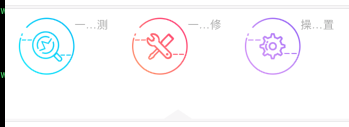
设置完图片和文字的顺序后,可以进行修饰了
 //设置排列顺序为左上

            self.contentHorizontalAlignment = .left;

            self.contentVerticalAlignment = .top;

if style == .CusButtonStyleOne {

                //图上字下

                let Titletop = (kGetHeigh(self.bounds) -  self.imageView!.intrinsicContentSize.height - self.titleLabel!.intrinsicContentSize.height)/ *  + self.imageView!.intrinsicContentSize.height;

                let Titleleft = (kGetWidth(self.bounds) - self.titleLabel!.intrinsicContentSize.width) /  - self.imageView!.intrinsicContentSize.width;

                self.titleEdgeInsets = UIEdgeInsets.init(top:Titletop , left: Titleleft, bottom: , right: );

                let imageTop = (kGetHeigh(self.bounds) - self.titleLabel!.intrinsicContentSize.height - self.imageView!.intrinsicContentSize.height) / ;

                let imgLeft = (kGetWidth(self.bounds) - self.imageView!.intrinsicContentSize.width)/;

                self.imageEdgeInsets = UIEdgeInsets.init(top: imageTop, left: imgLeft, bottom: , right: );

                NSLog("%@", self.titleLabel?.text ?? "");

            }
显示如下:
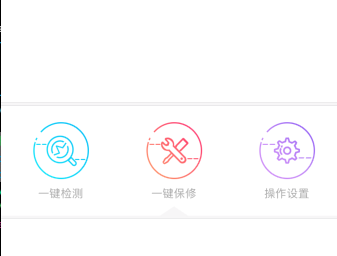
iOS 通用button 上图下字的更多相关文章
- 自定义控件,上图下字的Button,图片任意指定大小
最近处在安卓培训期,把自己的所学写成博客和大家分享一下,今天学的是这个自定义控件,上图下字的Button安卓自带,但是苦于无法设置图片大小(可以在代码修改),今天自己做了一个,首先看一下效果图,比较实 ...
- iOS通用链接(Universal Links)突然点击无效的解决方案
接上文<微信中通过页面(H5)直接打开本地app的解决方案>已经把iOS搞定并且已经正常能跑了,突然就再也用不了了... 问题描述 测试告诉我,如果从微信打开App之后,点击App右上角的 ...
- (转)查询或修改iPhone的短信服务中心号码(iOS通用)
有些时候会有提示你自己的iPhone无法发送短信,原因是没有设置短信中心号码,下面就介绍一下如何设置iPhone的短信中心号码和iPhone查看短信中心号码的方法.(iOS通用) iPhone的设置短 ...
- iOS 在 ARC 环境下 dealloc 的使用、理解误区
iOS 在 ARC 环境下 dealloc 的使用.理解误区 太阳火神的漂亮人生 (http://blog.csdn.net/opengl_es) 本文遵循"署名-非商业用途-保持一致&qu ...
- 李洪强iOS经典面试题下
李洪强iOS经典面试题下 21. 下面的代码输出什么? @implementation Son : Father - (id)init { self = [super init]; if (self) ...
- iOS 点击cell下拉
iOS 点击cell下拉 代码如下: #import "ViewController.h" @interface ViewController ()<UITableView ...
- 改动导航栏上返回button上的字,比如把back改动为返回
改动导航栏上返回button上的字,比如把back改动为返回 注意:这个须要在跳转之前到视图控制器中写,而不是在跳转之后到控制器中写 UIBarButtonItem *backIetm = [[UIB ...
- 【Bootstrap3.0建站笔记二】button可下拉弹出层
1.button可下拉弹出层: watermark/2/text/aHR0cDovL2Jsb2cuY3Nkbi5uZXQvY2hpbmFwbGFu/font/5a6L5L2T/fontsize/400 ...
- [Android]Button按下后修改背景图
Button按下后修改背景图 错误做法:为Button添加OnTouch事件监听,根据ACTION_UP和ACTION_DOWN动作来修改Button的背景图 错误原因:从理论上讲,按钮按下修改背景色 ...
随机推荐
- mac 安装 navicat premium11.2.1400 破解版
前言: 在 Mac 系统下 安装 navicat for mysql 时,遇到注册码的问题,适用了很多破解下载,都没有成功,现找到一篇特此记录下. Mac 下一款实用的数据库管理工具--Navicat ...
- java:网络编程(InetAddress,InetSocketAddress,URL,TCP(Socket与SeverSocket),TCP与UDP的区别)
InerAddress: /**IP地址:在网络上唯一标示一台计算机 * 端口号:标示计算机上不同的应用程序 * java.net.InetAddress类:此类表示互联网协议 (IP) 地址. * ...
- 树形结构JSON的实现方法
在Web应用程序开发领域,基于Ajax技术的JavaScript树形控件已经被广泛使用,它用来在Html页面上展现具有层次结构的数据项.目前市场上常见的JavaScript框架及组件库中均包含自己的树 ...
- Aspose.Cells 基础用法
最近使用Aspose.Cells做Excel,在怎么添加批注和添加内部导航链接上耗费了一些时间,最后在官网上找到相关用法,记录一下. 代码不用过多介绍,看看即可明白. 测试代码下载 Workbook ...
- Oracle clob 操作
--Oracle clob 操作 -- Created on 2015/4/8 by TianPing declare -- Local variables here v_clob1 Clob; v_ ...
- 小红帽的画笔(NOIP模拟赛Round 7)
又到了神奇的模拟赛时间~ 真是丧~ 好吧我们来看看题目 小红帽是Pop star上最著名的人类画家,她可以将任何画出的东西变成真实的物品.赋予她这样神奇能力的正是她手上的画笔. 小红帽每次作画时,都需 ...
- Apache开启PHP的伪静态模式
首先,什么是伪静态: 伪静态又名URL重写,是动态的网址看起来像静态的网址.换句话说就是,动态网页通过重写 URL 方法实现去掉动态网页的参数,但在实际的网页目录中并没有必要实现存在重写的页面. 1. ...
- 纠正网上乱传的android调用Webservice方法。
1.写作背景: 笔者想实现android调用webservice,可是网上全是不管对与错乱转载的文章,结果不但不能解决问题,只会让人心烦,所以笔者决定将自己整理好的能用的android调用webser ...
- C#中使用aria2c进行下载并显示进度条
正则表达式的生成网站: http://www.txt2re.com/index-csharp.php3 Aria2c下载地址: https://github.com/aria2/aria2/relea ...
- CentOS6.5升级autoconf版本,解决”Autoconf version 2.64 or higher is required“错误
CentOS6.5升级autoconf版本,解决”Autoconf version 2.64 or higher is required“错误 https://blog.csdn.net/pretty ...