
[Python Study Notes]水平柱状图绘制
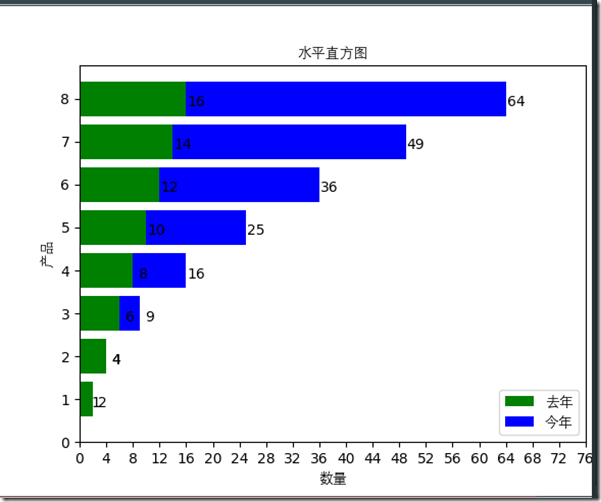
'''''''''''''''''''''''''''''''''''''''''''''''''''''''''''''''''''''''''''''''''''''''''''''''''''

>>文件: 水平直方图.py

>>作者: liu yang

>>邮箱: liuyang0001@outlook.com

>>博客: www.cnblogs.com/liu66blog

'''''''''''''''''''''''''''''''''''''''''''''''''''''''''''''''''''''''''''''''''''''''''''''''''''

#!/usr/bin/env python

#  -*- coding: utf-8 -*-

import sys, os

import matplotlib

import matplotlib.pyplot as plt

# 定义要使用的字体,防止出现中文乱码

font=matplotlib.font_manager.FontProperties(fname=r"C:\Windows\Fonts\Deng.ttf")

# Horizontal histogram 水平直方图

def horizontal_histogram():

    # 先生成一个画布

    fig = plt.figure()

    # 生成数据

    x1 = [x for x in range(1, 9)]

    y1 = [n * 2 for n in range(1, 9)]

    x2 = [x for x in range(1, 9)]

    y2 = [x ** 2 for x in x2]

    # 画水平直方图

    l2=plt.barh(x2,y2,color='b')

    l1=plt.barh(x1,y1,color='g')

    # 设置

    plt.title("水平直方图",fontproperties=font)

    # 设置x,y轴标签

    plt.xlabel('数量',fontproperties=font)

    plt.ylabel('产品',fontproperties=font)

    # 设置刻度

    plt.xticks([x for x in range(0,80,4)])

    plt.yticks([y for y in range(0,9,1)])

    # 设置注解狂图示

    plt.legend(handles = [l1, l2,], labels = ['去年', '今年'], loc = 'best',prop=font)

    for x1,x2, y1, y2 in zip(x1,x2, y1, y2):

        # 添加文本时添加偏移量使其显示更加美观

        plt.text(y1+1.5 , x1-0.25, '%.0f' % y1, ha='center', va='bottom')

        plt.text(y2+1.5 , x2-0.25, '%.0f' % y2, ha='center', va='bottom')

    # 显示

    plt.show()

if __name__ == '__main__':

    histogram = horizontal_histogram()
[Python Study Notes]水平柱状图绘制的更多相关文章
- [Python Study Notes]堆叠柱状图绘制
''''''''''''''''''''''''''''''''''''''''''''''''''''''''''''''''''''''''''''''''''''''''''''''''''' ...
- [Python Study Notes]双层柱状图绘制
''''''''''''''''''''''''''''''''''''''''''''''''''''''''''''''''''''''''''''''''''''''''''''''''''' ...
- [Python Study Notes]气泡散点图绘制
''''''''''''''''''''''''''''''''''''''''''''''''''''''''''''''''''''''''''''''''''''''''''''''''''' ...
- [Python Study Notes]七彩散点图绘制
''''''''''''''''''''''''''''''''''''''''''''''''''''''''''''''''''''''''''''''''''''''''''''''''''' ...
- [Python Study Notes]折线图绘制
''''''''''''''''''''''''''''''''''''''''''''''''''''''''''''''''''''''''''''''''''''''''''''''''''' ...
- [Python Study Notes]饼状图绘制
''''''''''''''''''''''''''''''''''''''''''''''''''''''''''''''''''''''''''''''''''''''''''''''''''' ...
- [Python Study Notes]匿名函数
Python 使用 lambda 来创建匿名函数. lambda这个名称来自于LISP,而LISP则是从lambda calculus(一种符号逻辑形式)取这个名称的.在Python中,lambda作 ...
- [Python Study Notes]字符串处理技巧(持续更新)
''''''''''''''''''''''''''''''''''''''''''''''''''''''''''''''''''''''''''''''''''''''''''''''''''' ...
- [Python Study Notes]with的使用
在 Python 2.5 中, with 关键字被加入.它将常用的 try ... except ... finally ... 模式很方便的被复用.看一个最经典的例子: with open('fil ...
随机推荐
- C#中List<object>.Clear()方法和实例化new List<object>()操作的结果分析
本文主要的目的是想简单的探讨一下C#中List针对内存的操作过程,以便以后遇到该种情况可以避免走进误区,内容非常简单,只是在此作为记录.能帮到人最好,帮不到就当给自己提个醒.C#将复杂的指针操作全都隐 ...
- 用createinstallmedia创建可恢复的OSX安装DMG
准备 从App Store下载OS X安装程序,下载完成,会在应用程序目录 /Applications 下找到类似 Install OS X 10.xxxxxx.app(中文名如:安装 OS X 10 ...
- GIT和SVN比较
SVN与Git比较 摘要Svn是目前得到大多数人认可,使用得最多的版本控制管理工具,而Git的优势在于易于本地增加分支和分布式的特性,可离线提交,解决了异地团队协同开发等svn不能解决的问题.本文就这 ...
- leetcode 645. Set Mismatch——凡是要节约空间的题目 都在输入数据上下功夫 不要担心破坏原始的input
The set S originally contains numbers from 1 to n. But unfortunately, due to the data error, one of ...
- Linux tar命令总结
压缩 tar –cvf jpg.tar *.jpg 将目录里所有jpg文件打包成tar.jpg tar –czf jpg.tar.gz *.jpg 将目录里所有jpg文件打包成jpg.tar后, ...
- L118
The company needs to focus on its biggest clients.This article discussed the events that led to her ...
- Project://CRM
初始化 考勤 录入成绩 查看成绩 待续...
- php实现二叉树的遍历
- Dilworth 定理
主要是做个笔记 DAG 最长反链 = 最小链覆盖 反链:反链上任意两个点 $(u,v)$ ,$u$ 不能到 $v$,$v$ 也不能到 $u$ 最小链覆盖:选出若干可以相交的链,覆盖整张图,注意与“最小 ...
- HDU - 5307 :He is Flying (分治+FFT)(非正解)
JRY wants to drag racing along a long road. There are nn sections on the road, the ii-th section has ...