
python+NLTK 自然语言学习处理六:分类和标注词汇一
在一段句子中是由各种词汇组成的。有名词,动词,形容词和副词。要理解这些句子,首先就需要将这些词类识别出来。将词汇按它们的词性(parts-of-speech,POS)分类并相应地对它们进行标注。这个过程叫做词性标注。
要进行词性标注,就需要用到词性标注器(part-of-speech tagger).代码如下
text=nltk.word_tokenize("customer found there are abnormal issue")
print(nltk.pos_tag(text))
提示错误:这是因为找不到词性标注器
LookupError:
**********************************************************************
Resource averaged_perceptron_tagger not found.
Please use the NLTK Downloader to obtain the resource:
>>> import nltk
>>> nltk.download('averaged_perceptron_tagger')
Searched in:
- '/home/zhf/nltk_data'
- '/usr/share/nltk_data'
- '/usr/local/share/nltk_data'
- '/usr/lib/nltk_data'
- '/usr/local/lib/nltk_data'
- '/usr/nltk_data'
- '/usr/lib/nltk_data'
**********************************************************************
运行nltk.download进行下载,并将文件拷贝到前面错误提示的搜索路径中去,
>>> import nltk
>>> nltk.download('averaged_perceptron_tagger')
[nltk_data] Downloading package averaged_perceptron_tagger to
[nltk_data] /root/nltk_data...
[nltk_data] Unzipping taggers/averaged_perceptron_tagger.zip.
True
以及对应的帮助文档
>>> nltk.download('tagsets')
[nltk_data] Downloading package tagsets to /root/nltk_data...
[nltk_data] Unzipping help/tagsets.zip.
True
运行结果:
[('customer', 'NN'), ('found', 'VBD'), ('there', 'EX'), ('are', 'VBP'), ('abnormal', 'JJ'), ('issue', 'NN')]
在这里得到了每个词以及每个词的词性。下表是一个简化的词性标记集
|
标记 |
含义 |
例子 |
|
ADJ |
形容词 |
new, good, high, special, big, local |
|
ADV |
动词 |
really, already, still, early, now |
|
CNJ |
连词 |
and, or, but, if, while, although |
|
DET |
限定词 |
the, a, some, most, every, no |
|
EX |
存在量词 |
there, there’s |
|
FW |
外来词 |
dolce, ersatz, esprit, quo, maitre |
|
MOD |
情态动词 |
will, can, would, may, must, should |
|
N |
名词 |
year, home, costs, time, education |
|
NP |
专有名词 |
Alison, Africa, April, Washington |
|
NUM |
数词 |
twenty-four, fourth, 1991, 14:24 |
|
PRO |
代词 |
he, their, her, its, my, I, us |
|
P |
介词 |
on, of, at, with, by, into, under |
|
TO |
词 to |
to |
|
UH |
感叹词 |
ah, bang, ha, whee, hmpf, oops |
|
V |
动词 |
is, has, get, do, make, see, run |
|
VD |
过去式 |
said, took, told, made, asked |
|
VG |
现在分词 |
making, going, playing, working |
|
VN |
过去分词 |
given, taken, begun, sung |
|
WH |
Wh 限定词 |
who, which, when, what, where, how |
如果解析的对象是由单独的词/标记字符串构成的,可以用str2tuple的方法将词和标记解析出来并形成元组。使用方法如下:
[nltk.tag.str2tuple(t) for t in "customer/NN found/VBD there/EX are/VBP abnormal/JJ issue/NN".split()]
运行结果:
[('customer', None), ('found', None), ('there', None), ('are', None), ('abnormal', None), ('issue', None)]
对于在NLTK中自带的各种文本,也自带词性标记器
nltk.corpus.brown.tagged_words()
[('The', 'AT'), ('Fulton', 'NP-TL'), ...]
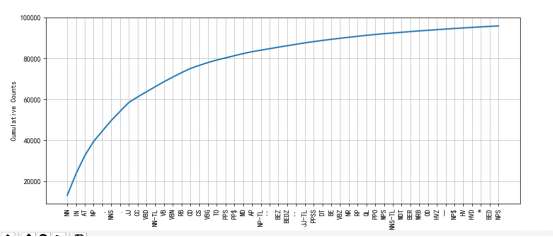
那么借助与Freqdist和以及绘图工具。我们就可以画出各个词性的频率分布图,便于我们观察句子结构
brown_news_tagged=nltk.corpus.brown.tagged_words(categories='news')
tag_fd=nltk.FreqDist(tag for (word,tag) in brown_news_tagged)
tag_fd.plot(50,cumulative=True)
结果如下,绘制出了前50个
假如我们正在学习一个词,想看下它在文本中的应用,比如后面都用的什么词。可以采用如下的方法,我想看下oftern后面都跟的是一些什么词语
brown_learned_text=nltk.corpus.brown.words(categories='learned')
ret=sorted(set(b for(a,b) in nltk.bigrams(brown_learned_text) if a=='often'))
在这里用到了bigrams方法,这个方法主要是形成双连词。
比如下面的这段文本,生成双连词
for word in nltk.bigrams("customer found there are abnormal issue".split()):
print(word)
结果如下:
('customer', 'found')
('found', 'there')
('there', 'are')
('are', 'abnormal')
('abnormal', 'issue')
光看后面跟了那些词语还不够,我们还需要查看后面的词语都是一些什么词性。
1 首先是对词语进行词性标记。形成词语和词性的二元组
2 然后根据bigrams形成连词,然后根据第一个词是否是often,得到后面词语的词性
brown_learned_text=nltk.corpus.brown.tagged_words(categories='learned')
tags=[b[1] for (a,b) in nltk.bigrams(brown_learned_text) if a[0]=='often']
fd=nltk.FreqDist(tags)
fd.tabulate()
结果如下:
VBN VB VBD JJ IN QL , CS RB AP VBG RP VBZ QLP BEN WRB . TO HV
15 10 8 5 4 3 3 3 3 1 1 1 1 1 1 1 1 1 1
同样的,如果我们想的到三连词, 可以采用trigrams的方法。
python+NLTK 自然语言学习处理六:分类和标注词汇一的更多相关文章
- python+NLTK 自然语言学习处理七:N-gram标注
在上一章中介绍了用pos_tag进行词性标注.这一章将要介绍专门的标注器. 首先来看一元标注器,一元标注器利用一种简单的统计算法,对每个标识符分配最有可能的标记,建立一元标注器的技术称为训练. fro ...
- NLTK学习笔记(五):分类和标注词汇
目录 词性标注器 标注语料库 表示已经标注的标识符:nltk.tag.str2tuple('word/类型') 读取已经标注的语料库 名词.动词.形容词等 尝试找出每个名词类型中最频繁的名词 探索已经 ...
- python+NLTK 自然语言学习处理八:分类文本一
从这一章开始将进入到关键部分:模式识别.这一章主要解决下面几个问题 1 怎样才能识别出语言数据中明显用于分类的特性 2 怎样才能构建用于自动执行语言处理任务的语言模型 3 从这些模型中我们可以学到那些 ...
- python+NLTK 自然语言学习处理:环境搭建
首先在http://nltk.org/install.html去下载相关的程序.需要用到的有python,numpy,pandas, matplotlib. 当安装好所有的程序之后运行nltk.dow ...
- python+NLTK 自然语言学习处理二:文本
在前面讲nltk安装的时候,我们下载了很多的文本.总共有9个文本.那么如何找到这些文本呢: text1: Moby Dick by Herman Melville 1851 text2: Sense ...
- python+NLTK 自然语言学习处理四:获取文本语料和词汇资源
在前面我们通过from nltk.book import *的方式获取了一些预定义的文本.本章将讨论各种文本语料库 1 古腾堡语料库 古腾堡是一个大型的电子图书在线网站,网址是http://www.g ...
- python+NLTK 自然语言学习处理五:词典资源
前面介绍了很多NLTK中携带的词典资源,这些词典资源对于我们处理文本是有大的作用的,比如实现这样一个功能,寻找由egivronl几个字母组成的单词.且组成的单词每个字母的次数不得超过egivronl中 ...
- python+NLTK 自然语言学习处理三:如何在nltk/matplotlib中的图片中显示中文
我们首先来加载我们自己的文本文件,并统计出排名前20的字符频率 if __name__=="__main__": corpus_root='/home/zhf/word' word ...
- Python+NLTK自然语言处理学习(一):环境搭建
Python+NLTK自然语言处理学习(一):环境搭建 参考黄聪的博客地址:http://www.cnblogs.com/huangcong/archive/2011/08/29/2157437.ht ...
随机推荐
- AndroidStudio短信验证功能收不到验证码
http://mob.com/第三方接口获取地址: 登陆过后点我的后台即可上传,管理应用.需注意的是,即使验证不通过,只要整合了短信验证的Jar包,每天都有20条免费验证短信.现在的mob.com只支 ...
- JNI 函数注册与管理
class<--> 一一对应so-->method 每个so对应于一个类对象 类中的每个native方法对应 于so中的一个native的function,对应关系涉及 {c ...
- JavaScript AJAX原生写法
<!DOCTYPE html> <html lang="zh"> <head> <meta charset="UTF-8&quo ...
- epoll使用详解(精髓)(转)
epoll - I/O event notification facility 在linux的网络编程中,很长的时间都在使用select来做事件触发.在linux新的内核中,有了一种替换它的机制,就是 ...
- cocos2d-x 3.0 回调函数
參考文章: http://blog.csdn.net/crayondeng/article/details/18767407 http://blog.csdn.net/star530/article/ ...
- 基于bootstrsp的jquery富文本编辑器的手冊说明
重点:当在页面插入文本编辑器后.无法用js/jq的方式去将某些值写入到文本编辑器.如:$("textarea").val("111");$("text ...
- Android插件化开发,初入殿堂
好久没有写博客了,这次准备写写我这几天的研究成果--Android插件化开发框架CJFrameForAndroid. 好久没有写博客了,这次准备写写我这几天的研究成果--Android插件化开发框架C ...
- 转 SQL行转列汇总
1.PIVOT 用于将列值旋转为列名(即行转列) PIVOT 的一般语法是:PIVOT(聚合函数(列名) FOR 列名 in (列值1,…) )AS P select * from TB pivot ...
- Nginx之红黑树
/* * Copyright (C) Igor Sysoev * Copyright (C) Nginx, Inc. */ #ifndef _NGX_RBTREE_H_INCLUDED_ #de ...
- sql语句偶记录
查看表结构: show FULL COLUMNS FROM tablename;