
ubuntu下apache与php配置
实验环境
uname -a
Linux tomato 4.4.0-34-generic #53-Ubuntu SMP Wed Jul 27 16:06:39 UTC 2016 x86_64 x86_64 x86_64 GNU/Linux
步骤
安装
sudo apt-get update

sudo apt-get install php7. apache2 libapache2-mod-php7.0
修改配置
刚开始的时候我上网查询如何配置apache2和php,很多人都提到了“在httpd.conf中AddType和LoadModule”,然而我找了很久都没找到这个文件,其他各种答案也是没效果。可能这个httpd.conf要下载源码才有吧,用apt安装的没有。于是我去下载了源码,但又是一大堆的依赖包什么的,也是失败了。在图书馆搞了4个小时,感觉身体被掏空......
后来我从图书馆回到宿舍,平静了一下,打开了刚刚看过的配置文件:
cd /etc/apache2

less apache2.conf
我被注释里的目录数吸引了:
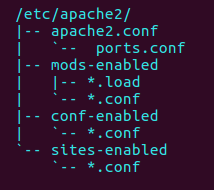
于是我认真地看了开头两页长的注释:
Summary of how the Apache 2 configuration works in Debian:
The Apache 2 web server configuration in Debian is quite different to
upstream's suggested way to configure the web server. This is because Debian's
default Apache2 installation attempts to make adding and removing modules,
virtual hosts, and extra configuration directives as flexible as possible, in
order to make automating the changes and administering the server as easy as
possible.
apache2在Debian中的配置不同,配置文件分成了几个文件。
apache2.conf is the main configuration file (this file). It puts the pieces
together by including all remaining configuration files when starting up the
web server
apache2.conf是主要的配置文件,将其他配置文件整合在一起。
Configuration files in the mods-enabled/, conf-enabled/ and sites-enabled/
directories contain particular configuration snippets which manage modules,
global configuration fragments, or virtual host configurations,
respectively.
They are activated by symlinking available configuration files from their
respective *-available/ counterparts.
mods-enabled/、conf-enabled/和sites-enabled/这几个目录分别管理modules,
global configuration fragments和virtual host configurations。它们链接到相应的-available文件而起作用。
看到modules我马上就动了:
cd mods-available
grep -d recurse "AddType"
mime.conf: # AddType allows you to add to or override the MIME configuration
mime.conf: #AddType application/x-gzip .tgz
mime.conf: AddType application/x-compress .Z
mime.conf: AddType application/x-gzip .gz .tgz
mime.conf: AddType application/x-bzip2 .bz2
mime.conf: AddType text/html .shtml
ssl.conf: AddType application/x-x509-ca-cert .crt
ssl.conf: AddType application/x-pkcs7-crl .crl
嘿嘿......
sudo vim mime.conf
在文件中定位到AddType的部分,加入这两行:
AddType application/x-httpd-php-source .phps

AddType application/x-httpd-php .php
保存退出。再来找一下“LoadModule”的归处:
mime.load:LoadModule mime_module /usr/lib/apache2/modules/mod_mime.so
sudo vim mime.load
加入这一句:
LoadModule php7_module /usr/lib/apache2/modules/libphp7..so
重启apache2,使配置生效:
sudo service apache2 restart
测试
apache2的默认web根目录在/etc/apache2/sites-available/000-default.conf中设置:
DocumentRoot /var/www/html/
在该目录下添加测试文件info.php,内容为:
<?php

phpinfo();

?>
保存退出。
打开浏览器,在地址栏输入:
localhost/phpinfo.php
回车。成功跳出由php解释后的信息:
PHP logo

PHP Version 7.0.-0ubuntu0.16.04.

System    Linux tomato 4.4.--generic #-Ubuntu SMP Wed Jul  :: UTC  x86_64

Server API    Apache 2.0 Handler

Virtual Directory Support    disabled

Configuration File (php.ini) Path    /etc/php/7.0/apache2

Loaded Configuration File    /etc/php/7.0/apache2/php.ini

Scan this dir for additional .ini files    /etc/php/7.0/apache2/conf.d
......
感动!
ubuntu下apache与php配置的更多相关文章
- [转]:Ubuntu 下Apache安装和配置
[转]:Ubuntu 下Apache安装和配置_服务器应用_Linux公社-Linux系统门户网站 https://www.linuxidc.com/Linux/2013-06/85827.htm ...
- Ubuntu 下Apache安装和配置
在Ubuntu上安装Apache,有两种方式:1 使用开发包的打包服务,例如使用apt-get命令:2 从源码构建Apache.本文章将详细描述这两种不同的安装方式. 方法一:使用开发包的打包服务—— ...
- Ubuntu 下Apache安装和配置2
在Ubuntu上安装Apache,有两种方式:1 使用开发包的打包服务,例如使用apt-get命令:2 从源码构建Apache.本文章将详细描述这两种不同的安装方式. 方法一:使用开发包的打包服务—— ...
- Windows下Apache+mod_python+Django配置
Windows下Apache+mod_python+Django配置 Apache 首先要安装Apache,我安装的版本是2.2.*: Python python肯定是要安装的,我安装的版本是2.5的 ...
- 分享:linux下apache服务器的配置和管理
linux下apache服务器的配置和管理. 一.两个重要目录: Apache有两个重要的目录:1.配置目录/etc/httpd/conf:2.文档目录/var/www: 二.两种配置模式: Apac ...
- windows下apache+https环境配置
windows下apache+https环境配置 转 https://www.cnblogs.com/sandaizi/p/7519370.html 1.修改配置文件conf/httpd.conf,去 ...
- ubuntu下安装mysql和配置远程访问
ubuntu下安装mysql和配置远程访问 下载安装mysql sudo apt-get install mysql-client mysql-server 安装的时候会提示要设置root密码,如 ...
- [转载]Ubuntu下Git服务器安装与配置
原文地址:Ubuntu下Git服务器安装与配置作者:F民抄 1. 安装 1.1 安装Git-Core: sudo apt-get install git-core 1.2 安装 Gitosis sud ...
- Linux下Apache虚拟主机配置
Linux下Apache虚拟主机的三种配置.这样可以实现一台主机架构多个独立域名网站.其中基于域名的最为常见.性价比也最高.下面PHP程序员雷雪松详细的讲解下Linux下Apache虚拟主机配置的具体 ...
随机推荐
- 给java中的System.getProperty添加新的key value对
由于系统被格了,所以,现在的java项目配置不对,代码里面的配置类调用了一个System.getProperty("env")发现找不到该变量的值,以前一直能找到的. 其实就是以前 ...
- 【POJ】2513 Colored Sticks
字典树+并查集. #include <cstdio> #include <cstring> #include <cstdlib> #define MAXN 5000 ...
- Unity笔记
1.使某个对象上的脚本失效和生效: GameObject.Find("xxx").transform.GetComponent<xxx>().enabled = fal ...
- Function语义学之member function
之前我们讲过编译器会对 nonmember functions 进行怎样的扩充和该写,今天我们来讲一下 member functions 函数调用方式 一.Nonstatic Member Funct ...
- 【动态规划】【KMP】HDU 5763 Another Meaning
题目链接: http://acm.hdu.edu.cn/showproblem.php?pid=5763 题目大意: T组数据,给两个字符串s1,s2(len<=100000),s2可以被解读成 ...
- IOS的 testflight测试设置
管理员邀请参与者 1.登录开发者账号https://developer.apple.com/account 2.进入后,点击ituns connect 3.点击进入用户和职能 4.在用户栏点击添加按钮 ...
- Evaluate Reverse Polish Notation——LeetCode
Evaluate the value of an arithmetic expression in Reverse Polish Notation. Valid operators are +, -, ...
- c#反序列化
C#序列化(转载) 2011-03-15 | 凯之风 | 转藏(2) 序列化有下列要求: A> 只序列化PUBLIC的成员变量和属性 B> 类必须有默认识构造函数 C> 如果 ...
- [经典] 在未排序数组中返回topK大的数
解法一,排序 先从大到小快排,然后扫前K个返回 时间复杂度:O(NlogN),空间复杂度O(1) 解法二,优先队列 前K个放入优先队列中,与最小堆顶元素比较大小,若大于则删除堆顶并插入:否则跳过 时间 ...
- VMware连不上网解决
在VMware里安装了ubuntu,但是某一天打开它,ubuntu忽然不能上网了,于是百度了好几个方法,最后是这样解决的: 额...现在连接的是无线,前两天出问题的时候连接的是有线,在Internet ...