
XCode的一些调试技巧
XCode 内置GDB,我们可以在命令行中使用 GDB 命令来调试我们的程序。下面将介绍一些常用的命令以及调试技巧。
po 命令:为 print object 的缩写,显示对象的文本描述(显示从对象的 description 消息获得的字符串信息)。
比如:我使用 po 命令显示一个 NSDictionary 的内容。注意在左侧我们可以看到 dict 的一些信息:3 key/value pairs,显示该 dict 包含的数据量,而展开的信息显示 isa 层次体系(即class 和 metaclass结构关系)。我们可以右击左侧的 dict,选中“Print Description of "dict"”,则可以在控制台输出 dict 的详细信息:
- Printing description of dict:
- <CFBasicHash 0x1001149e0 [0x7fff7e27ff40]>{type = immutable dict, count = 3,
- entries =>
- 0 : <CFString 0x100002458 [0x7fff7e27ff40]>{contents = "first"} = <CFString 0x100002438 [0x7fff7e27ff40]>{contents = "one"}
- 1 : <CFString 0x100002498 [0x7fff7e27ff40]>{contents = "second"} = <CFString 0x100002478 [0x7fff7e27ff40]>{contents = "two"}
- 2 : <CFString 0x1000024d8 [0x7fff7e27ff40]>{contents = "third"} = <CFString 0x1000024b8 [0x7fff7e27ff40]>{contents = "three"}
- }
- (gdb)
print 命令
:有点类似于格式化输出,可以输出对象的不同信息:
如:
- (gdb) print (char *)[[dict description] cStringUsingEncoding:4]
- $1 = 0x1001159c0 "{\n first = one;\n second = two;\n third = three;\n}"
- (gdb) print (int)[dict retainCount]
- $2 = 1
- (gdb)
注:4是 NSUTF8StringEncoding 的值。
info 命令:我们可以查看内存地址所在信息
比如 "info symbol 内存地址" 可以获取内存地址所在的 symbol 相关信息:
- (gdb) info symbol 0x00000001000017f7
- main + 343 in section LC_SEGMENT.__TEXT.__text of /Users/LuoZhaohui/Library/Developer/Xcode/DerivedData/RunTimeSystem-anzdlhiwvlbizpfureuvenvmatnp/Build/Products/Debug/RunTimeSystem
比如 "
info line *内存地址
" 可以获取内存地址所在的代码行相关信息:
- (gdb) info line *0x00000001000017f7
- Line 62 of "/Users/LuoZhaohui/Documents/Study/RunTimeSystem/RunTimeSystem/main.m" starts at address 0x1000017f7 <main+343> and ends at 0x10000180a <main+362>.
show 命令:显示 GDB 相关的信息。如:show version 显示GDB版本信息
- (gdb) show version
- GNU gdb 6.3.50-20050815 (Apple version gdb-1708) (Mon Aug 8 20:32:45 UTC 2011)
- Copyright 2004 Free Software Foundation, Inc.
- GDB is free software, covered by the GNU General Public License, and you are
- welcome to change it and/or distribute copies of it under certain conditions.
- Type "show copying" to see the conditions.
- There is absolutely no warranty for GDB. Type "show warranty" for details.
- This GDB was configured as "x86_64-apple-darwin".
help 命令:如果忘记某条命令的语法了,可以使用 help 命令名 来获取帮助信息。如:help info 显示 info 命令的用法。
- (gdb) help info
- Generic command for showing things about the program being debugged.
- List of info subcommands:
- info address -- Describe where symbol SYM is stored
- info all-registers -- List of all registers and their contents
- info args -- Argument variables of current stack frame
- info auxv -- Display the inferior's auxiliary vector
- info breakpoints -- Status of user-settable breakpoints
- info catch -- Exceptions that can be caught in the current stack frame
- info checkpoints -- Help
- info classes -- All Objective-C classes
- ......
- Type "help info" followed by info subcommand name for full documentation.
- Command name abbreviations are allowed if unambiguous.
- (gdb)
在系统抛出异常处设置断点
有时候我们的程序不知道跑到哪个地方就 crash 了,而 crash 又很难重现。保守的做法是在系统抛出异常之前设置断点,具体来说是在 objc_exception_throw处设置断点。设置步骤为:首先在 XCode 按 CMD + 6,进入断点管理窗口;然后点击右下方的 +,增加新的 Symbolic Breakpoint,在 Symbol 一栏输入:objc_exception_throw,然后点击 done,完成。 这样在 Debug 模式下,如果程序即将抛出异常,就能在抛出异常处中断了。比如在前面的代码中,我让 [firstObjctcrashTest]; 抛出异常。在 objc_exception_throw 处设置断点之后,程序就能在该代码处中断了,我们从而知道代码在什么地方出问题了。
2016/01/12跟新:
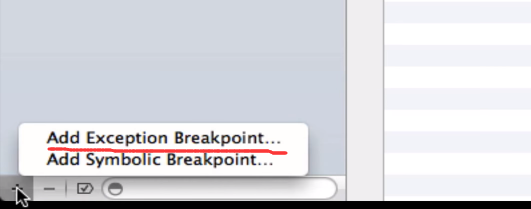
可以直接在断言窗口点击“+”选择 exception breakpoint, 并可以设置该断言。

XCode的一些调试技巧的更多相关文章
- iOS开发之Xcode常用调试技巧总结
转载自:iOS开发之Xcode常用调试技巧总结 最近在面试,面试过程中问到了一些Xcode常用的调试技巧问题.平常开发过程中用的还挺顺手的,但你要突然让我说,确实一脸懵逼.Debug的技巧很多,比如最 ...
- Xcode 调试技巧 --常用命令和断点
Xcode 中的调试技巧与我们的日常开发息息相关,而这些调试技巧在我们解决Bug时,常常有事半功倍的作用,经常会用到的有各种断点 和 命令.而这些调试技巧也经常会在面试中问到,所以不知道的就来看看吧. ...
- xcode的调试技巧
转自:http://www.cnblogs.com/daiweilai/p/4421340.html#biyouji 目录 前言逼优鸡知己知彼 百战不殆抽刀断Bug 普通操作 全局断点(Global ...
- (转)Xcode调试技巧
转自http://www.apkbus.com/android-140340-1-1.html 这篇文章给大家带来的是一些Xcode实用技巧,比如: • 摆脱NSlog打印输出,使用断点日志. • 摆 ...
- 5个Xcode开发调试技巧
转自Joywii的博客,原文:Four Tips for Debugging in XCode Like a Bro 1.Enable NSZombie Objects(开启僵尸对象) Enab ...
- iOS 5个Xcode开发调试技巧
转自Joywii的博客,原文:Four Tips for Debugging in XCode Like a Bro 1.Enable NSZombie Objects(开启僵尸对象) Enab ...
- Xcode 常用调试技巧总结
NSLog,po命令和普通断点调试相信每个iOS开发者都会,这里就不作介绍了. 一.Memory Graph Xcode8新增:Memory Graph解决闭包引用循环问题 有很多叹号说明就有问题了. ...
- (转)5个Xcode开发调试技巧
1.Enable NSZombie Objects(开启僵尸对象) Enable NSZombie Objects可能是整个Xcode开发环境中最有用的调试技巧.这个技巧非常非常容易追踪到重复释放的问 ...
- Xcode 调试技巧
一 NSLog调试 官方文档:Logs an error message to the Apple System Log facility. 即NSLog不是作为普通的debug log的,而是err ...
随机推荐
- 非主窗体在任务栏显示按钮(简单好用)good
非主窗体在任务栏显示按钮 type TForm2 = class(TForm) private { Private declarations } public { Public declaration ...
- 【HDOJ】2579 Dating with girls(2)
简单BFS. /* 2579 */ #include <iostream> #include <queue> #include <cstdio> #include ...
- Light OJ 1021 - Painful Bases(状态压缩DP)
题目大意: 给你一个base 进制的数字,把这个数字的每一位进行全排列,问有多少个数字是可以整除k的. 题目解析: #include<cstdio> #include<cstring ...
- Spfa费用流模板
; ,maxm=; ,fir[maxn],nxt[maxm],to[maxm]; int cap[maxm],val[maxm],dis[maxn],path[maxn]; void add(int ...
- 【最小生成树】Codeforces 707B Bakery
题目链接: http://codeforces.com/problemset/problem/707/B 题目大意: 给你N个点M条无向边,其中有K个面粉站,现在一个人要在不是面粉站的点上开店,问到面 ...
- [Locked] Group Shifted Strings
Group Shifted Strings Given a string, we can "shift" each of its letter to its successive ...
- 金牌分析师助力 鲁泰A图谋再造一个“鲁泰”?_财经_中国网
金牌分析师助力 鲁泰A图谋再造一个"鲁泰"?_财经_中国网 金牌分析师助力 鲁泰A图谋再造一个"鲁泰"?
- hdoj 1728 逃离迷宫
逃离迷宫 Time Limit: 1000/1000 MS (Java/Others) Memory Limit: 32768/32768 K (Java/Others)Total Submis ...
- session与cookie的关系
客户第一次发送请求给服务器,此时服务器产生一个唯一的sessionID,并返回给客户端(通过cookie),此时的cookie并没有setMaxAge();只是保存于客户端的内存中,并与一个浏览器窗口 ...
- Mac内建Apache开机启动
取消: sudo launchctl unload -w /System/Library/LaunchDaemons/org.apache.httpd.plist 添加: sudo launchctl ...