
.NET Core之Entity Framework Core 你如何创建 DbContext
本文版权归博客园和作者吴双共同所有,欢迎转载,转载和爬虫请注明博客园蜗牛原文地址 http://www.cnblogs.com/tdws/p/5874212.html。
目前国内各大论坛,各位大牛的分享,是按照Microsoft官方文档,在Web层直接应用EF Core。当然这并没有什么问题,因为我也要从文档开始分享。唯一多的一点就是在Dal层中调用DbContext的方法。你以前用的EF6.x,如果在测试代码中你可以直接new出来,在正式的项目开发中,你控制上下文线程内唯一时,也可以new一个对象。但是!在EF Core中你不能这样做。
在EF6.x中,你的上下文类中是这样的,在构造方法中没有任何参数。

你创建线程内唯一的上下文的方法也许是这样的。

回顾了EF6.x以及以前的版本,下面进入本篇分享的正文。英文官方文档地址https://docs.efproject.net/en/latest/platforms/aspnetcore/existing-db.html#
首先我新建了.NET Core WebApplication,ConsoleApp和几个.NET Core类库,暂且就先来一个BLL,DAL两个类库吧。

解决方案如下:

在类库和ConsoleApp和WebApi中都从nuget上安装好EF Core.SqlServer和design。你可以通过nuget可视化管理也可以通过nuget控制台命令。命令如下:
Install-Package Microsoft.EntityFrameworkCore.SqlServer
Install-Package Microsoft.EntityFrameworkCore.SqlServer.Design

另外你还需要使用如下命令安装tool。并且修改Dal层类库项目的project.json,增加tools节点。
Install-Package Microsoft.EntityFrameworkCore.Tools –Pre

 "tools": {

    "Microsoft.EntityFrameworkCore.Tools": "1.0.0-preview2-final"

  }
由于是DB First,还要创建你的测试数据库,像下面这样。


下一步,在你想添加EF的Dal层的nuget控制台,执行以下命令,连接数据库的相关信息,别忘了修改:
Scaffold-DbContext "Server=(localdb)\mssqllocaldb;Database=AppDb;Trusted_Connection=True;" Microsoft.EntityFrameworkCore.SqlServer -OutputDir Models
这就是我的配置。
Scaffold-DbContext "Server=2013-20150707DJ\SQL2012EXPRESS;Database=AppDb;Trusted_Connection=True;" Microsoft.EntityFrameworkCore.SqlServer -OutputDir Models
当然直接执行这段,你一定会遇到一个类似下面的错误。由于你的启动项目是Web,目前你还没有做项目应该具有的引用,所以它告诉你找不到DAL.dll。
解决办法当然就是UI引用BLL,BLL引用DAL,重新生成一下后再次执行该命令。还有如果提示让你dotnet restore一下,那你就执行一下。


成功之后你会发现DAL层中多了一个Model文件夹,并且将你的数据库表映射出实体类,另外还有DbContext类。

接下来看一下如何来处理你的DbContext。Miscrosoft告诉我们需要将如下代码做修改。
 protected override void OnConfiguring(DbContextOptionsBuilder optionsBuilder)

        {

            #warning To protect potentially sensitive information in your connection string, you should move it out of source code. See http://go.microsoft.com/fwlink/?LinkId=723263 for guidance on storing connection strings.

            optionsBuilder.UseSqlServer(@"Server=2013-20150707DJ\SQL2012EXPRESS;Database=AppDb;Trusted_Connection=True;");

        }
修改后是这样的:
        //protected override void OnConfiguring(DbContextOptionsBuilder optionsBuilder)

        //{

        //    #warning To protect potentially sensitive information in your connection string, you should move it out of source code. See http://go.microsoft.com/fwlink/?LinkId=723263 for guidance on storing connection strings.

        //    optionsBuilder.UseSqlServer(@"Server=2013-20150707DJ\SQL2012EXPRESS;Database=AppDb;Trusted_Connection=True;");

        //}

        public AppDbContext(DbContextOptions<AppDbContext> options)

            : base(options)

        { }
在你的WebAPI或者你的MVC的Startup.cs做如下修改。在其ConfigureServices方法,添加以下代码,connection字符串依然要记得修改:
  services.AddApplicationInsightsTelemetry(Configuration);
  var connection = @"Server=2013-20150707DJ\SQL2012EXPRESS;Database=AppDb;Trusted_Connection=True;"
执行如下添加代码,看起来和EF6.x没什么区别。唯一的区别就在于DbContext对象,通过.NET Core框架自动为我们做构造函数依赖注入IOC。

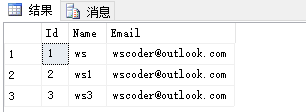
到此我们在Web/WebApi中操作dbContext成功。那么如果你要在Dal层操作,怎么办?这个_dbContext没有了依赖注入,谁来给我们对象?自己new一个,可是我们的构造函数摆在那里,不是单纯的New就可以操作了。
在你真正着手打算new一个的时候,你发现需要一个DbContextOption<AppDbContext>的对象。

那我们New一个DbContextOption<T>对象吧。你看到重载需要这个参数。

重载说道:你一般初始化一个实例使用重写DbContext.OnConfiguring方法,或者使用DbContextOptionBulider<T>来创建一个实例。由于我们所需对象为泛型DbContextOption<T>的对象,但是前者的重载方法并非泛型。也可能是我使用有误,如果你有好的实现,请留下建议。
  public class UserDal

     {

         static string connection = @"Server=2013-20150707DJ\SQL2012EXPRESS;Database=AppDb;Trusted_Connection=True;";

         static DbContextOptions<AppDbContext> dbContextOption = new DbContextOptions<AppDbContext>();

         static DbContextOptionsBuilder<AppDbContext> dbContextOptionBuilder = new DbContextOptionsBuilder<AppDbContext>(dbContextOption);

         AppDbContext _dbContext = new AppDbContext(dbContextOptionBuilder.UseSqlServer(connection).Options);

         public int AddUser()

         {

             _dbContext.Users.Add(new Users { Name = "ws4", Email = "wscoder@outlook.com" });

             return _dbContext.SaveChanges();

         }

     }
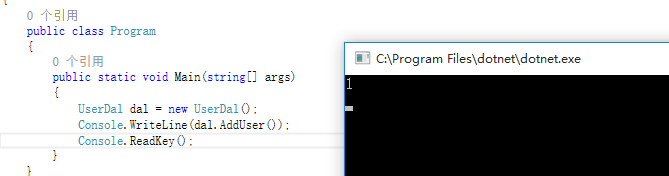
在ConsoleApp中调用,添加成功
如果我的点滴分享,对您有点滴帮助,欢迎点赞,也为你自己的收获点赞。
长期分享,欢迎点击下方关注。祝大家中秋快乐!
晚上喝个红牛又喝点茶,一直到凌晨五点钟也不困...腰疼。,有个研究生朋友经常和我说,你见过凌晨三点的西安吗?现在睡一觉,醒来去问问他见没见过凌晨五点的苏州。
最后我有个问题,EF Core目前支持Code First吗? 没看到相关文档。
EF Core如何保证上下文线程内唯一?没有CallContext...,也没办法用HttpContext.Current.Item,有人 操作过吗?
.NET Core之Entity Framework Core 你如何创建 DbContext的更多相关文章
- ASP.NET Core 配置 Entity Framework Core - ASP.NET Core 基础教程 - 简单教程,简单编程
原文:ASP.NET Core 配置 Entity Framework Core - ASP.NET Core 基础教程 - 简单教程,简单编程 ASP.NET Core 配置 Entity Fram ...
- Working with Data » Getting started with ASP.NET Core and Entity Framework Core using Visual Studio » 更新关系数据
Updating related data¶ 7 of 7 people found this helpful The Contoso University sample web applicatio ...
- Working with Data » Getting started with ASP.NET Core and Entity Framework Core using Visual Studio » 读取关系数据
Reading related data¶ 9 of 9 people found this helpful The Contoso University sample web application ...
- Working with Data » Getting started with ASP.NET Core and Entity Framework Core using Visual Studio »迁移
Migrations¶ 4 of 4 people found this helpful The Contoso University sample web application demonstra ...
- Working with Data » Getting started with ASP.NET Core and Entity Framework Core using Visual Studio » 创建复杂数据模型
Creating a complex data model 创建复杂数据模型 8 of 9 people found this helpful The Contoso University sampl ...
- Working with Data » Getting started with ASP.NET Core and Entity Framework Core using Visual Studio » 排序、筛选、分页以及分组
Sorting, filtering, paging, and grouping 7 of 8 people found this helpful By Tom Dykstra The Contoso ...
- Working with Data » Getting started with ASP.NET Core and Entity Framework Core using Visual Studio » 增、查、改、删操作
Create, Read, Update, and Delete operations¶ 5 of 5 people found this helpful By Tom Dykstra The Con ...
- 【EF Core】Entity Framework Core 批处理语句
在Entity Framework Core (EF Core)有许多新的功能,最令人期待的功能之一就是批处理语句.那么批处理语句是什么呢?批处理语句意味着它不会为每个插入/更新/删除语句发送单独的请 ...
- Oracle Data Provider for .NET – Microsoft .NET Core and Entity Framework Core
http://www.oracle.com/technetwork/topics/dotnet/tech-info/odpnet-dotnet-ef-core-sod-4395108.pdf Orac ...
随机推荐
- [原] KVM 环境下MySQL性能对比
KVM 环境下MySQL性能对比 标签(空格分隔): Cloud2.0 [TOC] 测试目的 对比MySQL在物理机和KVM环境下性能情况 压测标准 压测遵循单一变量原则,所有的对比都是只改变一个变量 ...
- SuperMap-iServer-单点登录功能验证(CAS)
SuperMap-iServer-单点登录功能验证(CAS) 1.测试目的: 验证SuperMap-iServer使用CAS单点登录的功能是否正常. 2.测试环境: SuperMap-iServer8 ...
- SharePoint2016安装的过程的”Microsoft.SharePoint.Upgrade.SPUpgradeException”错误解决方法
前提 在windows server 2012的服务器上运行安装sharepoint2016出现如下错误: Could not load file or assembly ‘Microsoft.Dat ...
- unity3d导出到IOS程序下 集成unity3dAR功能
转载自: 来自AR学院(www.arvrschool.com),原文地址为:http://www.arvrschool.com/index.php?c=post&a=modify&ti ...
- Linux设备文件简介(转载)
Linux 中的设备有2种类型:字符设备(无缓冲且只能顺序存取).块设备(有缓冲且可以随机存取).每个字符设备和块设备都必须有主.次设备号,主设备号相同的设 备是同类设备(使用同一个驱动程序).这些设 ...
- json
#json序列化,只能处理简单的数据类型,如:字典.列表.字符串,类和函数等数据类型过于复杂,不支持序列化import jsondef sayhi(name): print('hello,', nam ...
- MVP初探
什么是MVP MVP是一种UI的架构模式,是MVC的一种变体,适用于基于事件驱动的应用框架.MVP中的M和V分别对应了MVC中的Model和View,而P代替了Controller,而它更多地体现在了 ...
- Visual Studio Code v0.9.1 发布
微软的跨平台编辑器 Visual Studio Code v0.9.1 已经发布,官方博客上发布文章Visual Studio Code – October Update (0.9.1):http:/ ...
- MapReduce剖析笔记之七:Child子进程处理Map和Reduce任务的主要流程
在上一节我们分析了TaskTracker如何对JobTracker分配过来的任务进行初始化,并创建各类JVM启动所需的信息,最终创建JVM的整个过程,本节我们继续来看,JVM启动后,执行的是Child ...
- React Native 环境搭建
1,安装 HomeBrew /usr/bin/ruby -e "$(curl -fsSL https://raw.githubusercontent.com/Homebrew/install ...