
JHipster框架的简要搭建与说明
JHipster的亮点
- 风头超劲,席卷欧美,最新全能Java Web开发程式产生器 (java web generator)。
- 由Java专家累积的开发经验,配上各类实用的框架技术,去繁取精的运用,全方位的配置,制成出完备的开发应用程式。
- 完美Java体系架构,适合各行各业项目,尤其以适用于面向服务的体系结构(SOA)更为胜任。
- 不论菜鸟,老牛或专家,极容易上手,只要你可以下载及建立以下要求的工作环境。
- 快速建成一个制作就绪的基本项目工作模版,令你可以用有限的精力专注业务上的运作。
- 使用技术:jHipster3.8+Spring4.2.6+Spring Boot1.3.5+Hibernate4.3.11+MySQL5.7.12+AngularJs1.5.8
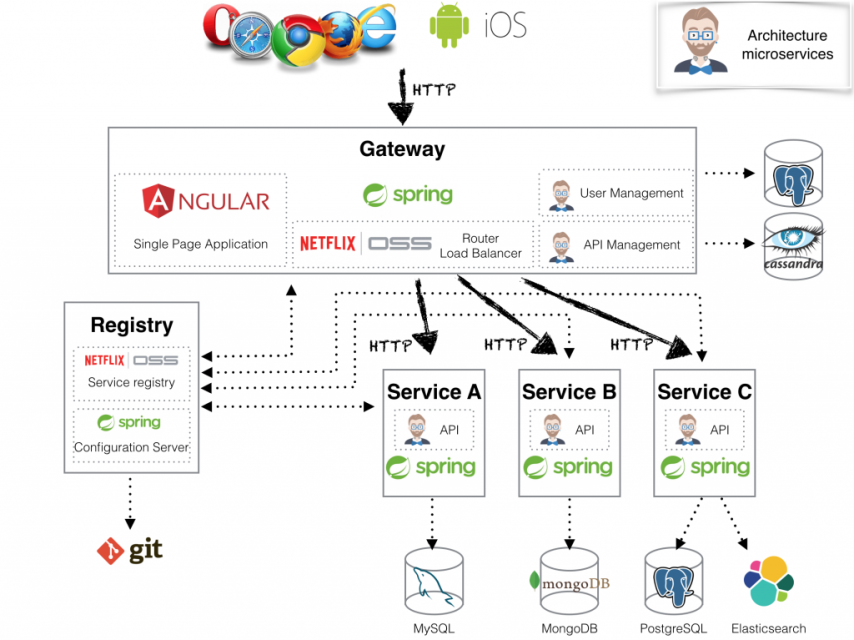
JHipster或者称Java Hipster,是一个应用代码产生器,能够创建Spring Boot + AngularJS的应用。开源项目地址:JHipster/Github。
JHipster使用Node.js和Yeoman产生Java应用代码,使用Maven(Gradle)运行产生的代码,产生代码有如下关键特征:
- src/main/java 目录有Spring Boot 配置类在config包中,JHipster使用Spring的Java 配置,没有XML配置。
- JPA实体或MongoDB文档类是在domain包. JPA实体使用缓存和auto-generated 主键配置. 如果你使用JHipster产生你的JPA实体, 可以创建1:N和N:N关系。
- 在repostiory包中是Spring Data 仓储.
- 可选,你有通常@Service-beans 在服务层. 这些服务通常是配置为事务的 安全的业务对象。
- REST 端点存在web.rest 包中, 支持Spring MVC的REST
- JHipster也产生 Liquibase 改变日志文件,用来处理数据库更新,增加一个实体将创建特定的schema更新,这将会版本化,当应用重启时可被执行。
- 集成Spring的 Test 上下文测试支持.
- JHipster 创建完整可用的AngularJS 前端,使用CRUD来管理你产生的实体。
客户端技术栈
单页面Web应用:
- 响应式页面设计
- HTML5 Boilerplate
- Twitter Bootstrap
- AngularJS
- 兼容 IE9+ 和其他现代浏览器
- 完整的国际化支持,基于 Angular Translate
- 可选 Sass 用于 CSS 设计
- 可选 Spring Websocket 来实现 WebSocket
强大的 Yeoman 开发工作流:
- 使用 Bower 可以轻松的安装 JavaScript 类库
- 使用 Gulp.js 构建, 优化项目, 支持 live reload
- 使用 Karma and PhantomJS 进行测试
那么,如果单页面应用不能满足你的需求呢?
- 支持 Thymeleaf 模板引擎, 用于在服务端渲染页面
服务端技术栈
一个完整的 Spring 应用:
- Spring Boot 用于简化应用配置
- Maven 或者 Gradle 用于构建,测试和运行应用
- "development" 和 "production" 配置文件 (支持 Maven 和 Gradle)
- Spring Security
- Spring MVC REST + Jackson
- 可选的 WebSocket 支持 -- 基于 Spring Websocket
- Spring Data JPA + Bean 验证
- 使用 Liquibase 实现数据库自动更新
- Elasticsearch 支持对数据库的搜索功能
- 支持像MongoDB 这样的 document-oriented NoSQL 数据库
- 支持像Cassandra 这样的 column-oriented NoSQL 数据库
支持生产环境:
- Monitoring with Metrics 监控运行状态
- 支持 ehcache (本地缓存) 或者 hazelcast (分布式缓存)
- 可选的 HTTP session 集群 -- 基于 hazelcast
- 优化的静态资源(gzip filter, HTTP cache headers)
- 日志管理 Logback, 可在运行时配置
- HikariCP 连接池,用于性能优化
- 可以将应用构建成一个标准的 WAR 文件或者一个可执行的 JAR 文件
安装
安装前置条件
- JDK 8+
- Maven或者Gradle
- NodeJs
- PhantomJS(见下文安装说明)
- MySql
- Git
- Spring Tool Suite或Eclipse或Intellij IDEA
- window 管理员权限的 CMD或者PowerShell(推荐用PowerShell)
- 全局安装 Yeoman : npm install -g yo
- 全局安装 Bower:npm install -g bower
- 全局安装 Gulp :npm install -g gulp-cli
- 全局安装 JHipster:npm install -g generator-jhipster
假如已经安装完毕则软件各版本如下
- yo@1.8.5
- bower@1.7.9
- gulp-cli@1.2.2
- npm@3.10.3
- generator-jhipster@3.8.0
至此,JHipster已经安装完毕
准备工作安装phantomjs
注意先确保已经设置好PhantomJS环境变量,以Windows为例,右键我的电脑-》属性-》高级系统设置-》高级-》环境变量-》新建用户或者系统变量
变量名:PHANTOMJS_HOME
变量值:解压的phantomjs路径
修改系统变量path追加
;%PHANTOMJS_HOME%\bin;生成代码
JHipster通过 entity sub-generator自动创建前后端相应代码
JHipster entity sub-generator 根据项目类型,和选项,自动创建相应代码(gateway和Monolithic application 会创建前后端代码,uaa,microservice创建后端代码)
对于关联关系可以参加 管理实体间映射关系
对于简单(字段少),实体类数量少的实体创建,建议使用命令行,打开项目文件夹
yo jhipster:entity <实体类名> [options] 可以通过yo jhipster:entity --help 查看支持的选项
yo jhipster:entity --helpUsage: yo jhipster:entity [options] <name> Options:-h, --help # Print the generator's options and usage(打印生成器支持的选项)
--skip-cache # Do not remember prompt answers(不记住之前选项,默认记住) Default: false
--skip-install # Do not automatically install dependencies(不自动安装依赖项,默认安装) Default: false
--regenerate # Regenerate the entity without presenting an option to update it(重新生成) Default: false
--table-name # Specify table name that will be used by the entity(指定生成的表名)
--fluent-methods # Generate fluent methods in entity beans to allow chained object construction Default: true--angular-suffix # Use a suffix to generate AngularJS routes and files, to avoid name clashes(增加angular文件后缀,防止文件名字冲突)
--skip-server # Skip the server-side code generation(不生成服务端代码,默认生成) Default: false
--skip-client # Skip the client-side code generation(不生成客户端代码,默认生成) Default: false
Arguments: name Type: String Required: true Description: Creates a new JHipster entity: JPA entity, Spring MVC REST controller, AngularJS controller, service and view, all wired up together Example: yo jhipster:entity Foo This will create: .jhipster.Foo.json src/main/java/package/domain/Foo.java src/main/java/package/repository/FooRepository.java src/main/java/package/web/rest/FooResource.java src/main/resources/config/liquibase/changelog/20150128232313_added_entity_Foo.xml src/main/webapp/app/entities/foo/foos.html src/main/webapp/app/entities/foo/foo-detail.html src/main/webapp/app/entities/foo/foo.js src/main/webapp/app/entities/foo/foo.controller.js src/main/webapp/app/entities/foo/foo-detail.controller.js src/main/webapp/app/entities/foo/foo.service.js src/test/java/package/web/rest/FooResourceTest.java src/main/webapp/i18n/en/foo.json src/main/webapp/i18n/fr/foo.json对于比较复杂的实体(数量多,关系复杂,字段多),建议使用JHipster UML 和JDL Studio
例如生成 Author和Book两个实体
创建实体类
yo jhipster:entity author (创建author实体类)
The entity Author is being created. Generating field #1 (第一个字段)
? Do you want to add a field to your entity? Yes? What is the name of your field? name? What is the type of your field? String? Do you want to add validation rules to your field? No ================= Author =================Fieldsname (String) Generating field #2 ? Do you want to add a field to your entity? Yes? What is the name of your field? birthDate? What is the type of your field? LocalDate? Do you want to add validation rules to your field? No ================= Author =================Fieldsname (String)birthDate (LocalDate) Generating field #3 ? Do you want to add a field to your entity? No (停止创建)
================= Author =================Fieldsname (String)birthDate (LocalDate) Generating relationships to other entities ? Do you want to add a relationship to another entity? Yes(创建关联关系)
? What is the name of the other entity? book? What is the name of the relationship? book? What is the type of the relationship? one-to-many? What is the name of this relationship in the other entity? author ================= Author =================Fieldsname (String)birthDate (LocalDate) Relationshipsbook (Book) one-to-many Generating relationships to other entities ? Do you want to add a relationship to another entity? No ================= Author =================Fieldsname (String)birthDate (LocalDate) Relationshipsbook (Book) one-to-many ? Do you want to use a Data Transfer Object (DTO)? No, use the entity directly (是否创建DTO?)
? Do you want to use separate service class for your business logic? No, the REST controller should use the repository directly (对于业务逻辑是否使用分离的服务类,使用REST controller和repository)
? Do you want pagination on your entity? No(是否分页)
Everything is configured, generating the entity... create .jhipster\Author.json create src\main\java\com\shunneng\app\domain\Author.java create src\main\java\com\shunneng\app\repository\AuthorRepository.java create src\main\java\com\shunneng\app\web\rest\AuthorResource.java conflict src\main\resources\ehcache.xml? Overwrite src\main\resources\ehcache.xml? overwrite this and all others force src\main\resources\ehcache.xml create src\main\resources\config\liquibase\changelog\20160926160804_added_entity_Author.xml force src\main\resources\config\liquibase\master.xml create src\main\webapp\app\entities\author\authors.html create src\main\webapp\app\entities\author\author-detail.html create src\main\webapp\app\entities\author\author-dialog.html create src\main\webapp\app\entities\author\author-delete-dialog.html force src\main\webapp\app\layouts\navbar\navbar.html create src\main\webapp\app\entities\author\author.state.js create src\main\webapp\app\entities\author\author.controller.js create src\main\webapp\app\entities\author\author-dialog.controller.js create src\main\webapp\app\entities\author\author-delete-dialog.controller.js create src\main\webapp\app\entities\author\author-detail.controller.js create src\main\webapp\app\entities\author\author.service.js create src\main\webapp\i18n\zh-cn\author.json force src\main\webapp\i18n\zh-cn\global.json create src\test\javascript\spec\app\entities\author\author-detail.controller.spec.js create src\test\javascript\e2e\entities\author.js create src\test\java\com\shunneng\app\web\rest\AuthorResourceIntTest.java create src\test\gatling\simulations\AuthorGatlingTest.scala Running gulp Inject to add javascript to index项目结构图
webapp
├── app - Your application(你的应用)
│ ├── account - User account management UI(用户账号管理界面)
│ ├── admin - Administration UI(管理员界面)
│ ├── blocks - Common building blocks like configuration and interceptors(公共构建模块和拦截器)
│ ├── components - Common components like alerting and form validation(常用组件,比如警告组件和验证组件)
│ ├── entities - Generated entities (more information below)(生成的实体,下面会有介绍)
│ ├── home - Home page(主页)
│ ├── layouts - Common page layouts like navigation bar and error pages(通用页面布局,类似导航条和错误页)
│ ├── services - Common services like authentication and user management(通用服务,类似身份验证和管理)
│ ├── app.constants.js - Application constants(应用常量)
│ ├── app.module.js - Application modules configuration(应用modules配置)
│ ├── app.state.js - Main application router(应用路由--单页应用业务通过js控制,无法简单通过url控制,故而使用应用路由,详情请百度)
├── bower_components - Dependencies installed by Bower(通过Bower安装的依赖)
├── content - Static content(静态内容)
│ ├── images - Images(图片)
│ ├── styles - CSS stylesheets(css样式表)
│ ├── fonts - Font files will be copied here(字体库)
├── i18n - Translation files(国际化语言文件)
├── scss - Sass style sheet files will be here if you choose the option(如果创建应用选择了LibSass,则其文件会在这生成)
├── swagger-ui - Swagger UI front-end(SwaggerAPI文档前段页面)
├── 404.html - 404 page(404错误页)
├── favicon.ico - Fav icon(网站图标)
├── index.html - Index page(索引页)
├── robots.txt - Configuration for bots and Web crawlers(针对搜索引擎爬虫的配置文件)
使用entity sub-generator自动创建的实体,对应的前段结构如下,例如 foo
webapp
├── app
│ ├── entities
│ ├── foo - CRUD front-end for the Foo entity(Foo实体的前段CRUD代码)
│ ├── foo.controller.js - Controller for the list page(列表页面的控制器)
│ ├── foo.service.js - Service which access the Foo REST resource(访问Foo REST 资源接口的服务)
│ ├── foo.state.js - AngularUI router, which manages routes for this entity(AngularUI路由,管理这个实体的)
│ ├── foo-delete-dialog.controller.js - Controller for the delete dialog pop-up(删除对话框的控制器)
│ ├── foo-delete-dialog.html - View for the delete dialog pop-up(删除实体的页面)
│ ├── foo-detail.controller.js - Controller for the entity details page(实体详细信息页控制器)
│ ├── foo-detail.html - View for the entity details page(实体详细信息页面)
│ ├── foo-dialog.controller.js - Controller for the create/update dialog pop-up(创建和更新对话框控制器)
│ ├── foo-dialog.html - View for the create/update dialog pop-up(创建和更新页面)
│ ├── foos.html - View for the list page(列表页面)
├── i18n - Translation files(国际化语言配置文件)
│ ├── en - English translations(英文翻译)
│ │ ├── foo.json - English translation of Foo name, fields, ...
│ ├── fr - French translations(法语)
│ │ ├── foo.json - French translation of Foo name, fields, ...
转载请注明出处!
http://www.cnblogs.com/libingbin/
感谢您的阅读。如果文章对您有用,那么请轻轻点个赞,以资鼓励。
JHipster框架的简要搭建与说明的更多相关文章
- 浅谈一下SSI+Oracle框架的整合搭建
浅谈一下SSI+Oracle框架的整合搭建 最近换了一家公司,公司几乎所有的项目都采用的是Struts2+Spring+Ibatis+Oracle的架构,上一个东家一般用的就是JSF+Spring,所 ...
- Python3.6 性能测试框架Locust的搭建与使用
背景 Python3.6 性能测试框架Locust的搭建与使用 基础 python版本:python3.6 方法一: pip install locustio 方法二: 开发工具:pycharm 使用 ...
- 嵌入式框架Zorb Framework搭建一:嵌入式环境搭建、调试输出和建立时间系统
我是卓波,我是一名嵌入式工程师,我万万没想到我会在这里跟大家吹牛皮. 嵌入式框架Zorb Framework搭建过程 嵌入式框架Zorb Framework搭建一:嵌入式环境搭建.调试输出和建立时间系 ...
- 嵌入式框架Zorb Framework搭建二:环形缓冲区的实现
我是卓波,我是一名嵌入式工程师,我万万没想到我会在这里跟大家吹牛皮. 嵌入式框架Zorb Framework搭建过程 嵌入式框架Zorb Framework搭建一:嵌入式环境搭建.调试输出和建立时间系 ...
- 嵌入式框架Zorb Framework搭建三:列表的实现
我是卓波,我是一名嵌入式工程师,我万万没想到我会在这里跟大家吹牛皮. 嵌入式框架Zorb Framework搭建过程 嵌入式框架Zorb Framework搭建一:嵌入式环境搭建.调试输出和建立时间系 ...
- 嵌入式框架Zorb Framework搭建四:状态机的实现
我是卓波,我是一名嵌入式工程师,我万万没想到我会在这里跟大家吹牛皮. 嵌入式框架Zorb Framework搭建过程 嵌入式框架Zorb Framework搭建一:嵌入式环境搭建.调试输出和建立时间系 ...
- 嵌入式框架Zorb Framework搭建五:事件的实现
我是卓波,我是一名嵌入式工程师,我万万没想到我会在这里跟大家吹牛皮. 嵌入式框架Zorb Framework搭建过程 嵌入式框架Zorb Framework搭建一:嵌入式环境搭建.调试输出和建立时间系 ...
- 嵌入式框架Zorb Framework搭建六:定时器的实现
我是卓波,我是一名嵌入式工程师,我万万没想到我会在这里跟大家吹牛皮. 嵌入式框架Zorb Framework搭建过程 嵌入式框架Zorb Framework搭建一:嵌入式环境搭建.调试输出和建立时间系 ...
- 嵌入式框架Zorb Framework搭建七:任务的实现
我是卓波,我是一名嵌入式工程师,我万万没想到我会在这里跟大家吹牛皮. 嵌入式框架Zorb Framework搭建过程 嵌入式框架Zorb Framework搭建一:嵌入式环境搭建.调试输出和建立时间系 ...
随机推荐
- Android local.properties 文件读取
转载请标明出处:http://www.cnblogs.com/zhaoyanjun/p/6202369.html 本文出自[赵彦军的博客] 在Android Studio项目里面有个local.pro ...
- 智能头盔 "Livall携全球首款智能骑行头盔亮相CES"
LIVALL是全球首创集音乐.通讯.智能灯光为一体的智能骑行头盔的研发者,日前Livall携旗下智能骑行头盔BH 100和BH 60参展CES 2017,这也是目前世全球首款智能骑行头盔类产品,同时亮 ...
- 札记:Java异常处理
异常概述 程序在运行中总会面临一些"意外"情况,良好的代码需要对它们进行预防和处理.大致来说,这些意外情况分三类: 交互输入 用户以非预期的方式使用程序,比如非法输入,不正当的操作 ...
- .NET跨平台之旅:在生产环境中上线第一个运行于Linux上的ASP.NET Core站点
2016年7月10日,我们在生产环境中上线了第一个运行于Linux上的ASP.NET Core站点,这是一个简单的提供后端服务的ASP.NET Core Web API站点. 项目是在Windows上 ...
- 《MSSQL2008技术内幕:T-SQL语言基础》读书笔记(下)
索引: 一.SQL Server的体系结构 二.查询 三.表表达式 四.集合运算 五.透视.逆透视及分组 六.数据修改 七.事务和并发 八.可编程对象 五.透视.逆透视及分组 5.1 透视 所谓透视( ...
- CSharpGL(36)通用的非托管数组排序方法
CSharpGL(36)通用的非托管数组排序方法 如果OpenGL要渲染半透明物体,一个方法是根据顶点到窗口的距离排序,按照从远到近的顺序依次渲染.所以本篇介绍对 UnmanagedArray< ...
- 数据库中树形列表(以easyui的tree为例)
构造一棵easyui前台框架的一个树形列表为例后台框架是spring MVC+JPA. 先看一下数据库是怎么建的,怎么存放的数据 下面是实体类 /** * 部门类 用户所属部门(这里的部门是一个相对抽 ...
- Win10 字体模糊解决(DPI缩放禁用),设置默认输入法英文
电脑坏了 , 换了新电脑, 但是新电脑,死活不能装win7, 装都不能装!!!郁闷了 好多地方字体模糊了,百般设置都不好看, 后来远程桌面到win2008server, 发现,在远程桌面里面居然很清晰 ...
- [原创]关于ORACLE的使用入门
Oracle===============================数据库:Oracle------>甲骨文(Oracle) 49+%DB2---------->IBM 49+%Sq ...
- python处理命令行参数
直接从命令行执行py文件的时候如果带有参数,如何获取这些参数,如何解析? http://blog.chinaunix.net/uid-20786165-id-3182268.html sys.argv ...