
absolute和relative的几个Demo
这些例子最好通过FireFox结合FireBug调试查看
1、absolute让元素inline-block化
 <!DOCTYPE html>

 <html xmlns="http://www.w3.org/1999/xhtml">

 <head>

     <meta http-equiv="Content-Type" content="text/html; charset=utf-8" />

     <title>absolute让元素inline-block化</title>

     <link rel="shortcut icon" href="favicon.ico" type="image/x-icon" />

     <link rel="icon" href="favicon.ico" type="image/x-icon" />

     <style type="text/css">

         body

         {

             font-family: 'Microsoft YaHei';

             font-size: 18px;

         }

         .div

         {

             padding: 10px;

             margin-left: 20px;

             margin-bottom: 10px;

             background-color: #f0f3f9;

             border: 8px solid #ffd800;

         }

         .abs

         {

             position: absolute;

         }

         .info

         {

             bottom: 10px;

             right: 10px;

             border-width: 8px 0 0;

             border-radius: 8px 8px 0 0;

             border-color: blue;

         }

             .info span

             {

                 width: 200px; /*width无效,必须设置为block才有效!有3种方式>>>>1、display:block;2、float:left;3、position:absolute;*/

                 border: 1px solid #4cff00;

                 display: block;

                 /*float:left;*/

                 /*position: absolute;

                 left: 0;

                 top: 0;*/

             }

     </style>

 </head>

 <body>

     <div class="div">

         <img src="http://image.zhangxinxu.com/image/study/s/s256/mm1.jpg" />

         <p>无absolute</p>

     </div>

     <div class="div abs">

         <img src="http://image.zhangxinxu.com/image/study/s/s256/mm1.jpg" />

         <p>absolute后</p>

     </div>

     <div class="div abs info">

         <p>

             说明:包裹性换种说法就是让元素inline-block化,<br />

             例如一个div标签默认宽度是100%显示的,但是一旦被absolute属性缠上,<br />

             则100%默认宽度就会变成自适应内部元素的宽度。

         </p>

         <h1>absolute 特性总结</h1>

         <p>

             1、脱离文档流<br />

             2、宽和高均为0(FireBug查看布局可知)<br />

             3、如果没有[left/right/top/bottom] 则待在原位(表现为一个没有长宽的参考点)<br />

             4、如果指定[left/right/top/bottom] 则向上追溯到 relative或absolute父盒子,直至body后定位<br />

             5、包裹其内部子元素,即让元素inline-block化<br />

         </p>

         <span>这是span标签,inline是没有宽度的,block后才有宽度</span>

     </div>

 </body>

 </html>

2、absolute绝对定位的破坏性
 <!DOCTYPE html>

 <html xmlns="http://www.w3.org/1999/xhtml">

 <head>

     <meta http-equiv="Content-Type" content="text/html; charset=utf-8" />

     <link rel="shortcut icon" href="favicon.ico" type="image/x-icon" />

     <link rel="icon" href="favicon.ico" type="image/x-icon" />

     <title>absolute绝对定位的破坏性</title>

     <style>

         body

         {

             font-family: 'Microsoft YaHei';

             font-size: 18px;

         }

         .div

         {

             padding: 10px;

             margin: 5px;

             border: 8px solid #ffd800;

             background-color: #f0f3f9;

             float: left;

         }

         .abs

         {

             position: absolute;

             /*没有翅膀是飞不走的,待在原位*/

             /*

               1、取消注释,插上翅膀,则会以body为参考物作left:0 top:0 位移

               2、FireBug禁用翅膀,取消位移,回到原位!

             */

             /*left: 0px;

             top: 0px;*/

         }

         .info

         {

             border-width: 8px 0 0;

             border-radius: 8px 8px 0 0;

             border-color: blue;

             top: auto; /*复写abs以清空*/

             left: 10px; /*复写abs以重置*/

             bottom: 10px;

         }

     </style>

 </head>

 <body>

     <div class="div">

         <img src="http://image.zhangxinxu.com/image/study/s/s256/mm1.jpg" />

         <p>图片无absolute</p>

     </div>

     <div class="div">

         <img class="abs" src="http://image.zhangxinxu.com/image/study/s/s256/mm1.jpg" />

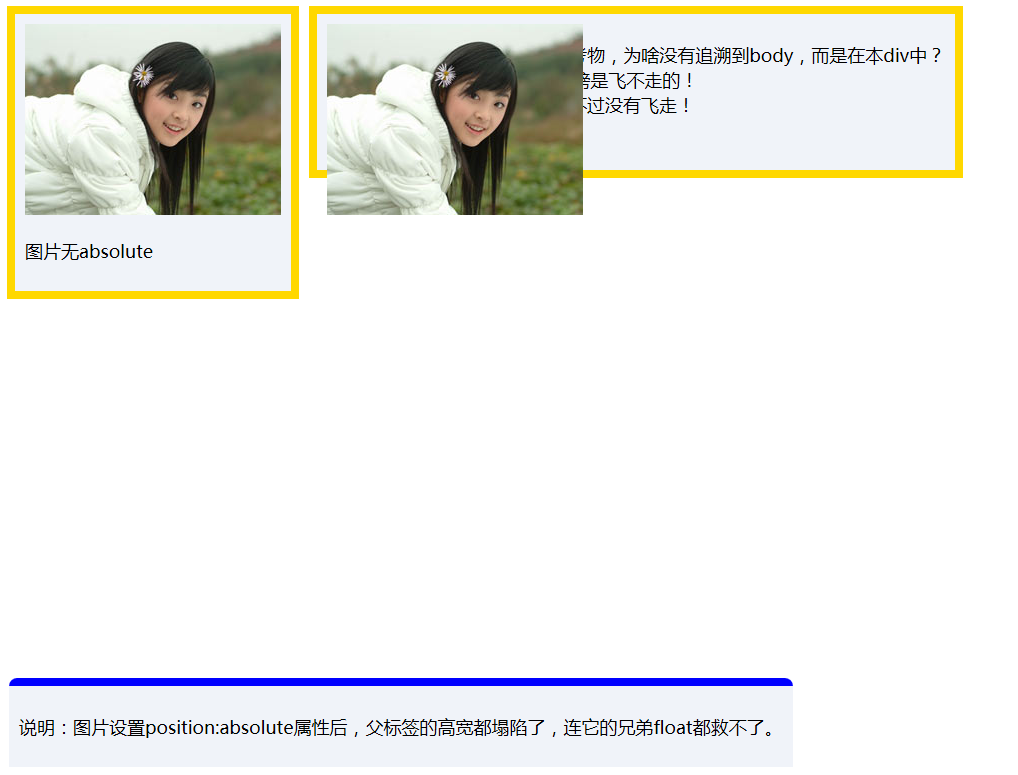
         <p>

             图片absolute后,absolute的参考物,为啥没有追溯到body,而是在本div中?<br />

             因为没有指定left/top!没有翅膀是飞不走的!<br />

             事实上参考物的确为body,只不过没有飞走!<br />

             依然保持原位,貌似还在div中。

         </p>

     </div>

     <div class="div abs info">

         <p>说明:图片设置position:absolute属性后,父标签的高宽都塌陷了,连它的兄弟float都救不了。</p>

     </div>

 </body>

 </html>
3、父盒子限魔大法
 <!DOCTYPE html>

 <html xmlns="http://www.w3.org/1999/xhtml">

 <head>

     <meta http-equiv="Content-Type" content="text/html; charset=utf-8" />

     <link rel="shortcut icon" href="favicon.ico" type="image/x-icon" />

     <link rel="icon" href="favicon.ico" type="image/x-icon" />

     <title>父盒子限魔大法</title>

     <style>

         body

         {

             font-family: 'Microsoft YaHei';

             font-size: 18px;

         }

         .box

         {

             width: 15em;

             height: 10em;

             background-color: #beceeb;

             position: relative; /*父盒子限魔大法,父盒子真身还在文档流,纵云梯z-index飙升*/

             /*position: absolute;*/ /*父盒子限魔大法,父盒子真身不在文档流,没有了宽和高,纵云梯z-index飙升*/

             left: 100px;

             top: 100px;

         }

             .box img

             {

                 position: absolute; /*向上追溯absolute或relative,直至body*/

                 left: 20px;

                 top: 20px;

             }

     </style>

 </head>

 <body>

     <div>

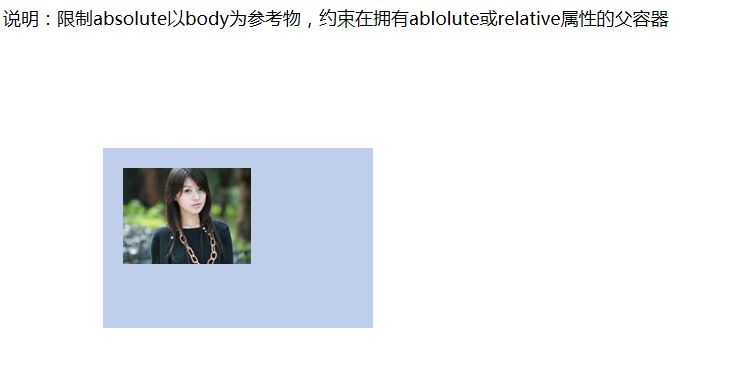
         <p>说明:限制absolute以body为参考物,约束在拥有ablolute或relative属性的父容器</p>

     </div>

     <div id="target" class="box">

         <img src="http://image.zhangxinxu.com/image/study/s/s128/mm3.jpg" />

     </div>

 </body>

 </html>
4、relative最小影响原则(不遵循)
 <!DOCTYPE html>

 <html xmlns="http://www.w3.org/1999/xhtml">

 <head>

     <meta http-equiv="Content-Type" content="text/html; charset=utf-8" />

     <link rel="shortcut icon" href="favicon.ico" type="image/x-icon" />

     <link rel="icon" href="favicon.ico" type="image/x-icon" />

     <title>relative最小影响原则(不遵循)</title>

     <style>

         body

         {

             font-family: 'Microsoft YaHei';

             font-size: 18px;

         }

         .test

         {

             width: 25em;

             margin: 2em auto;

         }

         .box

         {

             padding: 2em;

             border: 1px solid #beceeb;

             border-radius: 2px;

             background-color: #f0f3f9;

             position: relative;

         }

         .ok

         {

             color: green;

             font-size: 6em;

             position: absolute;

             right: -11px;

             bottom: -.5em;

         }

         .infodiv

         {

             background-color: #f0f3f9;

             margin: 5px auto;

             width: 800px;

         }

         .infoborder

         {

             /*position: absolute;*/ /*inline-block化,但是没有自然居中,即需要其他辅助居中*/

             border-style: solid;

             border-width: 8px 0 0;

             border-radius: 8px 8px 0 0;

             border-color: blue;

         }

     </style>

 </head>

 <body>

     <div class="test">

         <div class="box">

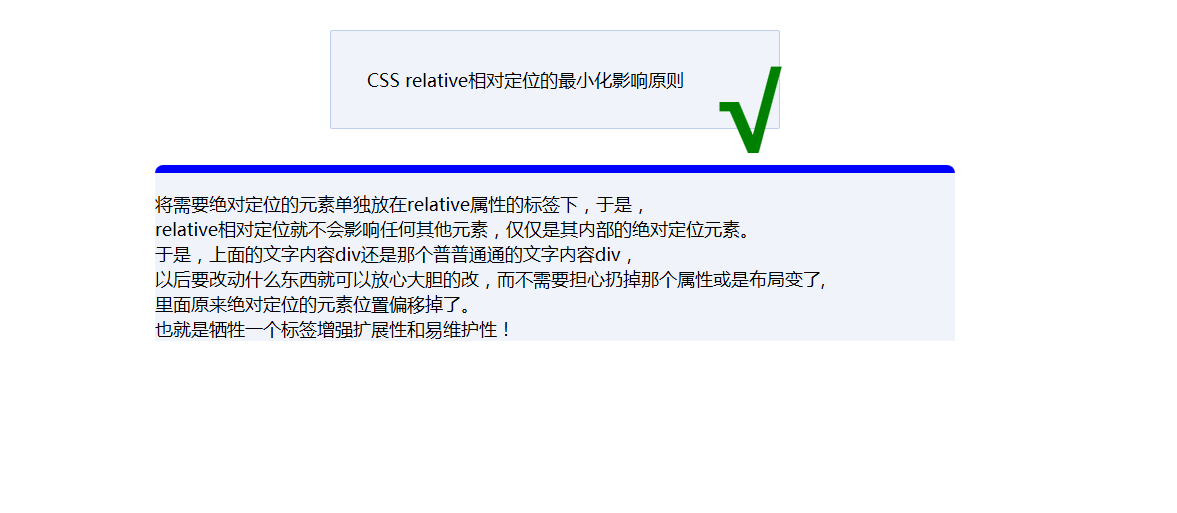
             CSS relative相对定位的最小化影响原则

         <strong class="ok">√</strong>

         </div>

     </div>

     <div class="infodiv infoborder">

         <p>

             将需要绝对定位的元素单独放在relative属性的标签下,于是,<br />

             relative相对定位就不会影响任何其他元素,仅仅是其内部的绝对定位元素。<br />

             于是,上面的文字内容div还是那个普普通通的文字内容div,<br />

             以后要改动什么东西就可以放心大胆的改,而不需要担心扔掉那个属性或是布局变了,<br />

             里面原来绝对定位的元素位置偏移掉了。<br />

             也就是牺牲一个标签增强扩展性和易维护性!

         </p>

     </div>

 </body>

 </html>
5、relative最小影响原则(遵循)
 <!DOCTYPE html>

 <html xmlns="http://www.w3.org/1999/xhtml">

 <head>

     <meta http-equiv="Content-Type" content="text/html; charset=utf-8" />

     <link rel="shortcut icon" href="favicon.ico" type="image/x-icon" />

     <link rel="icon" href="favicon.ico" type="image/x-icon" />

     <title>relative最小影响原则(遵循)</title>

     <style>

         body

         {

             font-family: 'Microsoft YaHei';

             font-size: 18px;

         }

         .test

         {

             width: 25em;

             margin: 2em auto;

         }

         .box

         {

             padding: 2em;

             border: 1px solid #beceeb;

             border-radius: 2px;

             background-color: #f0f3f9;

         }

         .rel

         {

             position: relative;

         }

         .ok

         {

             color: green;

             font-size: 6em;

             position: absolute;

             right: -10px;

             top: -1em;

         }

         .infodiv

         {

             background-color: #f0f3f9;

             margin: 5px auto;

             /*width: 800px;*/

         }

         .infoborder

         {

             position: absolute; /*inline-block化,但是脱离文档流后无法自然居中,居中的技巧就是transform*/

             left: 50%;

             -moz-transform: translateX(-50%);

             -ms-transform: translateX(-50%);

             -o-transform: translateX(-50%);

             -webkit-transform: translateX(-50%);

             transform: translateX(-50%);

             border-style: solid;

             border-width: 8px 0 0;

             border-radius: 8px 8px 0 0;

             border-color: blue;

         }

     </style>

 </head>

 <body>

     <div class="test">

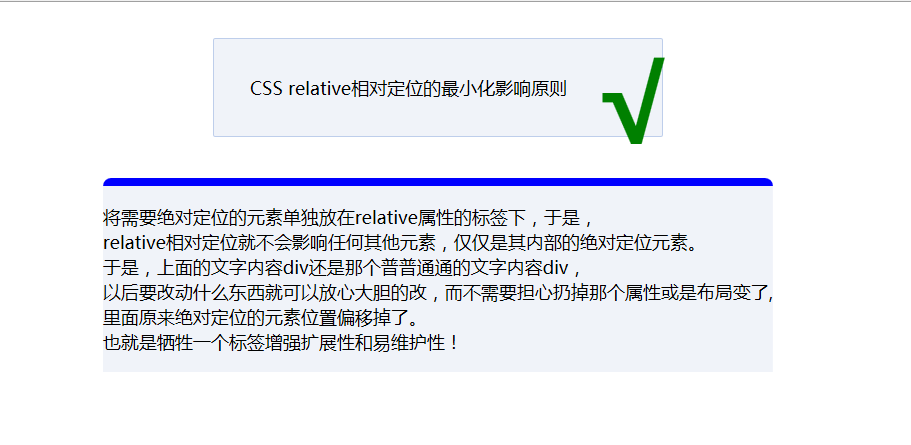
         <div class="box">CSS relative相对定位的最小化影响原则</div>

         <div class="rel"><strong class="ok">√</strong></div>

     </div>

     <div class="infodiv infoborder">

         <p>

             将需要绝对定位的元素单独放在relative属性的标签下,于是,<br />

             relative相对定位就不会影响任何其他元素,仅仅是其内部的绝对定位元素。<br />

             于是,上面的文字内容div还是那个普普通通的文字内容div,<br />

             以后要改动什么东西就可以放心大胆的改,而不需要担心扔掉那个属性或是布局变了,<br />

             里面原来绝对定位的元素位置偏移掉了。<br />

             也就是牺牲一个标签增强扩展性和易维护性!

         </p>

     </div>

 </body>

 </html>
absolute和relative的几个Demo的更多相关文章
- Position属性四个值:static、fixed、absolute和relative的区别和用法
Position属性四个值:static.fixed.absolute和relative的区别和用法 在用CSS+DIV进行布局的时候,一直对position的四个属性值relative,absolu ...
- position属性absolute与relative 详解
最近一直在研究javascript脚本,熟悉DOM中CSS样式的各种定位属性,以前对这个属性不太了解,从网上找到两篇文章感觉讲得很透彻,收藏下来,唯恐忘记.一.解读absolute与relative ...
- css absolute与relative的区别
<!DOCTYPE html PUBLIC "-//W3C//DTD XHTML 1.0 Transitional//EN" "http://www.w3.org/ ...
- Div CSS absolute与relative的区别小结
absolute:绝对定位,CSS 写法“ position: absolute; ”,它的定位分两种情况,如下: 1. 没有设定 Top.Right.Bottom.Left 的情况,默认依据父级的“ ...
- position属性absolute和relative理解
relative:相对于自身静态位置进行定位,不脱离流. absolute:绝对定位,脱离流,如果父元素定义了position属性,无论是absolute.relative还是fixed,都是相对于父 ...
- CSS+DIV布局中absolute和relative区别
原文:http://developer.51cto.com/art/201009/225201.htm 这里向大家简单介绍一下CSS+DIV布局中absolute和relative属性的用法和区别,定 ...
- position的absolute与fixed,absolute与relative共同点与不同点
absolute与fixed 共同点: (1) 改变行内元素的呈现方式,display被置为block: (2) 让元素脱离普通流,不占据空间: (3) 默认会覆盖到非定位元素上 不同点: absol ...
- focus、click、blur、display、float、border、absolute、relative、fixed
onfocus:获取焦点,点击时,按着不放 onclick:点击松开之后,未点击其他处 onblur:点击松开之后,又点击其他处 display:block,none,inline block:单独占 ...
- 怕忘记了CSS中position的absolute和relative用法
CSS2.0中的定位确实有时会把人弄糊涂,所以今天给它记下来,同时供以后查阅.下面写的内容有一部分借鉴了w3cschool和divcss5这两个官方网站,在此处特别的说明一下 CSS2.0中posit ...
随机推荐
- 利用微软类库 Visual Studio International Pack 汉字转拼音
首先,从微软官网下载安装包:http://www.microsoft.com/downloads/zh-cn/details.aspx?FamilyID=44CAC7F0-633B-477D-AED2 ...
- zookeeper实现商品秒杀抢购
package com.test; import java.io.IOException; import java.util.List; import java.util.concurrent.Cyc ...
- C# 数据类型映射 (SQLite,MySQL,MSSQL,Oracle)
一.C# vs SQLite: C# SQLite 字段名 类型 库类型 GetFieldType(#) 转换 备注 F_BOOL bool BIT NOT NULL Boolean F_BOOL_N ...
- Java实战之03Spring-04Spring的数据库访问
四.Spring的数据库访问 1.DAO模式 /** * 抽取的一个类 * @author zhy * */ public class JdbcDaoSupport { private QueryRu ...
- "const wchar_t is incompatible with parameter of type "LPCSTR"
MessageBox(NULL, L"TEST", L"TEST", MB_OK); You may get this error if you "U ...
- 为UITextView添加与UITextField一样的边框——UITextField默认边框颜色、宽度、圆角
我的技术博客经常被流氓网站恶意爬取转载.请移步原文:http://www.cnblogs.com/hamhog/p/3789052.html,享受整齐的排版.有效的链接.正确的代码缩进.更好的阅读体验 ...
- Linux用户级线程和内核级线程区别
1.内核级线程: (1)线程的创建.撤销和切换等,都需要内核直接实现,即内核了解每一个作为可调度实体的线程.(2)这些线程可以在全系统内进行资源的竞争.(3)内核空间内为每一个内核支持线程设置了一个线 ...
- mysql数据库之索引和分析索引
分析查询语句是否用到了索引 explain sql语句\G //根据返回的信息,我们可知,该sql语句是否使用索引,从多少记录中取出,可以看到排序的方式. 主要是看 key 实际用到的索引 rows ...
- Linux中的安装神器--yum源安装
linux配置yum源 一.修改yum的配置文件 /etc/yum.repos.d/xxx.repo 1.进入yum配置文件目录 # cd /etc/yum.r ...
- (转载)ADOQuery参数传递
ADOQuery参数传递 dbgrid1.DataSource := datasource1; datasource1.DataSet := adoquery1; Value := 1221; SQL ...