
机器学习作业(三)多类别分类与神经网络——Matlab实现
题目太长了!下载地址【传送门】
第1题
简述:识别图片上的数字。
第1步:读取数据文件:
%% Setup the parameters you will use for this part of the exercise

input_layer_size  = 400;  % 20x20 Input Images of Digits

num_labels = 10;          % 10 labels, from 1 to 10

                          % (note that we have mapped "0" to label 10)

% Load Training Data

fprintf('Loading and Visualizing Data ...\n')

load('ex3data1.mat'); % training data stored in arrays X, y

m = size(X, 1);

% Randomly select 100 data points to display

rand_indices = randperm(m);

sel = X(rand_indices(1:100), :);

displayData(sel);
第2步:实现displayData函数:
function [h, display_array] = displayData(X, example_width)

% Set example_width automatically if not passed in

if ~exist('example_width', 'var') || isempty(example_width)

	example_width = round(sqrt(size(X, 2)));

end

% Gray Image

colormap(gray);

% Compute rows, cols

[m n] = size(X);

example_height = (n / example_width);

% Compute number of items to display

display_rows = floor(sqrt(m));

display_cols = ceil(m / display_rows);

% Between images padding

pad = 1;

% Setup blank display

display_array = - ones(pad + display_rows * (example_height + pad), ...

                       pad + display_cols * (example_width + pad));

% Copy each example into a patch on the display array

curr_ex = 1;

for j = 1:display_rows

	for i = 1:display_cols

		if curr_ex > m,

			break;

		end

		% Copy the patch

		% Get the max value of the patch

		max_val = max(abs(X(curr_ex, :)));

		display_array(pad + (j - 1) * (example_height + pad) + (1:example_height), ...

		              pad + (i - 1) * (example_width + pad) + (1:example_width)) = ...

						reshape(X(curr_ex, :), example_height, example_width) / max_val;

		curr_ex = curr_ex + 1;

	end

	if curr_ex > m,

		break;

	end

end

% Display Image

h = imagesc(display_array, [-1 1]);

% Do not show axis

axis image off

drawnow;

end
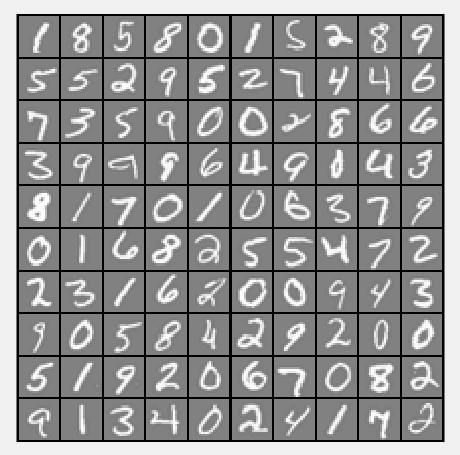
运行结果:
第3步:计算θ:
lambda = 0.1;

[all_theta] = oneVsAll(X, y, num_labels, lambda);
其中oneVsAll函数:
function [all_theta] = oneVsAll(X, y, num_labels, lambda)

% Some useful variables

m = size(X, 1);

n = size(X, 2);

% You need to return the following variables correctly

all_theta = zeros(num_labels, n + 1);

% Add ones to the X data matrix

X = [ones(m, 1) X];

for c = 1:num_labels,

    initial_theta = zeros(n+1, 1);

    options = optimset('GradObj', 'on', 'MaxIter', 50);

    [theta] = ...

        fmincg(@(t)(lrCostFunction(t, X, (y==c), lambda)), initial_theta, options);

    all_theta(c,:) = theta;

end;

end
第4步:实现lrCostFunction函数:
function [J, grad] = lrCostFunction(theta, X, y, lambda)

% Initialize some useful values

m = length(y); % number of training examples

% You need to return the following variables correctly

J = 0;

grad = zeros(size(theta));

theta2 = theta(2:end,1);

h = sigmoid(X*theta);

J = 1/m*(-y'*log(h)-(1-y')*log(1-h)) + lambda/(2*m)*sum(theta2.^2);

theta(1,1) = 0;

grad = 1/m*(X'*(h-y)) + lambda/m*theta;

grad = grad(:);

end
第5步:实现sigmoid函数:
function g = sigmoid(z)

g = 1.0 ./ (1.0 + exp(-z));

end
第6步:计算预测的准确性:
pred = predictOneVsAll(all_theta, X);

fprintf('\nTraining Set Accuracy: %f\n', mean(double(pred == y)) * 100);
其中predictOneVsAll函数:
function p = predictOneVsAll(all_theta, X)

m = size(X, 1);

num_labels = size(all_theta, 1);

% You need to return the following variables correctly

p = zeros(size(X, 1), 1);

% Add ones to the X data matrix

X = [ones(m, 1) X];

g = zeros(size(X, 1), num_labels);

for c = 1: num_labels,

    theta = all_theta(c, :);

    g(:, c) = sigmoid(X*theta');

end

[value, p] = max(g, [], 2);

end
运行结果:

第2题
简介:使用神经网络实现数字识别(Θ已提供)
第1步:读取文档数据:
%% Setup the parameters you will use for this exercise

input_layer_size  = 400;  % 20x20 Input Images of Digits

hidden_layer_size = 25;   % 25 hidden units

num_labels = 10;          % 10 labels, from 1 to 10

                          % (note that we have mapped "0" to label 10)

% Load Training Data

fprintf('Loading and Visualizing Data ...\n')

load('ex3data1.mat');

m = size(X, 1);

% Randomly select 100 data points to display

sel = randperm(size(X, 1));

sel = sel(1:100);

displayData(X(sel, :));

% Load the weights into variables Theta1 and Theta2

load('ex3weights.mat');
第2步:实现神经网络:
pred = predict(Theta1, Theta2, X);

fprintf('\nTraining Set Accuracy: %f\n', mean(double(pred == y)) * 100);
其中predict函数:
function p = predict(Theta1, Theta2, X)

% Useful values

m = size(X, 1);

num_labels = size(Theta2, 1);

% You need to return the following variables correctly

p = zeros(size(X, 1), 1);

X = [ones(m,1) X];

z2 = X*Theta1';

a2 = sigmoid(z2);

a2 = [ones(size(a2, 1), 1) a2];

z3 = a2*Theta2';

a3 = sigmoid(z3)

[values, p] = max(a3, [], 2)

end
运行结果:

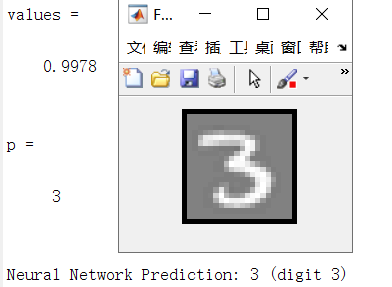
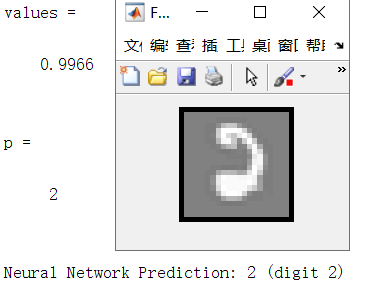
第3步:实现单个数字识别:
rp = randperm(m);

for i = 1:m

    % Display

    fprintf('\nDisplaying Example Image\n');

    displayData(X(rp(i), :));

    pred = predict(Theta1, Theta2, X(rp(i),:));

    fprintf('\nNeural Network Prediction: %d (digit %d)\n', pred, mod(pred, 10));

    % Pause with quit option

    s = input('Paused - press enter to continue, q to exit:','s');

    if s == 'q'

      break

    end

end
运行结果:

机器学习作业(三)多类别分类与神经网络——Matlab实现的更多相关文章
- 机器学习作业(三)多类别分类与神经网络——Python(numpy)实现
题目太长了!下载地址[传送门] 第1题 简述:识别图片上的数字. import numpy as np import scipy.io as scio import matplotlib.pyplot ...
- 机器学习入门16 - 多类别神经网络 (Multi-Class Neural Networks)
原文链接:https://developers.google.com/machine-learning/crash-course/multi-class-neural-networks/ 多类别分类, ...
- 機器學習基石(Machine Learning Foundations) 机器学习基石 作业三 课后习题解答
今天和大家分享coursera-NTU-機器學習基石(Machine Learning Foundations)-作业三的习题解答.笔者在做这些题目时遇到非常多困难,当我在网上寻找答案时却找不到,而林 ...
- 机器学习实验报告:利用3层神经网络对CIFAR-10图像数据库进行分类
PS:这是6月份时的一个结课项目,当时的想法就是把之前在Coursera ML课上实现过的对手写数字识别的方法迁移过来,但是最后的效果不太好… 2014年 6 月 一.实验概述 实验采用的是CIFAR ...
- Andrew Ng机器学习课程笔记(四)之神经网络
Andrew Ng机器学习课程笔记(四)之神经网络 版权声明:本文为博主原创文章,转载请指明转载地址 http://www.cnblogs.com/fydeblog/p/7365730.html 前言 ...
- 斯坦福深度学习与nlp第四讲词窗口分类和神经网络
http://www.52nlp.cn/%E6%96%AF%E5%9D%A6%E7%A6%8F%E6%B7%B1%E5%BA%A6%E5%AD%A6%E4%B9%A0%E4%B8%8Enlp%E7%A ...
- 用Python开始机器学习(2:决策树分类算法)
http://blog.csdn.net/lsldd/article/details/41223147 从这一章开始进入正式的算法学习. 首先我们学习经典而有效的分类算法:决策树分类算法. 1.决策树 ...
- 吴恩达《深度学习》-第一门课 (Neural Networks and Deep Learning)-第三周:浅层神经网络(Shallow neural networks) -课程笔记
第三周:浅层神经网络(Shallow neural networks) 3.1 神经网络概述(Neural Network Overview) 使用符号$ ^{[
- 基于机器学习和TFIDF的情感分类算法,详解自然语言处理
摘要:这篇文章将详细讲解自然语言处理过程,基于机器学习和TFIDF的情感分类算法,并进行了各种分类算法(SVM.RF.LR.Boosting)对比 本文分享自华为云社区<[Python人工智能] ...
随机推荐
- 【iOS】Spring Animations (弹性动画)
This interface shows how a spring animation can be created by specifying a “damping” (bounciness) an ...
- 【python数据挖掘】使用词云分析来分析豆瓣影评数据
概述: 制作词云的步骤: 1.从文件中读取数据 2.根据数据追加在一个字符串里面,然后用jieba分词器将评论分开 3.设置WordCloud词云参数 4.保存最后的结果 数据:使用爬取的豆瓣影评数据 ...
- MySql学习-2. NavicatforMySQL 与 MySql的对接以及一些操作:
1.连接: 2.数据库的创建: 3.数据库中表的创建: 4.表的设计: 4.1 设计表: 4.2 增加数据(自动递增只是保证唯一值,即使数据删除了也是得前进):
- 笔记本磁盘中OEM分区的使用
(1).开机进入系统前,按F8,进入Windows 10的高级启动选项,选择“修复计算机”. (2).选择键盘输入方法. (3).如果有管理员密码,需要输入:如果没有设置密码,直接“确定”即可. (4 ...
- [CF1311A] Add Odd or Subtract Even
Solution a<b, delta=odd, ans=1 a<b, delta=even, ans=2 a=b ans=0 a>b, delta=odd, ans=2 a> ...
- es5和es6创建新数组的方法
//es5 let array = Array(5) let array = [] //es6 1.let array = Array.of(1,2,3,4,5) 2.let array = Arra ...
- 洛谷P1464 Function HDU P1579 Function Run Fun
洛谷P1464 Function HDU P1579 Function Run Fun 题目描述 对于一个递归函数w(a,b,c) 如果a≤0 or b≤0 or c≤0就返回值11. 如果a> ...
- mac本地安装全局包报错npm WARN checkPermissions
安装本地全局包时,本地报错 npm WARN checkPermissions Missing write access to /Users/xxx/.nvm/versions/node/v11.10 ...
- adworld easy_RSA | RSA算法
题目描述: 解答出来了上一个题目的你现在可是春风得意,你们走向了下一个题目所处的地方 你一看这个题目傻眼了,这明明是一个数学题啊!!!可是你的数学并不好.扭头看向小鱼,小鱼哈哈一笑 ,让你在学校里面不 ...
- layui弹出表单提交后,界面model验证部分起作用
情况1----input属性中type=submit时验证都可以起作用,但是弹出层表单的返回值不能获取,所以用ajax二次提交后会出现重复添加数据的问题 情况2----input属性中type=but ...