
android之Activity的创建与关闭
Activity的启动和关闭
1.启动activity
activity的启动分为两种,一种为入口activity,另一种为其他activity
在AndroidManifests进行配置,入口activity的启动只要在要启动的activity里加入intent,例如下面代码将MainActivity作为入口Activity
<activity android:name=".MainActivity">

            <intent-filter>

                <action android:name="android.intent.action.MAIN" />

                <category android:name="android.intent.category.LAUNCHER" />

            </intent-filter>

</activity>
那其他activity如何启动呢?
答案是:startActivity来进行启动,通过intent对象获得要启动的activity,再进行启动。
 psw.setOnClickListener(new View.OnClickListener() {

            @Override

            public void onClick(View v) {

                Intent intent=new Intent(MainActivity.this,ForgetpswActivity.class);

                startActivity(intent);

            }

        });
2.关闭Activity
直接调用finish()即可关闭当前的活动,需要注意的是,当需要关闭的活动不是主活动而是其他活动时,关闭后就会回到主活动;如果要关闭的活动是主活动
则就直接返回手机主屏幕。
close.setOnClickListener(new View.OnClickListener() {  //为关闭按钮创建监听事件

            @Override

            public void onClick(View v) {

                finish(); //关闭当前Activity

            }

        });
小妙招:刷新当前Activity------》onCreat(null);
Activity启动与关闭的实例:
activity_main.xml
<?xml version="1.0" encoding="utf-8"?>

<androidx.constraintlayout.widget.ConstraintLayout xmlns:android="http://schemas.android.com/apk/res/android"

    xmlns:app="http://schemas.android.com/apk/res-auto"

    xmlns:tools="http://schemas.android.com/tools"

    android:layout_width="match_parent"

    android:layout_height="match_parent"

    android:background="@drawable/biaoge"

    tools:context=".MainActivity">

    <TextView

        android:id="@+id/zhanghao"

        android:layout_width="wrap_content"

        android:layout_height="wrap_content"

        android:text="账号:"

        android:textSize="25sp"

        app:layout_constraintBottom_toTopOf="@+id/idpsw"

        app:layout_constraintEnd_toEndOf="parent"

        app:layout_constraintHorizontal_bias="0.145"

        app:layout_constraintStart_toStartOf="parent"

        app:layout_constraintTop_toTopOf="parent"

        app:layout_constraintVertical_bias="0.924"

        tools:ignore="MissingConstraints" />

    <EditText

        android:id="@+id/edtzhanghao"

        android:layout_width="wrap_content"

        android:layout_height="wrap_content"

        android:hint="邮箱或者手机号"

        app:layout_constraintStart_toEndOf="@+id/idpsw"

        app:layout_constraintTop_toTopOf="@+id/zhanghao"

        tools:ignore="MissingConstraints" />

    <TextView

        android:id="@+id/idpsw"

        android:layout_width="wrap_content"

        android:layout_height="wrap_content"

        android:layout_marginStart="1dp"

        android:layout_marginLeft="1dp"

        android:text="密码:"

        android:textSize="25sp"

        app:layout_constraintBaseline_toBaselineOf="@+id/edtpsw"

        app:layout_constraintStart_toStartOf="@+id/btnzhuce"

        tools:ignore="MissingConstraints" />

    <EditText

        android:id="@+id/edtpsw"

        android:layout_width="wrap_content"

        android:layout_height="wrap_content"

        android:layout_marginStart="1dp"

        android:layout_marginLeft="1dp"

        android:layout_marginBottom="205dp"

        android:hint="输入6-16位数字或密码"

        app:layout_constraintBottom_toBottomOf="parent"

        app:layout_constraintStart_toEndOf="@+id/idpsw"

        tools:ignore="MissingConstraints" />

    <Button

        android:id="@+id/btnzhuce"

        android:layout_width="wrap_content"

        android:layout_height="wrap_content"

        android:layout_marginStart="48dp"

        android:layout_marginLeft="48dp"

        android:text="注册"

        app:layout_constraintBaseline_toBaselineOf="@+id/btnlogin"

        app:layout_constraintStart_toStartOf="parent"

        tools:ignore="MissingConstraints" />

    <Button

        android:id="@+id/btnlogin"

        android:layout_width="wrap_content"

        android:layout_height="wrap_content"

        android:layout_marginTop="20dp"

        android:layout_marginEnd="8dp"

        android:layout_marginRight="8dp"

        android:background="#FF8247"

        android:text="登录"

        app:layout_constraintEnd_toStartOf="@+id/wang_psw"

        app:layout_constraintTop_toBottomOf="@+id/edtpsw"

        tools:ignore="MissingConstraints" />

    <TextView

        android:id="@+id/wang_psw"

        android:layout_width="wrap_content"

        android:layout_height="wrap_content"

        android:layout_marginTop="19dp"

        android:layout_marginEnd="76dp"

        android:layout_marginRight="76dp"

        android:background="#FF8247"

        android:text="忘记密码?"

        app:layout_constraintEnd_toEndOf="parent"

        app:layout_constraintTop_toBottomOf="@+id/btnlogin"

        tools:ignore="MissingConstraints" />

</androidx.constraintlayout.widget.ConstraintLayout>
activity_forgetpsw.xml
<?xml version="1.0" encoding="utf-8"?>

<androidx.constraintlayout.widget.ConstraintLayout xmlns:android="http://schemas.android.com/apk/res/android"

    xmlns:app="http://schemas.android.com/apk/res-auto"

    xmlns:tools="http://schemas.android.com/tools"

    android:layout_width="match_parent"

    android:layout_height="match_parent"

    android:background="@drawable/beijing"

    tools:context=".ForgetpswActivity">

    <ImageButton

        android:id="@+id/close"

        android:layout_width="wrap_content"

        android:layout_height="wrap_content"

        android:layout_marginStart="3dp"

        android:layout_marginLeft="3dp"

        android:layout_marginTop="16dp"

        android:background="#0000"

        android:src="@drawable/guanbi"

        app:layout_constraintStart_toStartOf="parent"

        app:layout_constraintTop_toTopOf="parent"

        tools:ignore="MissingConstraints" />

    <TextView

        android:id="@+id/textView"

        android:layout_width="wrap_content"

        android:layout_height="wrap_content"

        android:layout_marginStart="33dp"

        android:layout_marginLeft="33dp"

        android:layout_marginTop="124dp"

        android:text="你的邮箱或手机号"

        android:textSize="15sp"

        app:layout_constraintStart_toStartOf="parent"

        app:layout_constraintTop_toTopOf="parent"

        tools:ignore="MissingConstraints" />

    <EditText

        android:id="@+id/edtemailorphone"

        android:layout_width="wrap_content"

        android:layout_height="wrap_content"

        android:layout_marginStart="33dp"

        android:layout_marginLeft="33dp"

        android:layout_marginTop="28dp"

        android:hint="请输入手机号或邮箱"

        app:layout_constraintStart_toStartOf="parent"

        app:layout_constraintTop_toBottomOf="@+id/textView" />

    <Button

        android:id="@+id/btnok"

        android:layout_width="wrap_content"

        android:layout_height="wrap_content"

        android:layout_marginStart="56dp"

        android:layout_marginLeft="56dp"

        android:layout_marginTop="48dp"

        android:layout_marginEnd="58dp"

        android:layout_marginRight="58dp"

        android:background="#fff000"

        android:text="确定"

        app:layout_constraintEnd_toEndOf="@+id/edtemailorphone"

        app:layout_constraintStart_toStartOf="parent"

        app:layout_constraintTop_toBottomOf="@+id/edtemailorphone" />

</androidx.constraintlayout.widget.ConstraintLayout>
MainActivity.java
package com.example.forgetpsw;

import androidx.appcompat.app.AppCompatActivity;

import android.content.Intent;

import android.os.Bundle;

import android.view.View;

import android.widget.TextView;

public class MainActivity extends AppCompatActivity {

    @Override

    protected void onCreate(Bundle savedInstanceState) {

        super.onCreate(savedInstanceState);

        setContentView(R.layout.activity_main);

        TextView psw=(TextView)findViewById(R.id.wang_psw);

        psw.setOnClickListener(new View.OnClickListener() {

            @Override

            public void onClick(View v) {

                Intent intent=new Intent(MainActivity.this,ForgetpswActivity.class);

                startActivity(intent);

            }

        });

    }

}
ForgetpswActivity.java
package com.example.forgetpsw;

import androidx.appcompat.app.AppCompatActivity;

import android.app.Activity;

import android.os.Bundle;

import android.view.View;

import android.widget.ImageButton;

public class ForgetpswActivity extends Activity {

    @Override

    protected void onCreate(Bundle savedInstanceState) {

        super.onCreate(savedInstanceState);

        setContentView(R.layout.activity_forgetpsw);

        ImageButton close = (ImageButton) findViewById(R.id.close); //获取布局文件中的关闭按钮

        close.setOnClickListener(new View.OnClickListener() {  //为关闭按钮创建监听事件

            @Override

            public void onClick(View v) {

                finish(); //关闭当前Activity

            }

        });

    }

}
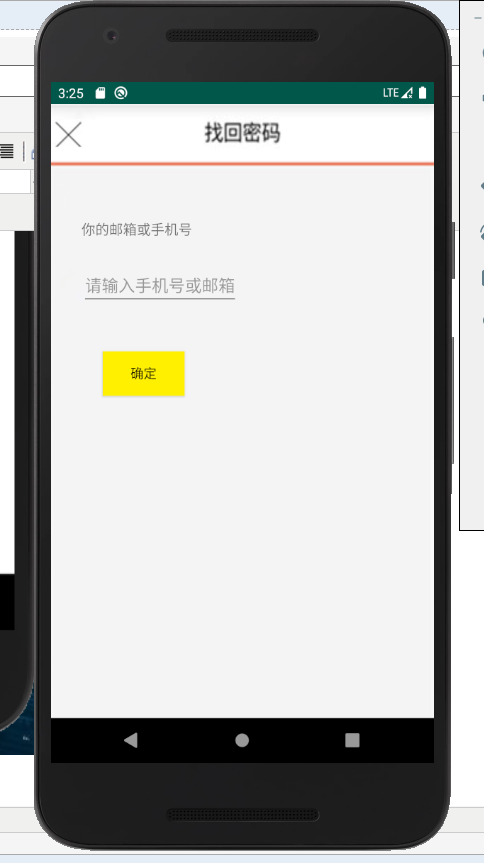
项目截图:当点击忘记密码会启动忘记密码事件,当点击叉号就会回到主活动。

android之Activity的创建与关闭的更多相关文章
- Android课程---Activity的创建
一.为了创建一个新的Activity,你需要继承Activity类,定义UI,实现功能.新的Activity的最基本的框架代码如下所示: package com.paad.myapplication; ...
- Android开发--Activity的创建
1.Activity概述 Activity是android四大基本组件之一.每一个activity文件对应一个界面,一个程序由多个activity组成. 2.Android工作目录
- Android基础Activity篇——创建一个活动(Activity)
1.创建活动 首先用AS创建一个add no activity项目名使用ActivityTest,包名为默认的com.example.activitytest 2.右击app.java.com.exa ...
- Android提升篇系列:Activity recreate(Activity 重新创建/自我恢复)机制(一)
注:本文中的recreate是指当内存不足时,Activity被回收,但再次来到此Activity时,系统重新恢复的过程.例如:当Activity A到Activity B时,如果内存不足,A被回收, ...
- Android开发之Activity的创建跳转及传值
在Android系统的江湖中有四大组件:活动(Activity), 服务(Service), 广播接收器(Broadcast Reciver)和内容提供者(Content Provider).今天所介 ...
- Android 子activity关闭 向父activity传值
使用startActivity方式启动的Activity和它的父Activity无关,当它关闭时也不会提供任何反馈. 可变通的,你可以启动一个Activity作为子Activity,它与父Activi ...
- Android 编程下 Activity 的创建和应用退出时的销毁
为了确保对应用中 Activity 的创建和销毁状态进行控制,所以就需要一个全局的变量来记录和销毁这些 Activity.这里的大概思路是写一个类继承 Application,并使获取该 Applic ...
- Android WiFi开发教程(一)——WiFi热点的创建与关闭
相对于BlueTooth,WiFi是当今使用最广的一种无线网络传输技术, 几乎所有智能手机.平板电脑和笔记本电脑都支持Wi-Fi上网.因此,掌握基本的WiFI开发技术是非常必要的.本教程将围绕一个小D ...
- ADT中创建Android的Activity
去创建Activity New->Other->Android->Android Activity->BlankActivity: 输入对应的信息: 创建完毕后,可以看到新建了 ...
随机推荐
- 从零开始のcocos2dx生活(三)Scheduler
文章目录 取模 Timer() 变量 设置定时器Timer() 一些成员函数 Scheduler() 变量 初始化 哈希表 构造函数schedule() 开启定时器Update() 析构函数~Upda ...
- MSXM简单的使用
// xml.cpp : 定义控制台应用程序的入口点. // #include "stdafx.h" #include <string> #include <at ...
- 《美国纽约摄影学院摄影教材》PDF教材
下载地址: 美国纽约摄影学院摄影教材(上册).pdf 美国纽约摄影学院摄影教材(下册).pdf 欢迎你到纽约摄影学院来,我们急切地等待着开课,你们也在 跃跃欲试了.那就让我们马上开始吧! 你已 ...
- 关于knockout下拉多选值的应用
在最近的开发过程中,应用了一些关于knockout的下拉项目. 关于下拉多选的开发在这里做一个记录. 下面直接上代码 添加的时候,无需给初始值 --viewmodel function ViewMod ...
- 详解Spring IoC容器
一.Spring IoC容器概述 1.依赖反转(依赖注入):依赖对象的获得被反转了. 如果合作对象的引用或依赖关系的管理由具体对象来完成,会导致代码的高度耦合和可测试性的降低,这对复杂的面向对象系统的 ...
- 别再埋头刷LeetCode之:北美算法面试的题目分类,按类型和规律刷题,事半功倍
算法面试过程中,题目类型多,数量大.大家都不可避免的会在LeetCode上进行训练.但问题是,题目杂,而且已经超过1300道题. 全部刷完且掌握,不是一件容易的事情.那我们应该怎么办呢?找规律,总结才 ...
- Web及网络基础学习(一)
---恢复内容开始--- 2019.10.16 1.TCP.IP分层 应用层.网络层.传输层.数据链路层 2.各层讲解 应用层 决定了向用户提供应用服务时通信的活动.例如FTP(File Trans ...
- python专题我对json的日常操作
一前言 本篇文章将会阐述对json的日常操作,如何读取json文件,将json文件转为字典:如何将字典转为json,将字典写入文件等: 二 josn数据格式简要说明 json对于初学者可以理解是一种数 ...
- 【转】Spring面试问题集锦
Q. 对于依赖倒置原则(Dependency Inversion Principle,DIP),依赖注入(Dependency Injection,DI)和控制反转(Inversion of Cont ...
- 浏览器从输入url 到页面展示完成响应过程
用户从输入 url 到浏览器响应,呈现给用户的具体过程 1.用户在输入栏输入地址 (1) 如果有 beforeunload 事件会先执行判断继续还是跳出操作 (2) 浏览器进程识别是 地址还是关键字检 ...