
Android添加图片到ListView或者 RecyclerView显示
先上图
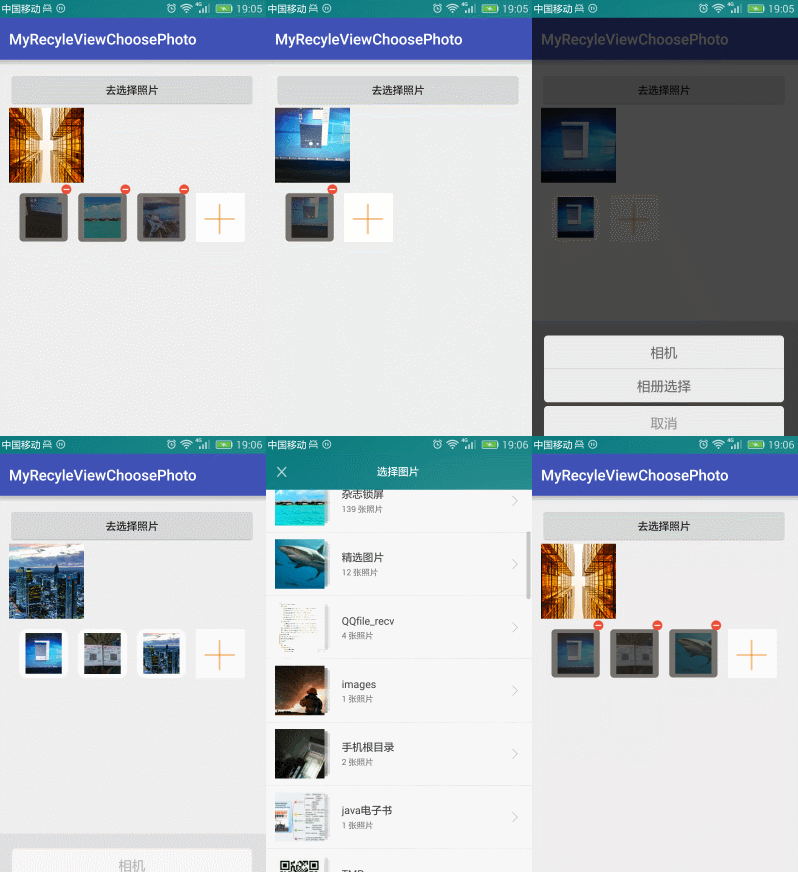
点击+号就去选择图片
实际上这个添加本身就是一个ListView或者 RecyclerView
只是布局有些特殊
item
<?xml version="1.0" encoding="utf-8"?>

<liu.myrecyleviewchoosephoto.view.SquareRelativeLayout

    xmlns:android="http://schemas.android.com/apk/res/android"

    android:id="@+id/rootView"

    android:layout_width="wrap_content"

    android:layout_height="wrap_content">

    <RelativeLayout

        android:layout_width="wrap_content"

        android:layout_height="wrap_content"

        android:layout_marginLeft="7dp"

        android:layout_marginRight="7dp"

        android:layout_marginTop="14dp"

        android:background="@drawable/shape_white_bg_corner"

        >

        <ImageView

            android:id="@+id/ivDisPlayItemPhoto"

            android:layout_width="match_parent"

            android:layout_height="match_parent"

            android:contentDescription="@null"

            android:scaleType="centerCrop"

            android:layout_centerInParent="true"

            android:layout_marginRight="8dp"

            android:layout_marginLeft="8dp"

            android:layout_marginTop="5dp"

            android:layout_marginBottom="5dp"

            />

        <ImageView

            android:id="@+id/ivAddPhoto"

            android:layout_width="match_parent"

            android:layout_height="match_parent"

            android:layout_centerInParent="true"

            android:background="@color/white"

            android:scaleType="centerCrop"

            android:src="@mipmap/add_photo_refund"

            android:visibility="visible"/>

        <ImageView

            android:id="@+id/ivUploadingBg"

            android:layout_width="match_parent"

            android:layout_height="match_parent"

            android:src="@drawable/shape_grey_bg_corner"

            android:visibility="gone"/>

        <ImageView

            android:id="@+id/ivError"

            android:layout_width="wrap_content"

            android:layout_height="wrap_content"

            android:layout_centerInParent="true"

            android:src="@mipmap/icon_prompt"

            android:visibility="gone"/>

        <TextView

            android:id="@+id/tvProgress"

            android:layout_width="wrap_content"

            android:layout_height="wrap_content"

            android:layout_centerInParent="true"

            android:text="0%"

            android:textColor="@color/white"

            android:textSize="16sp"

            android:visibility="gone"/>

    </RelativeLayout>

    <ImageView

        android:id="@+id/ivDelete"

        android:layout_width="wrap_content"

        android:layout_height="wrap_content"

        android:layout_alignParentRight="true"

        android:src="@mipmap/delete_photo"

        android:visibility="gone"/>

</liu.myrecyleviewchoosephoto.view.SquareRelativeLayout>
在Adpater中判断一个数据是不是为0和是不是最后一个添加的图片就可以了。
 @Override

    public int getItemCount() {

        if (mDatas == null || mDatas.size() == 0) {

            return 1;

        } else if (mDatas.size() < mMaxNum) {

            return mDatas.size() + 1;

        } else {

            return mDatas.size();

        }

    }
这里用到了一个正方形的,容器
package liu.myrecyleviewchoosephoto.view;

import android.content.Context;

import android.util.AttributeSet;

import android.widget.RelativeLayout;

/**

 * 正方形的RelativeLayout

 * Created by 刘楠 on 2016/8/13 0013.16:07

 */

public class SquareRelativeLayout extends RelativeLayout {

    public SquareRelativeLayout(Context context) {

        super(context);

    }

    public SquareRelativeLayout(Context context, AttributeSet attrs) {

        super(context, attrs);

    }

    public SquareRelativeLayout(Context context, AttributeSet attrs, int defStyleAttr) {

        super(context, attrs, defStyleAttr);

    }

    @Override

    protected void onMeasure(int widthMeasureSpec, int heightMeasureSpec) {

        //设置自己测量结果

        setMeasuredDimension(getDefaultSize(0,widthMeasureSpec),getDefaultSize(0,heightMeasureSpec));

        /**

         * 测量子View的

         */

        int childWidthSize=getMeasuredWidth();

        //高度与宽度一样

        widthMeasureSpec =MeasureSpec.makeMeasureSpec(childWidthSize,MeasureSpec.EXACTLY);

        heightMeasureSpec =widthMeasureSpec;

        super.onMeasure(widthMeasureSpec, heightMeasureSpec);

    }

}
这里没有写图片选择器
有兴趣可以看这里
图片选择器:
https://github.com/ln0491/PhotoView
源码:
https://github.com/ln0491/MyRecyleViewChoosePhoto
Android添加图片到ListView或者 RecyclerView显示的更多相关文章
- android中ScrollView嵌套ListView或GridView显示位置问题
Android中ScrollView中嵌套ListView或GridView时在开始进入界面时总是显示中间位置,开头的位置显示不出来.这种情况下只需要在ScrollView的父控件中添加以下两行代码即 ...
- Android学习笔记:ListView简单应用--显示文字列表
在activity中的编写如下代码: final List<String> items = new ArrayList<String>(); //设置要显示的数据,这里因为是例 ...
- Android 解决ScrollView嵌入ListView | GridView | ScrollView显示问题
一.ScrollView中嵌套ListView ScrollView和ListView都是滚动结构,很明显如果在ScrollView中加入ListView,可以预见性的知道,肯定会有显示/滚动的问题, ...
- Android开发之漫漫长途 XVI——ListView与RecyclerView项目实战
该文章是一个系列文章,是本人在Android开发的漫漫长途上的一点感想和记录,我会尽量按照先易后难的顺序进行编写该系列.该系列引用了<Android开发艺术探索>以及<深入理解And ...
- android listview 替代品recyclerview详解
安卓v7支持包下的ListView替代品————RecyclerView RecyclerView这个控件也出来很久了,相信大家也学习的差不多了,如果还没学习的,或许我可以带领大家体验一把这个艺术 ...
- 【腾讯Bugly干货分享】Android ListView与RecyclerView对比浅析--缓存机制
本文来自于腾讯bugly开发者社区,非经作者同意,请勿转载,原文地址:http://dev.qq.com/topic/5811d3e3ab10c62013697408 作者:黄宁源 一,背景 Recy ...
- Android ListView item项 显示动画
(1)使用LayoutAnimation 所谓的布局动画,其实就是为ViewGroup添加显示动画效果,主要用过LayoutAnimationController来控制实现.LayoutAnimati ...
- android 项目学习随笔十七(ListView、GridView显示组图)
ListView.GridView显示组图,处理机制相同 <?xml version="1.0" encoding="utf-8"?> <Li ...
- Android根据Button状态(normal,focused,pressed)显示不同背景图片
Android根据Button状态(normal,focused,pressed)显示不同背景图片 Android中Button 有focused, selected, pressed 等不同状态,通 ...
随机推荐
- 比较一下以“反射”和“表达式”执行方法的性能差异
由于频繁地使用反射会影响性能,所以ASP.NET MVC采用了表达式树的方式来执行目标Action方法.具体来说,ASP.NET MVC会构建一个表达式来体现针对目标Action方法的执行,并且将该表 ...
- Percona博客学习总结
1. Upgrading to MySQL 5.7, focusing on temporal types 在MySQL 5.6.4中,对TIME, TIMESTAMP and DATETIME三种时 ...
- geotrellis使用(十七)使用缓冲区分析的方式解决单瓦片计算边缘值问题
Geotrellis系列文章链接地址http://www.cnblogs.com/shoufengwei/p/5619419.html 目录 前言 需求分析 实现方案 总结 一.前言 最 ...
- geotrellis使用(十八)导入多波段Tiff、读取多波段Tile
Geotrellis系列文章链接地址http://www.cnblogs.com/shoufengwei/p/5619419.html 目录 前言 多波段数据导入 读取多波段瓦片 提取单波段 总结 一 ...
- 字符串模式匹配之KMP算法图解与 next 数组原理和实现方案
之前说到,朴素的匹配,每趟比较,都要回溯主串的指针,费事.则 KMP 就是对朴素匹配的一种改进.正好复习一下. KMP 算法其改进思想在于: 每当一趟匹配过程中出现字符比较不相等时,不需要回溯主串的 ...
- JS详细入门教程(上)
首先,我们看一下DOM级别和兼容性: 之前好像在某本上看到说DOM有0级,实际上,DOM0级标准是不存在的.DOM有1.2.3三个级别.DOM1级由两个模块组成(DOM Core和DOM HTML), ...
- Zookeeper数据模型及其应用
Zookeeper作为分布式系统的底层协调服务有着其简单可依靠的数据模型,数据模型加之数据同步.一致性处理和可靠性,在此之上有很多经典的应用,例如,分布式锁.服务器动态上线下感知.主节点选举.数据发布 ...
- IO多路复用之poll总结
1.基本知识 poll的机制与select类似,与select在本质上没有多大差别,管理多个描述符也是进行轮询,根据描述符的状态进行处理,但是poll没有最大文件描述符数量的限制.poll和selec ...
- Command and Query Responsibility Segregation (CQRS) Pattern 命令和查询职责分离(CQRS)模式
Segregate operations that read data from operations that update data by using separate interfaces. T ...
- jQuery-1.9.1源码分析系列(十五) 动画处理——缓动动画核心Tween
在jQuery内部函数Animation中调用到了createTweens()来创建缓动动画组,创建完成后的结果为: 可以看到上面的缓动动画组有四个原子动画组成.每一个原子动画的信息都包含在里面了. ...