
css div布局示例2(head-main-footer
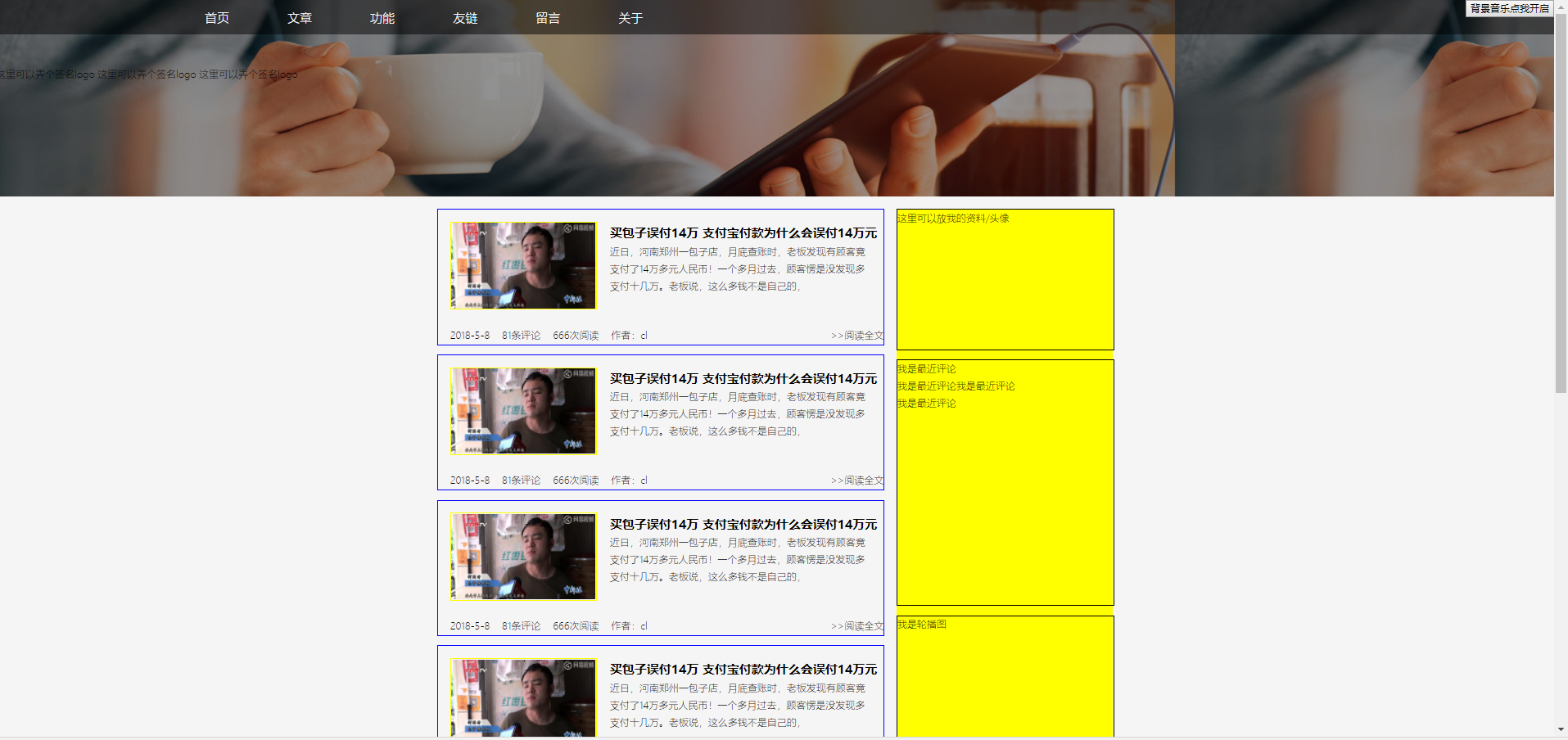
<!doctype html>

<html lang="en">

<head>

    <meta charset="UTF-8">

    <title>Document</title>

    <style type="text/css">

        body{

            margin:0;

            background-color: #F5F5F5;

            line-height: 1.8;

            font-size: 16px;

                font-weight: 300;

        }

        #head{

            height:320px;

            background-image: url("__STATIC__/images/titlepic.jpg");

        }

        #title{

            width:100%;

            position: fixed;

            background-color: rgba(0,0,0,0.5);/*fixed不会占据文档流*/

            padding-top: 10px;

            padding-bottom: 10px;

            padding-left: 250px;

        }

        #title a{

            color:white;

            font-size: 20px;

            margin-left:90px;

            text-decoration:none;

        }

        #title a:hover{

            color:pink;

        }

        #title #msc{

            position: fixed;

            top:0;

            right:0;

        }

        #desc{

            height:149px;

            position: relative;

            top:106px;

        }

        #kratos{

            height:1700px;

            padding-top: 20px;

            padding-bottom: 20px;

        }

        #row{

            width:1100px;

            height:100%;

            margin:0 auto;

        }

        #main{

            width:66%;

            height:100%;

            float:left;

        }

        .content{

            width:100%;

            height:220px;

              border:1px solid blue;

              margin-bottom: 15px;

        }

        .content .tu{

            margin-left:20px;

            margin-top:20px;

            width:234px;

            height: 139px;

            padding:2px;

            border: 0.2px solid yellow;

        }

        .content .tu img{

            width:234px;

            height: 139px;

        }

        .content .title{

            position: relative;

            top:-143px;

            left:260px;

            width:450px;

            height:28px;

            padding-left: 20px;

        }

        .content .title span{

            font-size: 20px;

            font-weight:588;

        }

        .content .neirong{

            position: relative;

            width:420px;

            height:109px;

            top:-153px;

            left:260px;

            padding-left: 20px;

        }

        .content .contentinfo{

            position: relative;

            top:-126px;

            width:100%;

            height:35px;

        }

        .content .contentinfo a{

            text-decoration:none;

            margin-left: 20px;

            color:black;

        }

        .quanwen{

            float:right;

        }

        #sidebar{

            height:100%;

            width:32%;

            background-color: yellow;

            float: right;

        }

        #toutu{

            width:100%;

            height:228px;

            margin-bottom: 15px;

            border:1px solid black;

        }

        #pinglun{

            width:100%;

            height:400px;

            margin-bottom: 15px;

            border:1px solid black;

        }

        #lunbotu{

            width:100%;

            height:255px;

            margin-bottom: 15px;

            border:1px solid black;

        }

        #paihang{

            width:100%;

            height:350px;

            margin-bottom: 15px;

            border:1px solid black;

        }

        #footer{

            height:182px;

            background-color: black;

        }

        #info{

            width:60%;

            height:60%;

            margin:0 auto;

            position: relative;

            top:20%;

            background-color: red;

            text-align: center;

        }

        #info span{

            margin-top:20px;

            font-size: 40px;

        }

    </style>

</head>

<body>

    <!--头部开始-->

    <div id="head">

        <div id="title">

            <a href=?>首页</a>

            <a href=?>文章</a>

            <a href=?>功能</a>

            <a href=?>友链</a>

            <a href=?>留言</a>

            <a href=?>关于</a>

            <div id="but">

            <button id="msc">背景音乐点我开启</button>

            </div>

        </div>

        <div id="desc">

        这里可以弄个签名logo

        这里可以弄个签名logo

        这里可以弄个签名logo

        </div>

    </div>

    <!--头部结束-->

    <!--主体开始-->

    <div id="kratos">

        <div id="row">

            <div id="main">

                <?php

                    $x = 0;

                    while($x<7){

                ?>

                <div class="content">

                    <div class="tu"><img src="__STATIC__/images/baozi.jpg"></div>

                    <div class="title"><span>买包子误付14万 支付宝付款为什么会误付14万元</span></div>

                    <div class="neirong"><p>近日,河南郑州一包子店,月底查账时,老板发现有顾客竟支付了14万多元人民币!一个多月过去,顾客愣是没发现多支付十几万。老板说,这么多钱不是自己的,</p></div>

                    <div class="contentinfo"><a href=?>2018-5-8</a><a href=?>81条评论</a><a href=?>666次阅读</a><a href=?>作者:cl</a>

                        <a  href=? class="quanwen">>>阅读全文</a></div>

                </div>

                <?php

                    $x++;

                        }

                ?>

                <div class="fanye">1234567我是翻页</div>

            </div>

            <div id="sidebar">

                <div id="toutu">这里可以放我的资料/头像</div>

                <div id="pinglun">我是最近评论<br>我是最近评论我是最近评论<br>我是最近评论</div>

                <div id="lunbotu">我是轮播图</div>

                <div id="paihang">我是随机/排行文章</div>

                这里可以空着备用

            </div>

        </div>

    </div>

    <!--主体结束-->

    <!--尾部开始-->

    <div id="footer">

        <div id="info">

            <span id="beian">我是备案信息</span>

        </div>

    </div>

    <!--尾部结束-->

</body>

</html>
css div布局示例2(head-main-footer的更多相关文章
- css div布局示例1(head-main-footer)
很简单的文档流布局 <!doctype html> <html lang="en"> <head> <meta charset=" ...
- CSS+DIV布局中absolute和relative区别
原文:http://developer.51cto.com/art/201009/225201.htm 这里向大家简单介绍一下CSS+DIV布局中absolute和relative属性的用法和区别,定 ...
- CSS+DIV布局初练—DIV元素必须成对出现?
一直做C/S开发的工作,但是很少做和布局相关的工作,往往都是同事将界面设计好,自己填写代码而已,对于B/S的工作,做过,但是很少没有像C/S这么多,界面布局的话,更无从谈起. 日子就这么过,一天一个样 ...
- 网站实战 从效果图开始CSS+DIV 布局华为网站
经过我们的前面css的学习,我们已经分模块的掌握的CSS的技术,但是,要是完整的做一个页面,我们还没有接触过,这次呢,小强老师来和大家完整的利用CSS+DIV做一个网站案例,我们来模仿下华为的网站. ...
- CSS:CSS+DIV布局网页
现代网页布局:CSS+DIV: 一般的网页都是顺序布局的,很难达到我们需要的网页布局格式,此时使用DIV进行分层布局,类似于盒子,对每一部分内容进行设计.这是现在主流的网页布局方式,使用DIV+CSS ...
- 关于css+div布局的疑问 2017-03-19
第一次布局一个静态网页,发现许多细节都需要自己探索,出现诸如以下问题: 1.布局问题:经常出现一个div被挤出来?做到一半少一个div布局? 布局之前,要点打好框架,明确每个地方的高宽是多少,争取精确 ...
- 回答: 2017-03-19的关于css+div布局的疑问 2017-04-05
原问题为红色,回答为黑色 第一次布局一个静态网页,发现许多细节都需要自己探索,出现诸如以下问题: 1.布局问题:经常出现一个div被挤出来?做到一半少一个div布局? 布局之前,要点打好框架,明确每个 ...
- 十天学会DIV+CSS(DIV布局)
一列布局: 一列固定宽度.一列固定宽度居中.一列自适应宽度.一列自适应宽度居中 一列固定宽度 <head> <style type="text/css"> ...
- CSS+DIV布局应用(2015年06月10日)
Div+css布局应用 一.html元素分类 2.1.顶级元素(Top-level element) 定义 组成html页面最顶级标签 特点 1. 不可设置宽高: 2. 必须在文档流中处于最高级位置: ...
随机推荐
- 客户端负载均衡框架:Spring Cloud Ribbon
最近在学习Spring Cloud的知识,现将客户端负载均衡框架 Spring Cloud Ribbon 的相关知识笔记整理如下.[采用 oneNote格式排版]
- P1345 [USACO5.4]奶牛的电信Telecowmunication【最小割】【最大流】
题目描述 农夫约翰的奶牛们喜欢通过电邮保持联系,于是她们建立了一个奶牛电脑网络,以便互相交流.这些机器用如下的方式发送电邮:如果存在一个由c台电脑组成的序列a1,a2,...,a(c),且a1与a2相 ...
- layui 弹出层layer中from初始化 ,并在btn中返回from.data
1.弹出对话框 layer.open() 来初始化弹层 // 监听添加操作 $(".data-add-btn").on("click", function () ...
- .7、void*
void * 是一种特殊的指针类型,可用于存放任意类型的地址.与其他指针类似,不同的是,我们对该地址中到底是一个什么类型的对象不了解,因此我们不能直接操作void * 所指的对象. ; int *p ...
- Java-出栈次序
题目: X星球特别讲究秩序,所有道路都是单行线.一个甲壳虫车队,共16辆车,按照编号先后发车,夹在其它车流中,缓缓前行.路边有个死胡同,只能容一辆车通过,是临时的检查站,如图所示. X星球太死板,要求 ...
- LeetCode 13、罗马数字转整数
罗马数字包含以下七种字符: I, V, X, L,C,D 和 M. 字符 数值I 1V 5X 10L 50C 100D 500M 1000例如, 罗马数字 2 写做 II ,即为两个并列的 1.12 ...
- sql注入常见绕过技巧
参考链接:https://blog.csdn.net/huanghelouzi/article/details/82995313 https://www.cnblogs.com/vincy99/p/9 ...
- 真·从零开始的Ubuntu+Apache+MySQL+PHP+phpstorm+xdebug下的debug环境搭建(纯小白向)
费了好几天劲,终于把Linux下的开发环境如何设置搞的有点明白了,在此写篇博客庆祝一下,让大家以后少踩坑(缓慢更新中) 关键词 win10双系统装Ubuntu 下载U盘烧录工具 下载UbuntuLTS ...
- ASP.NET简介及网页基础知识
ASP:Active Server Page. asp.net属于.NET Framework的一部分,命名空间是System.Web,主要用于网络程序的开发. .net版本演化(asp.net和.n ...
- 【Unity|C#】基础篇(18)——正则表达式(Regex类)
[学习资料] <C#图解教程>:https://www.cnblogs.com/moonache/p/7687551.html 电子书下载:https://pan.baidu.com/s/ ...