
Spring Boot框架 - 数据访问 - 整合Mybatis
一、新建Spring Boot项目
注意:创建的时候勾选Mybatis依赖,pom文件如下
<dependency>

    <groupId>org.mybatis.spring.boot</groupId>

    <artifactId>mybatis-spring-boot-starter</artifactId>

     <version>2.1.1</version>

</dependency>
二、配置文件application.properties中配置数据库信息
三、创建两个表(Employee,Department)
四、创建JavaBean 用来封装表的数据
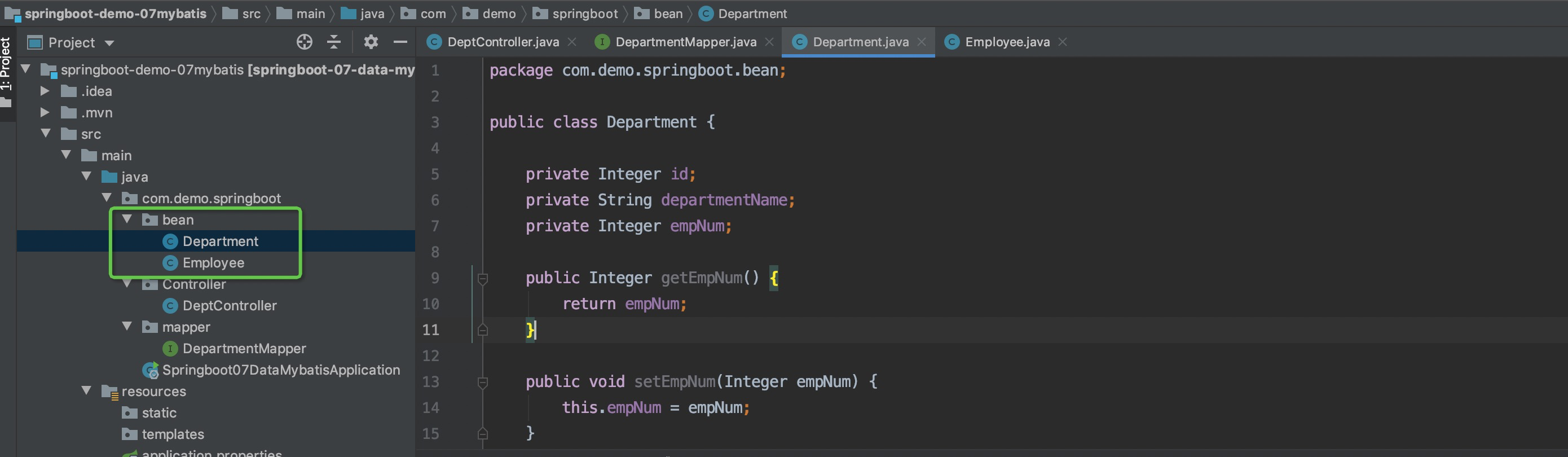
五、使用mybatis对数据库进行操作
- 配置文件方式
- 在resources目录下新建目录:
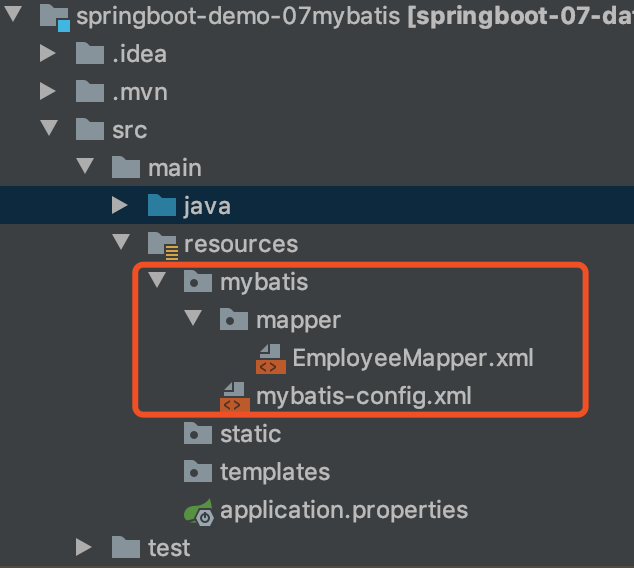
- mybatis-config.xml 内容如下
<?xml version="1.0" encoding="UTF-8" ?>
<!DOCTYPE configuration
PUBLIC "-//mybatis.org//DTD Config 3.0//EN"
"http://mybatis.org/dtd/mybatis-3-config.dtd">
<configuration> </configuration> - EmployeeMapper.xml 内容如下
 <?xml version="1.0" encoding="UTF-8" ?>

 <!DOCTYPE mapper

         PUBLIC "-//mybatis.org//DTD Mapper 3.0//EN"

         "http://mybatis.org/dtd/mybatis-3-mapper.dtd">

 <!--将EmployeeMapper的全类名(右键复制相对路径)复制出来,放在namespace里面-->

 <mapper namespace="com.demo.springboot.mapper.EmployeeMapper">

     <!--将接口的方法配置到映射文件中

     id="方法名"

     resultType="返回值类型Employee的全类名"-->

     <select id="getEmpById" resultType="com.demo.springboot.bean.Employee">

         select * from Employee where id=#{id};

     </select>

</mapper> - 将EmployeeMapper接口的方法配置在映射文件EmployeeMapper.xml中
在application.properties 中添加配置
#mybatis配置

mybatis.config-location=classpath:mybatis/mybatis-config.xml

mybatis.mapper-locations=classpath:mybatis/mapper/*.xml- 运行后测试(同下面的注解版 “***测试:新增一个Controller.DeptController”)
- mybatis-config.xml 内容如下
- 注解版方式
- 创建包:mapper
- 在包下添加一个接口:DepartmentMapper
 /**

  * 指定这是一个操作数据库的mapper

  */

 @Mapper

 public interface DepartmentMapper {

     @Select("select * from Department where id=#{id}")

     public Department getDeptById(Integer id);

     @Delete("delete from Department where id=#{id}")

     public int deleteDeptById(Integer id);

     @Insert("insert into Department(departmentName) values=(#{departmentName})")

     public int insertDept(Department department);

     @Update("update Department set departmentName=#{departmentName} where id=#{id}")

     public int updateDept(Department department);

} - ***测试:新增一个Controller.DeptController
 @RestController

 public class DeptController {

     @Autowired

     DepartmentMapper departmentMapper;

    //查询,带入浏览器中的参数id

     @GetMapping("dept/{id}")

     public Department getDepartment(@PathVariable("id") Integer id){

         return departmentMapper.getDeptById(id);

     }

    //插入

     @GetMapping("dept/add")

     public Department addDepartment(Department department){

         departmentMapper.insertDept(department);

         return department;

     }

 }
测试结果:
测试查询:在浏览器输入地址 http://localhost:8080/dept/1
- 测试插入:http://localhost:8080/dept/add?departmentName=%E6%8A%80%E6%9C%AF%E9%83%A8&empNum=13 查看数据库,新增数据成功
Spring Boot框架 - 数据访问 - 整合Mybatis的更多相关文章
- Spring Boot框架 - 数据访问 - JDBC&自动配置
一.新建Spring Boot 工程 特殊勾选数据库相关两个依赖 Mysql Driver — 数据库驱动 Spring Data JDBC 二.配置文件application.properties ...
- Spring Boot的数据访问:CrudRepository接口的使用
示例 使用CrudRepository接口访问数据 创建一个新的Maven项目,命名为crudrepositorytest.按照Maven项目的规范,在src/main/下新建一个名为resource ...
- (8)Spring Boot 与数据访问
文章目录 简介 整合基本的JDBC与数据源 整合 druid 数据源 整合 mybatis 简介 对于数据访问层,无论是 SQL 还是 NOSQL ,Spring Boot 默认都采用整合 Sprin ...
- spring boot(二)整合mybatis plus+ 分页插件 + 代码生成
先创建spring boot项目,不知道怎么创建项目的 可以看我上一篇文章 用到的环境 JDK8 .maven.lombok.mysql 5.7 swagger 是为了方便接口测试 一.Spring ...
- Spring Boot 知识笔记(整合Mybatis)
一.pom.xml中添加相关依赖 <!-- 引入starter--> <dependency> <groupId>org.mybatis.spring.boot&l ...
- Spring Boot学习笔记(五)整合mybatis
pom文件里添加依赖 <!-- 数据库需要的依赖 --> <dependency> <groupId>org.mybatis.spring.boot</gro ...
- Spring Boot实现数据访问计数器
1.数据访问计数器 在Spring Boot项目中,有时需要数据访问计数器.大致有下列三种情形: 1)纯计数:如登录的密码错误计数,超过门限N次,则表示计数器满,此时可进行下一步处理,如锁定该账户 ...
- Spring Boot的数据访问 之Spring Boot + jpa的demo
1. 快速地创建一个项目,pom中选择如下 <?xml version="1.0" encoding="UTF-8"?> <project x ...
- [Spring] 学习Spring Boot之二:整合MyBatis并使用@Trasactional管理事务
一.配置及准备工作 1.在 Maven 的 pom 文件中新增以下依赖: <dependency> <groupId>mysql</groupId> <art ...
随机推荐
- Python 绘图 cookbook
目录 python绘图常见bug matplotlib包加载 解决中文绘图乱码解决方法 解决python中用matplotlib画多幅图时出现图形部分重叠的问题 python绘图常见bug matpl ...
- 原生js判断设备类型
var u = navigator.userAgent; //Android终端 var isAndroid = u.indexOf('Android') > -1 || u.indexOf(' ...
- PPTP搭建
一.装包 yum -y install pptpd-1.4.0-2.el7.x86_64.rpm //系统光盘不自带,需要自行下载 二.修改配置文件并启动软件 rpm -qc ...
- vue加载单文件使用vue-loader报错
报错信息如下:ERROR in ./src/login.vue Module Error (from ./node_modules/vue-loader/lib/index.js): vue-load ...
- <input type="file">文件上传
<input> type 类型为 file 时使得用户可以选择一个或多个元素以提交表单的方式上传到服务器上,或者通过 Javascript 的 File API 对文件进行操作 . 常用i ...
- django学习,captcha图形验证码的使用
很多网站在登录或者注册的时候都有验证码,让你去输入. 刚好有这么一款插件,可以满足这个功能 首先,先pip install django-simple-captcha 然后再setting里添加,如 ...
- C++ stringstream用法(转)
一直觉得C++ iostream的cout输出比起printf差了太多,今天查c++字符串拼接的时候偶然看到原来还有stringstream这个类,还是挺好用的,该类位于<sstream> ...
- 洛谷P1093 奖学金
https://www.luogu.org/problem/P1093 #include <bits/stdc++.h> using namespace std; struct Node{ ...
- WDatePicker使用 出现ReferenceError: disabledDates is not defined
"ReferenceError: disabledDates is not defined at eval (eval at <anonymous> at HTMLInputEl ...
- mysql 查询——逻辑查询
--去重查询 distinct select distinct gander from student; --逻辑查询 and or not --查询18-28之间的数据 select *from s ...