
Wireless-MCS
MCS是modulation and coding scheme的缩写,可以翻译为调制和编码格式,我们可以选择配置该参数,来选择AP和Client之间传输的MCS rate,这些数据速率是使用short guard interval为20MHz信道宽度计算得出的: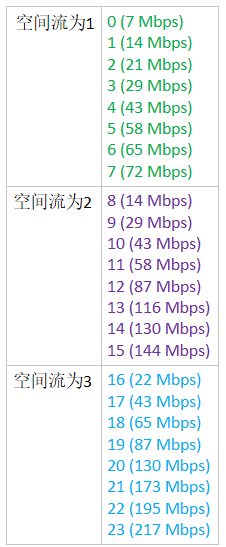
配置MCS:
Step 1
Choose Wireless > 802.11a/n/ac or 802.11b/g/n > High Throughput to open the (5 GHz or 2.4 GHz) High Throughput page.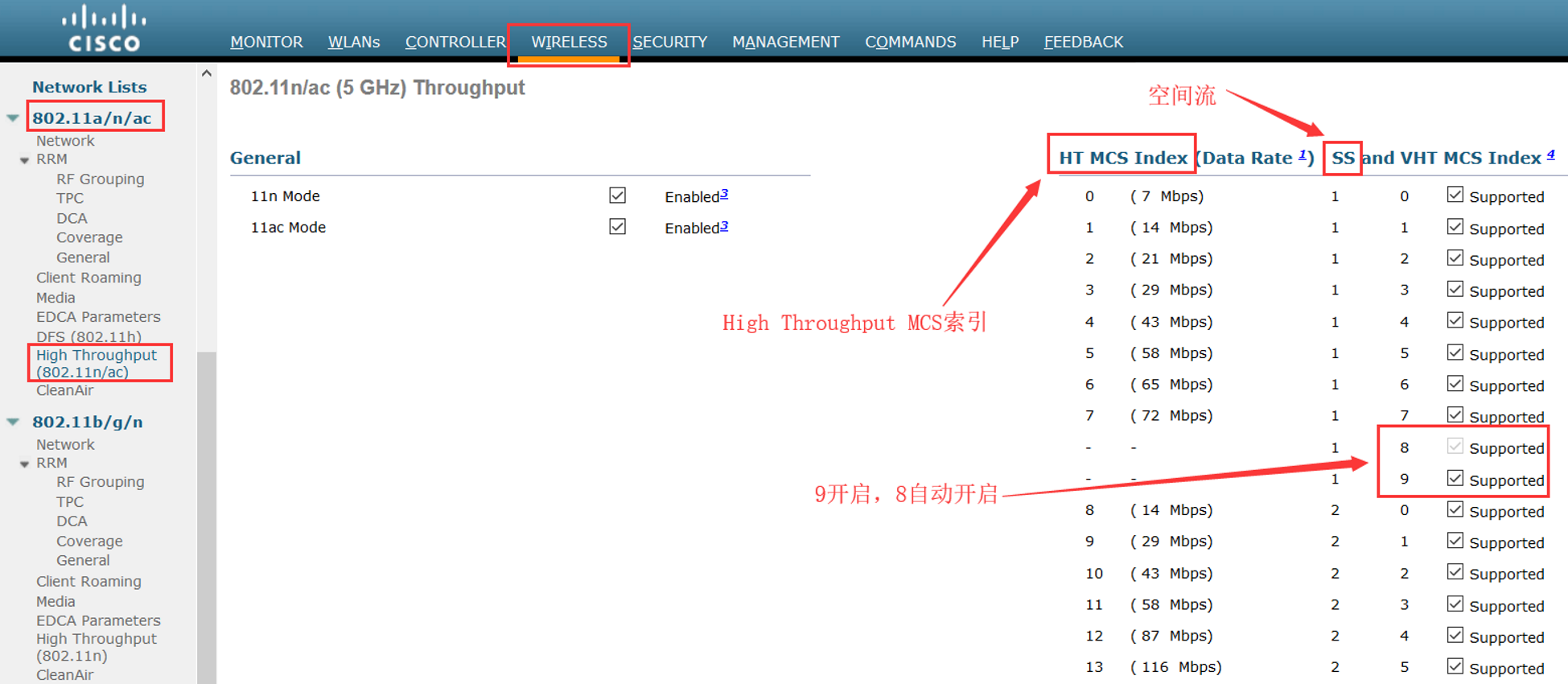
Step 2
Select the 11n Mode check box to enable 802.11n support on the network. The default value is enabled.
If you want to disable 802.11n mode when both 802.11n and 802.11ac modes are enabled, you must disable the 802.11ac mode first.
如果802.11n和11ac都开启的,你需要先关闭802.11ac才能关闭802.11n
Step 3
Select the check boxes of the desired rates to specify the modulation and coding scheme (MCS) rates at which data can be transmitted between the access point and the client. These data rates, which are calculated for a 20-MHz channel width using a short guard interval, are available:
选择你希望在AP和Client之间的MCS rate
• 0 (7 Mbps)
• 1 (14 Mbps)
• 2 (21 Mbps)
• 3 (29 Mbps)
• 4 (43 Mbps)
• 5 (58 Mbps)
• 6 (65 Mbps)
• 7 (72 Mbps)
• 8 (14 Mbps)
• 9 (29 Mbps)
• 10 (43 Mbps)
• 11 (58 Mbps)
• 12 (87 Mbps)
• 13 (116 Mbps)
• 14 (130 Mbps)
• 15 (144 Mbps)
Any associated clients that support the selected rates may communicate with the access point using those rates. However, the clients are not required to be able to use this rate in order to associate. The MCS settings determine the number of spatial streams(SS), the modulation, the coding rate, and the data rate values that are used.
任何支持选中速率的Client将会使用这些rate来和AP通信,然而,Client不需要使用这个rate去关联。MCS设置决定了被使用的空间流的数量,调制方式,编码速率和数据速率
Step 4
Click Apply.
Step 5
Use the 802.11n data rates that you configured by enabling WMM (Wi-Fi Multi-Media,WiFi多媒体) on the WLAN as follows:
通过开启WLAN的WMM使用你配置的802.11n数据速率。
a. Choose WLANs to open the WLANs page.
b. Click the ID number of the WLAN for which you want to configure WMM mode.
c. When the WLANs > Edit page appears, choose the QoS tab to open the WLANs > Edit (Qos) page.
d. From the WMM Policy drop-down list, choose Required or Allowed to require or allow client devices to use WMM. Devices that do not support WMM cannot join the WLAN. 选择“Required”或“Allowed”去要求或允许Client使用WMM,Client不支持WMM的就不能加入WLAN
e. If you choose Allowed, devices that cannot support WMM can join the WLAN but will not benefit from the 802.11n rates.
f. Click Apply.如果选择的是“Allowed”,不支持WMM的Client可以加入WLAN,但是不能受益于802.11n速率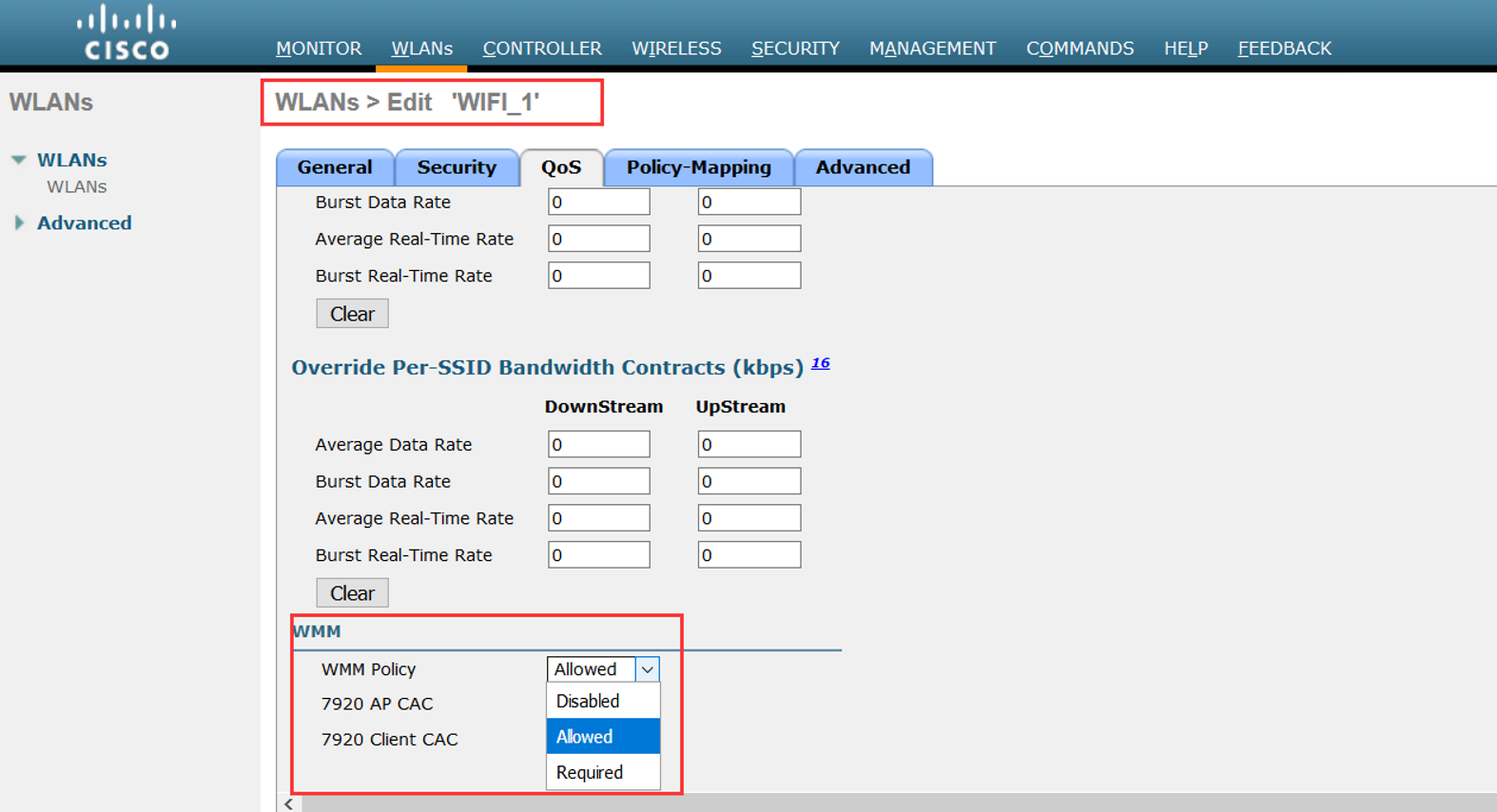
Step 6
Click Save Configuration.
Note To determine if an access point supports 802.11n, look at the 11n Supported text box on either the 802.11a/n/ac (or 802.11b/g/n) Cisco APs > Configure page or the 802.11a/n/ac (or 802.11b/g/n) AP Interfaces > Details page.
CLI命令配置:
• Enable 802.11n support on the network by entering this command:
config {802.11a | 802.11b} 11nsupport {enable | disable}
• Specify the modulation and coding scheme (MCS) rates at which data can be transmitted between the access point and the client by entering this command:
config {802.11a | 802.11b} 11nsupport mcs tx {0-15} {enable | disable}
• Use the 802.11n data rates that you configured by enabling WMM on the WLAN as follows:
config wlan wmm {allow | disable | require} wlan_id
The require parameter requires client devices to use WMM. Devices that do not support WMM cannot join the WLAN.
If set to allow, devices that cannot support WMM can join the WLAN but do not benefit from 802.11n rates.
• Specify the aggregation method used for 802.11n packets as follows:
1. Disable the network by entering this command:
config {802.11a | 802.11b} disable network
2. Specify the aggregation method entering this command:
config {802.11a | 802.11b} 11nsupport {a-mpdu | a-msdu} tx priority {0-7 | all} {enable | disable}
Aggregation is the process of grouping packet data frames together rather than transmitting them separately. Two aggregation methods are available: Aggregated MAC Protocol Data Unit (A-MPDU) and Aggregated MAC Service Data Unit (A-MSDU). A-MSDU is performed in hardware and therefore is the default method.
聚合是将分组数据帧分组在一起而不是单独发送它们的过程。 两种聚合方法可用:聚合MAC协议数据单元(A-MPDU)和聚合MAC服务数据单元(A-MSDU)。 A-MSDU在硬件中执行,因此是默认方法。
注意:For 802.11ac, all packets are A-MPDU. The A-MSDU option does not apply for 802.11ac.
You can specify the aggregation method for various types of traffic from the access point to the clients. This table defines the priority levels (0-7) assigned per traffic type
你可以指定从AP到Client各种流量的聚合方式。下面这个表定义了优先级级别0-7,对应的每种流量类型: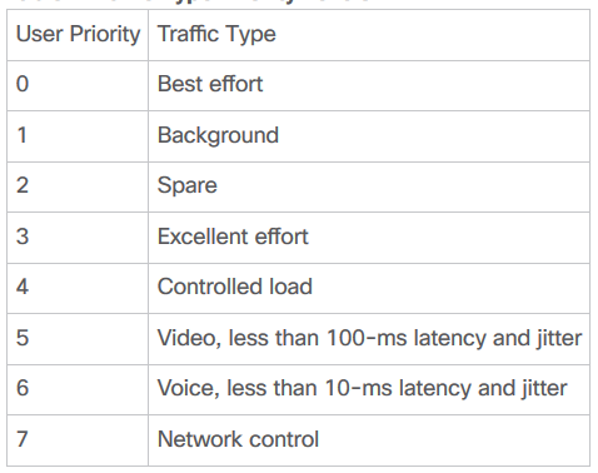
You can configure each priority level independently, or you can use the all parameter to configure all of the priority levels at once. When you use the enable command, the traffic associated with that priority level uses A-MPDU transmission. When you use the disable command, the traffic associated with that priority level uses A-MSDU transmission. Configure the priority levels to match the aggregation method used by the clients. By default, A-MPDU is enabled for priority level 0, 4 and 5 and the rest are disabled. By default, A-MSDU is enabled for all priorities except 6 and 7.
3. Reenable the network by entering this command:
config {802.11a | 802.11b} enable network
• Configure the 802.11n-5 GHz A-MPDU transmit aggregation scheduler by entering this command:
config 802.11{a | b} 11nsupport a-mpdu tx scheduler {enable | disable | timeout rt timeout-value}
The timeout value is in milliseconds. The valid range is between 1 millisecond to 1000 milliseconds.
• Configure the guard interval for the network by entering this command: config 802.11{a | b} 11nsupport guard_interval {any | long}
• Configure the Reduced Interframe Space (RIFS) for the network by entering this command:
config 802.11{a | b} 11nsupport rifs rx {enable | disable}
• Save your changes by entering this command: save config
• View the configuration settings for the 802.11 networks by entering this command:
show {802.11a | 802.11b}
Wireless-MCS的更多相关文章
- IEEE 802.11p (WAVE,Wireless Access in the Vehicular Environment)
IEEE 802.11p(又称WAVE,Wireless Access in the Vehicular Environment)是一个由IEEE 802.11标准扩充的通讯协定.这个通讯协定主要用在 ...
- [并查集] POJ 2236 Wireless Network
Wireless Network Time Limit: 10000MS Memory Limit: 65536K Total Submissions: 25022 Accepted: 103 ...
- 可重入锁 公平锁 读写锁、CLH队列、CLH队列锁、自旋锁、排队自旋锁、MCS锁、CLH锁
1.可重入锁 如果锁具备可重入性,则称作为可重入锁. ========================================== (转)可重入和不可重入 2011-10-04 21:38 这 ...
- POJ 2236 Wireless Network(并查集)
传送门 Wireless Network Time Limit: 10000MS Memory Limit: 65536K Total Submissions: 24513 Accepted ...
- Overview and Evaluation of Bluetooth Low Energy: An Emerging Low-Power Wireless Technology
转自:http://www.mdpi.com/1424-8220/12/9/11734/htm Sensors 2012, 12(9), 11734-11753; doi:10.3390/s12091 ...
- poj 2236:Wireless Network(并查集,提高题)
Wireless Network Time Limit: 10000MS Memory Limit: 65536K Total Submissions: 16065 Accepted: 677 ...
- wireless tool 移植
在linux上调试wifi, 需要移植wireless tool进行验证,本文记录移植方法. 参考链接 http://www.cnblogs.com/zengjfgit/p/5601473.html ...
- 无线电源传输 Wireless Power Consortium (WPC) Communication
Universally Compatible Wireless Power Using the Qi Protocol Wireless charging of portable electronic ...
- CLH锁 、MCS锁
一.引文 1.1 SMP(Symmetric Multi-Processor) 对称多处理器结构,指服务器中多个CPU对称工作,每个CPU访问内存地址所需时间相同.其主要特征是共享,包含对CPU,内存 ...
- Top 10 Free Wireless Network hacking/monitoring tools for ethical hackers and businesses
There are lots of free tools available online to get easy access to the WiFi networks intended to he ...
随机推荐
- audio mixer
https://blog.csdn.net/jeffasd/article/details/77155187 https://blog.csdn.net/jeffasd/article/details ...
- 每天进步一点点------ModelSim仿真Altera的ROM
1. 在QuartusII中生成rom的初始化文件,可以是hex,也可以是mif.MIF文件的格式很简单明了,所以我一向都是用MIF. 2.下载convert_hex2ver.dll文件,conver ...
- php对字符串的操作3之 字符类型转换详解
所有的数据输出到屏幕上,实际上被隐式的转换成了字符型,首先了解下各种数据类型的字符串表示 <?php echo 300,'<hr>'; echo true,'<hr>'; ...
- JS高级---原型和原型链
原型和原型链 原型链是一种关系, 实例对象和原型对象之间的关系,关系是通过实例对象中浏览器使用的原型(__proto__)来联系的 自定义构造函数,通过实例化,创建实例对象 实例对象中__proto_ ...
- UNICODE编码UTF-16 中的Endian(FE FF) 和 Little Endian(FF FE)
从网上找到的两篇不错的文章,由于被网上多处转载,所以不知道源处,未能注明出处,希望作者见谅,如有意见请发信给我,谢谢! 第一篇很清晰. 介绍Unicode之前,首先要讲解一些基础知识.虽然跟Unico ...
- Docker镜像加速,设置国内源
源地址设置 在 /etc/docker/daemon.json 中写入如下内容(如果文件不存在请新建该文件) { "registry-mirrors": [ "https ...
- go基础_接口断言
// interface package main import ( "fmt" ) //定义一个接口,接口名字Inter,接口的方法集有2个方法 type Inter inter ...
- jmeter实现IP欺骗
用jmeter模拟多个IP同时向一个目标发送请求 1.IP地址参数化 在csv文件中编辑参数化IP地址列表,参数化的IP需在同一个局域网,子网掩码相同(比如和客户端本机同一网段),如下 将csv列表中 ...
- STA之RC网
STA的主要工作是计算电路网络的延时,如今的电路网络还是由CMOS cell和net组成的,所以STA所要计算的延时仍是电容的充放电时间.等量子计算机普及的时候,如今的这一套理论都将随着科技的进步被丢 ...
- properties文件读写工具类PropertiesUtil.java
import java.io.FileInputStream; import java.io.FileOutputStream; import java.io.IOException; import ...