
Wireless-MCS
MCS是modulation and coding scheme的缩写,可以翻译为调制和编码格式,我们可以选择配置该参数,来选择AP和Client之间传输的MCS rate,这些数据速率是使用short guard interval为20MHz信道宽度计算得出的: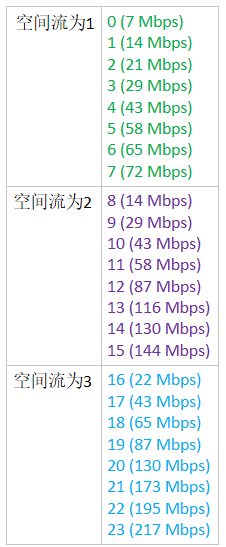
配置MCS:
Step 1
Choose Wireless > 802.11a/n/ac or 802.11b/g/n > High Throughput to open the (5 GHz or 2.4 GHz) High Throughput page.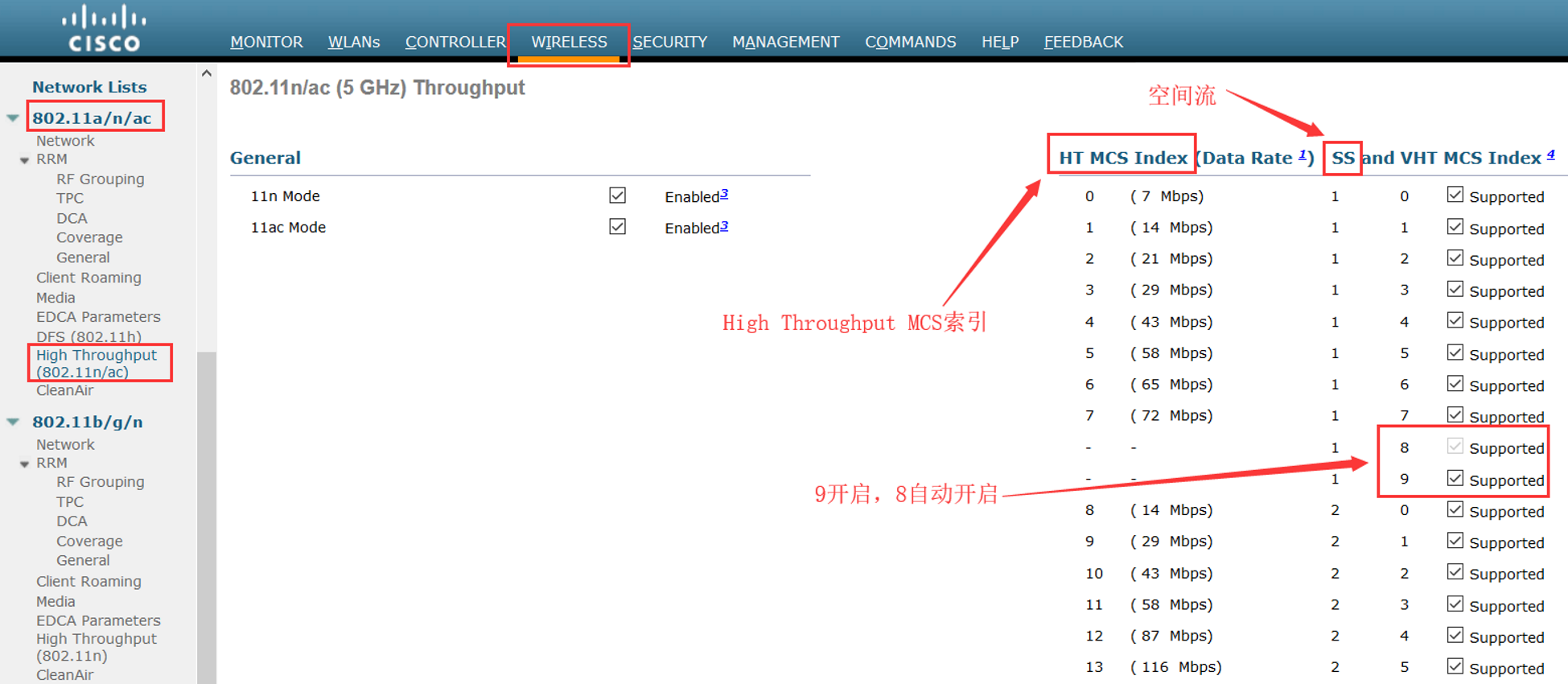
Step 2
Select the 11n Mode check box to enable 802.11n support on the network. The default value is enabled.
If you want to disable 802.11n mode when both 802.11n and 802.11ac modes are enabled, you must disable the 802.11ac mode first.
如果802.11n和11ac都开启的,你需要先关闭802.11ac才能关闭802.11n
Step 3
Select the check boxes of the desired rates to specify the modulation and coding scheme (MCS) rates at which data can be transmitted between the access point and the client. These data rates, which are calculated for a 20-MHz channel width using a short guard interval, are available:
选择你希望在AP和Client之间的MCS rate
• 0 (7 Mbps)
• 1 (14 Mbps)
• 2 (21 Mbps)
• 3 (29 Mbps)
• 4 (43 Mbps)
• 5 (58 Mbps)
• 6 (65 Mbps)
• 7 (72 Mbps)
• 8 (14 Mbps)
• 9 (29 Mbps)
• 10 (43 Mbps)
• 11 (58 Mbps)
• 12 (87 Mbps)
• 13 (116 Mbps)
• 14 (130 Mbps)
• 15 (144 Mbps)
Any associated clients that support the selected rates may communicate with the access point using those rates. However, the clients are not required to be able to use this rate in order to associate. The MCS settings determine the number of spatial streams(SS), the modulation, the coding rate, and the data rate values that are used.
任何支持选中速率的Client将会使用这些rate来和AP通信,然而,Client不需要使用这个rate去关联。MCS设置决定了被使用的空间流的数量,调制方式,编码速率和数据速率
Step 4
Click Apply.
Step 5
Use the 802.11n data rates that you configured by enabling WMM (Wi-Fi Multi-Media,WiFi多媒体) on the WLAN as follows:
通过开启WLAN的WMM使用你配置的802.11n数据速率。
a. Choose WLANs to open the WLANs page.
b. Click the ID number of the WLAN for which you want to configure WMM mode.
c. When the WLANs > Edit page appears, choose the QoS tab to open the WLANs > Edit (Qos) page.
d. From the WMM Policy drop-down list, choose Required or Allowed to require or allow client devices to use WMM. Devices that do not support WMM cannot join the WLAN. 选择“Required”或“Allowed”去要求或允许Client使用WMM,Client不支持WMM的就不能加入WLAN
e. If you choose Allowed, devices that cannot support WMM can join the WLAN but will not benefit from the 802.11n rates.
f. Click Apply.如果选择的是“Allowed”,不支持WMM的Client可以加入WLAN,但是不能受益于802.11n速率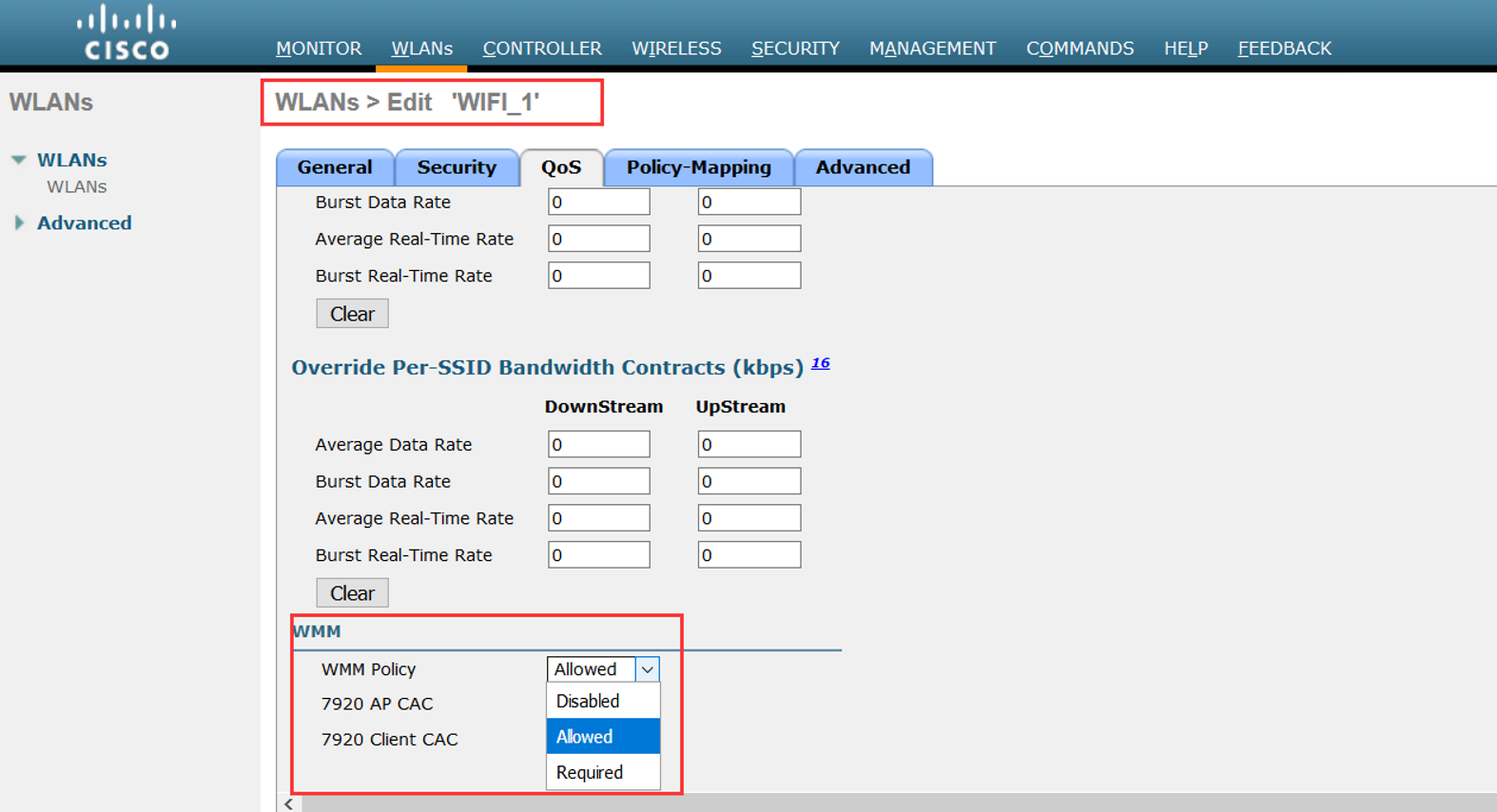
Step 6
Click Save Configuration.
Note To determine if an access point supports 802.11n, look at the 11n Supported text box on either the 802.11a/n/ac (or 802.11b/g/n) Cisco APs > Configure page or the 802.11a/n/ac (or 802.11b/g/n) AP Interfaces > Details page.
CLI命令配置:
• Enable 802.11n support on the network by entering this command:
config {802.11a | 802.11b} 11nsupport {enable | disable}
• Specify the modulation and coding scheme (MCS) rates at which data can be transmitted between the access point and the client by entering this command:
config {802.11a | 802.11b} 11nsupport mcs tx {0-15} {enable | disable}
• Use the 802.11n data rates that you configured by enabling WMM on the WLAN as follows:
config wlan wmm {allow | disable | require} wlan_id
The require parameter requires client devices to use WMM. Devices that do not support WMM cannot join the WLAN.
If set to allow, devices that cannot support WMM can join the WLAN but do not benefit from 802.11n rates.
• Specify the aggregation method used for 802.11n packets as follows:
1. Disable the network by entering this command:
config {802.11a | 802.11b} disable network
2. Specify the aggregation method entering this command:
config {802.11a | 802.11b} 11nsupport {a-mpdu | a-msdu} tx priority {0-7 | all} {enable | disable}
Aggregation is the process of grouping packet data frames together rather than transmitting them separately. Two aggregation methods are available: Aggregated MAC Protocol Data Unit (A-MPDU) and Aggregated MAC Service Data Unit (A-MSDU). A-MSDU is performed in hardware and therefore is the default method.
聚合是将分组数据帧分组在一起而不是单独发送它们的过程。 两种聚合方法可用:聚合MAC协议数据单元(A-MPDU)和聚合MAC服务数据单元(A-MSDU)。 A-MSDU在硬件中执行,因此是默认方法。
注意:For 802.11ac, all packets are A-MPDU. The A-MSDU option does not apply for 802.11ac.
You can specify the aggregation method for various types of traffic from the access point to the clients. This table defines the priority levels (0-7) assigned per traffic type
你可以指定从AP到Client各种流量的聚合方式。下面这个表定义了优先级级别0-7,对应的每种流量类型: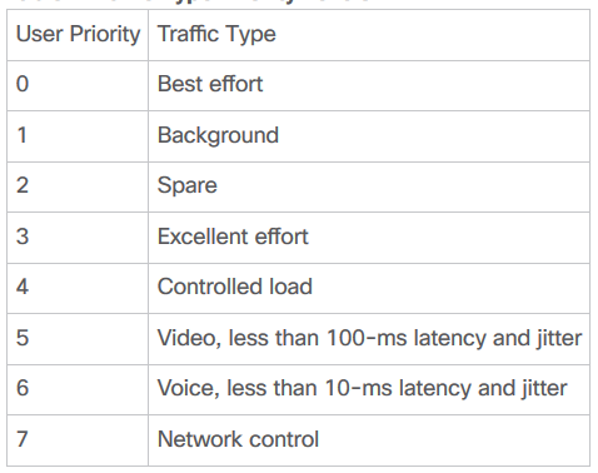
You can configure each priority level independently, or you can use the all parameter to configure all of the priority levels at once. When you use the enable command, the traffic associated with that priority level uses A-MPDU transmission. When you use the disable command, the traffic associated with that priority level uses A-MSDU transmission. Configure the priority levels to match the aggregation method used by the clients. By default, A-MPDU is enabled for priority level 0, 4 and 5 and the rest are disabled. By default, A-MSDU is enabled for all priorities except 6 and 7.
3. Reenable the network by entering this command:
config {802.11a | 802.11b} enable network
• Configure the 802.11n-5 GHz A-MPDU transmit aggregation scheduler by entering this command:
config 802.11{a | b} 11nsupport a-mpdu tx scheduler {enable | disable | timeout rt timeout-value}
The timeout value is in milliseconds. The valid range is between 1 millisecond to 1000 milliseconds.
• Configure the guard interval for the network by entering this command: config 802.11{a | b} 11nsupport guard_interval {any | long}
• Configure the Reduced Interframe Space (RIFS) for the network by entering this command:
config 802.11{a | b} 11nsupport rifs rx {enable | disable}
• Save your changes by entering this command: save config
• View the configuration settings for the 802.11 networks by entering this command:
show {802.11a | 802.11b}
Wireless-MCS的更多相关文章
- IEEE 802.11p (WAVE,Wireless Access in the Vehicular Environment)
IEEE 802.11p(又称WAVE,Wireless Access in the Vehicular Environment)是一个由IEEE 802.11标准扩充的通讯协定.这个通讯协定主要用在 ...
- [并查集] POJ 2236 Wireless Network
Wireless Network Time Limit: 10000MS Memory Limit: 65536K Total Submissions: 25022 Accepted: 103 ...
- 可重入锁 公平锁 读写锁、CLH队列、CLH队列锁、自旋锁、排队自旋锁、MCS锁、CLH锁
1.可重入锁 如果锁具备可重入性,则称作为可重入锁. ========================================== (转)可重入和不可重入 2011-10-04 21:38 这 ...
- POJ 2236 Wireless Network(并查集)
传送门 Wireless Network Time Limit: 10000MS Memory Limit: 65536K Total Submissions: 24513 Accepted ...
- Overview and Evaluation of Bluetooth Low Energy: An Emerging Low-Power Wireless Technology
转自:http://www.mdpi.com/1424-8220/12/9/11734/htm Sensors 2012, 12(9), 11734-11753; doi:10.3390/s12091 ...
- poj 2236:Wireless Network(并查集,提高题)
Wireless Network Time Limit: 10000MS Memory Limit: 65536K Total Submissions: 16065 Accepted: 677 ...
- wireless tool 移植
在linux上调试wifi, 需要移植wireless tool进行验证,本文记录移植方法. 参考链接 http://www.cnblogs.com/zengjfgit/p/5601473.html ...
- 无线电源传输 Wireless Power Consortium (WPC) Communication
Universally Compatible Wireless Power Using the Qi Protocol Wireless charging of portable electronic ...
- CLH锁 、MCS锁
一.引文 1.1 SMP(Symmetric Multi-Processor) 对称多处理器结构,指服务器中多个CPU对称工作,每个CPU访问内存地址所需时间相同.其主要特征是共享,包含对CPU,内存 ...
- Top 10 Free Wireless Network hacking/monitoring tools for ethical hackers and businesses
There are lots of free tools available online to get easy access to the WiFi networks intended to he ...
随机推荐
- 用js实现鼠标点击爱心特效
效果如图以下是代码 <script> !function(e, t, a) { function r() { for (var e = 0; e < s.length; e++) s ...
- JavaScript中的 typeof,null,和undefined
typeof操作符 null 在JavaScript中null表示“什么都没有”. null是一个只有一个值的特殊类型.表示一个空对象引用. typeof null; 返回的是object 可以将nu ...
- springmvc、 springboot 项目全局异常处理
异常在项目中那是不可避免的,通常情况下,我们需要对全局异常进行处理,下面介绍两种比较常用的情况. 准备工作: 在捕获到异常的时候,我们通常需要返回给前端错误码,错误信息等,所以我们需要手动封装一个js ...
- python中pip问题
1.在cmd中运行pip命令显示‘pip命令显示不是内部或外部命令,也不是可运行的程序或批处理文件’的问题 先看python的安装目录下Script文件夹中pip3.exe有没有缺失 如果没有在cmd ...
- Flask 教程 第十六章:全文搜索
本文翻译自The Flask Mega-Tutorial Part XVI: Full-Text Search 这是Flask Mega-Tutorial系列的第十六部分,我将在其中为Microblo ...
- sql注入基础知识
信息安全概论课堂作业 SQL注入之万能密码漏洞 第一道题是牵扯到了万能密码漏洞 用户名先输入个’ 返回了sql报错语句,猜测存在sql注入漏洞 使用万能密码测试 登陆成功 原理 假设登录框处的判断代码 ...
- windows cmake与nmake
在Linux下编库经常会使用CMakeLists.txt文件,然后一个cmake 再一个make就可以编译出来. 在Windows下有cmake,但是cmake出来是一个Visual Studio工程 ...
- ORACLE_BASE、ORACLE_HOME有什么区别
ORACLE_BASE.ORACLE_HOME有什么区别 ORACLE_BASE下是admin和productORACLE_HOME下则是ORACLE的命令.连接库.安装助手.listener等等 ...
- argparse 模块使用
import argparse,os data_func=["upload","download"]req_func=["getfunc", ...
- Dart语言学习(四)Dart字符串
一.字符串的创建 使用 单引号,双引号 创建字符串 使用 三个引号或双引号 创建多行字符串 使用 r 创建原始 raw 字符串 String str1 = 'Hello';//"" ...