
salesforce零基础学习(九十五)lightning out
随着salesforce对lightning的推进,越来越多的项目基于lightning开发,导致很多小伙伴可能都并不了解classic或者认为不需要用到classic直接就开始了lightning的开发。其实有精力了解classic的使用还是很有必要的,因为lightning还在不断的优化中,可能有一部分还需要使用classic的功能来实现或者来协助实现,比如list view的list button目前只能使用visualforce page搭配lightning component。那么vf 如何去引用已经弄好的lightning component呢,我们接下来使用一个demo去简单了解一下。
需求:在lightning环境下的contact list view定义一个自定义的list button,实现使用pop up方式弹出所勾选的数据列表( lwc + aura实现)。
实现步骤:
1.构建LwC component画UI;
2. 构建aura component包含lwc component;
3. 创建aura single APP继承ltng:outApp(包含SLDS样式库)/ltng:outAppUnstyled(不包含SLDS样式库),使用aura:dependency标签的resource属性引入2步骤中的aura component;
4. 创建vf page,使用$Lightning.use引入上面的aura single APP,然后动态创建component显示即可。
Talk is cheap,show me the code.下面根据上面的需求进行开发。
1. ContactListController.cls:根据选择的contact id list进行搜索数据,因为前端使用wire装载方式,所以方法声明必须使用cacheable=true
public with sharing class ContactListController {

    @AuraEnabled(cacheable=true)

    public static List<Contact> fetchContactListByIDs(List<String> idList){

        return [SELECT Id,Name

                FROM Contact

                WHERE Id IN :idList];

    }

}
2. contactListForLwc.html:用来展示一个popup modal,modal中展示一个table数据
<template>

    <section role="dialog" tabindex="-1" aria-labelledby="modal-heading-01" aria-modal="true" aria-describedby="modal-content-id-1" class="slds-modal slds-fade-in-open">

        <div class="slds-modal__container">

            <!-- modal header start -->

            <header class="slds-modal__header">

                <button class="slds-button slds-button_icon slds-modal__close slds-button_icon-inverse" title="Close">

                <lightning-icon icon-name="utility:close"

                    alternative-text="close"

                    variant="inverse"

                    size="small" ></lightning-icon>

                <span class="slds-assistive-text">Close</span>

                </button>

                <h2 id="modal-heading-01" class="slds-text-heading_medium slds-hyphenate">Selected Contact List</h2>

            </header>

            <!-- modal body start -->

            <div class="slds-modal__content slds-p-around_medium" id="modal-content-id-1">

                <table class="slds-table slds-table_cell-buffer slds-table_bordered">

                    <thead>

                        <tr class="slds-line-height_reset">

                            <th class="" scope="col">

                                <div class="slds-truncate">Contact Id</div>

                            </th>

                            <th class="" scope="col">

                                <div class="slds-truncate">Contact Name</div>

                            </th>

                        </tr>

                    </thead>

                    <tbody>

                        <template if:true={contactList.data}>

                            <template for:each={contactList.data} for:item="contact">

                                <tr key={contact.Id}>

                                    <td>{contact.Id}</td>

                                    <td> {contact.Name}</td>

                                </tr>

                            </template>

                        </template>

                        <template if:false={contactList.data}>

                            <tr>

                                <td colspan="2">List View is not contains any data</td>

                            </tr>

                        </template>

                    </tbody>

                </table>

            </div>

        </div>

    </section>

    <div class="slds-backdrop slds-backdrop_open"></div>

</template>
contactListForLwc.js:调用后台获取列表
import { LightningElement, api, wire } from 'lwc';

import fetchContactListByIDs from '@salesforce/apex/ContactListController.fetchContactListByIDs';

export default class ContactListForLwc extends LightningElement {

    @api contactIdList;

    @wire(fetchContactListByIDs,{idList:'$contactIdList'})

    contactList;

}
3. ContactListForAura.cmp:用于包一层lwc,用来在single app中使用,因为目前的动态创建component只能aura,所以lwc需要套一层。
<aura:component>

    <aura:attribute name="selectedIds" type="List" default="" />

    <c:contactListForLwc contactIdList="{!v.selectedIds}"/>

</aura:component>
4. ContactListApp.app:创建single app,设置access 为GLOBAL,因为需要使用SLDS的样式,这里extends为ltng:outApp,然后通过aura:dependency引入想要渲染的子component
<aura:application access="GLOBAL" extends="ltng:outApp">

    <aura:dependency resource="c:ContactListForAura"/>

</aura:application>
5. ContactListPage.page:用于声明contact list类型,然后使用$Lightning.user实现lightning out的功能。这里需要有几点小小的注意:
- 需要设置recordSetVar,这样才可以使用到list view的list button中;
- 需要引入apex:includeLightning,最好放在引入的第一行;
- javascript中使用GETRECORDIDS函数来获取列表中选择的数据选项,在vf page中需要使用{!selected}来获取,因为在js中如果使用''方式扩上他返回的是string类型,不扩上直接在list引用会报错,所以这里使用apex:repeat方式将其迭代在一个list中;
- 使用$lightning.use引入一个single app,然后在动态创建里面的auraDependency的component,$lightning.use可以多次使用,但是需要多次引入不同的single app,详细的使用自行查看文档。
<apex:page standardController="Contact" recordSetVar="Contacts" showHeader="false">

    <apex:includeLightning/>

    <div id="lightning" />

    <script>

        var selectedList = [];

    </script>

    <apex:repeat value="{!selected}" var="selectedItem">

        <script>

            selectedList.push('{!selectedItem}');

        </script>

    </apex:repeat>

    <script>

        if(selectedList.length == 0) {

            window.location.href = '/003';

        } else {

            $Lightning.use("c:ContactListApp", function() {

            $Lightning.createComponent("c:ContactListForAura",

                {selectedIds : selectedList},

                'lightning',

                function(cmp) {

                    console.log("component created");

                }

                );

            });

        }

    </script>

</apex:page>
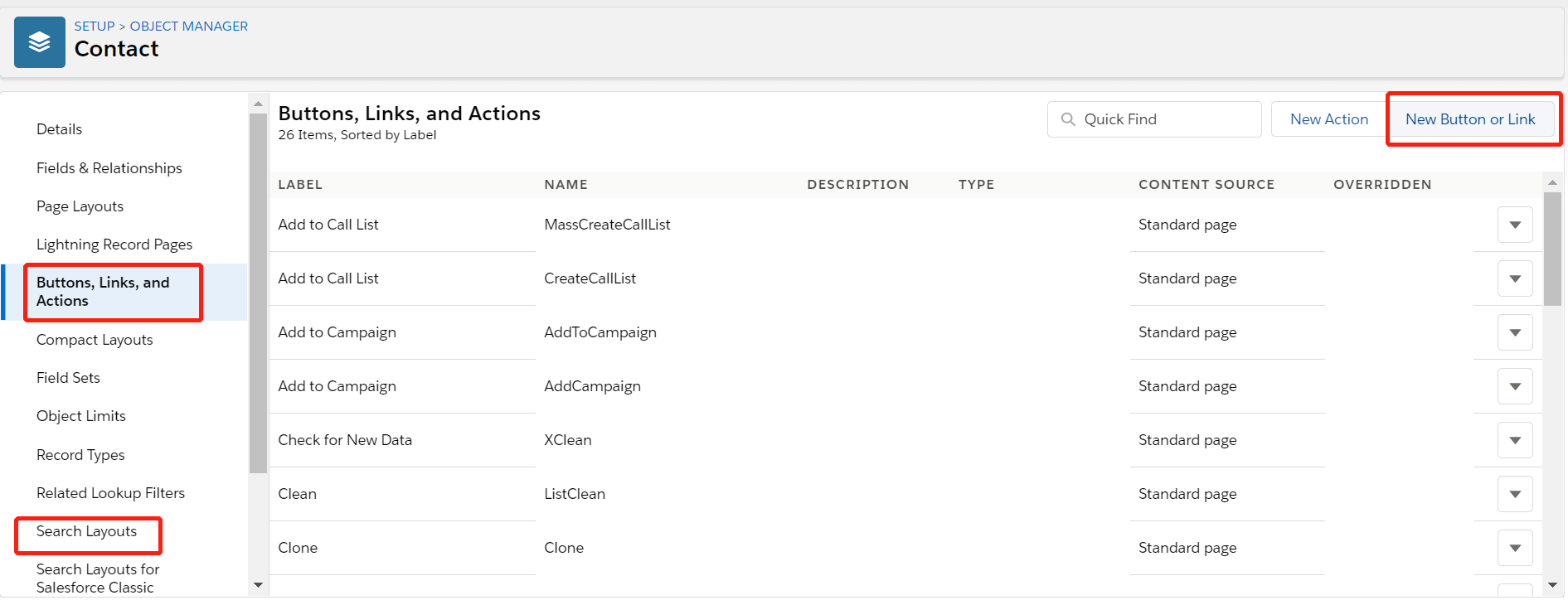
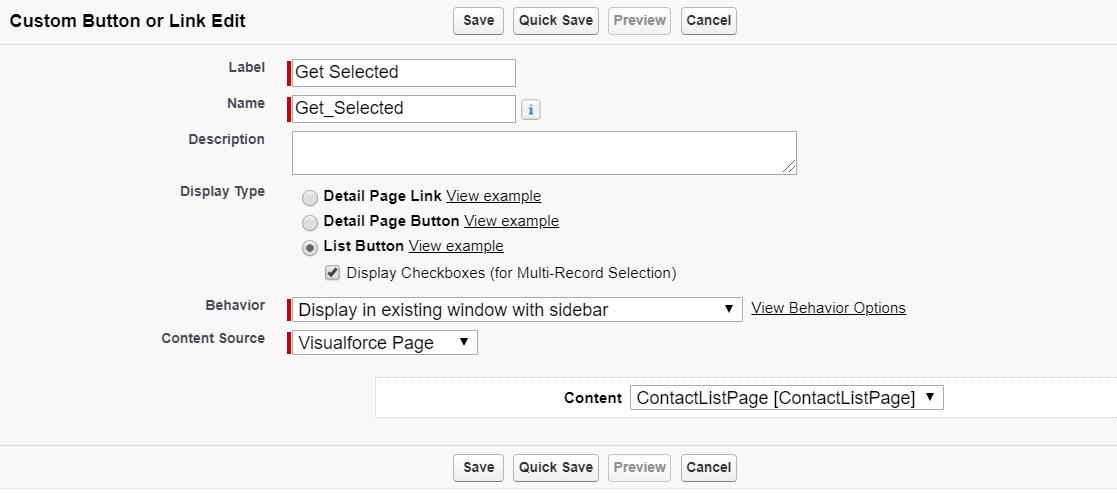
6. 创建contact的list button,然后类型选择 list button,选择指定的vf page,然后在search layout中的list view中将定义的拖拽即可。
效果展示:
1.Contact列表勾选了两条数据,然后点击按钮

2. 弹出页面展示选择的两条数据。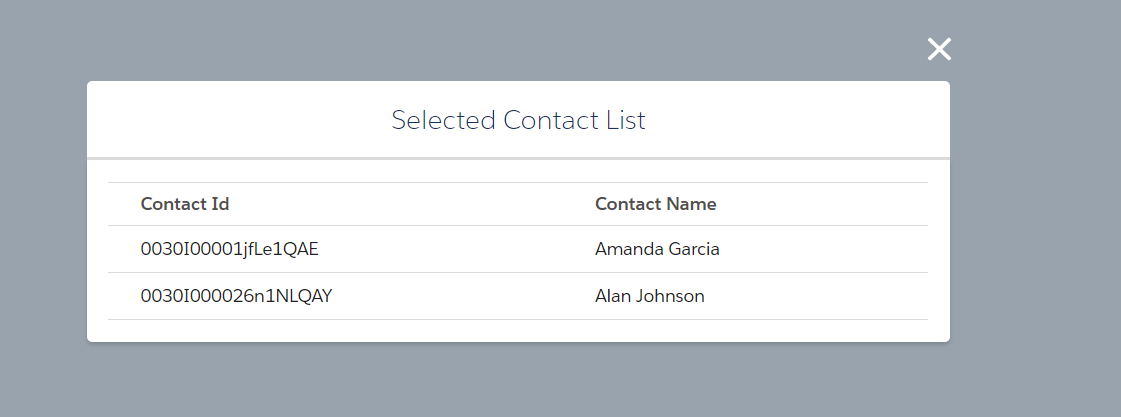
总结:篇中通过简单的例子展示了lightning out实现以及list view button关于vf page如何引入lightning component / lightning web component。缺点是使用vf page无法实现类似action的效果在本页pop up,查找了很多资料也没有实现,有好的实现方式欢迎留言。lightning out实际场景不仅仅demo中的使用场景,详细的lightning out知识以及限制自行查看。篇中有错误地方欢迎指出,有不懂地方欢迎留言。
salesforce零基础学习(九十五)lightning out的更多相关文章
- salesforce 零基础学习(五十二)Trigger使用篇(二)
第十七篇的Trigger用法为通过Handler方式实现Trigger的封装,此种好处是一个Handler对应一个sObject,使本该在Trigger中写的代码分到Handler中,代码更加清晰. ...
- salesforce 零基础学习(五十三)多个文件生成一个zip文件(使用git上封装的代码)
此篇参考git代码:https://github.com/pdalcol/Zippex 学习salesforce可以访问一个朋友的网站:https://www.xgeek.net 首先感谢git上提供 ...
- salesforce 零基础学习(五十八)通过sObject的field返回其对应的基础类型
项目中有时候会要求通过sObject的Field的type类型返回其对应的基本类型,然后对其进行相关的处理,创建sObject的field可以选择的type类型是固定多的. 上述类型可以转换成几种基本 ...
- salesforce 零基础学习(五十五)java通过SOAP方式定时访问某个文件然后插入到sObject中
项目源码:https://github.com/zhangyueqidlmu/SOAP-Access-SFDC.git 项目背景:salesforce端相关数据需要其他系统提供,其他系统可以提供相关数 ...
- salesforce 零基础学习(五十四)常见异常友好消息提示
异常或者error code汇总:https://developer.salesforce.com/docs/atlas.en-us.api.meta/api/sforce_api_calls_con ...
- salesforce 零基础学习(五十一)使用 Salesforce.com SOAP API 实现用户登录以及简单的增删改查(JAVA访问salesforce)
此篇请参看:https://resources.docs.salesforce.com/202/latest/en-us/sfdc/pdf/salesforce_developer_environme ...
- salesforce 零基础学习(五十)自定义View或者List以及查看系统原来的View或者List
salesforce给我们提供了标准的页面,比如标准的页面包括标准的列表和标准的详细页视图.有的时候我们想要自定义视图,比如做一个项目的时候不希望使用者直接通过ID查看到标准的详细页,而是跳转到指定处 ...
- salesforce 零基础学习(五十九)apex:param使用以及相关的疑惑
做web项目难免要从一个页面传参数,解析参数中的值进行相关处理以后跳转到其他页面,VF中也不例外.使用传参的标签为apex:param. apex:param标签不可以单独使用,需要作为子标签嵌套在相 ...
- salesforce 零基础学习(五十七)Test 类中创建TestUser帮助类
我们写Test Class的时候往往都需要指定一个uesr去run test method. TestUserHelper类如下: public class TestUserHelper { publ ...
- salesforce 零基础学习(五十六)实现getById
本来想通过template封装DAO中的getById,结果template中无法选择$(object_name),所以此种想法打消了,直接封装成一个Helper类,方便以后项目中如果有类似需要可以使 ...
随机推荐
- HashMap的运用 计算3个班级的总成绩和平均成绩
TestStudent.java package com.sxt.home; import java.util.ArrayList; import java.util.HashMap; import ...
- 流程控制 Day06
package com.sxt.arraytest2; public class breakTest { public static void main(String[] args) { label: ...
- 【datagrid】动态加载列 2016-01-03 16:32 2013人阅读 评论(19) 收藏
之前我们的项目在前台显示只需要把数据从数据库读出来进行显示就可以,datagrid的表头字段都是写死的,把数据往表里一扔,就基本没什么事儿了,结果客户前几天要求,其中一个字段不能是死的,应该是有多少项 ...
- 无人驾驶——对frenet坐标的理解
好的确定车和路之间的关系,我们通常将车辆的在大地坐标坐标转化为车辆和道路之间的frenet坐标. 可能有人会疑问为什么转换后就方便了呢?我们来看一个例子. 在大地坐标下: 无人车首先要知道红色车的位置 ...
- CF1054F Electric Scheme
CF1054F Electric Scheme 其实没啥的. 离散化后,每行每列选择一个. 但是可能会相交 每行或每列相邻两个点成为一小段. 小段按照行列左右部点 小段有交,连inf边,每个s-左, ...
- Getting started with the basics of programming exercises_4
1.编写一个删除C语言程序中所有的注释语句的程序.要正确处理带引号的字符串与字符串常量,C语言中程序注释不允许嵌套. #include<stdio.h> void rcomment(int ...
- css样式书写规范
在工作当中css样式是非常重要的,但是咋样书写css样式更重要. 一.css书写规范 1.定位属性:position display float left top right bottom ...
- H3C MAC地址
- oracle中 =: 和 := 分别是什么意思
oracle中 =: 和 := 分别是什么意思 =:应该相当于 a = :b 表明b是个绑定变量,需要执行时进行变量绑定:= 相当于一般编程语言中的 赋值 a := 1 即将 数字1赋值给变量 a
- Python--day72--Cookie和Session内容回顾
1. Cookie是什么 保存在浏览器端的键值对 为什么要有Cookie? 因为HTTP请求是无状态的 Cookie的原理? 服务端可以在返回响应的时候 做手脚 在浏览器上写入键值对(Cookie) ...