
【温故知新】Java web 开发(四)JSTL 与 JDBC 的增删改查
本篇开始使用 jstl 这个 jsp 的标签库,在同一个 Servlet 中实现处理 CRUD 请求,以及使用 jdbc 数据库基本操作。然后你会发现 Servlet 和 jdbc 还是有很多不方便之处,然后在篇章五将开始正式使用框架。
使用 jstl 是为了前后端分离,试想如果 jsp 中嵌入一堆的 java 代码片段,那样的话前端就很难开发除非它懂 java 技术,或者得由后端开发这个。
- 核心库 <%@ taglib prefix="c" uri="http://java.sun.com/jsp/jstl/core" %>
- 格式化文本库 <%@ taglib prefix="fmt" uri="http://java.sun.com/jsp/jstl/fmt" %>
- 函数库 <%@ taglib prefix="fn" uri="http://java.sun.com/jsp/jstl/functions" %>
<c:choose>
<c:when test="${empty fileMap or fn:length(fileMap) == 0}">
<p>您还没有上传文件,请点击这里上传:<a href=/file/add>上传文件</a></p>
</c:when>
<c:otherwise>
<c:forEach items="${fileMap}" var="entry">
<p>文件名: ${entry.key} <a href="/file/download?fileName=${entry.value}" >下载</a></p>
</c:forEach>
</c:otherwise>
</c:choose>
第二个:用到的有格式化浮点数的语句
<c:forEach items="${bookList}" var="book">
<tr>
<th>ids</th>
<th><input type="checkbox" value="${book.id}" /></th>
<td>${book.name}</td>
<td><fmt:formatNumber value="${book.price}" pattern="0.00"/></td>
<td>${book.pageCount}</td>
<td><a href="/book?method=update&id=${book.id}">编辑</a> <a href="/book?method=delete&id=${book.id}">删除</a></td>
</tr>
</c:forEach>
差点忘记说了,上边有取数的操作,比如最开始的${bookList}、${fileMap},它是怎样从 Servlet 传递到 jsp 中的呢?
答案是 servlet 中用 request.setAttribute("bookList", bookList);这种方式。
3. 数据库操作 jdbc
创建数据库连接的基本动作步骤
- 加载 jdbc 驱动类 DriverManager
- 创建连接(连接URL的格式)
- 创建 statement, 防止 Sql 注入的 PreparedStatement
- 执行语句 查询 executeQuery(); 更改、删除 executeUpdate()
- 处理返回结果 ResultSet
- 关闭连接
public class JDBCTest {

    public static void main(String[] args) {

        String driver = "com.mysql.jdbc.Driver";

        String dbName = "spring";

        String passwrod = "root";

        String userName = "root";

        String url = "jdbc:mysql://localhost:3308/" + dbName;

        String sql = "select * from users";

        try {

            Class.forName(driver);

            Connection conn = DriverManager.getConnection(url, userName,

                    passwrod);

            PreparedStatement ps = conn.prepareStatement(sql);

            ResultSet rs = ps.executeQuery();

            while (rs.next()) {

                System.out.println("id : " + rs.getInt(1) + " name : "

                        + rs.getString(2) + " password : " + rs.getString(3));

            }

            // 关闭记录集

            if (rs != null) {

                try {

                    rs.close();

                } catch (SQLException e) {

                    e.printStackTrace();

                }

            }

            // 关闭声明

            if (ps != null) {

                try {

                    ps.close();

                } catch (SQLException e) {

                    e.printStackTrace();

                }

            }

            // 关闭链接对象

            if (conn != null) {

                try {

                    conn.close();

                } catch (SQLException e) {

                    e.printStackTrace();

                }

            }

        } catch (Exception e) {

            e.printStackTrace();

        }

    }

}
@WebServlet(name = "bookServlet", urlPatterns = {"/book"})

public class BookServlet extends HttpServlet {

    @Override

    public void init() {

        try {

            Class.forName("com.mysql.jdbc.Driver");

        } catch (ClassNotFoundException e) {

            e.printStackTrace();

        }

    }

    @Override

    public void service(HttpServletRequest request, HttpServletResponse response) throws IOException, ServletException{

        request.setCharacterEncoding("UTF-8");

        String method = request.getParameter("method");

        Connection conn;

        try {

            conn = DriverManager.getConnection("jdbc:mysql://localhost:3306/webpractice", "root", "Circle233???");

            switch (method) {

                case "list":

                    list(request, response, conn);

                    break;

                case "add":

                    add(request, response);

                    break;

                case "create":

                    create(request, response, conn);

                    break;

                case "delete":

                    delete(request, response, conn);

                    break;

                case "update":

                    update(request, response, conn);

                    break;

                case "updateOp":

                    updateOp(request, response, conn);

                    break;

                default:

                    break;

            }

        } catch (Exception e) {

            e.printStackTrace();

        }

    }

    private void add(HttpServletRequest request, HttpServletResponse response) throws IOException, ServletException {

        request.getRequestDispatcher("/WEB-INF/page/book_add.jsp").forward(request, response);

    }

    private void create(HttpServletRequest request, HttpServletResponse response, Connection conn) throws IOException, ServletException {

        String message;

        PreparedStatement ps = null;

        String insertSql = "insert into books(name, price, page_count) values(?,?,?)";

        try {

            String name = request.getParameter("name");

            String pricePara = request.getParameter("price");

            double price = Double.valueOf(pricePara);

            String pageCountPara = request.getParameter("pageCount");

            int pageCount = Integer.parseInt(pageCountPara);

            ps = conn.prepareStatement(insertSql);

            ps.setString(1, name);

            ps.setDouble(2, price);

            ps.setInt(3, pageCount);

            ps.executeUpdate();

            message = "添加书籍成功!";

            request.setAttribute("message",message);

            request.setAttribute("suggestURL", "/book?method=list");

            request.setAttribute("declaration", "查看书籍列表");

            request.getRequestDispatcher("/WEB-INF/page/message.jsp").forward(request, response);

        } catch (Exception e) {

            e.printStackTrace();

            message = "添加书籍出错!";

            request.setAttribute("message",message);

            request.setAttribute("suggestURL", "/book?method=add");

            request.setAttribute("declaration", "重新添加书籍");

            request.getRequestDispatcher("/WEB-INF/page/message.jsp").forward(request, response);

        } finally {

            returnResource(null, ps, conn);

        }

    }

    private void delete(HttpServletRequest request, HttpServletResponse response, Connection conn) throws IOException, ServletException {

        String message;

        PreparedStatement ps = null;

        String deleteSql = "delete from books where id = (?)";

        try {

            String id = request.getParameter("id");

            ps = conn.prepareStatement(deleteSql);

            ps.setString(1, id);

            ps.executeUpdate();

            message = "删除书籍成功!";

            request.setAttribute("message",message);

            request.setAttribute("suggestURL", "/book?method=list");

            request.setAttribute("declaration", "查看书籍列表");

            request.getRequestDispatcher("/WEB-INF/page/message.jsp").forward(request, response);

        } catch (Exception e) {

            e.printStackTrace();

            message = "删除书籍出错!";

            request.setAttribute("message",message);

            request.setAttribute("suggestURL", "/book?method=list");

            request.setAttribute("declaration", "回到书籍列表");

            request.getRequestDispatcher("/WEB-INF/page/message.jsp").forward(request, response);

        } finally {

            returnResource(null, ps, conn);

        }

    }

    private void update(HttpServletRequest request, HttpServletResponse response, Connection conn) throws IOException, ServletException {

        PreparedStatement ps = null;

        ResultSet rs = null;

        String message;

        try {

            String queryOneSql = "select * from books where id = ?";

            ps = conn.prepareStatement(queryOneSql);

            ps.setString(1, request.getParameter("id"));

            rs = ps.executeQuery();

            if (rs.next()) {

                int id = rs.getInt("id");

                String name = rs.getString("name");

                double price = rs.getDouble("price");

                int pageCount = rs.getInt("page_count");

                Book book = new Book(name, price, pageCount);

                book.setId(id);

                request.setAttribute("book", book);

                request.getRequestDispatcher("/WEB-INF/page/book_update.jsp").forward(request, response);

            } else {

                message = "没有查到对应书籍,请刷新列表页面!";

                request.setAttribute("message",message);

                request.setAttribute("suggestURL", "/book?method=list");

                request.setAttribute("declaration", "回到书籍列表");

                request.getRequestDispatcher("/WEB-INF/page/message.jsp").forward(request, response);

            }

        } catch (Exception e) {

            e.printStackTrace();

            message = "编辑书籍出错!";

            request.setAttribute("message",message);

            request.setAttribute("suggestURL", "/book?method=list");

            request.setAttribute("declaration", "回到书籍列表");

            request.getRequestDispatcher("/WEB-INF/page/message.jsp").forward(request, response);

        } finally {

            returnResource(rs, ps, conn);

        }

    }

    private void updateOp(HttpServletRequest request, HttpServletResponse response, Connection conn) throws IOException, ServletException {

        PreparedStatement ps = null;

        ResultSet rs = null;

        String message;

        try {

            String updateSql = "update books set name = ?, price = ?, page_count = ? where id = ?";

            ps = conn.prepareStatement(updateSql);

            ps.setString(1, request.getParameter("name"));

            ps.setDouble(2, Double.valueOf(request.getParameter("price")));

            ps.setInt(3, Integer.parseInt(request.getParameter("pageCount")));

            ps.setInt(4, Integer.parseInt(request.getParameter("id")));

            int result = ps.executeUpdate();

            System.out.println("result: " + result);

            if (result == 1) {

                message = "修改书籍成功!";

                request.setAttribute("message", message);

                request.setAttribute("suggestURL", "/book?method=list");

                request.setAttribute("declaration", "查看书籍列表");

                request.getRequestDispatcher("/WEB-INF/page/message.jsp").forward(request, response);

            } else {

                message = "修改书籍失败!";

                request.setAttribute("message", message);

                request.setAttribute("suggestURL", "/book?method=list");

                request.setAttribute("declaration", "回到书籍列表");

                request.getRequestDispatcher("/WEB-INF/page/message.jsp").forward(request, response);

            }

        } catch (Exception e) {

            e.printStackTrace();

            message = "修改书籍失败!";

            request.setAttribute("message", message);

            request.setAttribute("suggestURL", "/book?method=list");

            request.setAttribute("declaration", "回到书籍列表");

            request.getRequestDispatcher("/WEB-INF/page/message.jsp").forward(request, response);

        } finally {

            returnResource(rs, ps, conn);

        }

    }

        private void list(HttpServletRequest request, HttpServletResponse response, Connection conn) throws IOException, ServletException{

        PreparedStatement ps = null;

        ResultSet rs = null;

        try {

            List<Book> list = new ArrayList<>();

            ps = conn.prepareStatement("select * from books");

            rs = ps.executeQuery();

            while (rs.next()) {

                int id = rs.getInt("id");

                String name = rs.getString("name");

                double price = rs.getDouble("price");

                int pageCount = rs.getInt("page_count");

                Book book = new Book(name, price, pageCount);

                book.setId(id);

                list.add(book);

            }

            request.setAttribute("bookList", list);

            request.getRequestDispatcher("/WEB-INF/page/book_list.jsp").forward(request, response);

        } catch (SQLException e) {

            e.printStackTrace();

        } finally {

            returnResource(rs, ps, conn);

        }

    }

    private void returnResource(ResultSet rs, PreparedStatement ps, Connection conn) {

        try {

            if (rs != null) {

                rs.close();

            }

            if (ps != null) {

                ps.close();

            }

            if (conn != null) {

                conn.close();

            }

        } catch (SQLException e) {

            e.printStackTrace();

        }

    }

}
book_add.jsp
<%--

  Created by IntelliJ IDEA.

  User: yixin

  Date: 2018/7/12

  Time: 14:49

  To change this template use File | Settings | File Templates.

--%>

<%@ page contentType="text/html;charset=UTF-8" pageEncoding="UTF-8" %>

<!DOCTYPE html>

<html lang="zh-cn">

<head>

    <meta charset="UTF-8">

    <title>添加新书籍</title>

</head>

<body>

    <form action="/book?method=create" method="post" >

        书名:<input name="name" type="text"><br />

        价格:<input name="price" type="text"><br />

        页数:<input name="pageCount" type="number"> <br />

        <input type="submit" value="提交"> <input type="reset" value="重置">

    </form>

    <a href="/index.html">回到首页</a>

</body>

</html>
book_list.jsp
<%@ page contentType="text/html;charset=UTF-8" pageEncoding="UTF-8"%>
<%@ taglib prefix="c" uri="http://java.sun.com/jsp/jstl/core" %>
<%@ taglib prefix="fmt" uri="http://java.sun.com/jsp/jstl/fmt" %>
<%@ page isELIgnored ="false" %>
<!DOCTYPE html>
<html lang="zh-cn">
<head>
<meta charset="UTF-8">
<title>书籍展示页</title>
</head>
<body>
<div>
<h2><span>购买过的书籍列表</span></h2> <c:choose>
<c:when test="${empty bookList}">
<tr>没有内容</tr>
</c:when>
<c:otherwise>
<table border="1">
<tr>
<th><input type="checkbox" id="chbAll"></th>
<th>编号</th>
<th>书名</th>
<th>价格</th>
<th>页数</th>
<th>操作</th>
</tr>
<tbody>
<c:forEach items="${bookList}" var="book">
<tr>
<th>ids</th>
<th><input type="checkbox" value="${book.id}" /></th>
<td>${book.name}</td>
<td><fmt:formatNumber value="${book.price}" pattern="0.00"/></td>
<td>${book.pageCount}</td>
<td><a href="/book?method=update&id=${book.id}">编辑</a> <a href="/book?method=delete&id=${book.id}">删除</a></td>
</tr>
</c:forEach>
</tbody>
</table>
</c:otherwise>
</c:choose>
<div>
<p>
<a href="/book?method=add">添加书籍</a> <a href="/index.html">返回首页</a>
</p>
</div>
</div>
</body>
</html>
book_update.jsp
<%--

  Created by IntelliJ IDEA.

  User: yinjd

  Date: 2018/7/15

  Time: 17:33

  To change this template use File | Settings | File Templates.

--%>

<%@ page contentType="text/html;charset=UTF-8" language="java" %>

<%@ page isELIgnored ="false" %>

<!DOCTYPE HTML>

<html lang="zh-cn">

<head>

    <meta charset="UTF-8">

    <title>修改书籍</title>

</head>

<body>

<form action="/book?method=updateOp" method="post" >

    书名:<input name="name" type="text" value="${book.name}"><br />

    价格:<input name="price" type="text" value="${book.price}"><br />

    页数:<input name="pageCount" type="number" value="${book.pageCount}"> <br />

    <input type="hidden" name="id" value="${book.id}"><br />

    <input type="submit" value="提交">

</form>

</body>

</html>
message.jsp
<%@ page contentType="text/html;charset=UTF-8"  pageEncoding="UTF-8" %>

<%@ taglib prefix="c" uri="http://java.sun.com/jsp/jstl/core" %>

<%@ taglib uri="http://java.sun.com/jsp/jstl/functions"  prefix="fn"%>

<%@ page isELIgnored ="false" %>

<!DOCTYPE html>

<html lang="zh-cn">

<head>

    <meta charset="UTF-8">

    <title>消息页</title>

</head>

<body>

<p>${message}</p>

<p>点击这里><a href="${suggestURL}">${declaration}</a></p>

</body>

</html>
index.html
<!DOCTYPE html>

<html lang="zh-cn">

<head>

    <meta charset="UTF-8">

    <title>欢迎页</title>

</head>

<body>

    <a href="/file/list">上传文件列表</a><br />

    <a href="/book?method=list">购买书籍列表</a>

</body>

</html>
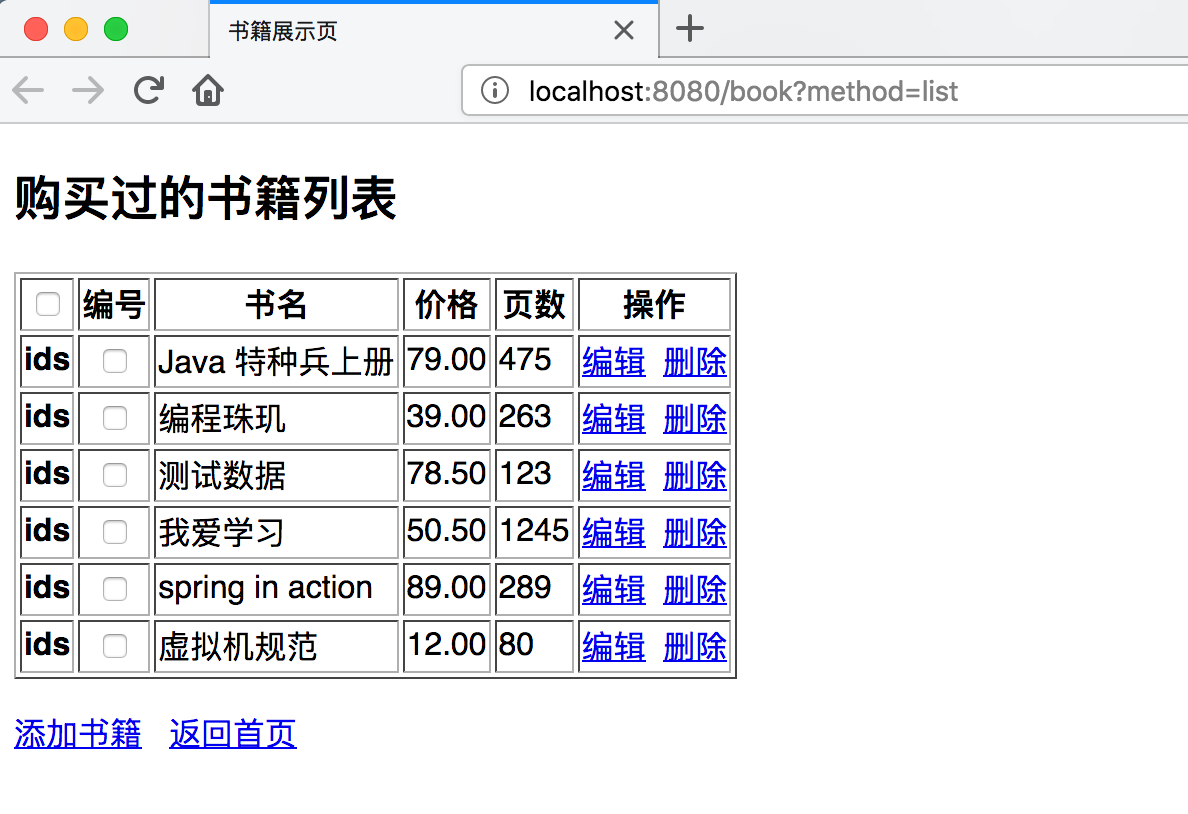
5. 效果展示页


【温故知新】Java web 开发(四)JSTL 与 JDBC 的增删改查的更多相关文章
- Java Web项目案例之---登录注册和增删改查(jsp+servlet)
登录注册和增删改查(jsp+servlet) (一)功能介绍 1.用户输入正确的密码进行登录 2.新用户可以进行注册 3.登录后显示学生的信息表 4.可以添加学生 5.可以修改学生已有信息 6.可以删 ...
- 纯Java JDBC连接数据库,且用JDBC实现增删改查的功能
Java JDBC连接数据库 package cn.cqvie.yjq; import java.sql.*; /** * 注册数据库的驱动程序,并得到数据库的连接对象 * @author yu * ...
- JDBC基础学习(一)—JDBC的增删改查
一.数据的持久化 持久化(persistence): 把数据保存到可掉电式存储设备中以供之后使用.大多数情况下,数据持久化意味着将内存中的数据保存到硬盘上加以固化,而持久化的实现过程大多通过各 ...
- Oracle使用JDBC进行增删改查 表是否存在
Oracle使用JDBC进行增删改查 数据库和表 table USERS ( USERNAME VARCHAR2(20) not null, PASSWORD VARCHAR2(20) ) a ...
- GZFramwork数据库层《四》单据主从表增删改查
同GZFramwork数据库层<三>普通主从表增删改查 不同之处在于:实例 修改为: 直接上效果: 本系列项目源码下载地址:https://github.com/GarsonZhang/G ...
- get,post,put,delete四种基础方法对应增删改查
PUT,DELETE,POST,GET四种基础方法对应增删改查 1.GET请求会向数据库发索取数据的请求,从而来获取信息,该请求就像数据库的select操作一样,只是用来查询一下数据,不会修改.增加数 ...
- Java Web(十) JDBC的增删改查,C3P0等连接池,dbutils框架的使用
前面做了一个非常垃圾的小demo,真的无法直面它,菜的抠脚啊,真的菜,好好努力把.菜鸡. --WH 一.JDBC是什么? Java Data Base Connectivity,java数据库连接,在 ...
- Web API开发实例——对产品Product进行增删改查
1.WebApi是什么 ASP.NET Web API 是一种框架,用于轻松构建可以由多种客户端(包括浏览器和移动设备)访问的 HTTP 服务.ASP.NET Web API 是一种用于在 .NET ...
- 初入码田--ASP.NET MVC4 Web应用开发之二 实现简单的增删改查
初入码田--ASP.NET MVC4 Web应用之创建一个空白的MVC应用程序 初入码田--ASP.NET MVC4 Web应用开发之一 实现简单的登录 2016-07-29 一.创建M002Adm ...
随机推荐
- 从 Spark 到 Kubernetes — MaxCompute 的云原生开源生态实践之路
2019年5月14日,喜提浙江省科学技术进步一等奖的 MaxCompute 是阿里巴巴自研的 EB 级大数据计算平台.该平台依托阿里云飞天基础架构,是阿里巴巴在10年前做飞天系统的三大件之分布式计算部 ...
- Freeware Tools For Linux, http://www.debianhelp.co.uk/tools.htm
Freeware Tools For Linux, http://www.debianhelp.co.uk/tools.htm Freeware Tools For Linux DNS related ...
- java文件操作 之 创建文件夹路径和新文件
一:问题 (1)java 的如果文件夹路径不存在,先创建: (2)如果文件名 的文件不存在,先创建再读写;存在的话直接追加写,关键字true表示追加 (3)File myPath = new File ...
- eBPF Tracing 入门教程与实例
原文链接 Learn eBPF Tracing: Tutorial and Examples译者 弃余 在 LPC'18(Linux Plumber's conference) 会议上,至少有24个关 ...
- @noi.ac - 506@ 强连通分量
目录 @description@ @solution@ @accepted code@ @details@ @description@ 有一天你学了一个叫能求出有向图中所有的强连通分量的算法,你决定将 ...
- 2019-9-2-C#枚举中使用Flags特性
title author date CreateTime categories C#枚举中使用Flags特性 lindexi 2019-09-02 12:57:37 +0800 2018-2-13 1 ...
- SuperSocket 服务器管理器 (ServerManager)
SuperSocket服务器管理器文档 客户端安全证书验证 在 TLS/SSL 安全通信中, 客户端的安全证书不是必需的, 但是有些系统需要更高级别的安全保障. 因此有些用户提出了在服务器端验证客户端 ...
- js用for循环实现乘法口诀表
for循环可以打印一个乘法口诀表.需要使用for循环的嵌套 <script> for(var i = 0; i <= 9; i++){ // 外层循环控制行数,外层循环执行一次,内层 ...
- [转]基于VS Code快速搭建Java项目
有时候随手想写一点Java测试代码,以控制台程序为主,还会用到一些其它框架,并基于Maven构建. 1.Java Extension Pack一定要安装. 2.VS Code打开一个指定目录,创建相应 ...
- [转]C#操作word模板插入文字、图片及表格详细步骤
c#操作word模板插入文字.图片及表格 1.建立word模板文件 person.dot用书签 标示相关字段的填充位置 2.建立web应用程序 加入Microsoft.Office.Interop.W ...