
自定义View(四) ViewGroup 动态添加变长Tag标签 支持自动换行
欲实现如下效果:
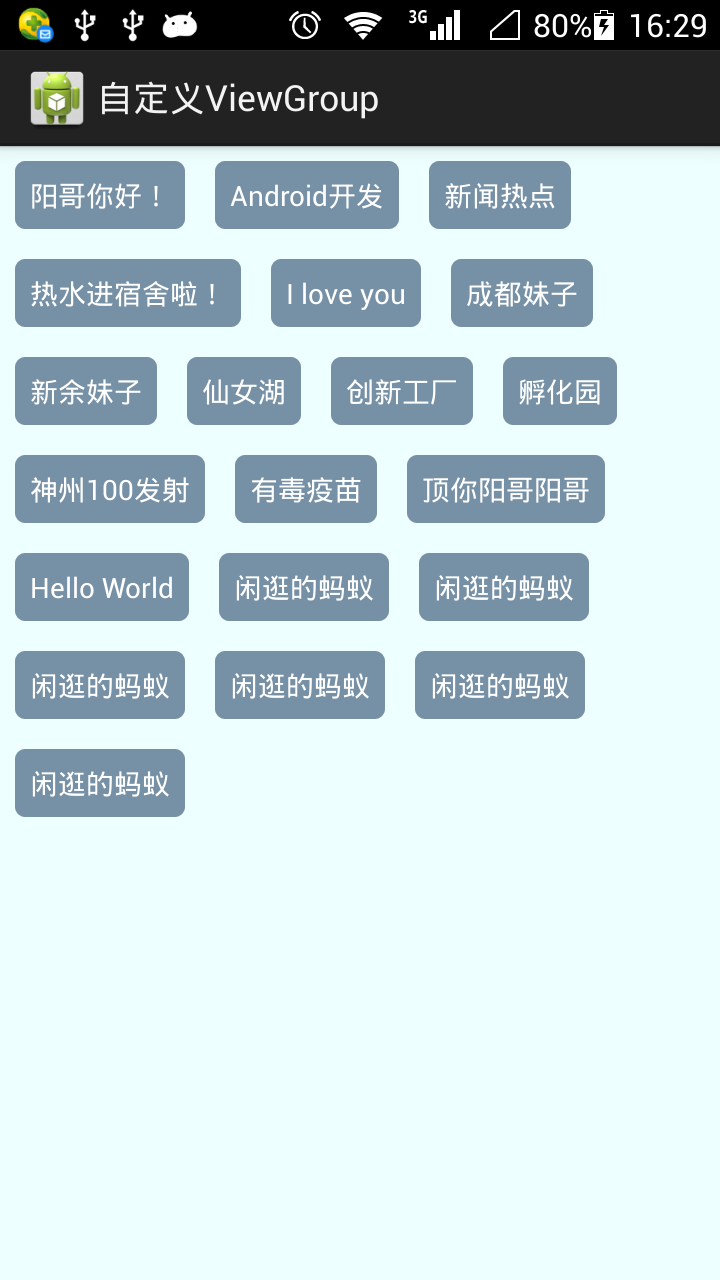
思路很简单就2步:
1、测量出ViewGroup的大小
2、找出子View的位置
若要实现动态添加标签view,就要实现ViewGroup的onMeasure()、onLayout()方法,这两个方法可由该ViewGroup的requestLayout()方法触发,
onMeasure是对ViewGroup的大小计算,onLayout是针对View(可以是子View也可以是本View)的位置设置
关于这几个方法的流程图如下:

/**

 * 流式标签(动态的,根据传入的数据动态添加标签)

 */

public class CustomerFlowLayout extends ViewGroup {

    private List<String> mTags = new ArrayList<String>();

    public CustomerFlowLayout(Context context, AttributeSet attrs, int defStyle) {

        super(context, attrs, defStyle);

    }

    public CustomerFlowLayout(Context context, AttributeSet attrs) {

        super(context, attrs);

    }

    public CustomerFlowLayout(Context context) {

        super(context);

    }

    @Override

    protected void onMeasure(int widthMeasureSpec, int heightMeasureSpec) {

        int widthMode = MeasureSpec.getMode(widthMeasureSpec);

        int widthSize = MeasureSpec.getSize(widthMeasureSpec);

        int heightMode = MeasureSpec.getMode(heightMeasureSpec);

        int heightSize = MeasureSpec.getSize(heightMeasureSpec);

        //当前ViewGroup的总高度

        int totalHeight= 0;

        //所有行中的最大宽度

        int maxLineWidth = 0;

        //当前行的最大高度

        int lineMaxHeight = 0;

        //当前行的总宽度

        int currentLineWidth = 0;

        //每个childView所占用的宽度

        int childViewWidthSpace = 0;

        //每个childView所占用的高度

        int childViewHeightSpace = 0;

        int count = getChildCount();

        MarginLayoutParams layoutParams;

        for(int i = 0; i < count; i++){

            View child = getChildAt(i);

            if(child.getVisibility() != View.GONE){//只有当这个View能够显示的时候才去测量

                //测量每个子View,以获取子View的宽和高

                measureChild(child, widthMeasureSpec, heightMeasureSpec);

                layoutParams = (MarginLayoutParams) child.getLayoutParams();

                childViewWidthSpace = child.getMeasuredWidth() + layoutParams.leftMargin + layoutParams.rightMargin;

                childViewHeightSpace = child.getMeasuredHeight() + layoutParams.topMargin + layoutParams.bottomMargin;

                if(currentLineWidth + childViewWidthSpace > widthSize){//表示如果当前行再加上现在这个子View,就会超出总的规定宽度,需要另起一行

                    totalHeight += lineMaxHeight;

                    if(maxLineWidth < currentLineWidth){//如果行的最长宽度发生了变化,更新保存的最长宽度

                        maxLineWidth = currentLineWidth;

                    }

                    currentLineWidth = childViewWidthSpace;//另起一行后,需要重置当前行宽

                    lineMaxHeight = childViewHeightSpace;

                }else{//表示当前行可以继续添加子元素

                    currentLineWidth += childViewWidthSpace;

                    if(lineMaxHeight < childViewHeightSpace){

                        lineMaxHeight = childViewHeightSpace;

                    }

                }

            }

        }

        setMeasuredDimension(widthMode == MeasureSpec.EXACTLY ? widthSize : maxLineWidth, heightMode == MeasureSpec.EXACTLY ? heightSize : totalHeight);

    }

    @Override

    protected void onLayout(boolean changed, int l, int t, int r, int b) {

        //当前是第几行

        int currentLine = 1;

        //存放每一行的最大高度

        List<Integer> lineMaxHeightList = new ArrayList<Integer>();

        //每个childView所占用的宽度

        int childViewWidthSpace = 0;

        //每个childView所占用的高度

        int childViewHeightSpace = 0;

        //当前行的最大高度

        int lineMaxHeight = 0;

        //当前行的总宽度

        int currentLineWidth = 0;

        int count = getChildCount();

        MarginLayoutParams layoutParams;

        for(int i = 0; i < count; i++){

            int cl= 0, ct = 0, cr = 0, cb = 0;

            View child = getChildAt(i);

            if(child.getVisibility() != View.GONE){//只有当这个View能够显示的时候才去测量

                layoutParams = (MarginLayoutParams) child.getLayoutParams();

                childViewWidthSpace = child.getMeasuredWidth() + layoutParams.leftMargin + layoutParams.rightMargin;

                childViewHeightSpace = child.getMeasuredHeight() + layoutParams.topMargin + layoutParams.bottomMargin;

                System.out.println("getWidth()---->"+getWidth());

                if(currentLineWidth + childViewWidthSpace > getWidth()){//表示如果当前行再加上现在这个子View,就会超出总的规定宽度,需要另起一行

                    lineMaxHeightList.add(lineMaxHeight);//此时先将这一行的最大高度加入到集合中

                    //新的一行,重置一些参数

                    currentLine++;

                    currentLineWidth = childViewWidthSpace;

                    lineMaxHeight = childViewHeightSpace;

                    cl = layoutParams.leftMargin;

                    if(currentLine > 1){

                        for(int j = 0; j < currentLine - 1; j++){

                            ct += lineMaxHeightList.get(j);

                        }

                        ct += layoutParams.topMargin ;

                    }else{

                        ct = layoutParams.topMargin;

                    }

                }else{//表示当前行可以继续添加子元素

                    cl = currentLineWidth + layoutParams.leftMargin;

                    if(currentLine > 1){

                        for(int j = 0; j < currentLine - 1; j++){

                            ct += lineMaxHeightList.get(j);

                        }

                        ct += layoutParams.topMargin;

                    }else{

                        ct = layoutParams.topMargin;

                    }

                    currentLineWidth += childViewWidthSpace;

                    if(lineMaxHeight < childViewHeightSpace){

                        lineMaxHeight = childViewHeightSpace;

                    }

                }

                cr = cl + child.getMeasuredWidth();

                cb = ct + child.getMeasuredHeight();

                child.layout(cl, ct, cr, cb);

            }

        }

    }

    @Override

    public LayoutParams generateLayoutParams(AttributeSet attrs) {

        return new MarginLayoutParams(getContext(), attrs);

    }

    public void setTags(List<String> tags){

        if(tags!= null){

            mTags.clear();

            mTags.addAll(tags);

            for(int i = 0; i < mTags.size(); i++){

                TextView tv = new TextView(getContext());

                MarginLayoutParams lp = new MarginLayoutParams(MarginLayoutParams.WRAP_CONTENT, MarginLayoutParams.WRAP_CONTENT);

                lp.setMargins(15, 15, 15, 15);

//                lp.width = MarginLayoutParams.WRAP_CONTENT;

//                lp.height = MarginLayoutParams.WRAP_CONTENT;

                tv.setLayoutParams(lp);

                tv.setBackgroundResource(R.drawable.tv_bg);

                /*

                 * setPadding一定要在setBackgroundResource后面使用才有效!!!

                 * http://stackoverflow.com/questions/18327498/setting-padding-for-textview-not-working

                 */

                tv.setPadding(15, 15, 15, 15);

                tv.setTextColor(Color.WHITE);

                tv.setText(mTags.get(i));

                tv.setOnClickListener(new OnClickListener() {

                    @Override

                    public void onClick(View v) {

                        if(listener != null){

                            listener.onClick(v);

                        }

                    }

                });

                addView(tv);

            }

            requestLayout();

        }

    }

    private OnTagItemClickListener listener;

    public interface OnTagItemClickListener{

        public void onClick(View v);

    }

    public void setOnTagItemClickListener(OnTagItemClickListener l){

        listener = l;

    }

}
针对在Activity中的使用:
public class MainActivity extends Activity {

    private CustomerFlowLayout customerFlowLayout;

    List<String> tags = new ArrayList<String>();

    @Override

    protected void onCreate(Bundle savedInstanceState) {

        super.onCreate(savedInstanceState);

        setContentView(R.layout.activity_dynamic_tagflowlayout);

        CustomerFlowLayout = (CustomerFlowLayout) findViewById(R.id.dynamic_tag);

        customerFlowLayout.setOnTagItemClickListener(new OnTagItemClickListener() {

            @Override

            public void onClick(View v) {

                TextView tv = (TextView) v;

                Toast.makeText(MainActivity.this, tv.getText().toString(), Toast.LENGTH_SHORT).show();

            }

        });

        initData();

        customerFlowLayout.setTags(tags);

    }

    private void initData() {

        tags.add("阳哥你好!");

        tags.add("Android开发");

        tags.add("新闻热点");

        tags.add("热水进宿舍啦!");

        tags.add("I love you");

        tags.add("成都妹子");

        tags.add("新余妹子");

        tags.add("仙女湖");

        tags.add("创新工厂");

        tags.add("孵化园");

        tags.add("神州100发射");

        tags.add("有毒疫苗");

        tags.add("顶你阳哥阳哥");

        tags.add("Hello World");

        tags.add("闲逛的蚂蚁");

        tags.add("闲逛的蚂蚁");

        tags.add("闲逛的蚂蚁");

        tags.add("闲逛的蚂蚁");

        tags.add("闲逛的蚂蚁");

        tags.add("闲逛的蚂蚁");

    }

}
上述的ViewGroup中可以添加 对标签的处理(例如:点击、选中)
参考资料:
https://blog.csdn.net/shakespeare001/article/details/51089128
https://www.cnblogs.com/ldq2016/p/9035332.html
自定义View(四) ViewGroup 动态添加变长Tag标签 支持自动换行的更多相关文章
- 【Android 应用开发】自定义View 和 ViewGroup
一. 自定义View介绍 自定义View时, 继承View基类, 并实现其中的一些方法. (1) ~ (2) 方法与构造相关 (3) ~ (5) 方法与组件大小位置相关 (6) ~ (9) 方法与触摸 ...
- 自定义View 和 ViewGroup
一. 自定义View介绍 自定义View时, 继承View基类, 并实现其中的一些方法. (1) ~ (2) 方法与构造相关 (3) ~ (5) 方法与组件大小位置相关 (6) ~ (9) 方法与触摸 ...
- android 自定义 view 和 ViewGroup
---恢复内容开始--- ViewGroup的职能为:给childView计算出建议的宽和高和测量模式 :决定childView的位置:为什么只是建议的宽和高,而不是直接确定呢,别忘了childVie ...
- ios开发runtime学习四:动态添加属性
#import "ViewController.h" #import "Person.h" #import "NSObject+Property.h& ...
- Android自定义组件系列【1】——自定义View及ViewGroup
View类是ViewGroup的父类,ViewGroup具有View的所有特性,ViewGroup主要用来充当View的容器,将其中的View作为自己孩子,并对其进行管理,当然孩子也可以是ViewGr ...
- Android 自定义View 四个构造函数详解
https://blog.csdn.net/zhao123h/article/details/52210732 在开发android开发过程中,很多人都会遇到自定义view,一般都需要继承自View类 ...
- 自定义View和ViewGroup
为了扫除学习中的盲点,尽可能多的覆盖Android知识的边边角角,决定对自定义View做一个稍微全面一点的使用方法总结,在内容上面并没有什么独特的地方,其他大神们的博客上面基本上都有讲这方面的内容,如 ...
- Android 自定义View (四) 视频音量调控
转载请标明出处:http://blog.csdn.net/lmj623565791/article/details/24529807 今天没事逛eoe,看见有人求助要做一个下面的效果,我看下面一哥们说 ...
- leveldb 学习记录(四) skiplist补与变长数字
在leveldb 学习记录(一) skiplist 已经将skiplist的插入 查找等操作流程用图示说明 这里在介绍 下skiplist的代码 里面有几个模块 template<typenam ...
随机推荐
- Python生成器(generator)和迭代器(Iterator)
列表生成式 a = [i+1 for i in range(10)] print(a) [1, 2, 3, 4, 5, 6, 7, 8, 9, 10] 这就是列表生成式 生成器(generator) ...
- Linux查看和修改文件时间
参考http://www.361way.com/chang-file-time/1632.html 一:查看时间 1:查看文件的具体时间信息 File: `probn' Size: Blocks: I ...
- docker-compose 安装redis sentinel,共享主机网络模式
采坑记录: docker sentinel模式安装完后因为是使用bridge模式,所以只有docker中运行的程序才能访问.刚开始尝试使用端口映射,返现sentinel返回的地址依然是docker的内 ...
- 关于tpg例程的仿真
关于tpg例程的仿真 processor system reset---rst_clk_wiz_0_148M 可以看出interconnect_aresetn和peripheral_aresetn的复 ...
- Delphi IdHTTP1下载文件防止假死 (
在Form1中添加控件:两个Indy控件:IdAntiFreeze1,IdHTTP1;一个按钮 :Button1;一个进度条 :ProgressBar1 显示下载速度 procedure TForm1 ...
- DHCP的搭建
挂载光盘 yum –y install dhcp cat /etc/dhcp/dhcpd.conf 配置文件到 /usr/share/doc/dhcp*/dhcpd.conf.sample 这是dhc ...
- 【算法和数据结构】_16_小算法_IntToStr: 将整型数据转换为字符串
/* IntToStr: 将整型数据转换为字符串 */ #include <stdio.h> void int_to_str(const unsigned long int i_numbe ...
- js鼠标拖动(转载)
<!DOCTYPE html PUBLIC "-//W3C//DTD XHTML 1.0 Transitional//EN" "http://www.w3.org/ ...
- [UE4]Spin Box,数字输入,可拖动
一.Spin Box在Input组下 二.Spin Box的文字样式可以在Spin Box.Display中修改 三.Spin Box事件 1.On Value Changed:值改变时触发 2.On ...
- servlet cdi analysis
CDI中最令人兴奋的功能是允许每个人在Java EE平台中编写强大的扩展性功能,甚至于改变其核心本身.这些扩展性功能是可以完全移植到任何支持CDI的环境中. CDI的一些主要特性 1.类型安全:CDI ...