
Kylin如何进行JDBC方式访问或者调用
Kylin提供了标准的ODBC和JDBC接口,能够和传统BI工具进行很好的集成。分析师们可以用他们最熟悉的工具来享受Kylin带来的快速。我们也可以对它进行定制开发报表等,把kylin当做数据库服务器就行了。
首先我们来看一下连接Kylin的URL格式为:
jdbc:kylin://<hostname>:<port>/<kylin_project_name>
注:
如果“ssl”为true话,那么上面的端口号应该为Kylin服务的HTTPS端口号。
kylin_project_name必须指定,并且在Kylin服务中存在。
运行环境需要把安装文件的那个lib目录拷贝到自己的项目引用下
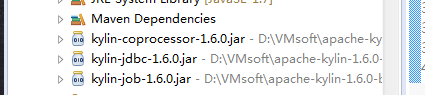
下面介绍几种方式访问Kylin数据:
第一种方法:使用Statement方式查询
第二种方法:使用PreparedStatement方式查询
第三种方法:获取查询结果集元数据
package org.apache.kylin.jdbc;

import java.sql.SQLException;

import java.util.Properties;

import org.junit.Test;

import java.sql.Connection;

import java.sql.Driver;

import java.sql.PreparedStatement;

import java.sql.ResultSet;

import java.sql.Statement;

/**

* @author :

* @date   : 2017年4月17日

* @version 1.0

* @parameter

*/

public class QueryKylinST {

    @Test

    public void testStatementWithMockData() throws SQLException, InstantiationException, IllegalAccessException, ClassNotFoundException {

        // 加载Kylin的JDBC驱动程序

        Driver driver = (Driver) Class.forName("org.apache.kylin.jdbc.Driver").newInstance();

         // 配置登录Kylin的用户名和密码

         Properties info= new Properties();

         info.put("user","ADMIN");

         info.put("password","KYLIN");

         // 连接Kylin服务

         Connection conn= driver.connect("jdbc:kylin://10.8.217.66:7070/learn_kylin",info);

         Statement state= conn.createStatement();

         ResultSet resultSet =state.executeQuery("select part_dt, sum(price) as total_selled,count(distinct seller_id) as sellers " +

                                     "from kylin_sales group by part_dt order by part_dt limit 5");

         System.out.println("part_dt\t"+ "\t" + "total_selled" + "\t" +"sellers");

         while(resultSet.next()) {

                   String col1 = resultSet.getString(1);

                   String col2 = resultSet.getString(2);

                   String col3 = resultSet.getString(3);

                   System.out.println(col1+ "\t" + col2 + "\t" + col3);

         }

    }

    @Test

    public  void testanylist() throws Exception {

        Driver driver =(Driver) Class.forName("org.apache.kylin.jdbc.Driver").newInstance();

        Properties info= new Properties();

        info.put("user","ADMIN");

        info.put("password","KYLIN");

        Connection conn= driver.connect("jdbc:kylin://10.8.217.66:7070/learn_kylin",info);

        PreparedStatement state = conn.prepareStatement("select * from KYLIN_CATEGORY_GROUPINGS where LEAF_CATEG_ID = ?");

        state.setLong(1,10058);

        ResultSet resultSet = state.executeQuery();

        while (resultSet.next()) {

                  String col1 = resultSet.getString(1);

                  String col2 = resultSet.getString(2);

                  String col3 = resultSet.getString(3);

                  System.out.println(col1+ "\t" + col2 + "\t" + col3);

            }

     }

    @Test

    public  void testmetadatalist() throws Exception {

        Driver driver = (Driver) Class.forName("org.apache.kylin.jdbc.Driver").newInstance();

        Properties info = new Properties();

        info.put("user", "ADMIN");

        info.put("password", "KYLIN");

        Connection conn = driver.connect("jdbc:kylin://10.8.217.66:7070/learn_kylin", info);

        Statement state = conn.createStatement();

        ResultSet resultSet = state.executeQuery("select * from kylin_sales");

        //第三个是表名称,一般情况下如果要获取所有的表的话,可以直接设置为null,如果设置为特定的表名称,则返回该表的具体信息。

        ResultSet tables = conn.getMetaData().getTables(null, null, null, new String[]{"TABLE"});

        while (tables.next()) {

//            for (int i = 0; i < 10; i++) {

//                System.out.println(tables.getString(i + 1));

//            }

            String col1 = tables.getString(1);  //表类别

            String col2 = tables.getString(2);  //表模式

            String col3 = tables.getString(3);  //表名称

            System.out.println("表信息:"+col1+ "\t" + col2 + "\t" + col3);

        }

     }

}
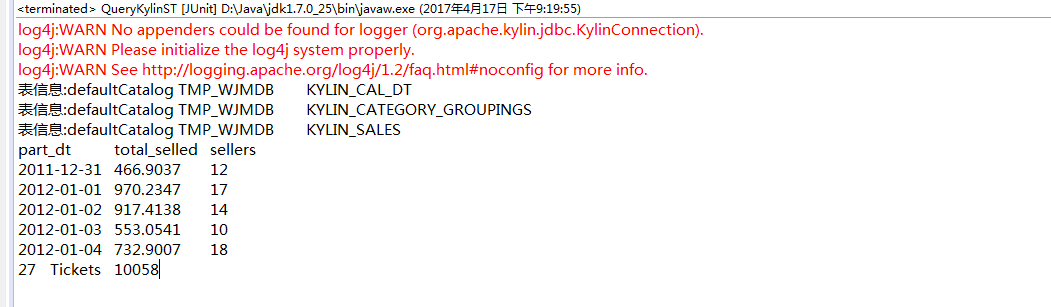
结果如下:由于单元测试,先后顺序不一致,注意忽视
参考资料
http://kylin.apache.org/docs20/howto/howto_jdbc.html
http://www.cnblogs.com/en-heng/p/5420269.html Python Post方式
http://blog.csdn.net/linlinv3/article/details/53893144 Java 使用httpClient 进行post访问
Kylin如何进行JDBC方式访问或者调用的更多相关文章
- 2017.11.12 web中JDBC 方式访问数据库的技术
JavaWeb------ 第四章 JDBC数据库访问技术 在JavaWeb应用程序中数据库访问是通过Java数据库连接(JavaDateBase Connectivity简称JDBC)数据库的链接一 ...
- Impala通过JDBC方式访问
不多说,直接上干货! • 配置: – impala.driver=org.apache.hive.jdbc.HiveDriver – impala.url=jdbc:hive2://node2:210 ...
- 使用jdbc的方式访问kylin cube的数据
使用jdbc的方式访问kylin cube的数据 引用kylin相关的jar包 <dependency> <groupId>org.apache.kylin</group ...
- Spring04-SpringEL&Spring JDBC数据访问
一. SpringEL入门 Spring动态语言(简称SpEL) 是一个支持运行时查询和操作对象图的强大的动态语言,语法类似于EL表达式,具有诸如显示方法和基本字符串模板函数等特性. 1. 准备工作 ...
- jdbc数据访问技术
jdbc数据访问技术 1.JDBC如何做事务处理? Con.setAutoCommit(false) Con.commit(); Con.rollback(); 2.写出几个在Jdbc中常用的接口 p ...
- 使用原生JDBC方式对数据库进行操作
使用原生JDBC方式对数据库进行操作,包括六个步骤: 1.加载JDBC驱动程序 在连接数据库之前,首先要加载想要连接的数据库的驱动到JVM.可以通过java.lang.Class类的静态方法forNa ...
- SharePoint—用REST方式访问列表
REST的定义与作用 在SharePoint 2010中,基本上有如下几种数据访问方式: 服务器端对象模型 LINQ to SharePoint Web Service 客户端对象模型 ADO.NET ...
- salesforce 零基础学习(三十三)通过REST方式访问外部数据以及JAVA通过rest方式访问salesforce
本篇参考Trail教程: https://developer.salesforce.com/trailhead/force_com_dev_intermediate/apex_integration_ ...
- URL方式访问Hadoop的内容
* 1.设置url支持hadoop,FsUrlStreamHandlerFactory * 2.创建URL对象,指定访问的HDFS路径 * 3.openStream获取输入流对象, ...
随机推荐
- JS_高程3.基本概念(5)语句
1.if语句 2.do-while语句:后测循环语句,循环体内的代码至少执行一次. 3.while语句:前测循环语句. 4.for语句:前测循环语句. 注意:在ECMAScript中不存在块级作用域, ...
- Cocos Creator下删除AnySDK步骤
1.删除 frameworks/runtime-src/Classes 下的 jsb_anysdk_basic_conversions.cpp manualanysdkbindings.cpp jsb ...
- @RequestBody, @ResponseBody 注解详解(转)
原文地址: https://www.cnblogs.com/qq78292959/p/3760651.html @RequestBody, @ResponseBody 注解详解(转) 引言: 接上一篇 ...
- NLP 第10章 基于深度学习的NLP 算法
- adb shell 命令详解
adb介绍 SDK的Tools文件夹下包含着Android模拟器操作的重要命令adb,adb的全称为(Android Debug Bridge就是调试桥的作用.通过adb我们可以在Eclipse中方面 ...
- exception The valid characters are defined in RFC 7230 and RFC 3986
1.情景展示 当你使用浏览器进行问号传参与后台进行交互时,会报这个异常. tomcat控制台报错信息如下: The valid characters are defined in RFC 7230 ...
- 3分钟搞明白信用评分卡模型&模型验证
信用评分卡模型在国外是一种成熟的预测方法,尤其在信用风险评估以及金融风险控制领域更是得到了比较广泛的使用,其原理是将模型变量WOE编码方式离散化之后运用logistic回归模型进行的一种二分类变量的广 ...
- php5.6.11编译安装报错configure: error: Don't know how to define struct flock on this system
centos 6.8 32位系统下,安装php.5.6.11是出现这个错误 解决办法: 1 2 3 4 vim /etc/ld.so.conf.d/local.conf # 编辑库文件 /us ...
- linux驱动(续)
网络通信 --> IO多路复用之select.poll.epoll详解 IO多路复用之select.poll.epoll详解 目前支持I/O多路复用的系统调用有 select,psel ...
- windows下查看特定端口被什么程序占用
我电脑上因为命令: netstat -ano 列出的太多了,所以不好看. 以下是其他方式: 查看8088端口占用情况: 开始---->运行---->cmd,或者是window+R组合键,调 ...