
linux下配置nginx负载均衡例子
准备2台虚拟机:

分别在两个虚拟机上安装tomcat,并在服务器A安装nginx,其中nginx端口设置为了 70。
服务器A的tomcat安装目录:

服务器B的tomcat安装目录:

服务器A的nginx安装目录:

准备test.jsp文件,分别上传到tomcat的 ROOT 目录下:
上传到服务器A的test.jsp :
<%@ page language="java" contentType="text/html; charset=UTF-8" pageEncoding="UTF-8"%>

<!DOCTYPE html PUBLIC "-//W3C//DTD HTML 4.01 Transitional//EN" "http://www.w3.org/TR/html4/loose.dtd">

<html>

<head>

<meta http-equiv="Content-Type" content="text/html; charset=UTF-8">

<title>Test Page</title>

</head>

<body>

Test1 Page!!!<br/>

remote ip :   <%=request.getHeader("X-real-ip") %>  <br/>

nginx server ip : <%=request.getRemoteAddr()%>

</body>

</html>
上传到服务器B 的test.jsp :
<%@ page language="java" contentType="text/html; charset=UTF-8" pageEncoding="UTF-8"%>

<!DOCTYPE html PUBLIC "-//W3C//DTD HTML 4.01 Transitional//EN" "http://www.w3.org/TR/html4/loose.dtd">

<html>

<head>

<meta http-equiv="Content-Type" content="text/html; charset=UTF-8">

<title>Test Page</title>

</head>

<body>

Test2 Page!!!<br/>

remote ip :   <%=request.getHeader("X-real-ip") %>  <br/>

nginx server ip : <%=request.getRemoteAddr()%>

</body>

</html>
其中的 request.getHeader("X-real-ip") 用来获取在nginx里面设置的 客户端的真实IP,request.getRemoteAddr() 获取的是代理服务器nginx的IP。
nginx 配置文件nginx.conf :
#user  nobody;

worker_processes  ;

#error_log  logs/error.log;

#error_log  logs/error.log  notice;

#error_log  logs/error.log  info;

#pid        logs/nginx.pid;

events {

    worker_connections  ;

}

http {

    include       mime.types;

    default_type  application/octet-stream;

    log_format  main  '$remote_addr - $remote_user [$time_local] "$request" '

                      '$status $body_bytes_sent "$http_referer" '

                      '"$http_user_agent" "$http_x_forwarded_for"';

    #access_log  logs/access.log  main;

    sendfile        on;

    #tcp_nopush     on;

    #keepalive_timeout  ;

    keepalive_timeout  ;

    #gzip  on;

    #

    #

    #webapp

    upstream myapp {

          server 192.168.85.3: weight= max_fails= fail_timeout=30s;

          server 192.168.85.4: weight= max_fails= fail_timeout=30s;

    }

    server {

        listen       ;

        server_name  localhost;

        #charset koi8-r;

        #access_log  logs/host.access.log  main;

        location / {

        #设置客户端真实ip地址

        proxy_set_header X-real-ip $remote_addr;

        #负载均衡反向代理

        proxy_pass http://myapp;

            root   html;

            index  index.html index.htm;

        }

    #配置反向代理tomcat服务器:拦截.jsp结尾的请求转向到tomcat

        #location ~ \.jsp$ {

        #设置客户端真实ip地址

    #    proxy_set_header X-real-ip $remote_addr;

        #    proxy_pass http://192.168.85.3:;

        #}

        #error_page                /.html;

        # redirect server error pages to the static page /50x.html

        #

        error_page        /50x.html;

        location = /50x.html {

            root   html;

        }

        # proxy the PHP scripts to Apache listening on 127.0.0.1:

        #

        #location ~ \.php$ {

        #    proxy_pass   http://127.0.0.1;

        #}

        # pass the PHP scripts to FastCGI server listening on 127.0.0.1:

        #

        #location ~ \.php$ {

        #    root           html;

        #    fastcgi_pass   127.0.0.1:;

        #    fastcgi_index  index.php;

        #    fastcgi_param  SCRIPT_FILENAME  /scripts$fastcgi_script_name;

        #    include        fastcgi_params;

        #}

        # deny access to .htaccess files, if Apache's document root

        # concurs with nginx's one

        #

        #location ~ /\.ht {

        #    deny  all;

        #}

    }

    # another virtual host using mix of IP-, name-, and port-based configuration

    #

    #server {

    #    listen       ;

    #    listen       somename:;

    #    server_name  somename  alias  another.alias;

    #    location / {

    #        root   html;

    #        index  index.html index.htm;

    #    }

    #}

    # HTTPS server

    #

    #server {

    #    listen        ssl;

    #    server_name  localhost;

    #    ssl_certificate      cert.pem;

    #    ssl_certificate_key  cert.key;

    #    ssl_session_cache    shared:SSL:1m;

    #    ssl_session_timeout  5m;

    #    ssl_ciphers  HIGH:!aNULL:!MD5;

    #    ssl_prefer_server_ciphers  on;

    #    location / {

    #        root   html;

    #        index  index.html index.htm;

    #    }

    #}

    #

    server {

        listen ;

        server_name lhy.com;

        access_log  logs/lhy.access.log  main;

        location /{

        #正则表达式匹配uri方式:在/usr/local/nginx/lhy下建立一个test1234.html 然后使用正则匹配

    #location ~ test {

        #重写语法:if return (条件 = ~ ~*)

        #if ($remote_addr = 192.168.85.1) {

        #    return ;

        #}

        if ($http_user_agent ~* firefox) {

            rewrite ^.*$ /firefox.html;

            break;

        }

        root lhy;

            index index.html;

        }

    location /goods {

        rewrite "goods-(\d{1,5})\.html" /goods-ctrl.html;

        root lhy;

        index index.html;

    }

    }

}
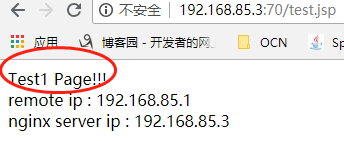
启动nginx、两台tomcat,访问 反向代理服务器nginx:http://192.168.85.3:70/test.jsp。
第一次访问,访问的是服务器A:
第二次访问,访问的是服务器B:
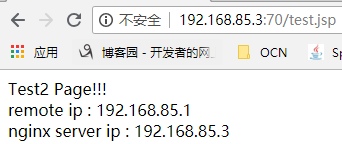
nginx+tomcat实现的 反向代理+负载均衡至此实现。
linux下配置nginx负载均衡例子的更多相关文章
- Mac下配置Nginx负载均衡
1.首先在Mac下安装Nginx(可参考我的另一篇随笔http://www.cnblogs.com/malcolmfeng/p/6896703.html). 2.安装Tomcat,下载后,解压,bin ...
- linux下配置nginx反向代理例子
官方说明: 例子: 虚拟机ip:192.168.85.3,物理机VMware Network Adapter VMnet8 ip:192.168.85.1 1,准备tomcat 准备一tomcat, ...
- Linux配置Nginx负载均衡
nginx配置负载均衡其实很简单,一直还以为负载均衡是个很高端人士玩的 首先先了解下负载均衡,假设一个场景,如果有1000个客户同时访问你服务器时,而你只有一台服务器的Nginx,且只有一个MySQL ...
- 配置nginx负载均衡
配置nginx负载均衡 执行命令:vi /usr/local/nginx/sbin/nginx/conf/nginx.conf 修改为: worker_processes 2; events { ...
- 负载均衡---在window与linux下配置nginx
最近有些时间,开始接触负载均衡方面的东西,从硬件F5再到Citrix Netscalar.不过因为硬件的配置虽然不复杂,但昂贵的价格也让一般用户望而却步(十几万到几十万),所以只能转向nginx,sq ...
- 【转】玩玩负载均衡---在window与linux下配置nginx
最近有些时间,开始接触负载均衡方面的东西,从硬件F5再到Citrix Netscalar.不过因为硬件的配置虽然不复杂,但昂贵的价格也让一般用户望而却步(十几万到几十万),所以只能转向nginx,sq ...
- 玩玩负载均衡---在window与linux下配置nginx
最近有些时间,开始接触负载均衡方面的东西,从硬件F5再到Citrix Netscalar.不过因为硬件的配置虽然不复杂,但昂贵的价格也让一般用户望而却步(十几万到几十万),所以只能转向nginx, ...
- Linux下配置nginx,负载IIS的页面
最近研究了下Linux下的nginx结果贴一下: 反向代理概念: 一般访问流程:a=>b,a访问b服务器, 加n来做反向代理流程:a=>n=>b 负载均衡概率:a访问B站点,B站点有 ...
- 如何配置nginx负载均衡配置(轮询,权重,ip绑定)
集群是为了解决单节点无法服务高并发的情况,在集群中nginx是如何分配将来自客户端的请求 转发给服务器的 负载均衡可以提高网站的吞吐量(接受和响应),减轻单台服务器的压力 负载均衡提供了三种策略:轮询 ...
随机推荐
- Apache无法正常启动(配置多个监听端口)
Apache监测多个端口配置: 1.conf->extra->httpd-vhosts.conf 检查配置项是否写错 2.http.conf listen端口是否监听正确 3.环境变量中 ...
- react项目的react-router-dom路由的使用
现在测试一下react-router-dom路由的使用,首先在App.js这个文件搭配路由 import React, { Component } from 'react'; import {Link ...
- <jsp:forward page='/index' />
- css初始
css概念及作用 css即层叠样式表的英文缩写 作用:1 渲染页面 2 页面布局 css语法 CSS 规则由两个主要的部分构成:选择器,以及一条或多条声明. 格式: selector{ prope ...
- Mouse Detected Problem
通常分三种情形: 鼠标完全不工作鼠标工作一段时间后不工作鼠标的按钮或者滚轮不工作 必要提交信息:1.鼠标的具体厂商和型号2.鼠标连接PC方式:串口.PS/2.USB或无线USB等:3.鼠标的工作机制: ...
- Blast
NCBI 教程:https://www.ncbi.nlm.nih.gov/books/NBK279681/ 本地使用 blast 的步骤 1. 构建本地数据库索引 $makeblastdb -in h ...
- Java-static关键字解析
static关键字是很多朋友在编写代码和阅读代码时碰到的比较难以理解的一个关键字,也是各大公司的面试官喜欢在面试时问到的知识点之一.下面就先讲述一下static关键字的用法和平常容易误解的地方,最后列 ...
- Python select模块学习
select 是常用的异步socket 处理方法 一般用法: # iwtd,owtd,ewtd 分别为需要异步处理的读socket队列, 写socket队列(一般不用), 和错误socket队列, 返 ...
- centos 7下 django 1.11 + nginx 1.12 + uwsgi 2.0
之前写过一个博客关于如何安装django的,见下网址, http://www.cnblogs.com/qinhan/p/8732626.html 还有一个网址如何安装nginx的 http://www ...
- Linux下设置快捷键
以设置终端为例,进入Settings>>Keyboard>>Custom Shortcuts,点左下脚的+号,Name栏填入Treminal,command栏填入gnome-t ...