
linux下配置nginx负载均衡例子
准备2台虚拟机:

分别在两个虚拟机上安装tomcat,并在服务器A安装nginx,其中nginx端口设置为了 70。
服务器A的tomcat安装目录:

服务器B的tomcat安装目录:

服务器A的nginx安装目录:

准备test.jsp文件,分别上传到tomcat的 ROOT 目录下:
上传到服务器A的test.jsp :
<%@ page language="java" contentType="text/html; charset=UTF-8" pageEncoding="UTF-8"%>

<!DOCTYPE html PUBLIC "-//W3C//DTD HTML 4.01 Transitional//EN" "http://www.w3.org/TR/html4/loose.dtd">

<html>

<head>

<meta http-equiv="Content-Type" content="text/html; charset=UTF-8">

<title>Test Page</title>

</head>

<body>

Test1 Page!!!<br/>

remote ip :   <%=request.getHeader("X-real-ip") %>  <br/>

nginx server ip : <%=request.getRemoteAddr()%>

</body>

</html>
上传到服务器B 的test.jsp :
<%@ page language="java" contentType="text/html; charset=UTF-8" pageEncoding="UTF-8"%>

<!DOCTYPE html PUBLIC "-//W3C//DTD HTML 4.01 Transitional//EN" "http://www.w3.org/TR/html4/loose.dtd">

<html>

<head>

<meta http-equiv="Content-Type" content="text/html; charset=UTF-8">

<title>Test Page</title>

</head>

<body>

Test2 Page!!!<br/>

remote ip :   <%=request.getHeader("X-real-ip") %>  <br/>

nginx server ip : <%=request.getRemoteAddr()%>

</body>

</html>
其中的 request.getHeader("X-real-ip") 用来获取在nginx里面设置的 客户端的真实IP,request.getRemoteAddr() 获取的是代理服务器nginx的IP。
nginx 配置文件nginx.conf :
#user  nobody;

worker_processes  ;

#error_log  logs/error.log;

#error_log  logs/error.log  notice;

#error_log  logs/error.log  info;

#pid        logs/nginx.pid;

events {

    worker_connections  ;

}

http {

    include       mime.types;

    default_type  application/octet-stream;

    log_format  main  '$remote_addr - $remote_user [$time_local] "$request" '

                      '$status $body_bytes_sent "$http_referer" '

                      '"$http_user_agent" "$http_x_forwarded_for"';

    #access_log  logs/access.log  main;

    sendfile        on;

    #tcp_nopush     on;

    #keepalive_timeout  ;

    keepalive_timeout  ;

    #gzip  on;

    #

    #

    #webapp

    upstream myapp {

          server 192.168.85.3: weight= max_fails= fail_timeout=30s;

          server 192.168.85.4: weight= max_fails= fail_timeout=30s;

    }

    server {

        listen       ;

        server_name  localhost;

        #charset koi8-r;

        #access_log  logs/host.access.log  main;

        location / {

        #设置客户端真实ip地址

        proxy_set_header X-real-ip $remote_addr;

        #负载均衡反向代理

        proxy_pass http://myapp;

            root   html;

            index  index.html index.htm;

        }

    #配置反向代理tomcat服务器:拦截.jsp结尾的请求转向到tomcat

        #location ~ \.jsp$ {

        #设置客户端真实ip地址

    #    proxy_set_header X-real-ip $remote_addr;

        #    proxy_pass http://192.168.85.3:;

        #}

        #error_page                /.html;

        # redirect server error pages to the static page /50x.html

        #

        error_page        /50x.html;

        location = /50x.html {

            root   html;

        }

        # proxy the PHP scripts to Apache listening on 127.0.0.1:

        #

        #location ~ \.php$ {

        #    proxy_pass   http://127.0.0.1;

        #}

        # pass the PHP scripts to FastCGI server listening on 127.0.0.1:

        #

        #location ~ \.php$ {

        #    root           html;

        #    fastcgi_pass   127.0.0.1:;

        #    fastcgi_index  index.php;

        #    fastcgi_param  SCRIPT_FILENAME  /scripts$fastcgi_script_name;

        #    include        fastcgi_params;

        #}

        # deny access to .htaccess files, if Apache's document root

        # concurs with nginx's one

        #

        #location ~ /\.ht {

        #    deny  all;

        #}

    }

    # another virtual host using mix of IP-, name-, and port-based configuration

    #

    #server {

    #    listen       ;

    #    listen       somename:;

    #    server_name  somename  alias  another.alias;

    #    location / {

    #        root   html;

    #        index  index.html index.htm;

    #    }

    #}

    # HTTPS server

    #

    #server {

    #    listen        ssl;

    #    server_name  localhost;

    #    ssl_certificate      cert.pem;

    #    ssl_certificate_key  cert.key;

    #    ssl_session_cache    shared:SSL:1m;

    #    ssl_session_timeout  5m;

    #    ssl_ciphers  HIGH:!aNULL:!MD5;

    #    ssl_prefer_server_ciphers  on;

    #    location / {

    #        root   html;

    #        index  index.html index.htm;

    #    }

    #}

    #

    server {

        listen ;

        server_name lhy.com;

        access_log  logs/lhy.access.log  main;

        location /{

        #正则表达式匹配uri方式:在/usr/local/nginx/lhy下建立一个test1234.html 然后使用正则匹配

    #location ~ test {

        #重写语法:if return (条件 = ~ ~*)

        #if ($remote_addr = 192.168.85.1) {

        #    return ;

        #}

        if ($http_user_agent ~* firefox) {

            rewrite ^.*$ /firefox.html;

            break;

        }

        root lhy;

            index index.html;

        }

    location /goods {

        rewrite "goods-(\d{1,5})\.html" /goods-ctrl.html;

        root lhy;

        index index.html;

    }

    }

}
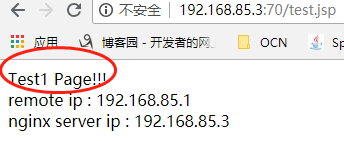
启动nginx、两台tomcat,访问 反向代理服务器nginx:http://192.168.85.3:70/test.jsp。
第一次访问,访问的是服务器A:
第二次访问,访问的是服务器B:
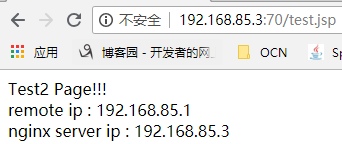
nginx+tomcat实现的 反向代理+负载均衡至此实现。
linux下配置nginx负载均衡例子的更多相关文章
- Mac下配置Nginx负载均衡
1.首先在Mac下安装Nginx(可参考我的另一篇随笔http://www.cnblogs.com/malcolmfeng/p/6896703.html). 2.安装Tomcat,下载后,解压,bin ...
- linux下配置nginx反向代理例子
官方说明: 例子: 虚拟机ip:192.168.85.3,物理机VMware Network Adapter VMnet8 ip:192.168.85.1 1,准备tomcat 准备一tomcat, ...
- Linux配置Nginx负载均衡
nginx配置负载均衡其实很简单,一直还以为负载均衡是个很高端人士玩的 首先先了解下负载均衡,假设一个场景,如果有1000个客户同时访问你服务器时,而你只有一台服务器的Nginx,且只有一个MySQL ...
- 配置nginx负载均衡
配置nginx负载均衡 执行命令:vi /usr/local/nginx/sbin/nginx/conf/nginx.conf 修改为: worker_processes 2; events { ...
- 负载均衡---在window与linux下配置nginx
最近有些时间,开始接触负载均衡方面的东西,从硬件F5再到Citrix Netscalar.不过因为硬件的配置虽然不复杂,但昂贵的价格也让一般用户望而却步(十几万到几十万),所以只能转向nginx,sq ...
- 【转】玩玩负载均衡---在window与linux下配置nginx
最近有些时间,开始接触负载均衡方面的东西,从硬件F5再到Citrix Netscalar.不过因为硬件的配置虽然不复杂,但昂贵的价格也让一般用户望而却步(十几万到几十万),所以只能转向nginx,sq ...
- 玩玩负载均衡---在window与linux下配置nginx
最近有些时间,开始接触负载均衡方面的东西,从硬件F5再到Citrix Netscalar.不过因为硬件的配置虽然不复杂,但昂贵的价格也让一般用户望而却步(十几万到几十万),所以只能转向nginx, ...
- Linux下配置nginx,负载IIS的页面
最近研究了下Linux下的nginx结果贴一下: 反向代理概念: 一般访问流程:a=>b,a访问b服务器, 加n来做反向代理流程:a=>n=>b 负载均衡概率:a访问B站点,B站点有 ...
- 如何配置nginx负载均衡配置(轮询,权重,ip绑定)
集群是为了解决单节点无法服务高并发的情况,在集群中nginx是如何分配将来自客户端的请求 转发给服务器的 负载均衡可以提高网站的吞吐量(接受和响应),减轻单台服务器的压力 负载均衡提供了三种策略:轮询 ...
随机推荐
- 关于@autoreleasepool
苹果推荐使用场景: 如果你编写的程序不是基于 UI 框架的,比如说命令行工具: 如果你编写的循环中创建了大量的临时对象:(常用) 如果你创建了一个辅助线程. @interface ViewContro ...
- python note 02 格式化与判断、字符串转换
1.格式化输出% %s %d name = input ('请输入姓名:') age = input ('请输入年龄:') height = input ('请输入身高:') msg = " ...
- @RequestBody配合@JsonFormat注解实现字符串自动转换成Date
2018年08月28日 16:41:15 混合动力火锅 阅读数:440 在controller中使用@RequestBody可以自动将字符串转换成int或者将int转换成字符串,但是Date类型则 ...
- eclipse装了springboot插件后yml文件没有自动提示问题
选择打开方式:spring yaml
- angular模拟web API
现象:angular Cannot find module 'angular-in-memory-web-api'报错找不动“angular-in-memory-web-api”模块 解决:1.控制台 ...
- 主机性能监控之wmi 获取系统信息及内存性能信息
标 题: 主机性能监控之wmi 获取系统信息及内存性能信息作 者: itdef链 接: http://www.cnblogs.com/itdef/p/3990240.html 欢迎转帖 请保持文本完整 ...
- mysql的innodb和myisam的区别和应用场景
1. 区别: (1)事务处理: MyISAM是非事务安全型的,而InnoDB是事务安全型的(支持事务处理等高级处理): (2)锁机制不同: MyISAM是表级锁,而InnoDB是行级锁: (3)sel ...
- Python3基础知识之日期时间与字符的转换
问题:“猿类”们都知道,编程中都会涉及到日期.时间类型与字符串类型的转换.不同场景,需要将字符串格式转换为日期类型:也需要将日期类型转换为字符串格式. 目标: 学习和积累python中time和dat ...
- Python3实战系列之八(获取印度售后数据项目)
问题:续接上一篇.说干咱就干呀,勤勤恳恳写程序呀! 目标:此篇开始进入正题了.为实现我们整个项目功能而开始实现各个子模块功能.首先实现第一篇列出的分步功能模块的第五步: 5.python连接SQL S ...
- ManageEngine SeviceDesk Plus帮助台和资产管理软件