
springboot 监控 Actuator
springboot 提供了对项目的监控功能。
1.首先添加依赖包
<!-- https://mvnrepository.com/artifact/org.springframework.boot/spring-boot-starter-actuator -->
<dependency>
<groupId>org.springframework.boot</groupId>
<artifactId>spring-boot-starter-actuator</artifactId>
<version>2.1.3.RELEASE</version>
</dependency>
2.浏览器访问
http://127.0.0.1:8080/actuator/health 访问项目监控需要加前缀 /actuator

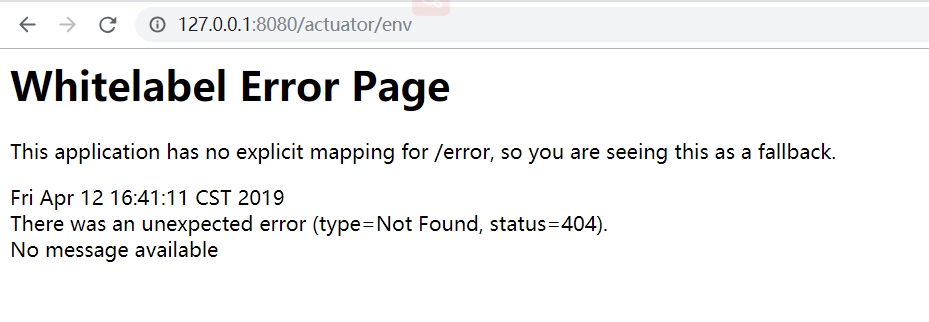
因为actuator默认只支持端点 /health、/info 所以访问 /env 会出现404页面。
3.配置端点
在application.properties中配置端点,
暴露部分端点
management.endpoints.web.exposure.include=info,health,beans,env
暴露所有端点
management.endpoints.web.exposure.include=*
不暴露beans端点
management.endpoints.web.exposure.exclude=beans
在上述配置中,首先使用 management.endpoints.web.exposure.include 暴露所有的端点,接着使用management.endpoints .web.exposure.exclud 排除 en 端点,这样就能够暴露除 env 外的所有 ctuator
端点了。
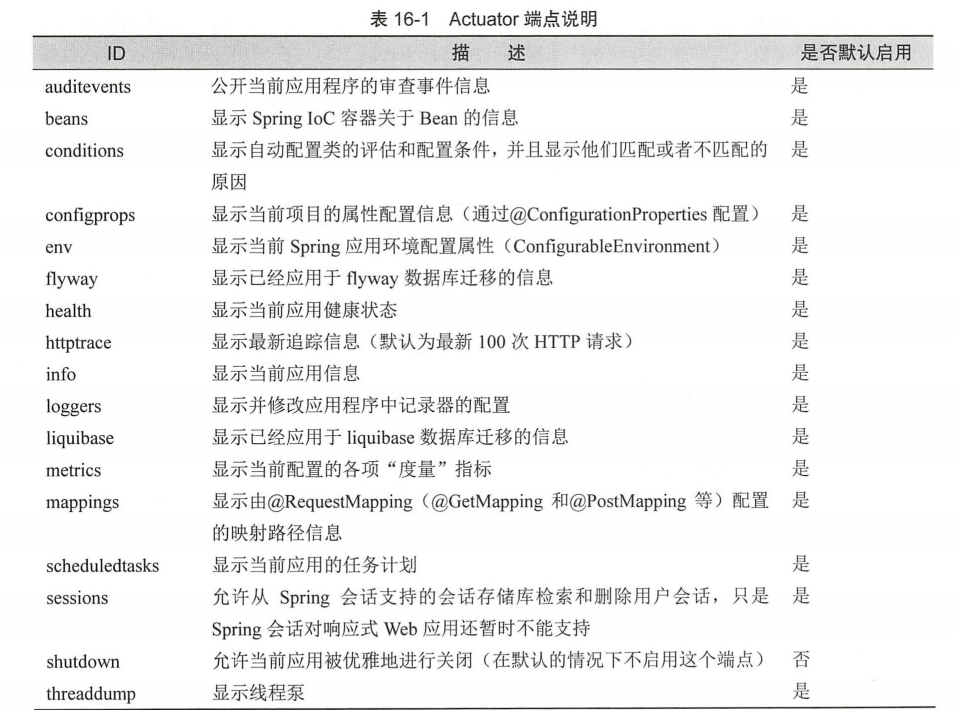
4.端点说明
5.端点其他配置
# Actuator 管理端口
management.server.port=8000
#暴露 有端
management.endpoints.web.exposure.include =女
#默认情况下 有端点都不启用,此时需要按需启用端点
management.endpoints.enabled-by-default=false
#启用端点 info
management.endpoint.info.enabled=true
#启用端点 beans
management.endpoint.beans.enabled=true
#启用端点 configprops
management.endpoint.configprops.enabled=true
#启用端点 env
management.endpont.env.enabled=true
#启用端点 health
management.endpoint.health.enabled=true
#启用端点 mappings
management.endpont.mappings.enabed=true
#启用端点 shutdown
management.endpoint.shutdown.enabled=true
# Actuator 端点前缀
management.endpoints.web.base -path=/manage
#将原来的 mappings 端点的请求路径修改为 urlMappings
management.endpoints.web.path-mapping.mappings=request_mappings
# Spring MVC 视图解析器配置
spring.mvc.view.prefix=/WEB-INF/jsp/
spring.mvc.view.suffix=.Jsp
springboot 监控 Actuator的更多相关文章
- SpringBoot系列: Actuator监控
Sprng Boot 2 actuator变动加大, 网上很多资料都都已经过期. ============================配置项============================ ...
- 【spring cloud】【spring boot】网管服务-->配置文件添加endpoints.enabled = false,SpringBoot应用监控Actuator使用的安全隐患
转载:https://xz.aliyun.com/t/2233 ==================================================================== ...
- SpringBoot集成Actuator监控管理
1.说明 本文详细介绍Spring Boot集成Actuator监控管理的方法, 基于已经创建好的Spring Boot工程, 然后引入Actuator依赖, 介绍监控管理相关功能的使用. Sprin ...
- springboot集成Actuator
Actuator监控端点,主要用来监控与管理. 原生端点主要分为三大类:应用配置类.度量指标类.操作控制类. 应用配置类:获取应用程序中加载的配置.环境变量.自动化配置报告等与SpringBoot应用 ...
- SpringBoot 之Actuator.
一.Actuator 介绍 Actuator 是 SpringBoot 项目中一个非常强大一个功能,有助于对应用程序进行监视和管理,通过 restful api 请求来监管.审计.收集应用的运行情况. ...
- Springboot监控之二:Spring Boot Admin对Springboot服务进行监控
概述 Spring Boot 监控核心是 spring-boot-starter-actuator 依赖,增加依赖后, Spring Boot 会默认配置一些通用的监控,比如 jvm 监控.类加载.健 ...
- SpringBoot 开启 Actuator
在生产环境中,需要实时或定期监控服务的可用性.spring-boot 的actuator(监控)功能提供了很多监控所需的接口.简单的配置和使用如下: 1.引入依赖: <dependency> ...
- SpringBoot集成actuator模块的基本使用
© 版权声明:本文为博主原创文章,转载请注明出处 1. 版本 SpringBoot:2.0.0.RELEASE 2. 集成 SpringBoot集成actuator模块非常简单,只需要引入actuat ...
- SpringBoot入门教程(十)应用监控Actuator
Actuator可能大家非常熟悉,它是springboot提供对应用自身监控,以及对应用系统配置查看等功能.spring-boot-starter-actuator模块的实现对于实施微服务的中小团队来 ...
随机推荐
- 2019-4-26 css学习笔记
CSS简介:Cascading Style Sheets(层叠样式表)的缩写,它是一种用来表现HTML或XML等文件样式的计算机语言. CSS的作用:是定义网页外观(例如,字体.背景.文本.位置.布局 ...
- vue moment库格式化处理后端传的日期
开篇 日期时间格式前端和后端都可以处理,我比较推荐前端来处理(定制化高),下面我就介绍下两种处理的方式 后端处理 django默认不经处理传给前端的日期格式为2018-08-26T19:53:36.5 ...
- 14-02 Java Math类,Random类,System类,BigDecimal类
Math类 Math的方法 package cn.itcast_01; /* * Math:用于数学运算的类. * 成员变量: * public static final double PI * pu ...
- MySQL百万级、千万级数据多表关联SQL语句调优
本文不涉及复杂的底层数据结构,通过explain解释SQL,并根据可能出现的情况,来做具体的优化,使百万级.千万级数据表关联查询第一页结果能在2秒内完成(真实业务告警系统优化结果).希望读者能够理解S ...
- 从零开始学 Web 之 DOM(三)innerText与innerHTML、自定义属性
大家好,这里是「 Daotin的梦呓 」从零开始学 Web 系列教程.此文首发于「 Daotin的梦呓 」公众号,欢迎大家订阅关注.在这里我会从 Web 前端零基础开始,一步步学习 Web 相关的知识 ...
- 从零开始学 Web 之 BOM(三)offset,scroll,变速动画函数
大家好,这里是「 从零开始学 Web 系列教程 」,并在下列地址同步更新...... github:https://github.com/Daotin/Web 微信公众号:Web前端之巅 博客园:ht ...
- kaggle-Digit Recognizer
安装kaggle工具获取数据源(linux 环境) 采用sklearn的KNeighborsClassifier训练数据 通过K折交叉验证来选取K值是正确率更高 1.安装kaggle,获取数据源 pi ...
- golang逃逸分析和竞争检测
最近在线上发现一块代码逻辑在执行N次耗时波动很大1ms~800ms,最开始以为是gc的问题,对代码进行逃逸分析,看哪些变量被分配到堆上了,后来发现是并发编程时对一个切片并发的写,导致存在竞争,类似下面 ...
- redis-scala链接redis集群
代码: package com.wenbronk.sparkstreaming.scala.commons import java.time.Duration import io.lettuce.co ...
- FFmpeg编解码处理2-编解码API详解
本文为作者原创,转载请注明出处:https://www.cnblogs.com/leisure_chn/p/10584925.html FFmpeg编解码处理系列笔记: [0]. FFmpeg时间戳详 ...