
springboot 监控 Actuator
springboot 提供了对项目的监控功能。
1.首先添加依赖包
<!-- https://mvnrepository.com/artifact/org.springframework.boot/spring-boot-starter-actuator -->
<dependency>
<groupId>org.springframework.boot</groupId>
<artifactId>spring-boot-starter-actuator</artifactId>
<version>2.1.3.RELEASE</version>
</dependency>
2.浏览器访问
http://127.0.0.1:8080/actuator/health 访问项目监控需要加前缀 /actuator

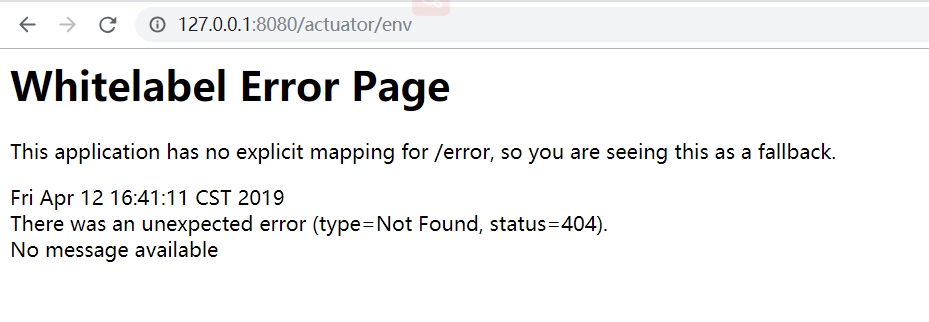
因为actuator默认只支持端点 /health、/info 所以访问 /env 会出现404页面。
3.配置端点
在application.properties中配置端点,
暴露部分端点
management.endpoints.web.exposure.include=info,health,beans,env
暴露所有端点
management.endpoints.web.exposure.include=*
不暴露beans端点
management.endpoints.web.exposure.exclude=beans
在上述配置中,首先使用 management.endpoints.web.exposure.include 暴露所有的端点,接着使用management.endpoints .web.exposure.exclud 排除 en 端点,这样就能够暴露除 env 外的所有 ctuator
端点了。
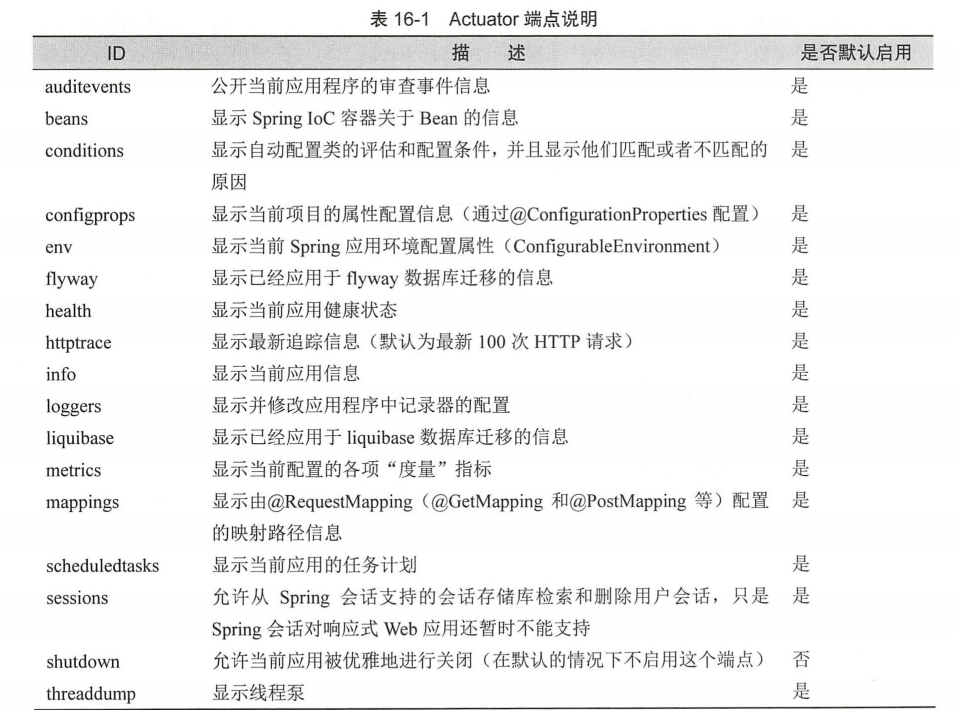
4.端点说明
5.端点其他配置
# Actuator 管理端口
management.server.port=8000
#暴露 有端
management.endpoints.web.exposure.include =女
#默认情况下 有端点都不启用,此时需要按需启用端点
management.endpoints.enabled-by-default=false
#启用端点 info
management.endpoint.info.enabled=true
#启用端点 beans
management.endpoint.beans.enabled=true
#启用端点 configprops
management.endpoint.configprops.enabled=true
#启用端点 env
management.endpont.env.enabled=true
#启用端点 health
management.endpoint.health.enabled=true
#启用端点 mappings
management.endpont.mappings.enabed=true
#启用端点 shutdown
management.endpoint.shutdown.enabled=true
# Actuator 端点前缀
management.endpoints.web.base -path=/manage
#将原来的 mappings 端点的请求路径修改为 urlMappings
management.endpoints.web.path-mapping.mappings=request_mappings
# Spring MVC 视图解析器配置
spring.mvc.view.prefix=/WEB-INF/jsp/
spring.mvc.view.suffix=.Jsp
springboot 监控 Actuator的更多相关文章
- SpringBoot系列: Actuator监控
Sprng Boot 2 actuator变动加大, 网上很多资料都都已经过期. ============================配置项============================ ...
- 【spring cloud】【spring boot】网管服务-->配置文件添加endpoints.enabled = false,SpringBoot应用监控Actuator使用的安全隐患
转载:https://xz.aliyun.com/t/2233 ==================================================================== ...
- SpringBoot集成Actuator监控管理
1.说明 本文详细介绍Spring Boot集成Actuator监控管理的方法, 基于已经创建好的Spring Boot工程, 然后引入Actuator依赖, 介绍监控管理相关功能的使用. Sprin ...
- springboot集成Actuator
Actuator监控端点,主要用来监控与管理. 原生端点主要分为三大类:应用配置类.度量指标类.操作控制类. 应用配置类:获取应用程序中加载的配置.环境变量.自动化配置报告等与SpringBoot应用 ...
- SpringBoot 之Actuator.
一.Actuator 介绍 Actuator 是 SpringBoot 项目中一个非常强大一个功能,有助于对应用程序进行监视和管理,通过 restful api 请求来监管.审计.收集应用的运行情况. ...
- Springboot监控之二:Spring Boot Admin对Springboot服务进行监控
概述 Spring Boot 监控核心是 spring-boot-starter-actuator 依赖,增加依赖后, Spring Boot 会默认配置一些通用的监控,比如 jvm 监控.类加载.健 ...
- SpringBoot 开启 Actuator
在生产环境中,需要实时或定期监控服务的可用性.spring-boot 的actuator(监控)功能提供了很多监控所需的接口.简单的配置和使用如下: 1.引入依赖: <dependency> ...
- SpringBoot集成actuator模块的基本使用
© 版权声明:本文为博主原创文章,转载请注明出处 1. 版本 SpringBoot:2.0.0.RELEASE 2. 集成 SpringBoot集成actuator模块非常简单,只需要引入actuat ...
- SpringBoot入门教程(十)应用监控Actuator
Actuator可能大家非常熟悉,它是springboot提供对应用自身监控,以及对应用系统配置查看等功能.spring-boot-starter-actuator模块的实现对于实施微服务的中小团队来 ...
随机推荐
- CentOS No manual entry for man 没有 xx 的手册页条目
yum install -y man man-pages man-pages-overrides https://unix.stackexchange.com/questions/182500/no- ...
- 前端学习之路-CSS介绍,Html介绍,JavaScript介绍
CSS介绍 学前端必备掌握CSS样式,css为层叠样式表,用来定义页面的显示效果,加强用户的体验乐趣,那么如何用css到html中呢? style属性方式 利用标签中的style属性来改变显示样式 & ...
- Java匹马行天下之JavaSE核心技术——面向对象
面向对象 注: 看此篇时强烈建议有一定的面向对象思想基础,有一定的基础后先翻到下面看第九条: 9.面向对象: 从未封装→封装→继承→多态→抽象类→接口的代码演变 按这个逻辑去看,,哪有不理解 ...
- [SDOI2006] 二进制方程
并查集水题.维护变量的对应位的相关关系,判断不确定点(自由元)的个数即可. 代码中的p数组:p[1] 值的id, p[2~k+1]每个变量的第一位的id. #include <bits/stdc ...
- 常用博客Metaweblog Api地址
常用博客Metaweblog Api地址 CSDN: http://write.blog.csdn.net/xmlrpc/index 博客园(cnblogs):http://www.cnblogs.c ...
- 为什么我们喜欢用 sigmoid 这类 S 型非线性变换?
本文整理自 @老师木 的一条图片新浪微博,从另一个角度给出为何采用 sigmoid 函数作非线性变换的解释. 为什么我们喜欢用 sigmoid 这类 S 型非线性变换?
- Redis主从同步原理-SYNC【转】
和MySQL主从复制的原因一样,Redis虽然读取写入的速度都特别快,但是也会产生读压力特别大的情况.为了分担读压力,Redis支持主从复制,Redis的主从结构可以采用一主多从或者级联结构,下图为级 ...
- PHP-CPP开发扩展(四)
PHP-CPP是一个用于开发PHP扩展的C++库.本节讲解如何在C++中调用PHP函数. 调用PHP函数 调用普通函数 // call a function from user space Php:: ...
- 程序员进阶之算法练习:LeetCode专场
欢迎大家前往腾讯云+社区,获取更多腾讯海量技术实践干货哦~ 本文由落影发表 前言 LeetCode上的题目是大公司面试常见的算法题,今天的目标是拿下5道算法题: 题目1是基于链表的大数加法,既考察基本 ...
- 详解 Java NIO
文件的抽象化表示,字节流以及字符流的文件操作等属于传统 IO 的相关内容,我们已经在前面的文章进行了较为深刻的学习了. 但是传统的 IO 流还是有很多缺陷的,尤其它的阻塞性加上磁盘读写本来就慢,会导致 ...