
ssm整合(方案一 引入jar)
最近为了研究redis整合,基本都是ssm+redis 好吧 我是老古董了,以前都是ssi,那就折腾一下ssm先,具体方案:
方案一:基本引入jar版、方案二:maven版(后续继续整)
这篇主要是通过方案一,反正折腾jar折腾了好久。
jar可以在我的百度云下载http://pan.baidu.com/s/1eRG5kky
项目目录
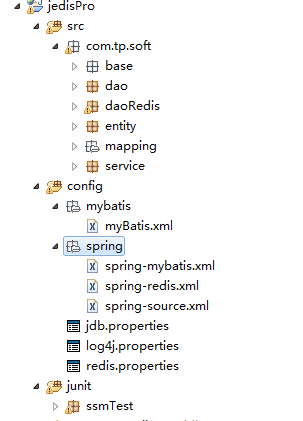
步骤如下:
一:
jdb.properties
#JDBCdriver

jdbc.driverClassName=oracle.jdbc.driver.OracleDriver

#JDBC

jdbc.url=数据库服务器链接

jdbc.username=数据库账号

jdbc.password=数据库密码

jdbc.publickey=公钥解密

jdbc.dbcp.initialSize=

jdbc.dbcp.maxActive=

jdbc.dbcp.maxIdle=

jdbc.dbcp.minIdle=

jdbc.dbcp.maxWait=
redis.properties用于redis的配置文件。ssm中暂时未用到可以忽略
二:
spring-source.xml
<?xml version="1.0" encoding="UTF-8"?>

<beans xmlns="http://www.springframework.org/schema/beans"

    xmlns:xsi="http://www.w3.org/2001/XMLSchema-instance"

    xmlns:aop="http://www.springframework.org/schema/aop"

    xmlns:context="http://www.springframework.org/schema/context"

    xmlns:tx="http://www.springframework.org/schema/tx"

    xmlns:jee="http://www.springframework.org/schema/jee"

    xmlns:jdbc="http://www.springframework.org/schema/jdbc"

    xmlns:cache="http://www.springframework.org/schema/cache"

    xmlns:jaxws="http://cxf.apache.org/jaxws"

    xmlns:jaxrs="http://cxf.apache.org/jaxrs"

    xsi:schemaLocation="http://www.springframework.org/schema/beans

                     http://www.springframework.org/schema/beans/spring-beans.xsd

                     http://www.springframework.org/schema/tx

                     http://www.springframework.org/schema/tx/spring-tx.xsd

                     http://www.springframework.org/schema/context

                     http://www.springframework.org/schema/context/spring-context.xsd

                     http://www.springframework.org/schema/aop

                     http://www.springframework.org/schema/aop/spring-aop.xsd

                     http://www.springframework.org/schema/jee

                     http://www.springframework.org/schema/jee/spring-jee-3.1.xsd

                     http://www.springframework.org/schema/jdbc

                     http://www.springframework.org/schema/jdbc/spring-jdbc-3.1.xsd

                     http://www.springframework.org/schema/cache http://www.springframework.org/schema/cache/spring-cache-3.2.xsd

                     http://cxf.apache.org/jaxws

                     http://cxf.apache.org/schemas/jaxws.xsd

                     http://cxf.apache.org/jaxrs

                     http://cxf.apache.org/schemas/jaxrs.xsd"  default-autowire="byName" >

    <context:annotation-config />

    <!-- 扫描注解web整合时用 -->

    <context:component-scan base-package="com.tp.soft" />

    <context:property-placeholder location="classpath:*.properties"/>

    <!-- <bean id="jsonSerializer" class="com.tp.soft.base.redis.JsonRedisSeriaziler"/>

    <bean id="userDao" class="com.tp.soft.daoRedis.impl.UserDaoImpl" />  -->

    <bean id="userSvc" class="com.tp.soft.service.impl.UserSvcImpl" />

</beans>
三:
spring-mybatis.xml
<?xml version="1.0" encoding="UTF-8"?>

<beans xmlns="http://www.springframework.org/schema/beans"

    xmlns:xsi="http://www.w3.org/2001/XMLSchema-instance"

    xmlns:aop="http://www.springframework.org/schema/aop"

    xmlns:context="http://www.springframework.org/schema/context"

    xmlns:tx="http://www.springframework.org/schema/tx"

    xmlns:jee="http://www.springframework.org/schema/jee"

    xmlns:jdbc="http://www.springframework.org/schema/jdbc"

    xmlns:cache="http://www.springframework.org/schema/cache"

    xmlns:jaxws="http://cxf.apache.org/jaxws"

    xmlns:jaxrs="http://cxf.apache.org/jaxrs"

    xsi:schemaLocation="http://www.springframework.org/schema/beans

                     http://www.springframework.org/schema/beans/spring-beans.xsd

                     http://www.springframework.org/schema/tx

                     http://www.springframework.org/schema/tx/spring-tx.xsd

                     http://www.springframework.org/schema/context

                     http://www.springframework.org/schema/context/spring-context.xsd

                     http://www.springframework.org/schema/aop

                     http://www.springframework.org/schema/aop/spring-aop.xsd

                     http://www.springframework.org/schema/jee

                     http://www.springframework.org/schema/jee/spring-jee-3.1.xsd

                     http://www.springframework.org/schema/jdbc

                     http://www.springframework.org/schema/jdbc/spring-jdbc-3.1.xsd

                     http://www.springframework.org/schema/cache http://www.springframework.org/schema/cache/spring-cache-3.2.xsd

                     http://cxf.apache.org/jaxws

                     http://cxf.apache.org/schemas/jaxws.xsd

                     http://cxf.apache.org/jaxrs

                     http://cxf.apache.org/schemas/jaxrs.xsd"  default-autowire="byName" >

    <!--Druid 连接池配置-->

    <bean id="dataSource" class="com.alibaba.druid.pool.DruidDataSource" init-method="init" destroy-method="close">

        <!-- 基本属性 url、user、password -->

        <property name="url" value="${jdbc.url}" />

        <property name="username" value="${jdbc.username}" />

        <property name="password" value="${jdbc.password}" />

        <property name="filters" value="stat,config" />

         <property name="connectionProperties" value="config.decrypt=true;config.decrypt.key=${jdbc.publickey}" />

        <!-- 配置初始化大小、最小、最大 -->

        <property name="initialSize" value="1" />

        <property name="minIdle" value="1" />

        <property name="maxActive" value="40" />

        <!-- 配置获取连接等待超时的时间 -->

        <property name="maxWait" value="60000" />

        <!-- 配置间隔多久才进行一次检测,检测需要关闭的空闲连接,单位是毫秒 -->

        <property name="timeBetweenEvictionRunsMillis" value="60000" />

        <!-- 配置一个连接在池中最小生存的时间,单位是毫秒 -->

        <property name="minEvictableIdleTimeMillis" value="300000" />

        <property name="validationQuery" value="SELECT 'x' FROM DUAL" />

        <property name="testWhileIdle" value="true" />

        <property name="testOnBorrow" value="false" />

        <property name="testOnReturn" value="false" />

        <!-- 打开PSCache,并且指定每个连接上PSCache的大小 -->

        <property name="poolPreparedStatements" value="true" />

        <property name="maxPoolPreparedStatementPerConnectionSize" value="20" />

        <!-- 配置监控统计拦截的filters,去掉后监控界面sql无法统计 -->

        <!-- property name="filters" value="stat" /-->

    </bean>

    <!-- 配置sqlSessionFactory -->

    <bean id="sqlSessionFactory" class="org.mybatis.spring.SqlSessionFactoryBean">

        <property name="dataSource" ref="dataSource"/>

        <property name="configLocation" value="classpath:mybatis/mybatis.xml"/>

    </bean>

    <!-- 扫描mapper -->

    <bean class="org.mybatis.spring.mapper.MapperScannerConfigurer">

        <property name="basePackage" value="com.tp.soft.dao"/>

        <!-- <property name="sqlSessionFactoryBeanName" ref="sqlSessionFactory" />   -->

        <property name="sqlSessionFactory" ref="sqlSessionFactory" />

    </bean>

</beans>
四:
spring-mybatis.xml
<?xml version="1.0" encoding="UTF-8"?>

<!DOCTYPE configuration PUBLIC "-//mybatis.org//DTD Config 3.0//EN"

"http://mybatis.org/dtd/mybatis-3-config.dtd">

<configuration>

   <!-- 配置映射类的别名 -->

    <typeAliases>

     <!-- 配置entity下的所有别名 别名首字母小写 -->

     <!-- <package name="com.tp.soft.entity"/> -->

     <typeAlias alias="User" type="com.tp.soft.entity.AuUser"/>

   </typeAliases>

   <mappers>

       <mapper resource="com/tp/soft/mapping/UserMapper.xml"/>

   </mappers>

</configuration>
五、
UserMapper.xml
<?xml version="1.0" encoding="UTF-8" ?>

<!DOCTYPE mapper PUBLIC "-//mybatis.org//DTD Mapper 3.0//EN" "http://mybatis.org/dtd/mybatis-3-mapper.dtd" >

<mapper namespace="com.tp.soft.dao.UserMapper" >

   <select id="getUser" parameterType="int" resultType="User">

        select * from AU_USER where userid = #{id}

   </select>

</mapper>
六、
实体类AuUser.java
package com.tp.soft.entity;

import java.io.Serializable;

public class AuUser implements Serializable{

    /**

     *

     */

    private static final long serialVersionUID = -1695973853274402680L;

    private int userid;

    private String login_name;

    private String login_pwd;

    public AuUser() {

    }

    public AuUser(int userid, String login_name, String login_pwd) {

        super();

        this.userid = userid;

        this.login_name = login_name;

        this.login_pwd = login_pwd;

    }

    public int getUserid() {

        return userid;

    }

    public void setUserid(int userid) {

        this.userid = userid;

    }

    public String getLogin_name() {

        return login_name;

    }

    public void setLogin_name(String login_name) {

        this.login_name = login_name;

    }

    public String getLogin_pwd() {

        return login_pwd;

    }

    public void setLogin_pwd(String login_pwd) {

        this.login_pwd = login_pwd;

    }

}
七:
dao层
UserMapper.java
package com.tp.soft.dao;

import com.tp.soft.entity.AuUser;

public interface UserMapper {

    public AuUser getUser(int id);

}
八:
业务层
UserSvc.java
package com.tp.soft.service;

import com.tp.soft.entity.AuUser;

public interface UserSvc {

    public AuUser getUser(int id);

}
UserSvcImpl.java
package com.tp.soft.service.impl;

import javax.annotation.Resource;

import org.springframework.dao.DataAccessException;

import org.springframework.stereotype.Service;

import com.tp.soft.dao.UserMapper;

import com.tp.soft.entity.AuUser;

import com.tp.soft.service.UserSvc;

@Service("userSvc")

public class UserSvcImpl implements UserSvc{

    @Resource

    private UserMapper userMapper;

    @Override

    public AuUser getUser(int id) {

        AuUser user = null;

        try{

            user = userMapper.getUser(id);

        }catch (DataAccessException e) {

            System.out.println(e.getLocalizedMessage());

        }

        return user;

    }

}
九:
junit测试
package ssmTest;

import javax.annotation.Resource;

import org.apache.log4j.PropertyConfigurator;

import org.junit.Before;

import org.junit.Test;

import org.springframework.test.context.ContextConfiguration;

import org.springframework.test.context.junit4.AbstractJUnit4SpringContextTests;

import com.tp.soft.entity.AuUser;

import com.tp.soft.service.UserSvc;

@ContextConfiguration(locations = {"classpath:/spring/spring-*.xml"})

public class RedisZhTest extends AbstractJUnit4SpringContextTests{

    @Resource

    private UserSvc userSvc;

    @Before

    public void loadLog(){

        PropertyConfigurator.configure("config/log4j.properties");//加载.properties文件

    }

    @Test

    public void test01(){

        AuUser user = userSvc.getUser(21);

        System.out.println(user.getLogin_name());

    }

}

到此配置全部结束
提别注意:
UserMapper.xml必须与UserMapper.java dao接口名字一样 以及和<mapper namespace="com.tp.soft.dao.UserMapper" >匹配
ssm整合(方案一 引入jar)的更多相关文章
- SSM整合文档
SSM整合文档 v2 一. 文件说明 文件名 描述 spring-servlet.xml 配置SpringMvc框架相关 applicationContext.xml 配置Spring容器 sprin ...
- ssm 整合(方案二 maven)
通过maven来整合ssm方便很多,至少不用去找jar包 具体架构如下: 1.配置pom.xml <project xmlns="http://maven.apache.org/POM ...
- Eclipse中的工程引入jar包后没有整合到一个文件夹而是全部在根目录下显示
Eclipse中的工程引入jar包后没有整合到一个文件夹而是全部在根目录下显示 解决方案: 1,在Eclipse中,点击window-->Preferences-->Java-->B ...
- 08 SSM整合案例(企业权限管理系统):06.产品操作
04.AdminLTE的基本介绍 05.SSM整合案例的基本介绍 06.产品操作 07.订单操作 08.用户操作 09.权限控制 10.权限关联与控制 11.AOP日志 06.产品操作 SSM 环境搭 ...
- Maven + 最新SSM整合
. 1. 开发环境搭建 参考博文:Eclipse4.6(Neon) + Tomcat8 + MAVEN3.3.9 + SVN项目完整环境搭建 2. Maven Web项目创建 2.1. 2.2. 2. ...
- SSM整合配置
SSM三大框架整合详细教程(Spring+SpringMVC+MyBatis) 使用SSM(Spring.SpringMVC和Mybatis)已经有三个多月了,项目在技术上已经没有什么难点了,基于现有 ...
- ssm整合说明与模板-Spring Spring MVC Mybatis整合开发
ssm整合说明 spring+spring mvc+mybatis 说明 源码下载 由于之前存在ssh框架,spring+struts+hibernate,其中spring负责aop与ioc,所以一般 ...
- spring MVC框架入门(外加SSM整合)
spring MVC框架 一.什么是sping MVC Spring MVC属于SpringFrameWork的后续产品,已经融合在Spring Web Flow里面.Spring 框架提供了构建 W ...
- Maven+SSM整合.doc
Maven + SSM整合 1开发环境搭建 1.1Eclipse4.7(Oxygen) + Tomcat8 + Maven3.5.2 2Maven Web项目创建 2.1新建maven项目 2.2 选 ...
随机推荐
- JavaScript基础知识(字符串的方法)
字符串的方法 1.字符串: 在js中被单引号或双引号包起来的内容都是字符串: var t = "true"; console.log(typeof t);// "stri ...
- MongoDB复制集原理、环境配置及基本测试详解
一.MongoDB复制集概述 MongoDB复制集实现了冗余备份和故障转移两大功能,这样能保证数据库的高可用性.在生产环境,复制集至少包括三个节点,其中一个必须为主节点,一个从节点,一个仲裁节点.其中 ...
- sourceTree回退撤销commit
https://blog.csdn.net/gang544043963/article/details/71511958
- 【实战】Docker入门实践二:Docker服务基本操作 和 测试Hello World
操作环境 操作系统:CentOS7.2 内存:1GB CPU:2核 Docker服务常用命令 docker服务操作命令如下 service docker start #启动服务 service doc ...
- 【Python全栈-JavaScript】JavaScript的window.onload()与jQuery 的ready()的区别
JavaScript的window.onload()与jQuery 的ready()的区别 做web开发时常用Jquery中$(document).ready()和JavaScript中的window ...
- java框架之Spring(1)-入门
介绍 概述 Spring 是一个开放源代码的设计层面框架,它解决的是业务逻辑层和其他各层的松耦合问题,因此它将面向接口的编程思想贯穿整个系统应用.Spring 是于 2003 年兴起的一个轻量级的 J ...
- 【Java】NO.80.Note.1.Java.1.001-【Java 各种特性概念】
1.0.0 Summary Tittle:[Java]NO.80.Note.1.Java.1.001-[Java 各种特性概念] Style:Java Series:Java Since:2018-0 ...
- Address already in use: AH00072: make_sock: could not bind to address 0.0.0.0:443
(1)端口被占用,找到对应的进行并结束.(2)Linux下查看,无进程占用443端口,确认/etc/httpd/conf.d下只有一个ssl.conf,无其他SSL配置.备份文件,如果有,apache ...
- [warn] _default_ VirtualHost overlap on port 443, the first has precedence
配置文件中添加 NameVirtualHost *:433 保存重启apache
- Ocelot:API网关概要
一.概要 Ocelot是.Net Core下一个开源API网关:Ocelot主要目标是在.NET在微服务或面向服务架构中提供统一的入口服务, Ocelot拿到HttpRequest对象到管道后,先创建 ...