
JavaScript鼠标拖动div且可调整div大小
http://www.softwhy.com/article-5502-1.html
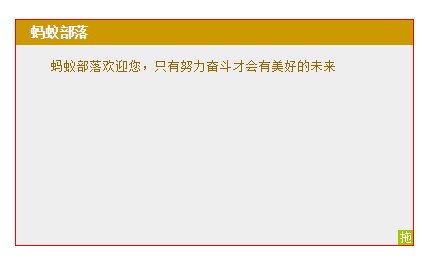
<!DOCTYPE html>

<html>

<head>

<meta charset=" utf-8">

<meta name="author" content="http://www.softwhy.com/" />

<title>蚂蚁部落</title>

<style>

*{

  margin:0;

  padding:0;

}

#zhezhao{

  width:100%;

  height:100%;

  background:#f00;

  filter:alpha(opacity:0);

  opacity:0;

  z-index:9999;

  position:absolute;

  top:0;

  left:0;

  display:none;

}

#div2{

  width:200px;

  height:200px;

  position:relative;

  background:#EEEEEE;

  border:1px solid #f00;

}

#div1{

  width:15px;

  height:15px;

  background:#99CC00;

  position:absolute;

  right:0px;

  bottom:0px;

  cursor:nw-resize;

  overflow:hidden;

  font-size:12px;

  text-align:center;

  line-height:15px;

  color:#FFFFFF;

  float:right;

  z-index:3;

}

#right{

  width:15px;

  height:100%;

  background:#f00;

  float:right;

  position:absolute;

  right:0;

  top:0;

  cursor:e-resize;

  overflow:hidden;

  filter:alpha(opacity:0);

  opacity:0;

  z-index:1;

}

#bottom{

  width:100%;

  height:15px;

  background:#f00;

  position:absolute;

  left:0;

  bottom:0;

  cursor:n-resize;

  overflow:hidden;

  filter:alpha(opacity:0);

  opacity:0;

  z-index:1;

}

#div2 p{

  padding:10px;

  line-height:24px;

  font-size:13px;

  text-indent:24px;

  color:#996600;

}

#div2 h2{

  width:100%;

  height:25px;

  line-height:25px;

  font-size:14px;

  background:#CC9900;

  color:#FFFFFF;

  text-indent:15px;

  cursor:move;

  overflow:hidden;

}

</style>

<script type="text/javascript">

window.onload=function(){

  var oDiv=document.getElementById("div1");

  var oDiv2=document.getElementById("div2");

  var zhezhao=document.getElementById("zhezhao");

  var h2=oDiv2.getElementsByTagName("h2")[0];

  var right=document.getElementById("right");

  var bottom=document.getElementById("bottom");

  var mouseStart={};

  var divStart={};

  var rightStart={};

  var bottomStart={};

  //往右拽

  right.onmousedown=function(ev){

    var oEvent=ev||event;

    mouseStart.x=oEvent.clientX;

    mouseStart.y=oEvent.clientY;

    rightStart.x=right.offsetLeft;

    if(right.setCapture){

      right.onmousemove=doDrag1;

      right.onmouseup=stopDrag1;

      right.setCapture();

    }

    else{

      document.addEventListener("mousemove",doDrag1,true);

      document.addEventListener("mouseup",stopDrag1,true);

    }

  };

  function doDrag1(ev){

    var oEvent=ev||event;

    var l=oEvent.clientX-mouseStart.x+rightStart.x;

    var w=l+oDiv.offsetWidth;

    if(w<oDiv.offsetWidth){

      w=oDiv.offsetWidth;

    }

    else if(w>document.documentElement.clientWidth-oDiv2.offsetLeft){

      w=document.documentElement.clientWidth-oDiv2.offsetLeft-2;

    }

    oDiv2.style.width=w+"px";

  };

  function stopDrag1(){

    if(right.releaseCapture){

      right.onmousemove=null;

      right.onmouseup=null;

      right.releaseCapture();

    }

    else{

      document.removeEventListener("mousemove",doDrag1,true);

      document.removeEventListener("mouseup",stopDrag1,true);

    }

  };

  //往下拽

  bottom.onmousedown=function(ev){

    var oEvent=ev||event;

    mouseStart.x=oEvent.clientX;

    mouseStart.y=oEvent.clientY;

    bottomStart.y=bottom.offsetTop;

    if(bottom.setCapture){

      bottom.onmousemove=doDrag2;

      bottom.onmouseup=stopDrag2;

      bottom.setCapture();

    }

    else{

      document.addEventListener("mousemove",doDrag2,true);

      document.addEventListener("mouseup",stopDrag2,true);

    }

  };

  function doDrag2(ev){

    var oEvent=ev||event;

    var t=oEvent.clientY-mouseStart.y+bottomStart.y;

    var h=t+oDiv.offsetHeight;

    if(h<oDiv.offsetHeight){

      h=oDiv.offsetHeight;

    }

    else if(h>document.documentElement.clientHeight-oDiv2.offsetTop){

      h=document.documentElement.clientHeight-oDiv2.offsetTop-2;

    }

    oDiv2.style.height=h+"px";

  };

  function stopDrag2(){

    if(bottom.releaseCapture){

      bottom.onmousemove=null;

      bottom.onmouseup=null;

      bottom.releaseCapture();

    }

    else{

      document.removeEventListener("mousemove",doDrag2,true);

      document.removeEventListener("mouseup",stopDrag2,true);

    }

  };

  //往左右同时拽

  oDiv.onmousedown=function(ev){

    var oEvent=ev||event;

    mouseStart.x=oEvent.clientX;

    mouseStart.y=oEvent.clientY;

    divStart.x=oDiv.offsetLeft;

    divStart.y=oDiv.offsetTop;

    if(oDiv.setCapture){

      oDiv.onmousemove=doDrag;

      oDiv.onmouseup=stopDrag;

      oDiv.setCapture();

    }

    else{

      document.addEventListener("mousemove",doDrag,true);

      document.addEventListener("mouseup",stopDrag,true);

    }

    zhezhao.style.display='block';

  };

  function doDrag(ev){

    var oEvent=ev||event;

    var l=oEvent.clientX-mouseStart.x+divStart.x;

    var t=oEvent.clientY-mouseStart.y+divStart.y;

    var w=l+oDiv.offsetWidth;

    var h=t+oDiv.offsetHeight;

    if(w<oDiv.offsetWidth){

      w=oDiv.offsetWidth;

    }

    else if(w>document.documentElement.clientWidth-oDiv2.offsetLeft){

      w=document.documentElement.clientWidth-oDiv2.offsetLeft-2;

    }

    if(h<oDiv.offsetHeight){

      h=oDiv.offsetHeight;

    }

    else if(h>document.documentElement.clientHeight-oDiv2.offsetTop){

      h=document.documentElement.clientHeight-oDiv2.offsetTop-2;

    }

    oDiv2.style.width=w+"px";

    oDiv2.style.height=h+"px";

  };

  function stopDrag(){

    if(oDiv.releaseCapture){

      oDiv.onmousemove=null;

      oDiv.onmouseup=null;

      oDiv.releaseCapture();

    }

    else{

      document.removeEventListener("mousemove",doDrag,true);

      document.removeEventListener("mouseup",stopDrag,true);

    }

    zhezhao.style.display='none';

  };

  //h2完美拖拽

  h2.onmousedown=function(ev){

    var oEvent=ev||event;

    mouseStart.x=oEvent.clientX;

    mouseStart.y=oEvent.clientY;

    divStart.x=oDiv2.offsetLeft;

    divStart.y=oDiv2.offsetTop;

    if(h2.setCapture){

      h2.onmousemove=doDrag3;

      h2.onmouseup=stopDrag3;

      h2.setCapture();

    }

    else{

      document.addEventListener("mousemove",doDrag3,true);

      document.addEventListener("mouseup",stopDrag3,true);

    }

    zhezhao.style.display='block';

  };

  function doDrag3(ev){

    var oEvent=ev||event;

    var l=oEvent.clientX-mouseStart.x+divStart.x;

    var t=oEvent.clientY-mouseStart.y+divStart.y;

    if(l<0){

      l=0;

    }

    else if(l>document.documentElement.clientWidth-oDiv2.offsetWidth){

      l=document.documentElement.clientWidth-oDiv2.offsetWidth;

    }

    if(t<0){

      t=0;

    }

    else if(t>document.documentElement.clientHeight-oDiv2.offsetHeight){

      t=document.documentElement.clientHeight-oDiv2.offsetHeight;

    }

    oDiv2.style.left=l+"px";

    oDiv2.style.top=t+"px";

  };

  function stopDrag3(){

    if(h2.releaseCapture){

      h2.onmousemove=null;

      h2.onmouseup=null;

      h2.releaseCapture();

    }

    else{

      document.removeEventListener("mousemove",doDrag3,true);

      document.removeEventListener("mouseup",stopDrag3,true);

    }

    zhezhao.style.display='none';

  }

};

</script>

</head>

<body>

<div id="div2">

 <div style="width:100%;height:100%;overflow:hidden;">

 <h2>蚂蚁部落</h2>

 <p>蚂蚁部落欢迎您,只有努力奋斗才会有美好的未来</p>

 <div id="right"></div>

 <div id="div1">拖</div>

 <div id="bottom"></div>

 </div>

</div>

<div id="zhezhao"></div>

</body>

</html>
JavaScript鼠标拖动div且可调整div大小的更多相关文章
- Javascript 简单实现鼠标拖动DIV
http://zhangbo-peipei-163-com.iteye.com/blog/1740078 比较精简的Javascript拖动效果函数代码 http://www.jb51.net/art ...
- 鼠标拖动改变DIV等网页元素的大小的最佳实践
1.初次实现 1.1 html代码 <html xmlns="http://www.w3.org/1999/xhtml" xml:lang="en" la ...
- jQuery实现鼠标拖动改变Div高度
最近项目中需要在DashBoard页面做一个事件通知栏,该通知栏固定位于页面底部,鼠标拖动该DIV实现自动改变高度扩展内容显示区域. 以下是一个设计原型,基于jQuery实现,只实现了拖动效果,没有做 ...
- 使用JS制作一个鼠标可拖的DIV(一)——鼠标拖动
使用 JS 来实现一个可拖动的DIV,主要是使用到以下几个事件: 1.鼠标按下:DIV元素的onmousedown. 2.鼠标按住拖动:document 的 onmousemove 元素. 3.鼠标放 ...
- [置顶] 原创鼠标拖动实现DIV排序
先上效果图: 对比传统的排序,这是一个很不错的尝试,希望对大家有启发. 大家可以参考我的上一篇博文:http://blog.csdn.net/littlebo01/article/details/12 ...
- 鼠标指向GridView某列显示DIV浮动列表
需求: 当GRIDVIEW数据列过多,不方便全部显示在同一行或者一些子信息需要鼠标指向某关键列GRIDVIEW的时候显示其子信息. 设计:先把需要显示的浮动数据一次过抓取出来.而不是鼠标指向的时候才从 ...
- 禁止鼠标多次点击选中div中的文字
<!DOCTYPE html><html><head><meta charset="utf-8"><title>Fire ...
- Qt——鼠标拖动调整窗口大小
要求:鼠标移到界面边角时,鼠标样式相应地发生改变. 实现方法一: 重写mouseMoveEvent,如果鼠标没有按下,则根据鼠标在界面上的位置设置鼠标样式,如果鼠标按下,则根据位置判断该怎样调整界面大 ...
- CSS3 resize属性 调整div大小
resize 用户可调整div大小 IE不支持 none 不可调整元素尺寸 both 可调整宽度高度 horizontal 可调整宽度 vertical 可调整高度 注意:如果属性生效,必须设置元素 ...
随机推荐
- Codeforces.97D.Robot in Basement(bitset 模拟)
题目链接 (ozr attack) 考虑怎么暴力,就是先在所有非障碍格子上全放上机器人,然后枚举每一步,枚举每个机器人移动这一步,直到所有机器人都在出口位置.复杂度是\(O(nmk)\)的. 怎么优化 ...
- 信息系统项目管理师EV、PV、AC、BAC、CV、SV、EAC、ETC、CPI、SPI概念说明
挣值常用名词: AC [Actual Cost] 实际成本:完成工作的实际成本是多少? [96版的ACWP] PV [Planned Value] 计划值: 应该完成多少工作? [96版的BCWS] ...
- 潭州课堂25班:Ph201805201 tornado 项目 第一课 项目介绍和创建 (课堂笔记)
tornado 相关说明 , 查找 python3 的路径: binbin@abc:~$ which python3/usr/bin/python3 创建虚拟环境 : 创建工程; 用 pycharm ...
- [Tyvj1001]第K极值 (贪心?模拟)
考前打tyvj的水题 题目描述 给定一个长度为N(0<n<=10000)的序列,保证每一个序列中的数字a[i]是小于maxlongint的非负整数 ,编程要求求出整个序列中第k大的数字减去 ...
- win7生成ssh key配置到gitlab
测试服务上使用ip访问gitlab,比如http://192.168.0.2/,创建用户并登陆后创建一个项目,比如git@gitlab.demo.com:demo/helloworld.git 如果想 ...
- MyBatis 作用域(Scope)和生命周期
SqlSessionFactoryBuilder SqlSessionFactoryBuilder的作用是创建SqlSessionFactory.一旦创建了SqlSessionFactory,就不再需 ...
- c#中base64加密解密
using System;using System.Text; namespace Common{/// <summary>/// 实现Base64加密解密/// </summary ...
- poj3280 Cheapest Palindrome(回文串区间dp)
https://vjudge.net/problem/POJ-3280 猛刷简单dp第一天第三题. 这个据说是[求字符串通过增减操作变成回文串的最小改动次数]的变体. 首先增减操作的实质是一样的,所以 ...
- APP中的图片如何长按可以下载并保存图片到相册出错处理
https://www.cnblogs.com/interdrp/p/9302164.html 接上文. 如果用户在保存图片过程中,不小心拒绝了相册的访问权限
- IndexDB 操作util
https://dexie.org/ https://www.tangshuang.net/5668.html https://github.com/tangshuang/hello-indexedd ...