
修改任务显示WrkTaskIp.aspx页面
环境:Sharepoint2010
需求:在审批任务页面中插入或显示表单或列表内容,让内容与审核在同一页面上。
修改文件:WrkTaskIp.aspx(改前记得备份)
文件所在的路径:C:\Program Files\Common Files\Microsoft Shared\Web Server Extensions\14\template\layouts
列表效果:
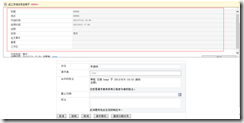
表单效果:
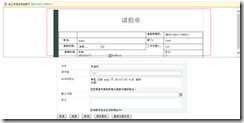
具体做法:
将WrkTaskIp.aspx与jquery-1.8.3.js两个件拷贝到C:\Program Files\Common Files\Microsoft Shared\Web Server Extensions\14\template\layouts里,拷贝前记得备份源文件。

WrkTaskIp.aspx 代码:
<%-- _lcid="" _version="14.0.4758" _dal="" --%>

<%-- _LocalBinding --%>

<%@ Assembly Name="Microsoft.Office.Workflow.Pages, Version=14.0.0.0, Culture=neutral, PublicKeyToken=71e9bce111e9429c"%>

<%@ Assembly Name="Microsoft.SharePoint, Version=14.0.0.0, Culture=neutral, PublicKeyToken=71e9bce111e9429c"%> <%@ Page Language="C#" DynamicMasterPageFile="~masterurl/default.master" Inherits="Microsoft.Office.Workflow.WrkTaskIPPage"   EnableSessionState="true" AutoEventWireup="false"   %> <%@ Import Namespace="Microsoft.SharePoint.WebControls" %> <%@ Register Tagprefix="SharePoint" Namespace="Microsoft.SharePoint.WebControls" Assembly="Microsoft.SharePoint, Version=14.0.0.0, Culture=neutral, PublicKeyToken=71e9bce111e9429c" %> <%@ Register Tagprefix="Utilities" Namespace="Microsoft.SharePoint.Utilities" Assembly="Microsoft.SharePoint, Version=14.0.0.0, Culture=neutral, PublicKeyToken=71e9bce111e9429c" %> <%@ Import Namespace="Microsoft.SharePoint" %> <%@ Assembly Name="Microsoft.Web.CommandUI, Version=14.0.0.0, Culture=neutral, PublicKeyToken=71e9bce111e9429c" %>

<%@ Register Tagprefix="InfoPath" Namespace="Microsoft.Office.InfoPath.Server.Controls" Assembly="Microsoft.Office.InfoPath.Server, Version=14.0.0.0, Culture=neutral, PublicKeyToken=71e9bce111e9429c" %>

<%@ Register TagPrefix="wssuc" TagName="LinksTable" src="/_controltemplates/LinksTable.ascx" %> <%@ Register TagPrefix="wssuc" TagName="InputFormSection" src="/_controltemplates/InputFormSection.ascx" %> <%@ Register TagPrefix="wssuc" TagName="InputFormControl" src="/_controltemplates/InputFormControl.ascx" %> <%@ Register TagPrefix="wssuc" TagName="LinkSection" src="/_controltemplates/LinkSection.ascx" %> <%@ Register TagPrefix="wssuc" TagName="ButtonSection" src="/_controltemplates/ButtonSection.ascx" %> <%@ Register TagPrefix="wssuc" TagName="ActionBar" src="/_controltemplates/ActionBar.ascx" %> <%@ Register TagPrefix="wssuc" TagName="ToolBar" src="/_controltemplates/ToolBar.ascx" %> <%@ Register TagPrefix="wssuc" TagName="ToolBarButton" src="/_controltemplates/ToolBarButton.ascx" %> <%@ Register TagPrefix="wssuc" TagName="Welcome" src="/_controltemplates/Welcome.ascx" %>

<asp:Content ContentPlaceHolderId="PlaceHolderAdditionalPageHead" runat="server">

</asp:Content>

<asp:Content ContentPlaceHolderId="PlaceHolderPageTitle" runat="server">

    <SharePoint:EncodedLiteral runat="server" text="<%$Resources:dlc, WrkTask_PageTitle%>" EncodeMethod='HtmlEncode'/>

</asp:Content>

<asp:Content ContentPlaceHolderId="PlaceHolderPageTitleInTitleArea" runat="server">

    <a tabindex=  id=onetidListHlink HREF=<% SPHttpUtility.AddQuote(SPHttpUtility.UrlPathEncode(List.DefaultViewUrl,true),Response.Output);%>><%SPHttpUtility.HtmlEncode(List.Title,Response.Output);%></A>: <% SPHttpUtility.HtmlEncode(m_taskName,Response.Output); %></asp:Content>

<asp:Content ContentPlaceHolderId="PlaceHolderTitleBreadcrumb" runat="server">

    <asp:SiteMapPath SiteMapProvider="SPContentMapProvider" id="ContentMap" SkipLinkText="" runat="server"/>

</asp:Content>

<asp:Content ContentPlaceHolderId="PlaceHolderLeftNavBar" runat="server">

</asp:Content>

<asp:Content ContentPlaceHolderId="PlaceHolderMain" runat="server">

    <SharePoint:FormComponent TemplateName="WorkflowEditFormToolBar" ControlMode="Edit" runat="server"/>

    <table class="ms-informationbar" style="margin-top: 10px;" border="" cellpadding="" cellspacing=""

        width="100%"

    >

        <tr>

            <td width="" valign="center" style="padding: 4px;">

                <img IMG SRC="/_layouts/images/Workflows.gif" alt=<%SPHttpUtility.AddQuote(SPHttpUtility.HtmlEncode(GetLocString("WrkTask_PageTitle")),Response.Output);%>/>

            </td>

            <td id="itemLink">

                <% SPHttpUtility.NoEncode(m_pageDescription,Response.Output); %></td>

        </tr>

    </table>

<div style="width:100%;height:250px;border:1px solid #666;overflow-x:hidden; overflow-y:auto">

<iframe width="100%" height="400px" frameborder="no" style="  margin-top:-140px;margin-left:50px;"  id="showItemDisplayForm"></iframe>

</div>

    <InfoPath:XmlFormView id="XmlFormControl" runat="server"

        style="width:100%;"

        />

    <SharePoint:FormDigest runat=server/>

<script src="/_layouts/jquery-1.8.3.js"></script>

<script language="javascript">

    var showDialog = function () {

        var itemlink = $("#itemLink").find("a").attr("href");

        var newItemLink;

        var v = itemlink.split("/");

        v.splice(, v.length - );

        var homePageUrl = v.join("/");

        if (itemlink.substring(itemlink.length - , itemlink.length) == ".xml") {

            newItemLink = homePageUrl + "/_layouts/FormServer.aspx?XmlLocation=" + encodeURI(itemlink) + "&DefaultItemOpen=1";

        }

        else {

            newItemLink = itemlink + "&isdlg=1";

        }

        $("#showItemDisplayForm").attr("src", newItemLink);

    }

 _spBodyOnLoadFunctionNames.push('showDialog');

</script>

</asp:Content>
如你有更好的方法,请分享下。
修改任务显示WrkTaskIp.aspx页面的更多相关文章
- 水晶报表显示到aspx页面中
1.在前台添加水晶报表显示控件. <CR:CrystalReportViewer ID="CrystalReportViewer1" runat="server&q ...
- 设置aspx页面的地址栏中的Session ID的显示与隐藏
设置aspx页面的地址栏中的Session ID的显示与隐藏修改web.config文件中的sessionState节点下的cookieless的值 1.cookieless的值是false的时候隐藏 ...
- 转:jquery向普通aspx页面发送ajax请求
本文将介绍在ASP.NET中如何方便使用Ajax,第一种当然是使用jQuery的ajax,功能强大而且操作简单方便,第二种是使用.NET封装好的ScriptManager. $.ajax向普通页面发送 ...
- Oracle Sales Cloud:管理沙盒(定制化)小细节1——利用公式创建字段并显示在前端页面
Oracle Sales Cloud(Oracle 销售云)是一套基于Oracle云端的CRM管理系统.由于 Oracle 销售云是基于 Oracle 云环境的,它与传统的管理系统相比,显著特点之一便 ...
- ASP.NET Core中显示自定义错误页面
在 ASP.NET Core 中,默认情况下当发生500或404错误时,只返回http状态码,不返回任何内容,页面一片空白. 如果在 Startup.cs 的 Configure() 中加上 app. ...
- Jquery Ajax调用aspx页面方法
Jquery Ajax调用aspx页面方法 在asp.net webform开发中,用jQuery ajax传值一般有几种玩法 1)普通玩法:通过一般处理程序ashx进行处理: 2)高级玩法:通过as ...
- aspx页面中用Input 标签实现上传图片功能
实现上传图片功能需单独的建立一个aspx页面, 其中前台页面需要注意两点: a)实现上传功能的input的type="file" b)设置请求报文头为 enctype=" ...
- <转>让SVN用户能够修改自身密码的PHP页面
1.修改Apache配置文件因为我在安装和配置SVN的时候,对Apache的配置文件进行过优化,将所有关于SVN的配置都写在了/opt/apache2/conf/extra/httpd-svn.con ...
- Aspx 页面生命周期
ASP.NET 页运行时,此页将经历一个生命周期,在生命周期中将执行一系列处理步骤.这些步骤包括初始化.实例化控件.还原和维护状态.运行事件处理程序代码以及进行 呈现.了解页的生命周期非常重要,这样就 ...
随机推荐
- ABP框架系列之十:(Application-Services-应用服务)
Application Services are used to expose domain logic to the presentation layer. An Application Servi ...
- 1001. A+B Format 字符串
题目及答案链接 https://www.liuchuo.net/archives/1888 c++ 有关 字符串 和各种类型的转换 #include <string> string a; ...
- 背水一战 Windows 10 (89) - 文件系统: 读写文本数据, 读写二进制数据, 读写流数据
[源码下载] 背水一战 Windows 10 (89) - 文件系统: 读写文本数据, 读写二进制数据, 读写流数据 作者:webabcd 介绍背水一战 Windows 10 之 文件系统 读写文本数 ...
- docker 安装 RabbitMQ
1.镜像中国(http://www.docker-cn.com/registry-mirror):直接使用https://hub.docker.com下载镜像比较慢,使用镜像中国加速 使用例子:$ d ...
- JavaSE核心之一:Date类、Calendar类、Math类、枚举;
1.Date类 1) java.util.Date类用于封装日期及时间信息,一般仅用它显示某个日期,不对他作任何操作处理,作处理用Calendar类,计算方便. 2) Date 类本质上拥有一个lon ...
- ubuntu 16.04 下更换boost版本
如果是新机器,没装过boost,那么直接一条命令 sudo apt-get install libboost-all-dev 头文件一般安装在 /usr/include 下面有一个目录boost,里面 ...
- linux下tar.bz2文件的 解压缩方法
一 使用bzip2解压缩命令进行解压缩: bzip2 -d gcc-4.1.0.tar.bz2 二 上面解压完之后执行下面的命令. tar -xvf gcc-4.1.0.tar 或 tar -xvf ...
- Testing - 软件测试知识梳理 - 理解测试
理解 目的 测试就是要找到关键信息,有关项目和产品的关键决策都是根据这些信息做出. 对产品质量做出总体评估. 找出并报告团队所有可能会对产品价值产生消极影响的问题(但并不意味着能发现所有问题). 重心 ...
- LeetCode:146_LRU cache | LRU缓存设计 | Hard
题目:LRU cache Design and implement a data structure for Least Recently Used (LRU) cache. It should su ...
- Spring Boot 配置随机数技巧
Spring Boot支持在系统加载的时候配置随机数. 添加config/random.properties文件,添加以下内容: #随机32位MD5字符串 user.random.secret=${r ...